
Sorand AC 230V Floor Heating Thermostat
Sorand AC 230V Digital Programmable Floor Heating Thermostat User Manual
Model: AC 230V Floor Heating Thermostat
مقدمة
This manual provides comprehensive instructions for the installation, operation, and maintenance of your Sorand AC 230V Digital Programmable Floor Heating Thermostat. Please read this manual carefully before installation and use to ensure proper function and safety.
The thermostat is designed for electronic floor heating systems and other electrical heating elements. It features a large LCD with backlight, programmable temperature settings, and internal/external temperature sensing capabilities.
معلومات السلامة
- يجب أن يتم التثبيت بواسطة كهربائي مؤهل.
- تأكد من فصل الطاقة قبل التثبيت أو الصيانة.
- لا تعرض منظم الحرارة للماء أو الرطوبة الزائدة.
- تعمل ضمن المجلد المحددtagه والحدود الحالية.
محتويات الحزمة
تأكد من وجود جميع العناصر في العبوة:
- 1 x Sorand AC 230V Digital Programmable Floor Heating Thermostat
- 1 x External Temperature Sensor Cable (approx. 3 meters)
- 2 × مسامير التثبيت
- 1 × دليل المستخدم (هذه الوثيقة)

Image: Contents of the Sorand thermostat package, showing the main unit, external sensor cable, mounting screws, and the instruction manual.
الإعداد والتثبيت
مهم: Installation should only be carried out by a qualified electrician. Ensure the main power supply is turned off before commencing any wiring work.
مخطط الأسلاك
Refer to the wiring diagram on the back of the thermostat unit for correct connections. The terminals are typically labeled as follows:
- L1, N1: Power input (AC 230V)
- LOAD (1, 2): Connection to the heating element
- NTC (5, 6): Connection for the external floor temperature sensor

الصورة: الخلفية view of the Sorand thermostat, displaying the wiring terminals and a simplified diagram for electrical connections.
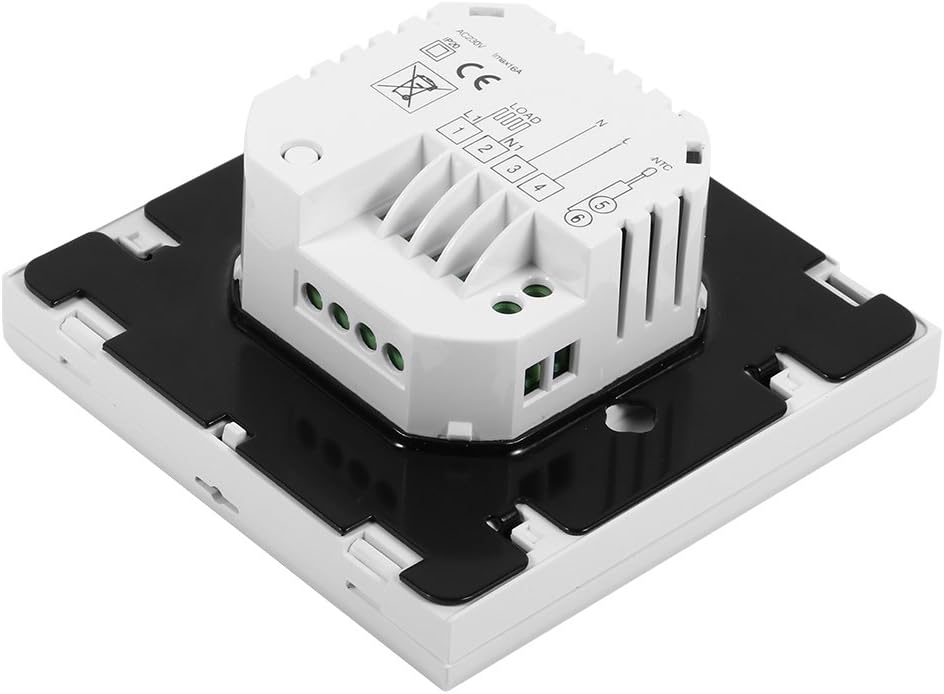
الصورة: الجانب view of the Sorand thermostat, illustrating the internal components and ports for wiring connections.
التركيب
- Prepare a standard electrical wall box (86x86mm recommended).
- Connect the power supply, heating load, and external sensor wires according to the wiring diagram.
- Carefully push the wired thermostat into the wall box.
- Secure the thermostat to the wall box using the provided screws.
- Attach the front panel of the thermostat.
تعليمات التشغيل
The thermostat features a large LCD and touch-sensitive buttons for easy operation.
وظائف الأزرار
- ⏻ (قوة): يقوم بتشغيل/إيقاف منظم الحرارة.
- ↻ (Mode/Cycle): يُبدّل بين الوضع اليدوي والوضع القابل للبرمجة.
- ⏱ (Clock/Time): Sets the time and enters programming mode.
- ▲ (سهم لأعلى): Increases temperature setting or adjusts values.
- ▼ (سهم لأسفل): Decreases temperature setting or adjusts values.

الصورة: الجبهة view of the Sorand thermostat, highlighting the LCD screen and the five touch-sensitive control buttons below it.
ضبط الوقت واليوم
- اضغط مع الاستمرار على ⏱ زر لمدة 3 ثوان للدخول في وضع إعداد الوقت.
- استخدم ▲ و ▼ الأزرار لضبط الساعة، ثم اضغط ⏱ to confirm and move to minutes, then day of the week.
- يضعط ⏱ again to exit, or wait for 10 seconds for automatic exit.
عملية الوضع اليدوي
In manual mode, the thermostat maintains a constant temperature set by the user.
- اضغط على ↻ button to switch to manual mode (indicated by a hand icon or similar on the display).
- استخدم ▲ و ▼ أزرار لضبط درجة الحرارة المرغوبة.
- The thermostat will now maintain this temperature.
Programmable Mode Operation (6 Periods)
The thermostat allows for 6 programmable periods per day, enabling different temperature settings at different times.
- اضغط على ↻ button to switch to programmable mode (indicated by a clock icon or similar).
- اضغط مع الاستمرار على ⏱ button for 3 seconds to enter programming mode.
- The display will show the first period (e.g., "Period 1"). Use ▲ و ▼ to set the start time and desired temperature for this period.
- يضعط ⏱ to move to the next period and repeat the process for all 6 periods.
- بعد ضبط جميع الفترات، اضغط ⏱ again or wait for automatic exit to save settings.
The thermostat will automatically follow the programmed schedule.
Sensor Selection (Internal/External)
The thermostat can use its internal sensor or the external floor sensor. The selection method is typically found in advanced settings or by a specific button combination. Refer to the on-screen indicators for the active sensor.
صيانة
- Clean the thermostat's display and casinامسح بقطعة قماش ناعمة وجافة. لا تستخدم المنظفات الكاشطة أو المذيبات.
- Ensure the thermostat is free from dust and debris to maintain optimal performance.
- No user-serviceable parts inside. Do not attempt to open or repair the unit.
استكشاف الأخطاء وإصلاحها
| مشكلة | السبب المحتمل | حل |
|---|---|---|
| منظم الحرارة لا يعمل. | لا يوجد مصدر للطاقة، الأسلاك غير صحيحة. | Check circuit breaker. Verify wiring connections (consult a qualified electrician). |
| لا يعمل نظام التدفئة/لا يتوقف. | Incorrect temperature setting; thermostat in OFF mode; wiring issue. | Adjust set temperature. Ensure thermostat is ON. Check heating element wiring. |
| قراءة غير دقيقة لدرجة الحرارة. | Sensor malfunction; incorrect sensor selected. | Verify sensor connection. Check if internal or external sensor is active. |
| العرض فارغ أو وميض. | تذبذب في الطاقة؛ عطل داخلي. | Reset power to the thermostat. If issue persists, contact support. |
تحديد
| ميزة | التفاصيل |
|---|---|
| ماركة | Sorand |
| نموذج | AC 230V Floor Heating Thermostat |
| العمل المجلدtage | تيار متردد 230 فولت، 50/60 هرتز |
| حمل التيار | 12/16A (Electric Heating) |
| دقة | ±0.5 درجة مئوية |
| Set-point Temperature Range | 5 درجة مئوية - 35 درجة مئوية |
| Limit Temperature Range | 5 درجة مئوية - 99 درجة مئوية |
| استهلاك الطاقة | <0.3 واط |
| مستشعر درجة الحرارة | NTC (Internal and External) |
| Surface Size | الأبعاد التقريبية: 86 × 86 × 40 ملم (3.4 × 3.4 × 1.6 بوصة) |
| طول كابل المستشعر الخارجي | حوالي 3 أمتار (9.8 قدمًا) |
| مادة | كمبيوتر شخصي+ABS |
| نوع العرض | شاشة LCD رقمية بإضاءة خلفية |
| طريقة التحكم | التحكم بلوحة اللمس |
الضمان والدعم
This product is covered by the manufacturer's standard warranty. Please refer to the product packaging or your point of purchase for specific warranty terms and conditions.
للحصول على الدعم الفني، أو المساعدة في حل المشكلات، أو لتقديم مطالبات الضمان، يرجى الاتصال بالبائع أو الشركة المصنعة مباشرةً. احتفظ بإيصال الشراء كإثبات للشراء.
Ask a question about this manual
Ask about setup, troubleshooting, compatibility, parts, safety, or missing instructions. Manuals+ will review the question and use this page’s manual context to help answer it.