
1. المقدمة
Thank you for choosing the XTUGA ES USB/MP3/Bluetooth Professional Audio Mixer. This manual provides essential information for the safe and efficient operation of your mixer. Please read it thoroughly before use and retain it for future reference.
The XTUGA ES series mixers (ES802/ES1202) are designed for professional audio applications, offering features such as USB/MP3 playback and recording, Bluetooth connectivity, built-in digital effects, and +48V phantom power for condenser microphones. Its ultra-thin design and robust metal chassis make it suitable for various environments, including DJ setups, stage performances, and recording studios.
2. تعليمات السلامة
- مزود الطاقة: استخدم محول الطاقة المحدد فقط. تأكد من مستوى الصوتtage يطابق مصدر الطاقة المحلي لديك.
- تهوية: لا تسد فتحات التهوية. تأكد من تدفق الهواء الكافي حول الجهاز لمنع ارتفاع درجة حرارته.
- الماء والرطوبة: Do not expose the mixer to rain, moisture, or any liquids. Do not place objects filled with liquids on the mixer.
- مصادر الحرارة: Keep the mixer away from heat sources such as radiators, heat registers, stoves, or other apparatus (including ampالمُضخِّمات) التي تنتج الحرارة.
- تنظيف: Clean only with a dry cloth. Disconnect the power before cleaning.
- الخدمة: لا تحاول خدمة هذا المنتج بنفسك. قم بإحالة جميع أعمال الصيانة إلى أفراد الخدمة المؤهلين.
- التأريض: تأكد من التأريض المناسب لمنع حدوث صدمة كهربائية.
- إدارة الكابلات: احمِ أسلاك الطاقة من الدوس عليها أو انضغاطها، وخاصة عند المقابس ومنافذ الطاقة ونقطة خروجها من الجهاز.
3. انتهى المنتجview
The XTUGA ES series mixer features a compact, durable design with a comprehensive set of controls for versatile audio mixing. It includes multiple input channels, a 3-band equalizer per channel, built-in digital effects, and various connectivity options.

الشكل 3.1: أمام view of the XTUGA ES Series Professional Audio Mixer, showing all input channels, faders, EQ knobs, and the central control panel with USB/MP3 display.
المميزات الرئيسية:
- القنوات: Available in 8 or 12 mono channel configurations with stereo inputs.
- قبلampرافعات: High-quality microphone preampالقاتلون.
- المعادلة: 3-band EQ on each mono channel for precise tone shaping.
- الاتصال: USB/MP3 playback and recording, Bluetooth function for wireless audio streaming.
- السلطة الوهمية: +48V phantom power for condenser microphones.
- التأثيرات الرقمية: معالج مؤثرات رقمية مدمج.
- يراقب: Headphone monitoring and dual 12-band main level display.
- تصميم متين: Ultra-thin metal chassis for durability and portability.
4. الإعداد
4.1 توصيل الطاقة
- تأكد من أن مفتاح الطاقة الخاص بالخلاط في وضع "إيقاف التشغيل".
- قم بتوصيل محول الطاقة المرفق بمدخل الطاقة الخاص بالخلاط.
- قم بتوصيل محول الطاقة بمأخذ كهربائي مناسب يعمل بالتيار المتردد.
- Turn the mixer's power switch to "ON". The power indicator will illuminate.
4.2 اتصالات الإدخال
يدعم الخلاط مصادر إدخال متنوعة:
- الميكروفونات: Connect microphones to the XLR inputs (MIC) on each channel. For condenser microphones requiring phantom power, ensure the +48V button is activated (see Section 5.2).
- الأجهزة ذات مستوى الخط: Connect instruments, keyboards, or other line-level devices to the 1/4" TRS/TS LINE inputs on each channel.
- مدخلات ستيريو: Use the dedicated stereo input channels for devices like CD players or external media players.
4.3 اتصالات الإخراج
- الإخراج الرئيسي: قم بتوصيل مكبرات الصوت الرئيسية أو amplifier to the MAIN L/R outputs (XLR or 1/4" TRS).
- مخرج سماعة الرأس: قم بتوصيل سماعات الرأس بمخرج سماعات الرأس للمراقبة.
- إرسال AUX: Use the AUX SEND output to connect to external effects processors or monitor speakers.
4.4 توصيل الكمبيوتر (USB)
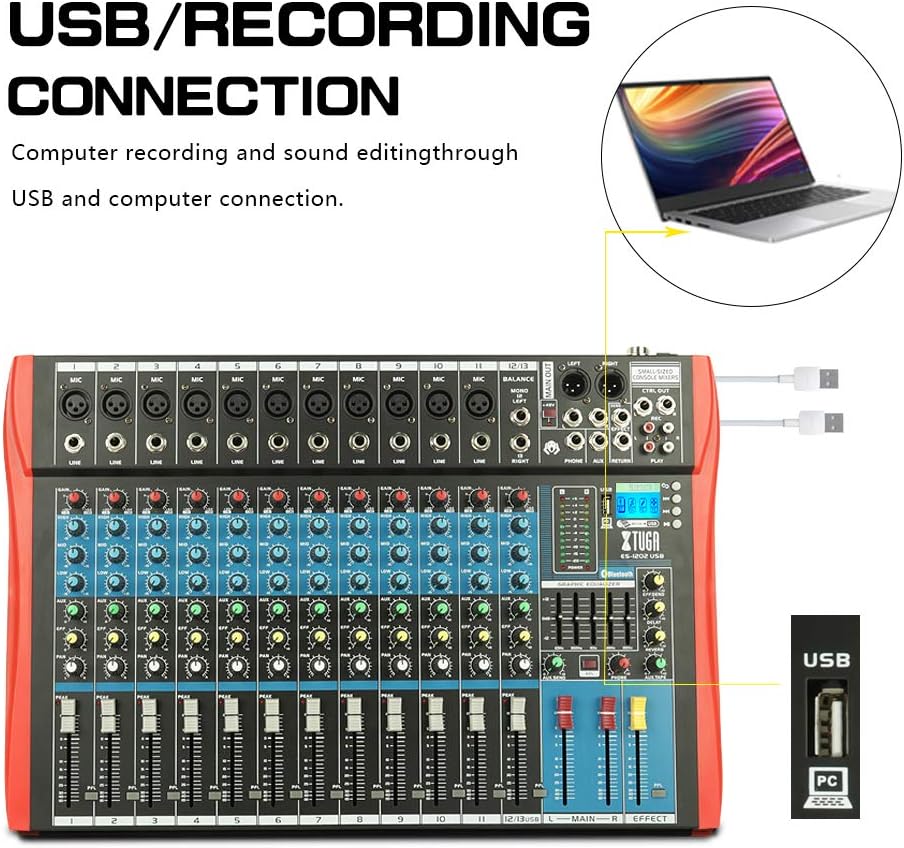
الشكل 4.1: Diagram illustrating the USB connection for computer recording and sound editing. Connect the mixer's USB port to your computer using a standard USB cable.
To use the mixer with a computer for recording or playback:
- Connect a USB cable from the mixer's USB port to an available USB port on your computer.
- The mixer will typically be recognized as a standard audio device. No special drivers are usually required for basic functionality.
- Select the mixer as your input/output device in your computer's sound settings or digital audio workstation (DAW) software.
5. تعليمات التشغيل
5.1 ضوابط القناة
- ربح: Adjusts the input sensitivity for each channel. Set this to achieve a strong signal without clipping (the PEAK LED should only flash occasionally).
- EQ (عالي، متوسط، منخفض): معادل صوت ثلاثي النطاقات لتشكيل نغمة كل قناة.

الشكل 5.1: Visual representation of the 3-band EQ frequency response curves. The HIGH band boosts/cuts above 12kHz, the MID band sweeps from 250Hz to 6kHz, and the LOW band boosts/cuts below 80Hz.
- عالي: Adjusts frequencies above 12 kHz (±15 dB).
- منتصف: Adjusts frequencies between 150 Hz and 3.5 kHz (±15 dB). This is a sweepable mid-range control.
- قليل: Adjusts frequencies below 80 Hz (±15 dB).
- تأثير: Sends a portion of the channel signal to the built-in effects processor.
- رقم التعريف الشخصي: Adjusts the stereo position of the channel signal (left to right).
- CHANNEL FADER: Controls the output level of each individual channel to the main mix.
- ذروة الصمام: يضيء هذا المؤشر عندما تكون إشارة الإدخال عالية جدًا، مما يشير إلى احتمال حدوث تشويه. قلل مستوى التضخيم (GAIN) إذا أضاء هذا المؤشر بشكل متكرر.
5.2 +48V Phantom Power
The mixer provides +48V phantom power for condenser microphones. To activate:
- Ensure all channel faders and the main fader are set to their minimum positions.
- Connect your condenser microphone(s) to the XLR inputs.
- Press the +48V PHANTOM POWER button. An indicator light will confirm activation.
- Gradually raise the channel faders and main fader to the desired levels.
Caution: Do not activate phantom power when dynamic microphones or other devices not requiring +48V are connected, as this may cause damage.
5.3 اتصال البلوتوث

الشكل 5.2: Close-up of the Bluetooth and MP3 control panel, showing the digital LCD display and control buttons.
لتوصيل جهاز بلوتوث:
- Press the "MODE" button on the MP3 player section until "Bluetooth" is selected on the digital display.
- On your mobile phone, tablet, or other Bluetooth-enabled device, search for available Bluetooth devices.
- Select "XTUGA MIXER" (or similar name) from the list to pair.
- بمجرد الاقتران، يمكنك تشغيل الصوت من جهازك عبر الخلاط.
5.4 USB/MP3 Playback and Recording
The mixer supports U-DISK MP3 playback and direct recording to a USB drive.
- تشغيل MP3: أدخل محرك أقراص فلاش USB يحتوي على MP3 files into the USB port. The mixer will automatically detect and begin playing the files. Use the control buttons (PLAY/PAUSE, PREV, NEXT) on the MP3 player section to navigate.
- تسجيل: To record the main mix to a USB drive, ensure a formatted USB drive is inserted. Press the "REC" button on the MP3 player section to start recording. Press it again to stop.
5.5 تأثيرات رقمية
The mixer includes a built-in digital effects processor. Use the "EFFECT" knob on each channel to send signal to the effects. The main "EFFECT" fader controls the overall level of the effects return to the main mix. Adjust the effect type and parameters using the dedicated controls in the effects section.
5.6 المراقبة
Connect headphones to the PHONES jack to monitor the main mix. The PHONES level knob controls the headphone volume. The main LED meters provide a visual indication of the main output level.

الشكل 5.3: Close-up of the main LED level meters, showing output levels for Left (L) and Right (R) channels, along with the USB and PC connection ports.
6. الصيانة
- تنظيف: Regularly wipe the mixer's surface with a soft, dry, lint-free cloth. Do not use abrasive cleaners, solvents, or waxes.
- تخزين: When not in use for extended periods, store the mixer in a cool, dry place, away from direct sunlight and extreme temperatures. Cover the unit to protect it from dust.
- العناية بالكابلات: Avoid bending or twisting cables excessively. Disconnect cables by pulling the plug, not the cable itself.
7. استكشاف الأخطاء وإصلاحها
| مشكلة | السبب المحتمل | حل |
|---|---|---|
| لا يوجد مخرج صوت |
|
|
| صوت مشوه |
|
|
| البلوتوث غير متصل |
|
|
| USB/MP3 not playing or recording |
|
|
8. المواصفات
| ميزة | مواصفة |
|---|---|
| ماركة | XTUGA |
| نموذج | ES802/1202 |
| عدد القنوات | 8 or 12 (depending on model) |
| تكنولوجيا الاتصال | مساعد، بلوتوث، USB |
| مصدر الطاقة | كهرباء سلكية |
| استجابة التردد | Microphone line input to any output: ±1.5 dB, 20 Hz ~ 20 KHz |
| تشويه متناسق كلي + ضوضاء | Sensitivity -30dB, Mix output +14dBu <0.02% @ 1 KHz or EQ (stereo input) |
| Crosstalk (1 KHz) | Channel mute > 90 dB, Fader off > 90 dB, AUX send port closed > 83 dB |
| Mono EQ (Q(MF): 1.5) | Low: 80Hz ± 15dB, Mid (sweepable): 150Hz-3.5KHz ± 15dB, High: 12 KHz ± 15 dB |
| Stereo EQ (Q(MF): 0.8) | Low: 80Hz ± 15dB, Mid: 720Hz ± 15dB, High: 12KHz ± 15dB |
| استهلاك الطاقة | أقل من 35 وات |
| درجة حرارة التشغيل | 5 درجة مئوية إلى +40 درجة مئوية |
| مدخل الصوت | XLR, Line, and Digital Inputs |
| رمز المنتج الموحد | 784124158662 |
| رقم GTIN | 784124158662 |
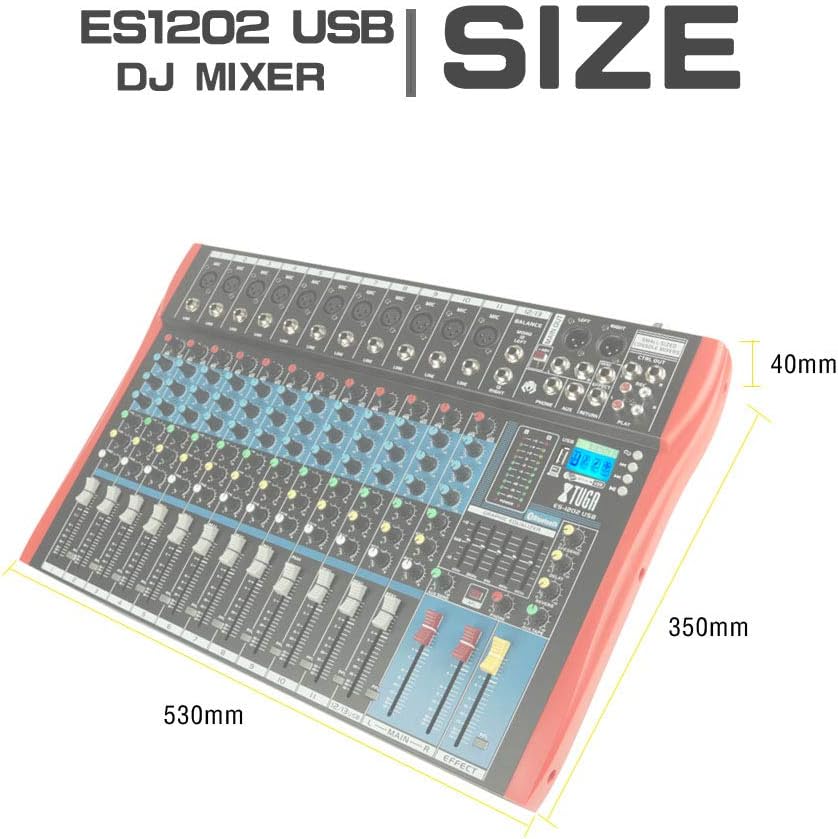
الشكل 8.1: Dimensions of the XTUGA ES1202 USB Mixer, showing approximate measurements of 530mm (width), 350mm (depth), and 40mm (height).
9. الضمان والدعم
9.1 معلومات الضمان
XTUGA products are designed and manufactured to high-quality standards. For specific warranty terms and conditions, please refer to the warranty card included with your product or contact your local XTUGA distributor or retailer. Keep your proof of purchase for warranty claims.
9.2 دعم العملاء
If you encounter any issues or have questions regarding your XTUGA ES USB/MP3/Bluetooth Professional Audio Mixer that are not covered in this manual, please contact XTUGA customer support or your authorized dealer for assistance. Please have your model number (ES802/1202) and purchase information ready when contacting support.