
مقدمة
This manual provides comprehensive instructions for the Rimous Universal Remote Control, designed for seamless compatibility with various LG Smart TV models, including LCD, LED, OLED, UHD, 3D, and 4K televisions. This remote control is a direct replacement and requires no complex programming for most LG TVs. Please read this manual carefully to ensure proper use and longevity of your remote control.
يثبت
1. تركيب البطارية
The Rimous Universal Remote Control operates on two (2) AAA batteries (not included). Follow these steps to install the batteries:
- حدد موقع حجرة البطارية في الجزء الخلفي من جهاز التحكم عن بعد.
- اضغط على المزلاج واسحب غطاء البطارية للأسفل لفتحه.
- قم بإدخال بطاريتين AAA، مع التأكد من محاذاة الأطراف الموجبة (+) والسالبة (-) بشكل صحيح مع العلامات الموجودة داخل الحجرة.
- قم بتحريك غطاء البطارية مرة أخرى إلى مكانه حتى يستقر بشكل آمن.
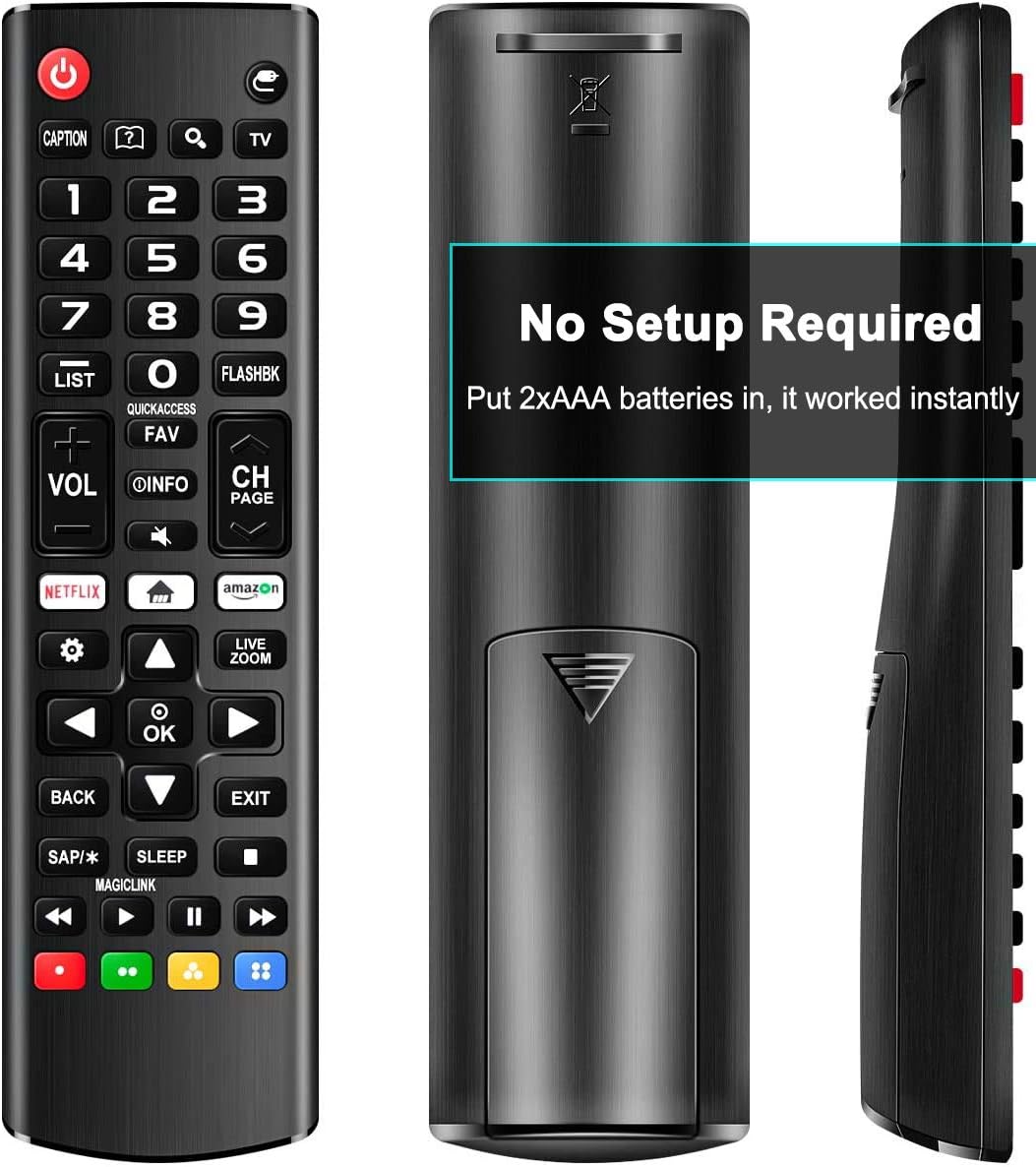
Image: Back of the remote control with the battery compartment open, illustrating the correct orientation for AAA battery insertion.
2. الاستخدام الأولي
This remote control is designed for immediate use with most LG Smart TVs. No programming or pairing is required. Once batteries are installed, point the remote towards your LG TV and begin operation.

الصورة: الجبهة view of the remote control, indicating compatibility with various LG Smart TV types.
تعليمات التشغيل
The Rimous Universal Remote Control features an ergonomic design for comfortable grip and intuitive button placement. Below is a guide to the primary functions of the remote's buttons.

Image: Detailed layout of the remote control buttons with their functions labeled.
- زر الطاقة (⑆): Turns the TV on and off.
- أزرار الأرقام (0-9): تحديد القنوات مباشرة.
- قائمة: Accesses the saved channels list.
- فلاشبك: Returns to the previously viewقناة إد.
- المجلد +/-: يضبط مستوى الصوت.
- CH +/-: تغيير القنوات لأعلى أو لأسفل.
- معلومات: Displays information about the current program.
- المفضلة: Accesses your favorite channel list.
- كتم الصوت: Cuts off the sound temporarily.
- زر نتفليكس: الوصول المباشر إلى تطبيق نتفليكس.
- Amazon Button: Direct access to the Amazon application.
- لوحة التنقل (أعلى، أسفل، يسار، يمين، موافق): يتنقل بين القوائم ويؤكد الاختيارات.
- خلف: Returns to the previous step or menu.
- EXIT: يخرج من القائمة أو التطبيق الحالي.
- ينام: Accesses the sleep timer function.
- أزرار ملونة (أحمر، أخضر، أصفر، أزرق): Provide shortcuts for interactive functions within certain applications or TV menus.
- Media Control Buttons (Play, Pause, Stop, Rewind, Fast Forward):التحكم في تشغيل الوسائط.

Image: The remote control held in a hand, illustrating its comfortable and ergonomic design.
صيانة
تنظيف
للحفاظ على مظهر جهاز التحكم عن بعد ووظائفه، امسحه بانتظام بقطعة قماش ناعمة وجافة. لإزالة الأوساخ المستعصية، افركه برفق.ampen the cloth with water. Avoid using harsh chemicals, abrasive cleaners, or solvents, as these can damage the remote's surface and internal components.
استبدال البطارية
Replace batteries when the remote's responsiveness decreases or it stops functioning. Always replace both AAA batteries at the same time with new ones. Do not mix old and new batteries, or different types of batteries, as this can lead to leakage or malfunction. Dispose of used batteries according to local regulations.
استكشاف الأخطاء وإصلاحها
- جهاز التحكم عن بعد لا يستجيب:
- تأكد من إدخال البطاريات بشكل صحيح بالقطبية الصحيحة (+/-).
- استبدال البطاريات القديمة ببطاريات AAA جديدة.
- تحقق من وجود أي عوائق بين جهاز التحكم عن بعد ومستشعر الأشعة تحت الحمراء الخاص بالتلفزيون.
- Ensure you are within the effective operating range and pointing the remote directly at the TV.
- Buttons require multiple presses:
- يشير هذا غالبًا إلى انخفاض طاقة البطارية. استبدل البطاريات.
- Clean the remote's surface, especially around the buttons, to ensure no debris is interfering with button presses.
- العمل عن بعد بشكل متقطع:
- Check battery connections for looseness.
- Ensure there are no strong light sources (like direct sunlight or certain types of lighting) interfering with the infrared signal.
تحديد
| ماركة | ريموس |
| الأجهزة المتوافقة | LG LED LCD HDTV 3D 4K Smart TV (all models) |
| تكنولوجيا الاتصال | الأشعة تحت الحمراء |
| مصدر الطاقة | 2 بطاريات AAA (غير مدرجة) |
| ميزة خاصة | Ergonomic, Universal, No Setup Required |
| أبعاد | 6.77 × 1.85 × 0.91 بوصة |
| وزن العنصر | 1.76 أونصات |
الضمان والدعم
This Rimous Universal Remote Control is designed for reliability and performance. For any questions, technical assistance, or warranty inquiries, please contact the manufacturer or your retailer. Please refer to your purchase documentation for specific warranty terms and contact information.