
1. المقدمة
Thank you for choosing the SUPCASE Unicorn Beetle Pro case for your Samsung Galaxy S20 FE 5G. This heavy-duty, full-body rugged protective phone case is designed to provide superior defense against drops, impacts, and daily wear. It features a dual-layer system, a built-in screen protector, a multi-function kickstand, and a rotatable belt-clip holster for enhanced usability and protection.
2. الإعداد والتثبيت
Proper installation ensures maximum protection for your device. Please follow these steps carefully.
2.1. التحقق من التوافق
Ensure your device is the Samsung Galaxy S20 FE 5G (6.5 inches). This case is not compatible with the standard Samsung Galaxy S20 (6.2 inches) or other S20 models.

الشكل 2.1: Compatibility check for Samsung Galaxy S20 FE 5G.
2.2. Case Assembly
- فكّك الغطاء: Carefully separate the front frame (with built-in screen protector) from the back cover.
- نظّف جهازك: Ensure your Samsung Galaxy S20 FE 5G screen and back are clean and free of dust or debris.
- Install Front Frame: Place your phone into the front frame, ensuring all edges are securely seated. The built-in screen protector should lay flat against your phone's screen.
- تركيب الغطاء الخلفي: Align the front frame with the back cover and press them together firmly around all edges until you hear a click, indicating a secure fit.

الشكل 2.2: Components of the SUPCASE Unicorn Beetle Pro case.
2.3. Fingerprint Sensor Area
The built-in screen protector includes a dedicated area for the fingerprint sensor. For optimal performance, ensure this area is clean and free of air bubbles during installation. You may need to re-register your fingerprints after installing the case for improved accuracy.
2.4. دليل فيديو التثبيت
فيديو 2.1: A detailed guide on how to install the SUPCASE Unicorn Beetle Pro Series case on your Samsung Galaxy S20 FE.
3. ميزات التشغيل
The Unicorn Beetle Pro case offers several features to enhance your phone's functionality and protection.
3.1. Built-in Kickstand
يتيح مسند القدم المدمج استخدامًا مريحًا بدون استخدام اليدين viewing in both portrait and landscape orientations. To deploy, gently pull out the kickstand from its recess on the back of the case. Push it back in until it clicks to secure it when not in use.
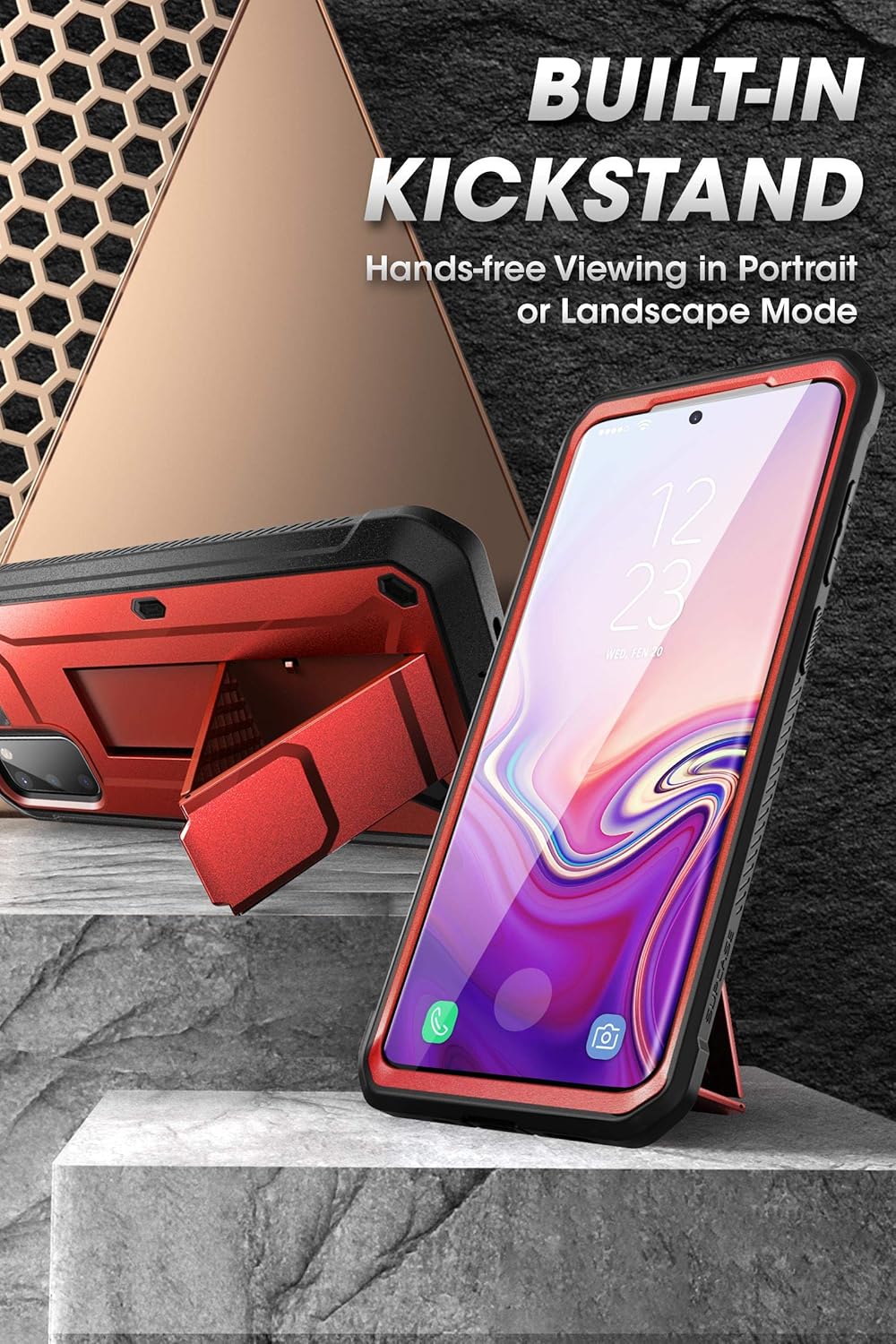
الشكل 3.1: Using the built-in kickstand for hands-free viewعمل.
فيديو 3.1: Demonstration of the tough and durable cell phone case with its integrated stand.
3.2. Rotatable Belt-Clip Holster
The included detachable holster provides an additional carrying option. Simply slide your cased phone into the holster until it locks securely. The belt clip can rotate 360 degrees, allowing you to position your phone vertically or horizontally on your belt or bag strap.

الشكل 3.2: The rotatable belt-clip holster in use.
3.3. Precise Cutouts and Button Sensitivity
The case features precise cutouts for all ports, speakers, and the camera, ensuring full access without obstruction. The button covers are designed to maintain tactile feedback and sensitivity.
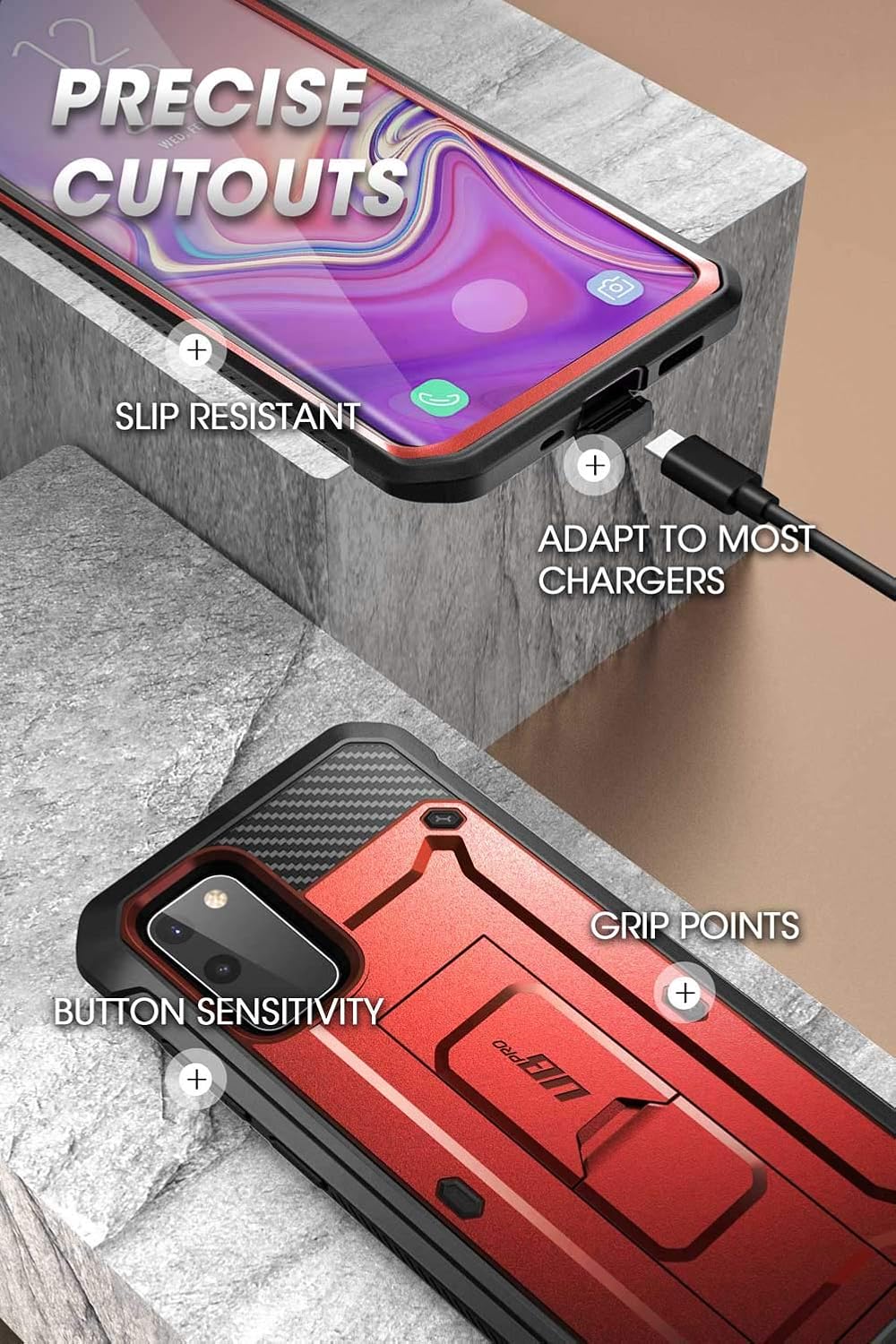
الشكل 3.3: Precise cutouts and button access.
3.4. Wireless Charging Compatibility
The Unicorn Beetle Pro case is designed to be compatible with most wireless chargers, allowing for convenient charging without removing the case.

الشكل 3.4: Wireless charging compatibility.
4. الصيانة
Regular cleaning and care will help maintain the appearance and protective qualities of your case.
4.1. تنظيف العلبة
- استخدمي قطعة قماش ناعمةamp cloth to wipe down the exterior of the case.
- For stubborn dirt, a mild soap solution can be used. Avoid harsh chemicals or abrasive cleaners, as these can damage the material.
- Periodically remove your phone from the case to clean any dust or debris that may accumulate between the phone and the case, especially around the ports and camera.
4.2. Screen Protector Care
- Clean the built-in screen protector with a microfiber cloth to remove fingerprints and smudges.
- If lint or dust gets trapped under the screen protector, carefully disassemble the case, clean both the phone screen and the protector, and reassemble.
- Avoid using sharp objects on the screen protector to prevent scratches.
4.3. Kickstand and Holster Care
- Operate the kickstand gently to prevent damage to the hinge mechanism.
- Ensure the belt-clip holster is free of debris that could interfere with its locking mechanism.
5. استكشاف الأخطاء وإصلاحها
فيما يلي حلول للمشاكل الشائعة التي قد تواجهها:
5.1. Fingerprint Sensor Not Working Accurately
- Ensure the fingerprint sensor area on the built-in screen protector is clean and free of dust or smudges.
- Remove any air bubbles from the fingerprint sensor area during installation.
- Re-register your fingerprints with the case installed. This often improves recognition accuracy.
5.2. Kickstand Feels Loose or Breaks
- The kickstand is designed for regular use but can wear over time. Operate it gently.
- If the kickstand breaks, contact customer support for potential replacement options.
5.3. Difficulty Pressing Side Buttons
- Ensure the phone is correctly seated within the case, and the case components are fully snapped together.
- The button covers are designed to be responsive; if you experience persistent issues, verify the case is not misaligned.
5.4. Screen Protector Affects Touch Sensitivity
- Ensure there are no air gaps between the phone screen and the built-in screen protector.
- Clean both surfaces thoroughly before installation.
- Adjust your phone's touch sensitivity settings if available (check your phone's display settings).
6. المواصفات
| ماركة | قضية فرعية |
| اسم الموديل | Unicorn Beetle Pro |
| رقم الموديل | Galaxy2020 S20FE UBPro |
| موديلات الهواتف المتوافقة | سامسونج جالكسي S20 FE 5G |
| مادة | البولي كربونات، البولي يوريثان الحراري |
| سمات | Built-in Screen Protector, Kickstand, Rotatable Belt-Clip Holster |
| أبعاد العنصر (الطول × العرض × الارتفاع) | 7.61 × 3.61 × 0.61 بوصة |
| وزن العنصر | 78 جرام |
| مستوى مقاومة الماء | غير مقاوم للماء |
| رمز المنتج الموحد | 843439134300 |
7. الضمان والدعم
7.1. الضمان المحدود
SUPCASE products are typically covered by a limited warranty against defects in materials and workmanship. For specific details regarding your product's warranty period and terms, please refer to the official SUPCASE webالموقع أو اتصل بخدمة العملاء الخاصة بهم مباشرة.
7.2. دعم العملاء
If you have any questions, require assistance with installation, or need to report a defect, please contact SUPCASE customer support. You can usually find contact information, FAQs, and additional resources on the official SUPCASE webموقع: www.supcase.com.