
1. المقدمة
شكرا لك على الشراءasing the SHARP ES-PW11E-S Washing Machine. This manual provides essential information for the safe and efficient use of your appliance. Please read it thoroughly before operation and keep it for future reference.
This washing machine features a unique hole-less tub design for enhanced cleanliness and water saving, inverter technology for quiet and efficient operation, and Plasmacluster technology for tub hygiene.
2. معلومات السلامة
- Always ensure the power plug is securely inserted into the outlet.
- لا تقم بتشغيل الجهاز ويداك مبتلتان.
- Keep children away from the appliance during operation. The child lock feature can be activated to prevent unintended operation.
- Do not wash items that are not suitable for machine washing.
- In case of malfunction, unplug the machine immediately and contact customer support.
- Ensure proper ventilation during drying cycles to prevent moisture buildup.
3. انتهى المنتجview
3.1 الميزات الرئيسية
- Hole-less Tub: Prevents black mold intrusion and saves water.
- تكنولوجيا العاكس: Provides quiet and energy-efficient operation.
- تقنية البلازما كلاستر: Helps keep the tub clean and hygienic.
- Ultrasonic Washer: For quick and gentle spot washing without damaging fabrics.
- COCORO WASH: Wi-Fi enabled smart features for convenient washing information and AI-assisted course selection.
- Wide Mouth & Low Body Design: يسهل تحميل وتفريغ الغسيل.
3.2 مكونات
Familiarize yourself with the main parts of your washing machine.

Image: Control Panel. This image shows a close-up of the touch control panel, displaying various settings and options for washing and drying cycles.

Image: Ultrasonic Washer. This image highlights the integrated ultrasonic washer, designed for pre-treating stains or washing small items.

Image: Control Panel and Dimensions. This diagram illustrates the layout of the control panel buttons and provides a detailed dimensional drawing of the washing machine, including width, depth, and height.
4. الإعداد والتثبيت
4.1 متطلبات التوظيف
Ensure adequate space for installation and operation. The following dimensions are crucial:
- External Dimensions (W×D×H): 600×650×1050mm. (Width includes drain hose, height includes water supply hose.)
- Installable Waterproof Pan (Inner Depth): 540mm or more.
- الحد الأدنى للتخليص: A width of at least 10cm more than the product dimensions is required for carrying in and installation.

Image: Installation Requirements. This image provides a visual guide for checking installation space, including required clearances for doorways, staircases, and the waterproof pan. It emphasizes needing at least 10cm extra width for transport.
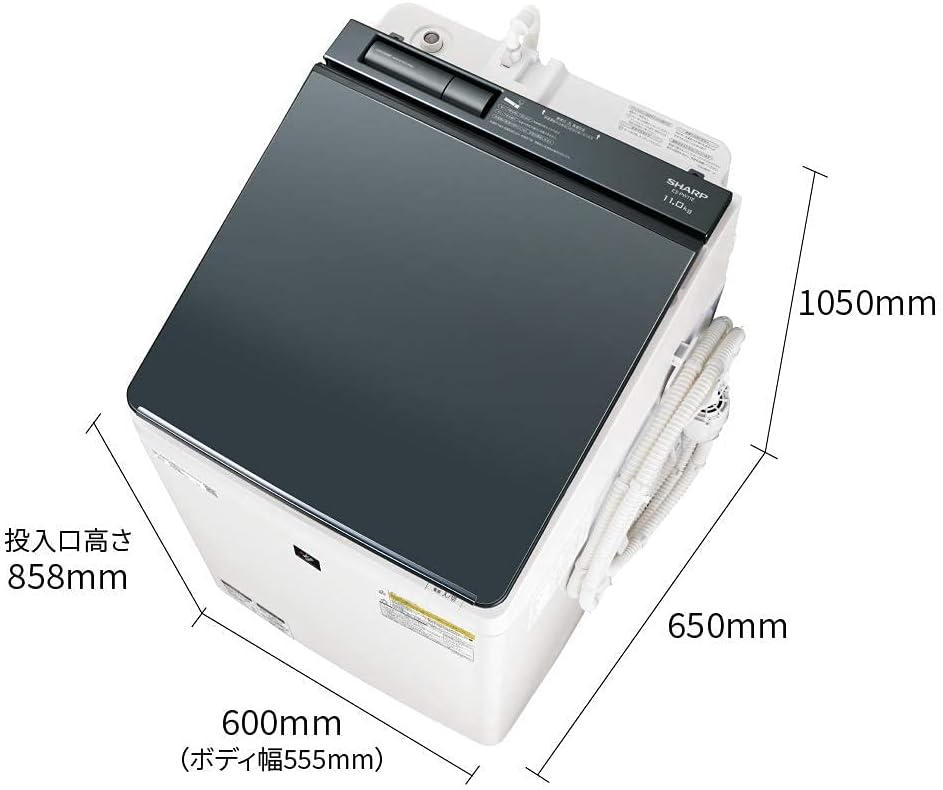
Image: Product Dimensions. This image shows the overall dimensions of the washing machine, including width (600mm), depth (650mm), and height (1050mm), with an emphasis on the loading port height (858mm).
4.2 توصيل الخراطيم
- خرطوم إمداد المياه: Connect the water supply hose to the faucet and the machine's inlet. Ensure a secure, leak-free connection.
- خرطوم الصرف: Position the drain hose correctly to allow for proper water drainage. The drain hose can be routed to the left, right, or rear.
- Bath Water Pump: If using the included bath water pump, connect it as per the separate instructions provided with the pump.
5. تعليمات التشغيل
5.1 التشغيل الأساسي
- تشغيل/إيقاف التشغيل: Press the power button to turn the machine on or off.
- بدء وقفة: Press the Start/Pause button to begin or temporarily stop a cycle.
- قفل الطفل: Activate the child lock to prevent accidental operation. While active, only power on/off operations are possible.
5.2 اختيار دورة الغسيل
Choose the appropriate course based on your laundry type and soil level.

Image: Wash Courses. This image illustrates specialized wash courses, such as the 'Hot Air Plus Stubborn Stain Course' for tough dirt (useful for pet clothing) and the '10-Minute Wash Course' for light stains, assisting with daily chores.
- المسار الدراسي القياسي: For everyday laundry. (Approx. 46 minutes for wash cycle).
- Hot Air Plus Stubborn Stain Course: Effectively removes persistent dirt, even suitable for pet clothing.
- 10-Minute Wash Course: Convenient for lightly soiled items or quick washes.
- Wash to Dry Course: Combines washing and drying. (Approx. 220 minutes).
5.3 Using the Ultrasonic Washer
The integrated ultrasonic washer can be used for pre-treating stains or washing small, delicate items. Refer to the specific instructions for its use in the full manual.
5.4 Hanger Drying
This feature allows you to dry clothes on hangers, helping to reduce wrinkles.

Image: Hanger Drying and Plasmacluster Tub Clean. This image demonstrates the hanger drying function, which helps prevent wrinkles. It also illustrates the Plasmacluster Tub Clean Course, which uses water flow and Plasmacluster ions to clean the tub and pulsator.
6. الصيانة
6.1 Plasmacluster Tub Clean Course
Regularly use the Plasmacluster Tub Clean Course to maintain hygiene and prevent mold growth in the tub and behind the pulsator. This course uses water flow and Plasmacluster ions for thorough cleaning.
6.2 التنظيف العام
- امسح الجزء الخارجي من الجهاز بقطعة قماش ناعمة، دamp قطعة قماش.
- نظف موزعات المنظفات ومنعم الأقمشة بانتظام لمنع تراكم الرواسب.
- Check and clean the lint filter after each drying cycle.
7. استكشاف الأخطاء وإصلاحها
If you encounter any issues, please refer to the following common problems and solutions before contacting service.
| مشكلة | السبب المحتمل | حل |
|---|---|---|
| الآلة لا تبدأ | Power cord unplugged; Door not closed properly; Child lock active. | Check power connection; Ensure door is fully closed; Deactivate child lock. |
| اهتزاز/ضوضاء مفرطة أثناء الدوران | الغسالة غير مستوية؛ الغسيل غير موزع بالتساوي؛ مسامير الشحن لم تُزال. | اضبط أرجل التسوية؛ أعد توزيع الغسيل؛ قم بإزالة مسامير الشحن (إن وجدت). |
| تسرب المياه | وصلات الخراطيم مفكوكة؛ خرطوم التصريف مسدود أو موضوع بشكل غير صحيح. | Check and tighten all hose connections; Clear any blockages in the drain hose and ensure proper positioning. |
| الملابس لا تجف بشكل صحيح | Lint filter clogged; Overloaded dryer; Incorrect drying course selected. | Clean lint filter; Reduce load size; Select appropriate drying course. |
For other error codes or persistent issues, please consult the comprehensive troubleshooting section in the full user manual or contact SHARP customer support.
8. المواصفات
| ميزة | التفاصيل |
|---|---|
| ماركة | حاد |
| نموذج | ES-PW11E-S |
| سعة | 11 كيلوغرام |
| الأبعاد الخارجية (العرض × العمق × الارتفاع) | 600 × 650 × 1050 ملم |
| وزن المنتج | 55 كيلوغرام |
| ضوضاء التشغيل (الغسيل) | 39 ديسيبل |
| ضوضاء التشغيل (الدوران) | 38 ديسيبل |
| ضوضاء التشغيل (جافة) | 44 ديسيبل |
| Approximate Wash Time | 46 minutes (50/60Hz) |
| Approximate Wash-to-Dry Time | 220 minutes (50/60Hz) |
| المميزات الخاصة | Inverter, Hole-less Tub, Plasmacluster, Ultrasonic Washer, COCORO WASH |
| نوع لوحة التحكم | يلمس |
| موقف الباب | كبار الحمل |
| مُكَمِّلات | Instruction manual, warranty card, bath water pump, drying (deodorizing) parent-child hanger |
9. الضمان والدعم
Your SHARP ES-PW11E-S Washing Machine comes with a manufacturer's warranty. Please refer to the included warranty card for details on coverage and duration.
For technical assistance, service requests, or to purchase replacement parts, please contact SHARP customer support. Contact information can typically be found on the warranty card or the official SHARP webموقع.