
المنتج انتهىview
The XIAOMI Redmi 9I is a feature-rich smartphone designed for everyday use. This manual provides essential information for setting up, operating, maintaining, and troubleshooting your device.
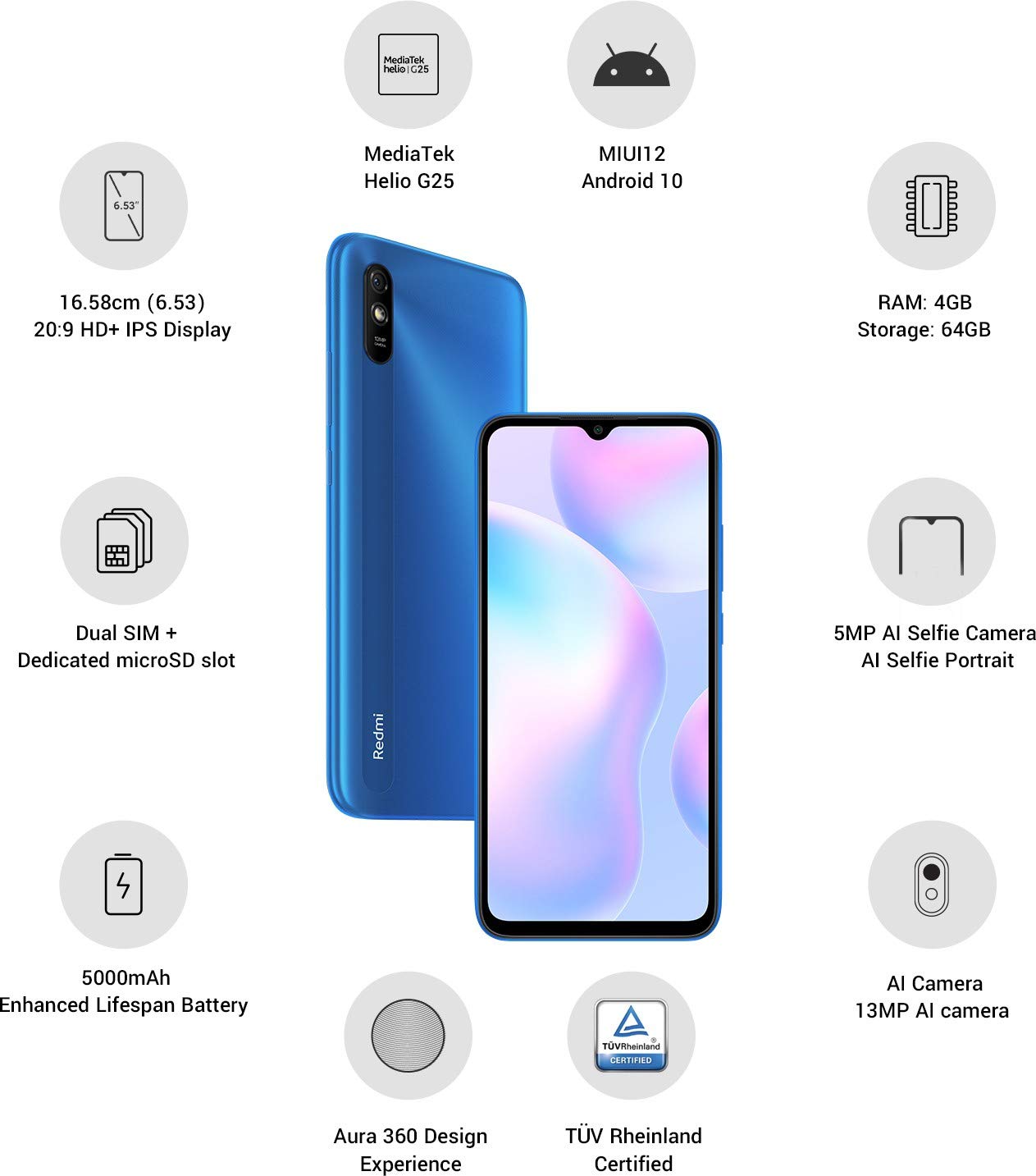
الصورة: أكثر منview of the Xiaomi Redmi 9I highlighting key features such as the 6.53-inch HD+ IPS Display, MediaTek Helio G25 processor, MIUI12 Android 10, 4GB RAM, 64GB Storage, Dual SIM + dedicated microSD slot, 5000mAh battery, 5MP AI Selfie Camera, 13MP AI Camera, Aura 360 Design Experience, and TÜV Rheinland Certification.
دليل الإعداد
1. فك الصندوق والفحص الأولي
أزل جميع العناصر من العبوة بعناية. تأكد من وجود المكونات التالية:
- XIAOMI Redmi 9I Smartphone
- محول الطاقة
- كابل USB Type-C
- أداة قاذف SIM
- دليل البدء السريع (إذا كان متضمنًا)
2. إدخال بطاقة (بطاقات) SIM وبطاقة MicroSD
Locate the SIM card tray on the side of your device. Use the provided SIM ejector tool to open the tray. Insert your Nano SIM card(s) and/or a microSD card into the designated slots. Ensure the cards are correctly oriented as shown in the diagram below. Gently push the tray back into the phone until it clicks into place.

الصورة: الجانب view of the Xiaomi Redmi 9I, illustrating the location of the SIM card tray. The tray is designed to hold dual Nano SIM cards and a dedicated microSD card.
3. شحن الجهاز
Before first use, fully charge your Redmi 9I. Connect the USB Type-C cable to the phone's charging port (located at the bottom) and the other end to the power adapter. Plug the adapter into a wall outlet. The charging indicator will appear on the screen.

الصورة: أسفل view of the Xiaomi Redmi 9I, showing the USB Type-C charging port and speaker grille.
4. التشغيل والتكوين الأولي
Press and hold the Power button (located on the right side of the device) until the XIAOMI logo appears. Follow the on-screen instructions to complete the initial setup, including language selection, Wi-Fi connection, Google account setup, and security settings.

الصورة: الجانب view of the Xiaomi Redmi 9I, clearly showing the power button and volume rocker on the right edge of the device.
تعليمات التشغيل
الملاحة الأساسية
- يلمس: انقر على الأيقونات لفتح التطبيقات أو تحديد العناصر أو تأكيد الإجراءات.
- انتقاد: Slide your finger across the screen to scroll, switch between home screens, or navigate within apps.
- قرصة: استخدم إصبعين للتكبير أو التصغير في الصور web الصفحات.
- ضغطة طويلة: Press and hold an item for additional options or to move icons.
إجراء المكالمات وإرسال الرسائل
Tap the Phone icon to access the dialer. Enter a number or select a contact. Tap the Messages icon to compose and send text messages.
الاتصال بالشبكات
- واي فاي: اذهب الى الإعدادات > Wi-Fiقم بتشغيل الواي فاي، واختر الشبكة التي تريدها. أدخل كلمة المرور إذا طُلب منك ذلك.
- بلوتوث: اذهب الى الإعدادات > البلوتوث, turn Bluetooth on, and pair with compatible devices.
- بيانات الجوال (4G): تأكد من أن بطاقة SIM الخاصة بك نشطة وأن بيانات الهاتف المحمول مفعلة Settings > SIM cards & mobile networks.
استخدام الكاميرا
Tap the Camera icon to open the camera application. The Redmi 9I features a 13MP rear camera and a 5MP front camera. Switch between modes (Photo, Video, Portrait, etc.) by swiping across the screen. Tap the shutter button to capture photos or start/stop video recording.

الصورة: الخلفية view of the Xiaomi Redmi 9I, showcasing the 13MP AI camera module and the Redmi branding.
صيانة
تنظيف جهازك
استخدم قطعة قماش ناعمة وخالية من الوبر لتنظيف شاشة هاتفك وجسمه. تجنب استخدام المواد الكيميائية القاسية أو المواد الكاشطة، لأنها قد تُتلف الشاشة أو سطحها. بالنسبة للبقع العنيدة، افركها برفق.ampانقع قطعة القماش في الماء أو في منظف الشاشة المخصص للإلكترونيات.
تحديثات البرامج
تحقق بانتظام من تحديثات البرامج وثبّتها لضمان الأداء الأمثل والأمان والوصول إلى الميزات الجديدة. انتقل إلى الإعدادات > حول الهاتف > إصدار MIUI للتحقق من التحديثات.
العناية بالبطارية
The Redmi 9I is equipped with a 5000 mAh Lithium-Polymer battery. To prolong battery life:
- تجنب درجات الحرارة القصوى.
- لا تترك البطارية تنفد تمامًا قبل إعادة شحنها بشكل متكرر.
- استخدم الشاحن والكابل الأصليين.
- Optimize battery usage in Settings > Battery & performance.
إدارة التخزين
يأتي جهازك مزودًا بسعة تخزين داخلية تبلغ 64 جيجابايت. لإدارة التخزين بكفاءة:
- احذف الأشياء غير الضرورية بانتظام fileالصور والفيديوهات.
- إلغاء تثبيت التطبيقات غير المستخدمة.
- استخدم خدمات التخزين السحابي.
- تحرك على نطاق واسع fileإلى بطاقة microSD المُدخلة.
استكشاف الأخطاء وإصلاحها
This section addresses common issues you might encounter with your Redmi 9I.
الجهاز لا يعمل
- Ensure the battery is charged. Connect the phone to its charger for at least 30 minutes.
- اضغط مع الاستمرار على زر الطاقة لمدة 10-15 ثانية لفرض إعادة التشغيل.
Poor Network Connectivity
- تأكد من إدخال بطاقة SIM الخاصة بك بشكل صحيح.
- Toggle Airplane Mode on and off (swipe down from the top for Quick Settings).
- أعد تشغيل جهازك.
- Verify your mobile data plan is active and you are in an area with network coverage.
تعطل التطبيقات أو تجمدها
- أغلق التطبيق الذي به المشكلة ثم أعد فتحه.
- مسح ذاكرة التخزين المؤقت والبيانات للتطبيق (الإعدادات > التطبيقات > إدارة التطبيقات > [اسم التطبيق] > مسح البيانات).
- تأكد من تحديث التطبيق إلى الإصدار الأحدث.
- أعد تشغيل هاتفك.
الشاشة لا تستجيب
- أعد تشغيل الجهاز بالقوة عن طريق الضغط باستمرار على زر الطاقة.
- If the issue persists, consider a factory reset (تحذير: سيؤدي هذا إلى مسح جميع البيانات على هاتفك. انسخ بياناتك المهمة احتياطيًا أولًا. اذهب الى الإعدادات > حول الهاتف > إعادة ضبط المصنع).
تحديد
| ميزة | التفاصيل |
|---|---|
| ماركة | شاومي |
| نموذج | Redmi 9I |
| نظام التشغيل | Android 9.0 (MIUI12) |
| كبش | 4 جيجا بايت |
| التخزين الداخلي | 64 جيجا بايت |
| المعالج | سنابدراغون (سرعة المعالج 2 جيجاهرتز) |
| نوع العرض | شاشة الكريستال السائل |
| حجم الشاشة | 6.53 بوصة |
| الكاميرا الخلفية | 13 ميجا بكسل |
| الكاميرا الأمامية | 5 ميجا بكسل |
| سعة البطارية | 5000 مليamp Hours (Lithium-Polymer) |
| فتحة بطاقة SIM | Dual SIM (Nano) |
| الاتصال | 4G, Wi-Fi, Bluetooth, USB Type C |
| نظام تحديد المواقع العالمي (جي بي اس) | جلوناس |
| مادة | بلاستيك |
| مستوى مقاومة الماء | مقاوم للماء |
معلومات الضمان
The XIAOMI Redmi 9I comes with a ضمان الشركة المصنعة لمدة عامين from the date of purchase. This warranty covers manufacturing defects under normal use. For detailed terms and conditions, please refer to the warranty card included in your product packaging or visit the official XIAOMI support webموقع.
دعم العملاء
If you encounter issues not covered in this manual or require further assistance, please contact XIAOMI customer support. You can typically find contact information (phone numbers, email, chat support) on the official XIAOMI webالموقع أو من خلال قسم الدعم ضمن إعدادات جهازك.
Before contacting support, please have your device's model number (Redmi 9I) and serial number ready. The serial number can usually be found in الإعدادات> حول الهاتف> الحالة.