
1. المقدمة
This user manual provides essential information for the safe and efficient installation, operation, and maintenance of your TOA Electronics PC-1860 5-Inch Ceiling Mount Speaker. Please read this manual thoroughly before using the product and retain it for future reference.
The PC-1860 is designed for clear audio reproduction in various indoor environments, featuring a compact design suitable for ceiling installation.
2. احتياطات السلامة
تحذير:
- تأكد من إجراء جميع التوصيلات الكهربائية بواسطة موظفين مؤهلين وتتوافق مع القوانين الكهربائية المحلية.
- Do not install the speaker in locations exposed to direct water spray or excessive humidity, as the product is not waterproof.
- افصل الطاقة دائمًا قبل إجراء أي عملية تركيب أو صيانة أو استكشاف أعطال.
- Use appropriate mounting hardware and ensure the ceiling structure can support the speaker's weight (approximately 10 pounds).
- Avoid placing heavy objects on the speaker or subjecting it to strong impacts.
حذر:
- Do not attempt to modify or repair the speaker yourself. Refer all servicing to qualified service personnel.
- Keep the speaker away from heat sources and direct sunlight to prevent damage.
- تأكد من وجود تهوية مناسبة حول السماعة لمنع ارتفاع درجة حرارتها.
3. محتويات العبوة
تأكد من تضمين جميع العناصر المدرجة أدناه في الحزمة الخاصة بك:
- 1 x TOA Electronics PC-1860 5-Inch Ceiling Mount Speaker
- 1 x Mesh Filter
- دليل المستخدم هذا
4. الإعداد والتثبيت
يُعدّ التركيب الصحيح أمراً بالغ الأهمية لتحقيق الأداء الأمثل والسلامة. يُنصح بأن يتم التركيب بواسطة فني مؤهل.
4.1 فك التعبئة
Carefully remove the speaker and all accessories from the packaging. Inspect for any signs of damage during transit. If damage is found, contact your supplier immediately.
4.2 اختيار موقع التركيب
Choose a suitable location in the ceiling that can structurally support the speaker's weight. Ensure there are no obstructions such as electrical conduits, water pipes, or structural beams in the chosen area. Maintain adequate clearance for wiring and ventilation.
4.3 خطوات التثبيت
- تحضير فتحة السقف: Cut a circular hole in the ceiling at the selected location, ensuring the diameter matches the speaker's mounting requirements. Refer to the speaker's physical dimensions for precise measurements.
- توصيل الأسلاك: Route the speaker wire from your amplifier or audio source to the ceiling opening. Connect the wires to the speaker terminals, observing correct polarity (+ to + and - to -). Ensure connections are secure.
- Insert Speaker into Opening: Carefully insert the speaker into the prepared ceiling opening. The mounting clips (visible in the image) are designed to secure the speaker in place.
- تأمين مكبر الصوت: Engage the mounting clips by tightening the screws (if applicable) or by pushing them outwards until they firmly grip the ceiling material. Ensure the speaker is flush with the ceiling surface and securely held.
- Attach Mesh Filter: If not pre-installed, attach the included mesh filter to the speaker grille. This helps protect the speaker from dust and debris.
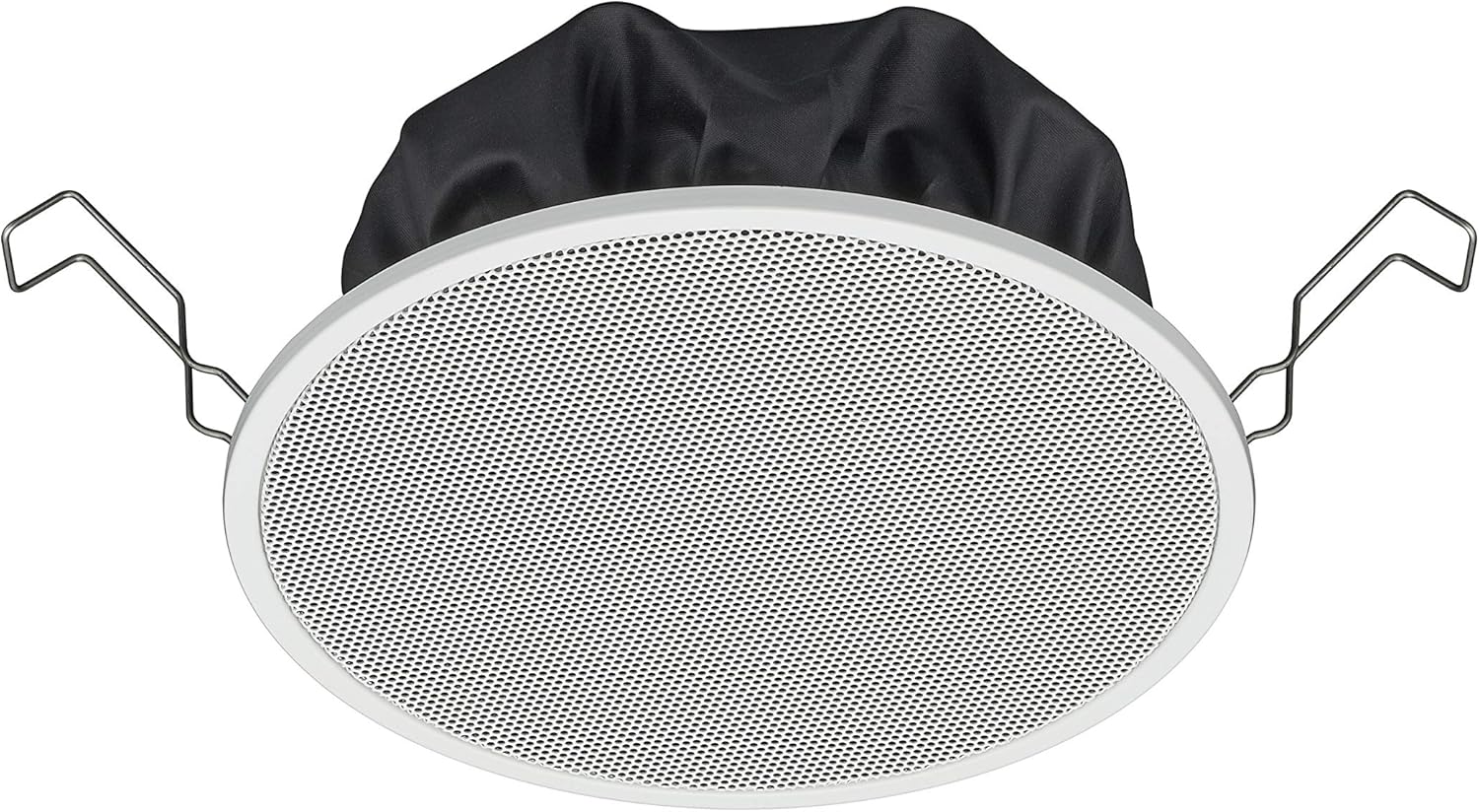
Figure 1: TOA Electronics PC-1860 5-Inch Ceiling Mount Speaker, showing the white grille, black rear enclosure, and metal mounting clips. This image illustrates the speaker's design for flush ceiling installation.
5. تعليمات التشغيل
The TOA Electronics PC-1860 is a passive speaker designed to reproduce audio from an external amplifier or audio source. It does not require direct power or complex controls.
5.1 تشغيل الصوت الأساسي
- تشغيل الطاقة Ampمكبر: تأكد من الصوت الخاص بك amplifier or receiver is powered on and connected to your audio source (e.g., MP3 player, desktop, projector, television).
- ضبط مستوى الصوت: Use the volume controls on your amplifier or audio source to set the desired listening level.
- Voice Control (if applicable): If your connected audio system supports voice control, you may be able to manage playback and volume through voice commands directed at your audio source device. The speaker itself does not have integrated voice control functionality but can reproduce audio from devices that do.
- Radio Functionality (if applicable): If your connected audio source is a radio receiver, the speaker will reproduce the radio broadcast. The speaker itself does not contain a radio tuner.
The PC-1860 is designed for straightforward audio output. All primary controls for audio source selection, volume, and equalization will be managed through your connected amplifier أو نظام الصوت.
6. الصيانة
Regular maintenance ensures the longevity and optimal performance of your speaker.
- تنظيف: Gently wipe the speaker grille and frame with a soft, dry cloth. For stubborn dirt, a slightly damp يمكن استخدام قطعة قماش، ثم قطعة قماش جافة. تجنب استخدام المواد الكيميائية القاسية أو المذيبات أو المنظفات الكاشطة.
- إزالة الغبار: Periodically use a soft brush or a vacuum cleaner with a brush attachment to remove dust from the grille, especially the mesh filter.
- تقتيش: Occasionally inspect the speaker for any visible damage or loose connections. If any issues are found, refer to the troubleshooting section or contact support.
- بيئة: Ensure the installation environment remains within recommended temperature and humidity levels.
7. استكشاف الأخطاء وإصلاحها
If you encounter issues with your PC-1860 speaker, refer to the following common problems and solutions:
| مشكلة | السبب المحتمل | حل |
|---|---|---|
| لا يوجد صوت من السماعة |
|
|
| صوت مشوه أو غير واضح |
|
|
| Speaker not securely mounted |
|
|
If the problem persists after attempting these solutions, please contact TOA Electronics customer support.
8. المواصفات
Below are the key technical specifications for the TOA Electronics PC-1860 5-Inch Ceiling Mount Speaker:
| ميزة | التفاصيل |
|---|---|
| اسم الموديل | PC-1860 |
| ماركة | توا الكترونيكس |
| نوع السماعة | في السقف |
| نوع التركيب | التركيب على السقف |
| حجم السماعة | 5 بوصة |
| نوع برنامج تشغيل الصوت | سائق ديناميكي |
| وضع إخراج الصوت | Stereo (when paired with another speaker) |
| لون | أبيض |
| المكونات المضمنة | 1 x Mesh Filter |
| مقاوم للماء | خطأ شنيع |
| وزن العنصر | 10 رطل (تقريبًا) |
| مصدر الطاقة | الكهرباء السلكية (عبر ampمكبر) |
| طريقة التحكم | Voice (via compatible external devices) |
| الاستخدامات الموصى بها | Construction, Industrial |
| الأجهزة المتوافقة | Desktop, MP3 Player, Projector, Television (via ampمكبر) |
9. معلومات الضمان
The TOA Electronics PC-1860 speaker comes with a Limited Warranty. Specific terms and conditions of the warranty, including coverage period and claim procedures, are subject to the policies of TOA Electronics.
For detailed warranty information, please refer to the official TOA Electronics webيمكنك زيارة الموقع الإلكتروني أو الاتصال بخدمة العملاء مباشرةً. احتفظ بإثبات الشراء لتقديم مطالبات الضمان.
10. دعم العملاء
If you require further assistance, have questions not covered in this manual, or need technical support, please contact TOA Electronics customer service.
- الدعم عبر الإنترنت: Visit the official TOA Electronics webموقع للأسئلة الشائعة، ووثائق المنتج، ونماذج الاتصال.
- معلومات الاتصال: Refer to the TOA Electronics website for current phone numbers and email addresses for your region.
When contacting support, please have your product model (PC-1860) and purchase information readily available.