
مقدمة
This manual provides comprehensive instructions for the Lexmark MS431dw Monochrome Laser Printer. It covers setup, operation, maintenance, and troubleshooting to ensure optimal performance and longevity of your device. The Lexmark MS431dw is designed for efficient monochrome printing, offering speeds up to 40 pages per minute and automatic duplex printing.

الصورة: أمامية يمينية view of the Lexmark MS431dw Monochrome Laser Printer.
يثبت
1. تفريغ الطابعة
Carefully remove the printer from its packaging. Ensure all packing materials, tapes, and protective films are removed from the exterior and interior of the printer. Retain the packaging for future transport if needed.
2. تركيب خرطوشة الحبر
- افتح الغطاء الأمامي للطابعة.
- أخرج خرطوشة الحبر الجديدة من عبوتها وقم برجها برفق لتوزيع الحبر.
- أدخل خرطوشة الحبر في الفتحة المخصصة حتى تسمع صوت طقطقة عند تثبيتها في مكانها.
- أغلق الغطاء الأمامي.
3. تحميل الورق
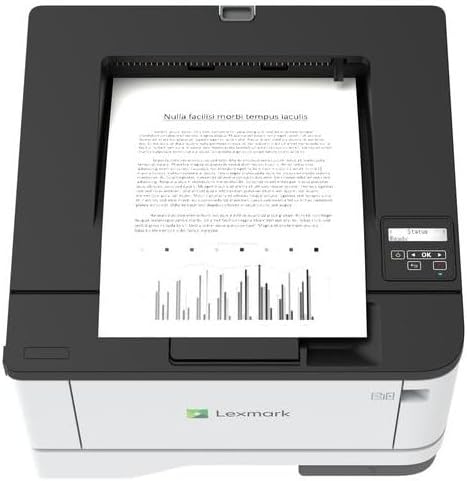
الصورة: أعلى view of the Lexmark MS431dw with paper loaded in the input tray.
Open the paper tray and adjust the paper guides to fit the size of your paper. Load the paper stack into the tray, ensuring it is flat and below the maximum fill line. Close the paper tray. The printer supports various media types, including card stock.
4. توصيل الطاقة
قم بتوصيل سلك الطاقة بمدخل الطاقة الخاص بالطابعة ثم بمأخذ كهربائي مؤرض.
5. Connecting to a Network/Computer
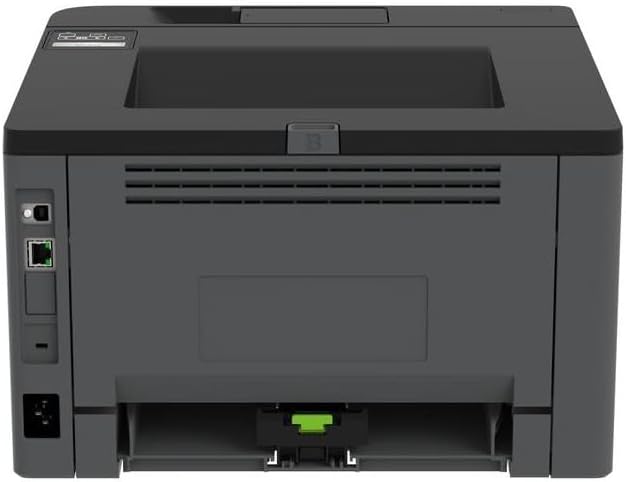
الصورة: الخلفية view of the Lexmark MS431dw, highlighting the Ethernet and power connection ports.
The Lexmark MS431dw supports Ethernet connectivity. Connect an Ethernet cable from your network router or switch to the Ethernet port on the back of the printer. For direct connection to a computer, use a USB cable (not included) if available, or configure network printing.
6. تثبيت برنامج التشغيل
Turn on the printer. Insert the driver CD (if provided) into your computer, or download the latest drivers from the official Lexmark support webاتبع التعليمات التي تظهر على الشاشة لإكمال تثبيت برنامج التشغيل.
تعليمات التشغيل
1. انتهت لوحة التحكمview

الصورة: أعلى view of the Lexmark MS431dw, showing the printer's control panel with display and buttons.
The control panel features a display screen and navigation buttons (Up, Down, OK, Back) to access printer settings, status, and functions. Refer to the on-screen menus for specific options.
2. الطباعة الأساسية
- تأكد من تشغيل الطابعة وتوصيلها بالكمبيوتر أو الشبكة.
- افتح المستند الذي ترغب في طباعته على جهاز الكمبيوتر الخاص بك.
- يختار مطبعة من قائمة التطبيق (على سبيل المثال، File >طباعة).
- Choose the Lexmark MS431dw from the list of available printers.
- Adjust print settings as desired (e.g., number of copies, paper size).
- انقر مطبعة.
3. الطباعة التلقائية على الوجهين
The MS431dw supports automatic two-sided (duplex) printing. To enable this feature:
- In the print dialog box on your computer, navigate to the printer properties or preferences.
- Look for an option related to "Two-sided printing" or "Duplex printing."
- حدد خيار الطباعة على الوجهين المطلوب (على سبيل المثال، التجليد ذو الحافة الطويلة، التجليد ذو الحافة القصيرة).
- أكد اختيارك وتابع عملية الطباعة.
صيانة
1. Replacing the Toner Cartridge
When the toner level is low, the printer's display will indicate a warning. To replace the cartridge:
- تأكد من تشغيل الطابعة.
- افتح الغطاء الأمامي.
- قم بإزالة خرطوشة الحبر القديمة عن طريق سحبها للخارج.
- Unpack a new Lexmark-compatible toner cartridge and gently shake it.
- قم بإدخال الخرطوشة الجديدة حتى يتم قفلها في مكانها.
- أغلق الغطاء الأمامي.
2. تنظيف الطابعة
يساعد التنظيف المنتظم في الحفاظ على جودة الطباعة وإطالة عمر الطابعة.
- الخارج: امسحي الأسطح الخارجية بقطعة ناعمة ، دampاستخدم قطعة قماش خالية من الوبر. لا تستخدم منظفات أو مذيبات كاشطة.
- الداخلية: Periodically open the front cover and gently remove any dust or paper debris from accessible areas using a dry, lint-free cloth. Avoid touching the fuser unit.
استكشاف الأخطاء وإصلاحها
This section addresses common issues you might encounter. For more detailed troubleshooting, refer to the Lexmark support webموقع.
1. انحشار الورق
- If a paper jam occurs, the printer display will show an error message indicating the location of the jam.
- افتح الأغطية أو الصواني المشار إليها بحرص.
- اسحب الورقة العالقة برفق في اتجاه مسار الورق. تجنب تمزيقها.
- Close all covers and trays. The printer should resume printing.
2. جودة طباعة رديئة
- طبعات باهتة: قد يكون مستوى الحبر في خرطوشة الحبر منخفضاً. استبدلها إذا لزم الأمر.
- خطوط أو بقع: Clean the printer's interior as described in the Maintenance section. Ensure the toner cartridge is properly seated.
- صفحات فارغة: Verify the toner cartridge is installed correctly and has toner. Check printer drivers and print settings.
3. مشاكل الاتصال
- لم يتم العثور على الطابعة: Ensure the Ethernet cable is securely connected to both the printer and the network. Verify network settings on the printer and computer.
- حالة عدم الاتصال: Check the printer's power and network connection. Restart both the printer and your computer.
تحديد
| ميزة | التفاصيل |
|---|---|
| رقم الموديل | 29س0110 |
| تكنولوجيا الطباعة | الليزر |
| مخرجات الطابعة | أحادي اللون |
| أقصى سرعة طباعة (أبيض وأسود) | تصل إلى 40 صفحة في الدقيقة |
| تكنولوجيا الاتصال | إيثرنت |
| ميزة خاصة | Auto-Duplex (Automatic Two-sided Printing) |
| الحد الأقصى لسعة ورقة الإدخال | 900 ورقات |
| دعم الوسائط المطبوعة | Card stock, Plain paper |
| وزن العنصر | 9300 غرام (حوالي 20.5 رطل) |
| واتtage | 570 واط |
| رمز المنتج الموحد | 734646695558 |
ملاحظة: المواصفات عرضة للتغيير دون إشعار.
الضمان والدعم
معلومات الضمان
Your Lexmark MS431dw printer is covered by a standard manufacturer's warranty. For specific terms, conditions, and duration of your warranty, please refer to the documentation included with your product or visit the official Lexmark webالموقع. احتفظ بإثبات الشراء الخاص بك لتقديم مطالبات الضمان.
دعم العملاء
For technical assistance, driver downloads, or further support, please visit the official Lexmark support portal.
Visit the Lexmark Store for Support