
1. المقدمة
This manual provides essential instructions for the safe and efficient operation of your Lenco DIR-250 Internet Radio. Please read this manual thoroughly before using the device and retain it for future reference. The Lenco DIR-250 is a versatile audio system offering Internet Radio, DAB+, FM radio, Bluetooth connectivity, Spotify Connect, and USB playback.
2. معلومات السلامة
- لا تعرض الجهاز للمطر أو الرطوبة لتجنب نشوب حريق أو التعرض لصدمة كهربائية.
- تأكد من التهوية الجيدة. لا تسد فتحات التهوية.
- استخدم فقط محول الطاقة المرفق مع الوحدة.
- لا تفتح الصندوقasinز. إحالة جميع أعمال الصيانة إلى موظفين مؤهلين.
- احتفظ بالوحدة بعيدًا عن أشعة الشمس المباشرة ومصادر الحرارة والمجالات المغناطيسية القوية.
- تجنب وضع أشياء ثقيلة فوق الوحدة.
3. محتويات العبوة
تأكد من وجود جميع العناصر عند فك العبوة:
- Lenco DIR-250 Internet Radio Unit
- محول الطاقة
- جهاز التحكم عن بعد
- دليل المستخدم (هذا المستند)
- Antennas (2 included)
4. انتهى المنتجview

الشكل 4.1: أمام view of the Lenco DIR-250 Internet Radio and its remote control.

الشكل 4.2: Close-up of the right side of the front panel, featuring the TFT LCD display, volume control knob, Dimmer, and Alarm buttons.
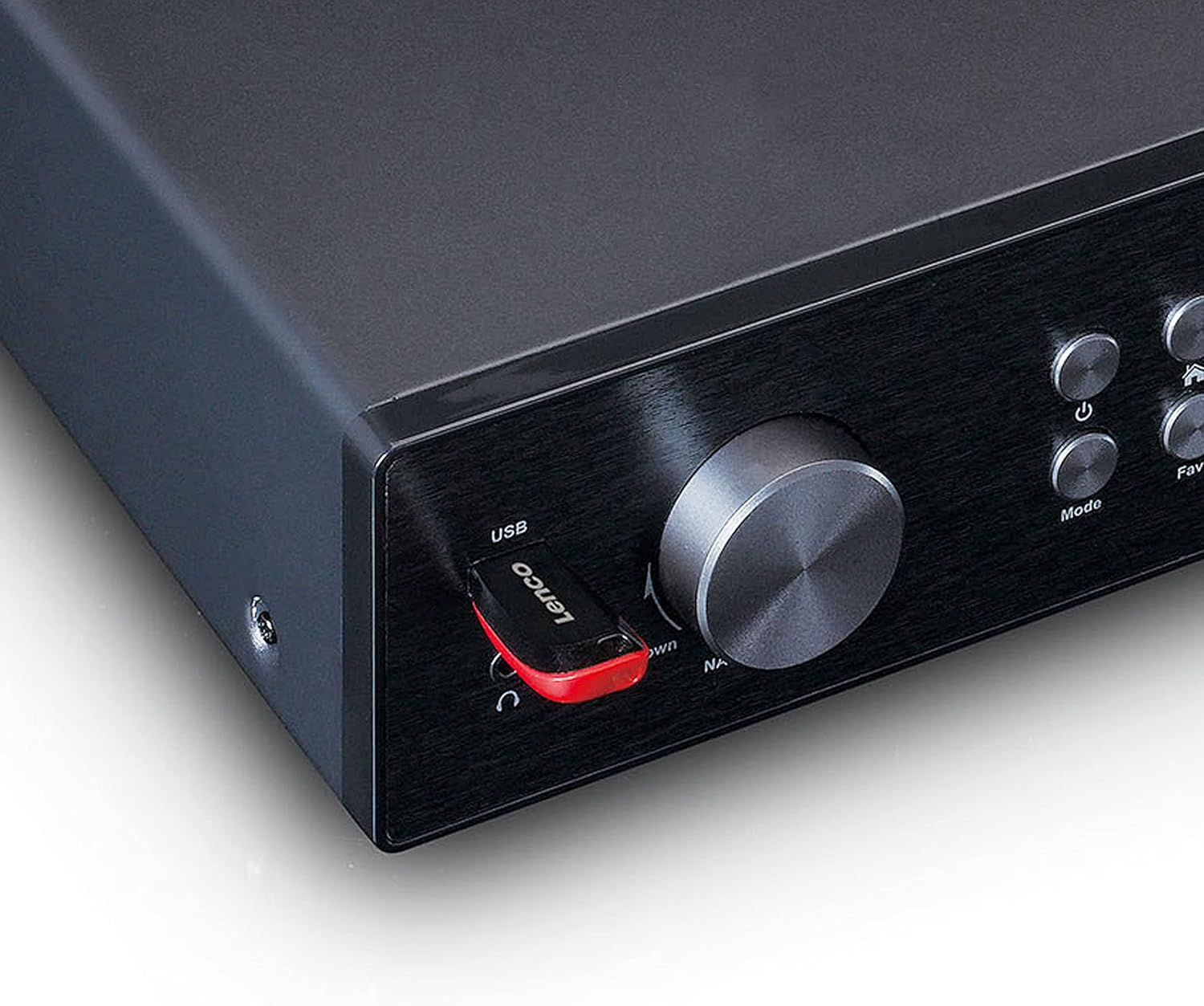
الشكل 4.3: Close-up of the left side of the front panel, showing the USB port, headphone jack, Navigate/OK knob, Mode, and Favorite buttons.

الشكل 4.4: Rear panel connections, including DC IN, Audio Output (RCA), Analog Input/Output, Optical Output, Coaxial Output, LAN (RJ45), and Antenna ports.
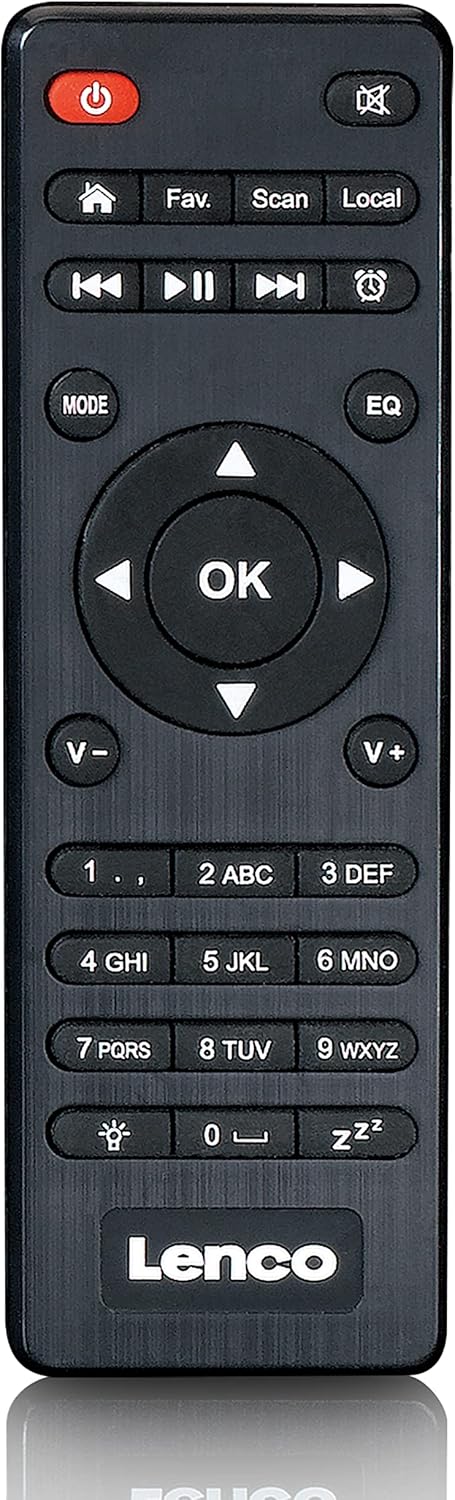
الشكل 4.5: The included remote control for convenient operation of the Lenco DIR-250.
5. الإعداد
5.1. توصيل الطاقة
- قم بتوصيل محول الطاقة المرفق بمنفذ DC IN الموجود في الجزء الخلفي من الوحدة.
- قم بتوصيل محول الطاقة بمأخذ الحائط.
5.2. اتصال الهوائي
For optimal reception of DAB+ and FM radio, connect the provided antennas to their respective ports on the rear panel. Extend the telescopic antenna fully for best results.
5.3. اتصال الشبكة
The DIR-250 supports both Wi-Fi and Ethernet connections for Internet Radio and Spotify Connect.
- واي فاي: Upon first power-on, the unit will guide you through the Wi-Fi setup. Select your network from the list and enter the password using the navigation knob and OK button, or the remote control.
- إيثرنت: Connect an Ethernet cable from your router to the LAN port on the rear of the unit. The device will automatically detect the wired connection.
5.4. معالج الإعداد الأولي
The first time you power on the DIR-250, an initial setup wizard will appear on the display. Follow the on-screen prompts to configure language, time, date, and network settings. This ensures the device is ready for use.
6. التشغيل
6.1. عناصر التحكم الأساسية
The DIR-250 can be operated using the front panel controls or the included remote control.
- زر الطاقة: Turns the unit on/off or puts it into standby mode.
- مقبض الصوت: قم بتدوير الجهاز لضبط مستوى الصوت. اضغط لكتم الصوت/إلغاء كتمه.
- Navigate/OK Knob: Rotate to scroll through menus and options. Press to confirm a selection.
- زر الوضع: Cycles through available modes (Internet Radio, DAB+, FM, Bluetooth, USB, AUX).
- Fav. Button: Accesses your list of favorite stations or saves the current station as a favorite.
- زر باهتة: ضبط سطوع الشاشة.
- زر التنبيه: Sets or manages alarms.
6.2. راديو الإنترنت
Access thousands of radio stations worldwide via your internet connection.
- اضغط على وضع اضغط على الزر حتى يتم تحديد "راديو الإنترنت".
- استخدم Navigate/OK knob or remote control to browse stations by location, genre, or search.
- يضعط OK لتحديد محطة.
- لحفظ محطة كمفضلة، اضغط مع الاستمرار على مفضل. زر.
6.3. DAB+ Radio
استمتع ببث إذاعي رقمي عالي الجودة.
- اضغط على وضع button until "DAB+" is selected.
- سيقوم الراديو تلقائيًا بالبحث عن محطات DAB+ المتوفرة.
- استخدم Navigate/OK knob or remote to select a station from the list.
6.4. راديو FM
Tune into traditional analog FM radio stations.
- اضغط على وضع اضغط على الزر حتى يتم تحديد "FM".
- استخدم مسح ضوئي الزر الموجود على جهاز التحكم عن بعد أو Navigate/OK knob to search for stations.
- يضعط OK to listen to a selected station.
6.5. وضع بلوتوث
قم ببث الصوت لاسلكيًا من هاتفك الذكي أو جهازك اللوحي أو أي أجهزة أخرى تدعم تقنية البلوتوث.
- اضغط على وضع button until "Bluetooth" is selected. The display will show "Pairing".
- On your external device, enable Bluetooth and search for "Lenco DIR-250".
- Select the device to pair. Once connected, you can play audio from your device through the radio.
6.6. سبوتيفي كونيكت
Control your music directly from the Spotify app on your smartphone or tablet.
- Ensure your Lenco DIR-250 and your smartphone/tablet are connected to the same Wi-Fi network.
- افتح تطبيق Spotify على جهازك.
- قم بتشغيل أغنية ثم انقر على أيقونة "الأجهزة المتوفرة" (عادةً ما تكون أيقونة مكبر صوت أو كمبيوتر).
- Select "Lenco DIR-250" from the list of available devices.
6.7. تشغيل USB
تشغيل الصوت files (MP3, WAV, AAC) from a USB flash drive.
- قم بإدخال محرك أقراص فلاش USB في منفذ USB الموجود على اللوحة الأمامية.
- اضغط على وضع اضغط على الزر حتى يتم تحديد "USB".
- استخدم Navigate/OK knob or remote to browse and select audio files.
6.8. مدخلات AUX
قم بتوصيل الأجهزة الصوتية الخارجية باستخدام كابل صوت مقاس 3.5 ملم.
- Connect your external audio device to the AUX IN port on the rear panel.
- اضغط على وضع button until "AUX" is selected.
- تشغيل الصوت من جهازك المتصل.
6.9. Alarm and Sleep Timer
Set alarms to wake up to your favorite radio station or use the sleep timer to automatically turn off the radio.
- إنذار: اضغط على إنذار button on the front panel or remote. Follow the on-screen instructions to set alarm time, source, and volume.
- مؤقت النوم: اضغط على ينام button on the remote control repeatedly to cycle through available sleep timer durations (e.g., 15, 30, 60 minutes, Off).
7. الصيانة
7.1. التنظيف
To clean the unit, wipe it with a soft, dry cloth. Do not use abrasive cleaners, waxes, or solvents as these may damage the surface. Ensure the unit is unplugged before cleaning.
7.2. التخزين
If you plan not to use the unit for an extended period, unplug it from the power outlet and store it in a cool, dry place, away from direct sunlight and extreme temperatures.
8. استكشاف الأخطاء وإصلاحها
| مشكلة | السبب المحتمل | حل |
|---|---|---|
| لا يوجد طاقة | محول الطاقة غير متصل أو المنفذ معيب. | تحقق من توصيلات الطاقة. جرّب مقبسًا آخر. |
| لا يوجد صوت | Volume too low, muted, or incorrect input selected. | Increase volume. Check if muted. Select correct input mode. |
| لا يمكن الاتصال بشبكة Wi-Fi | Incorrect password, out of range, or router issue. | Verify Wi-Fi password. Move unit closer to router. Restart router. |
| Internet Radio buffering/disconnecting | Weak Wi-Fi signal or slow internet connection. | Improve Wi-Fi signal strength. Check internet speed. Try wired Ethernet connection. |
| ضعف استقبال DAB+/FM | Antenna not properly connected or extended. | Ensure antennas are fully extended and positioned for best reception. |
| مشاكل اقتران البلوتوث | Device not in pairing mode, or already paired with another device. | Ensure DIR-250 is in Bluetooth mode. Disconnect from other devices. |
| تتجمد الوحدة أو تصبح غير مستجيبة | خلل مؤقت في البرنامج. | Unplug the power adapter, wait 10 seconds, then plug it back in to restart the unit. |
9. المواصفات
| ماركة | لينكو |
| رقم الموديل | أ004231 |
| تكنولوجيا العرض | شاشة الكريستال السائل |
| الاتصال | Bluetooth V5.0, Ethernet (RJ45), Wi-Fi |
| نطاقات الراديو المدعومة | راديو الإنترنت، DAB+، FM |
| المميزات الخاصة | Spotify Connect, USB Playback, Alarm, Sleep Timer |
| الأبعاد (الطول × العرض × الارتفاع) | 43 × 28.7 × 7.2 سم |
| وزن | 1.5 كيلوغرام |
| مصدر الطاقة | Wired (AC Adapter) |
| الأجهزة المتوافقة | Tablet, Smartphone, USB storage devices |
10. الضمان
This product comes with a manufacturer's warranty of 24 months from the date of purchase. Please retain your proof of purchase for warranty claims. The warranty covers defects in materials and workmanship under normal use. It does not cover damage caused by misuse, accidents, unauthorized modifications, or normal wear and tear.
11. الدعم
For technical support, service, or further inquiries regarding your Lenco DIR-250 Internet Radio, please visit the official Lenco website or contact their customer service department. Contact information can typically be found on the Lenco webيمكنك الاطلاع على معلومات الموقع أو في وثائق الضمان المرفقة مع المنتج.
Lenco Official Webموقع: www.lenco.com