
1. المقدمة
The Korg SoundLink MW-1608 is a 16-channel hybrid mixer designed for a wide range of audio applications, including studio recording and live sound reinforcement. This mixer integrates both analog and digital processing to provide comprehensive control over audio signals. It features high-quality components such as HiVolt microphone preamps, Velvet Sound AD/DA converters, and ALPS faders.
Key functionalities include per-channel 3-band equalizers, 1-knob compressors, mute groups, a dedicated monitor section, feedback suppression, all-XLR speaker outputs, a built-in spectrum analyzer, and a suite of Korg digital effects. This manual provides essential information for the proper setup, operation, maintenance, and troubleshooting of your MW-1608 mixer.
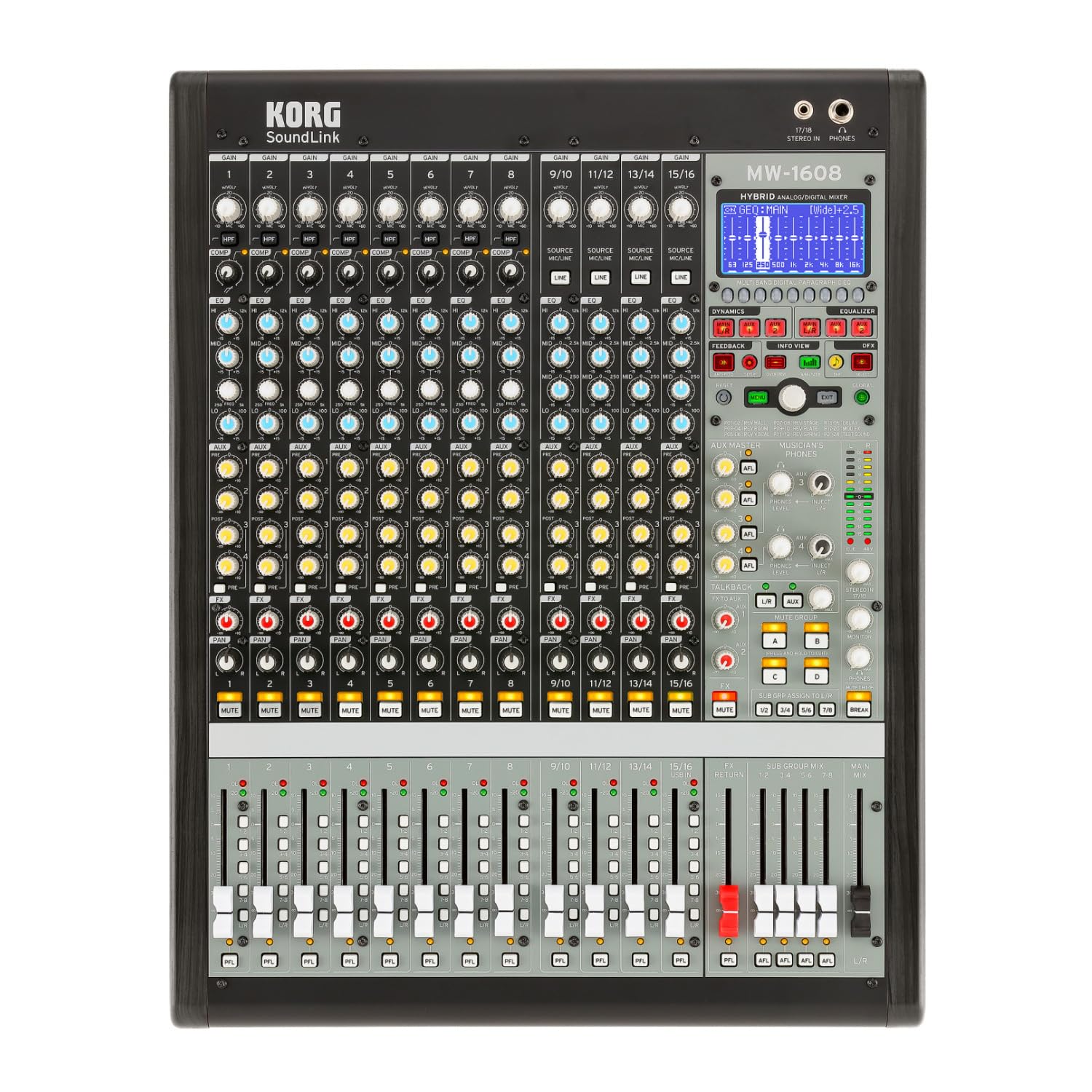
الشكل 1: الجبهة view of the Korg SoundLink MW-1608 mixer, showing the control surface with faders, knobs, and display.
2. الإعداد
Before operating the Korg SoundLink MW-1608, ensure all connections are made correctly and securely. This section outlines the basic steps for setting up your mixer.
2.1 التفريغ والتنسيب
- أخرج الخلاط من عبوته بحرص. احتفظ بجميع مواد التغليف لاستخدامها في النقل أو التخزين مستقبلاً.
- Place the mixer on a stable, flat surface with adequate ventilation. Avoid placing it near heat sources or in direct sunlight.
- Ensure sufficient space around the unit for cable connections and heat dissipation.
2.2 توصيل الطاقة
- The MW-1608 operates on a "Corded Electric" power source.
- Connect the supplied AC power cord to the mixer's power input on the rear panel.
- Plug the other end of the power cord into a suitable electrical outlet. Ensure the power switch is in the OFF position before connecting.
2.3 اتصالات الصوت
The MW-1608 offers various input and output options. Refer to the rear panel diagram below for connection points.

الشكل 2: خلفي view of the Korg SoundLink MW-1608 mixer, showing various input and output connectors.
- مدخلات الميكروفون: Connect microphones to the XLR inputs (channels 1-12, 15/16, 13/14, 11/12, 9/10, 7, 6, 5, 4, 3, 2, 1) using balanced XLR cables.
- مدخلات الخط: Connect line-level devices (e.g., keyboards, media players) to the 1/4-inch TRS or RCA line inputs.
- المخرجات الرئيسية: قم بتوصيل مكبرات الصوت الرئيسية أو مصدر الطاقة amplifier to the MAIN OUT (XLR L/R) connectors. The mixer features "XLR" output connector type.
- المخرجات المساعدة: Use the AUX OUT (XLR) connectors for monitor mixes or external effects processors.
- Group Outputs: Utilize the GROUP OUT (XLR) for sub-mixes.
- اتصال USB: The USB port allows for connection to a computer for recording or playback.
3. تعليمات التشغيل
يوفر هذا القسم عرضًا تفصيليًاview of the Korg SoundLink MW-1608's operational features and controls.
3.1 ضوابط القناة
- كسب الإدخال: Adjust the input sensitivity for each channel to achieve optimal signal levels.
- 3 نطاقات EQ: Each channel features a 3-band equalizer for tone shaping. Adjust the HIGH, MID, and LOW frequency bands as needed.
- ضاغط بمقبض واحد: Engage and adjust the built-in compressor on individual channels to control dynamics and add punch.
- إرسال مساعد: Route channel signals to auxiliary outputs for monitor mixes or external effects.
- التحكم في عموم: Position the channel's signal within the stereo field.
- زر كتم الصوت: Silences the channel's output.
- قناة فيدر: Controls the volume level of the individual channel in the main mix.
3.2 القسم الرئيسي
- أزرار التحكم الرئيسية في الميكس: التحكم في مستوى الإخراج الإجمالي للمزيج الرئيسي الاستريو.
- مُخفِّضات مستوى الصوت الجماعية: Adjust the output levels of the 8-bus groups.
- قسم المراقبة: Provides control over headphone and control room outputs. The "Musician's Phone Feature" allows for dedicated monitoring.
- التأثيرات الرقمية: Access and apply Korg's studio-quality digital effects to your mix.
- قمع ردود الفعل: Utilize the integrated feedback suppression system to prevent unwanted audio feedback.
- محلل الطيف: The built-in spectrum analyzer provides visual feedback on the frequency content of your audio.
4. الصيانة
Proper maintenance ensures the longevity and optimal performance of your Korg SoundLink MW-1608 mixer.
- تنظيف: استخدم قطعة قماش ناعمة وجافة لمسح الجزء الخارجي من الخلاط. بالنسبة للأوساخ المستعصية، استخدم قطعة قماش مبللة قليلاً.amp يمكن استخدام قطعة قماش مبللة بصابون لطيف، ثم قطعة قماش جافة. تجنب استخدام المنظفات الكاشطة أو المذيبات.
- حماية الغبار: When not in use, cover the mixer with a dust cover to prevent dust and debris from accumulating on controls and inside the unit.
- الظروف البيئية: Operate and store the mixer in a clean, dry environment. Avoid extreme temperatures, high humidity, and direct exposure to liquids.
- إدارة الكابلات: تأكد من تنظيم الكابلات بشكل أنيق وعدم تعرضها للضغط لمنع تلف الموصلات والمنافذ.
5. استكشاف الأخطاء وإصلاحها
This section addresses common issues you might encounter with your MW-1608 mixer. If the problem persists after attempting these solutions, contact Korg customer support.
- لا يوجد طاقة:
- Ensure the power cord is securely connected to both the mixer and a working electrical outlet.
- تحقق من مفتاح الطاقة الموجود على اللوحة الخلفية.
- تأكد من أن المخرج الكهربائي يعمل عن طريق توصيل جهاز آخر.
- لا يوجد إخراج صوت:
- تحقق من جميع توصيلات كابلات الإدخال والإخراج.
- Ensure channel faders, group faders, and main mix faders are raised.
- تأكد من أن القنوات ليست مكتومة.
- تحقق من إعدادات الكسب لكل قناة إدخال.
- تأكد من أن مكبرات الصوت المتصلة أو ampمكبرات الصوت تعمل بشكل سليم.
- صوت مشوه:
- Reduce input gain levels if the signal is clipping (indicated by peak LEDs).
- Check for damaged cables or faulty connectors.
- Ensure output levels are not overdriving connected devices.
- Channel or Group Functionality Issues:
- Verify routing assignments for channels to groups or main mix.
- Ensure mute buttons are disengaged for relevant channels/groups.
- Check if any effects or processing are inadvertently applied.
6. المواصفات
| ميزة | التفاصيل |
|---|---|
| رقم الموديل | MW-1608 |
| ماركة | كورج |
| عدد القنوات | 16 |
| تكنولوجيا الاتصال | مساعد |
| نوع موصل الإخراج | إكس إل آر |
| مصدر الطاقة | كهرباء سلكية |
| وزن العنصر | 3.41 رطل |
| أبعاد المنتج (الطول × العرض × الارتفاع) | 18.9 × 7.36 × 20.91 بوصة |
| ASIN | B08FSYXMW9 |
7. الضمان والدعم
للحصول على معلومات مفصلة حول الضمان، يرجى الرجوع إلى بطاقة الضمان المرفقة مع المنتج أو زيارة موقع Korg الرسمي. webقد تختلف شروط وأحكام الضمان حسب المنطقة.
For technical support, service, or additional product information, please visit the official Korg support website or contact their customer service department. Keep your product's model number (MW-1608) and serial number (if applicable) ready when seeking support.
كورج الرسمي Webموقع: www.korg.com