
1. المقدمة
شكرا لك على الشراءasing the YESIDO YSP03 Sports Bluetooth In-Ear Earphones. This manual provides essential information for the safe and efficient use of your new earphones. Please read it thoroughly before use and retain it for future reference.
2. معلومات السلامة
- لا تعرض سماعات الأذن لدرجات حرارة قصوى أو رطوبة عالية أو بيئات أكالة.
- Avoid dropping, impacting, or bending the earphones.
- Do not disassemble or modify the earphones. This may void the warranty and cause damage.
- أبقِ سماعات الأذن بعيداً عن متناول الأطفال والحيوانات الأليفة.
- استخدم فقط كابل الشحن المقدم أو ما يعادله المعتمد.
- استمع إلى مستويات صوت معتدلة لتجنب تلف السمع.
- Do not use the earphones while driving or in situations where you need to be aware of your surroundings.
3. محتويات العبوة
يرجى التحقق من الحزمة للعناصر التالية:
- YESIDO YSP03 Sports Bluetooth In-Ear Earphones
- كابل شحن USB
- دليل المستخدم
- Ear tips (various sizes, typically)
4. انتهى المنتجview
The YESIDO YSP03 earphones feature an in-ear design with a control unit for easy operation. They support Bluetooth wireless connectivity and also offer direct music playback via an SD card.
Control Unit and Ports
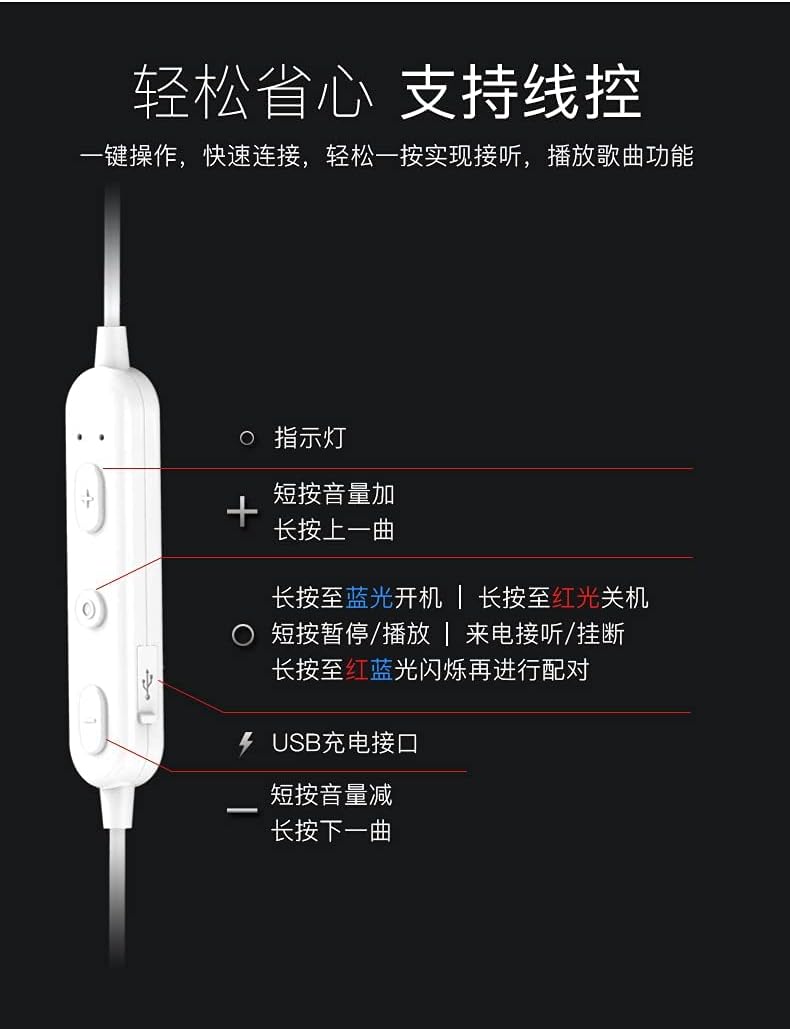
صورة: مفصل view of the earphone control unit, showing the indicator light, volume/track buttons, multi-function button, and USB charging port.
- مؤشر الضوء: يعرض الحالة (الطاقة، الاقتران، الشحن).
- زر '+': Short press for Volume Up; Long press for Previous Track.
- زر متعدد الوظائف (الوسط): Long press for Power On (blue light) / Power Off (red light); Short press for Play/Pause or Answer/Hang up calls; Long press until red and blue lights flash for Pairing Mode.
- '-' زر: Short press for Volume Down; Long press for Next Track.
- منفذ شحن USB: لتوصيل كابل الشحن.
فتحة بطاقة SD
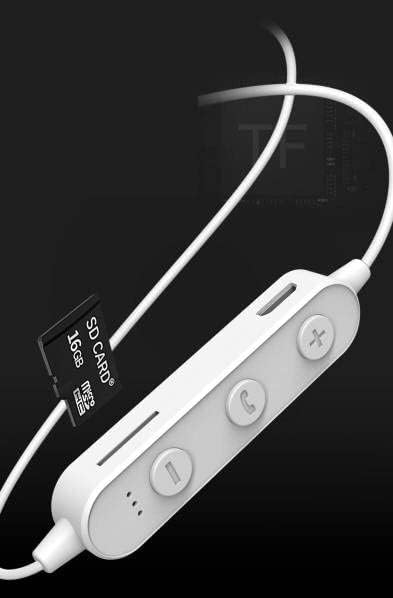
صورة: Close-up of the control unit showing the SD card slot, indicating direct music playback without a phone. A 64GB card can store approximately 15,000 songs.
The earphones feature an integrated SD card slot, allowing you to play music directly from a memory card without needing a connected device. This is ideal for sports or activities where carrying a phone is inconvenient.
5. الإعداد
5.1 شحن سماعات الأذن
- Connect the USB charging cable to the USB charging port on the earphone control unit.
- قم بتوصيل الطرف الآخر من كابل USB بمحول طاقة USB (غير متضمن) أو بمنفذ USB الخاص بالكمبيوتر.
- The indicator light will typically show a red light during charging and turn off or change color when fully charged.
- خصص حوالي 1-2 ساعات للشحن الكامل.
5.2 اقتران بلوتوث
- تأكد من إيقاف تشغيل سماعات الأذن.
- Press and hold the Multi-function Button (center button) for approximately 5-7 seconds until the indicator light flashes red and blue alternately. This indicates pairing mode.
- On your mobile phone or Bluetooth-enabled device, go to the Bluetooth settings and turn on Bluetooth.
- بحث عن available devices. You should see "YESIDO YSP03" or a similar name in the list.
- Select "YESIDO YSP03" to connect. Once successfully paired, the indicator light will typically flash blue slowly or turn off.
- إذا طُلب منك إدخال كلمة المرور، أدخل "0000".
5.3 إدخال بطاقة SD
- Locate the SD card slot on the control unit.
- Gently insert a formatted Micro SD card (TF card) with the metal contacts facing down until it clicks into place.
- The earphones will automatically detect the card and switch to SD card playback mode if no Bluetooth device is connected or if Bluetooth is disconnected.
6. تعليمات التشغيل
6.1 تشغيل/إيقاف التشغيل
- تشغيل الطاقة: Press and hold the Multi-function Button until the blue indicator light appears.
- إيقاف التشغيل: Press and hold the Multi-function Button until the red indicator light appears.
6.2 تشغيل الموسيقى (وضع البلوتوث)
- تشغيل/إيقاف مؤقت: اضغط قصيرًا على الزر متعدد الوظائف.
- رفع الصوت: Short press the '+' Button.
- اخفض الصوت: Short press the '-' Button.
- المسار التالي: Long press the '-' Button.
- المسار السابق: Long press the '+' Button.
6.3 إدارة المكالمات
- الرد/إنهاء المكالمة: Short press the Multi-function Button when an incoming call is received.
- رفض المكالمة: Long press the Multi-function Button when an incoming call is received.
- إعادة الاتصال بالرقم الأخير: اضغط مرتين على الزر متعدد الوظائف.
تشغيل بطاقة SD 6.4
- Once an SD card is inserted and detected, the earphones will automatically begin playing music from the card.
- The same controls for Play/Pause, Volume, Next/Previous Track apply as in Bluetooth mode.
7. الصيانة
- تنظيف: استخدم قطعة قماش ناعمة وجافة لتنظيف سماعات الأذن. لا تستخدم مواد كيميائية قاسية أو مواد كاشطة.
- تخزين: قم بتخزين سماعات الأذن في مكان بارد وجاف بعيدًا عن أشعة الشمس المباشرة ودرجات الحرارة القصوى.
- العناية بالبطارية: To prolong battery life, charge the earphones regularly, even if not in frequent use. Avoid fully discharging the battery for extended periods.
8. استكشاف الأخطاء وإصلاحها
| مشكلة | حل |
|---|---|
| Earphones won't power on. | Ensure the earphones are fully charged. Press and hold the Multi-function Button for a longer duration. |
| لا يمكن الاقتران بالجهاز. | Ensure earphones are in pairing mode (red and blue flashing light). Turn off and on Bluetooth on your device. Move closer to the earphones. Forget the device in your phone's Bluetooth settings and try pairing again. |
| لا يوجد صوت. | Check volume levels on both earphones and your connected device. Ensure earphones are properly connected via Bluetooth or that the SD card is inserted correctly and contains playable files. |
| SD card not playing. | Ensure the SD card is inserted correctly and contains compatible audio files (e.g., MP3). Try re-inserting the card. Ensure no Bluetooth device is actively connected, as SD card playback might be prioritized when Bluetooth is disconnected. |
| جودة الصوت رديئة. | Ensure there are no obstructions between the earphones and your device. Move closer to your device. Try a different audio source or file. |
9. المواصفات
| ميزة | التفاصيل |
|---|---|
| ماركة | YESIDO |
| رقم الموديل | YSP03 |
| لون | أبيض |
| وضع الأذن | داخل الأذن |
| تكنولوجيا الاتصال | لاسلكي (بلوتوث) |
| التحكم في الضوضاء | لا أحد |
| الأجهزة المتوافقة | الهواتف المحمولة |
| استخدامات محددة للمنتج | الرياضة |
| ميزة الكابل | Cable-free |
| مستوى مقاومة الماء | غير مقاوم للماء |
| نوع التحكم | التحكم الصوتي |
| طريقة التحكم | App (Voice Control implies app integration for some functions) |
أداء البطارية

صورة: Visual representation of battery performance metrics for the YESIDO YSP03 earphones.
- وقت تشغيل الموسيقى: حوالي 9 ساعات
- Headphone Standby Time: حوالي 120 ساعات
- مدة المكالمة: حوالي 7.5 ساعات
*Note: These data are obtained from YESIDO laboratory tests, and slight deviations may occur due to changes in objective environment and usage patterns.
10. الضمان والدعم
10.1 معلومات الضمان
This product is provided without an explicit warranty. Please refer to your retailer's return policy for any issues within the applicable return period.
10.2 دعم العملاء
For further assistance or inquiries, please contact the retailer where you purchased the product. You may also visit the official YESIDO website for general product information and potential support resources.