
PowerPac PPFS212B 2-in-1 Dual-Usage Stand Fan Instruction Manual
Model: PPFS212B
1. معلومات هامة حول السلامة
يرجى قراءة جميع التعليمات بعناية قبل استخدام هذا الجهاز والاحتفاظ بها للرجوع إليها مستقبلاً. قد يؤدي عدم اتباع هذه التعليمات إلى حدوث صدمة كهربائية أو حريق أو إصابة خطيرة.
- تأكد من مستوى الصوتtagيتوافق الجهد الكهربائي الموضح على ملصق التصنيف مع جهد التيار الكهربائي الرئيسي لديك.tage.
- لا تغمر المروحة أو القابس أو السلك في الماء أو السوائل الأخرى.
- Unplug the fan from the power outlet before cleaning, assembling, or disassembling parts.
- Keep fingers, pencils, or any other objects out of the fan grille when it is running.
- لا تقم بتشغيل المروحة إذا كان السلك أو القابس تالفًا. اتصل بفنيي الصيانة المؤهلين لإصلاحها.
- This appliance is equipped with thermal fuse protection against overheating. If the fan stops working unexpectedly, unplug it and allow it to cool before attempting to restart.
- لا يُقصد استخدام هذا الجهاز من قبل الأشخاص (بما في ذلك الأطفال) ذوي القدرات البدنية أو الحسية أو العقلية المحدودة، أو الذين يفتقرون إلى الخبرة والمعرفة، ما لم يتم الإشراف عليهم أو توجيههم فيما يتعلق باستخدام الجهاز من قبل شخص مسؤول عن سلامتهم.
2. انتهى المنتجview
The PowerPac PPFS212B is a versatile 2-in-1 dual-usage stand fan designed for efficient cooling in indoor environments. It features 7 blades for maximum airflow, 3-speed settings, and an oscillation function for wider air distribution. The fan is equipped with thermal fuse protection for enhanced safety.
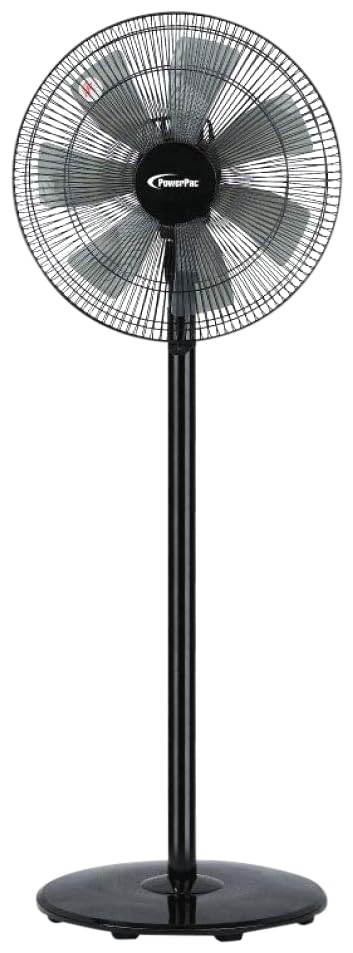
Image: PowerPac PPFS212B 2-in-1 Dual-Usage Stand Fan, showcasing its black finish and stand configuration.
3. محتويات العبوة
يرجى التحقق من محتويات العبوة عند فتحها للتأكد من وجود جميع الأجزاء وعدم تلفها:
- 1 x PowerPac PPFS212B Stand Fan (includes fan head, stand pole, and base)
4. تعليمات التجميع
Follow these steps to assemble your PowerPac PPFS212B fan:
- قم بإخراج جميع المكونات من العبوة بعناية.
- Attach the stand pole to the fan base. Ensure it is securely fastened according to the markings or locking mechanism.
- Mount the fan head assembly onto the top of the stand pole. Align the connection points and secure it firmly.
- Ensure all screws and fasteners are tightened to prevent wobbling during operation.
- Place the assembled fan on a stable, flat surface.
Image: Illustrative diagram of the PowerPac PPFS212B fan assembly, showing the base, stand, and fan head components.
5. تعليمات التشغيل
To operate your PowerPac PPFS212B fan:
- قم بتوصيل سلك الطاقة بمأخذ كهربائي مناسب.
- تشغيل/إيقاف التشغيل: Press the 'ON/OFF' button (or corresponding button) on the control panel to turn the fan on or off.
- تعديل السرعة: Press the 'SPEED' button repeatedly to cycle through the 3 available speed settings (Low, Medium, High).
- وظيفة التذبذب: Press the 'OSC' button (or corresponding button) to activate or deactivate the oscillation feature, which allows the fan head to sweep from side to side.
- When finished, press the 'ON/OFF' button to turn off the fan and unplug it from the power outlet.
6. الصيانة والتنظيف
Regular cleaning and maintenance will help ensure optimal performance and longevity of your fan:
- افصل دائمًا المروحة عن مصدر الطاقة قبل التنظيف.
- استخدمي قطعة قماش ناعمةamp cloth to wipe the exterior surfaces of the fan. Do not use abrasive cleaners, solvents, or harsh chemicals.
- To clean the fan blades, carefully remove the front grille (if detachable) according to the product design. Wipe the blades with a soft cloth. Ensure all parts are dry before reassembling.
- لا تسمح للماء بالتنقيط في غلاف المحرك.
- قم بتخزين المروحة في مكان بارد وجاف عندما لا تكون قيد الاستخدام لفترات طويلة.
7. استكشاف الأخطاء وإصلاحها
إذا واجهت مشاكل مع المروحة، فراجع الجدول التالي للاطلاع على المشاكل الشائعة وحلولها:
| مشكلة | السبب المحتمل | حل |
|---|---|---|
| المروحة لا تعمل. | لا يوجد مصدر للطاقة. Thermal fuse activated. | تأكد من إدخال القابس في المنفذ بشكل آمن. تأكد من أن منفذ الطاقة يعمل بشكل صحيح. Unplug and allow the fan to cool down for 30 minutes before restarting. |
| تدفق الهواء ضعيف أو معدوم. | تم ضبط سرعة المروحة على مستوى منخفض جدًا. شفرات المروحة متسخة. | قم بزيادة سرعة المروحة. Unplug the fan and clean the blades as per maintenance instructions. |
| المروحة لا تهتز. | تم إيقاف وظيفة التذبذب. | Press the 'OSC' button to activate oscillation. |
| ضجيج غير عادي أثناء التشغيل. | أجزاء فضفاضة. إعاقة. | Unplug the fan and check for any loose components or obstructions around the blades or motor. Tighten any loose parts. |
إذا استمرت المشكلة بعد محاولة هذه الحلول، فيرجى الاتصال بدعم العملاء.
8. المواصفات
| ميزة | مواصفة |
|---|---|
| ماركة | باورباك |
| رقم الموديل | PPFS212B |
| يكتب | 2-in-1 Dual-Usage Stand Fan |
| عدد الشفرات | 7 |
| عدد السرعات | 3 |
| مصدر الطاقة | كهرباء سلكية |
| واتtage | 50 واط |
| طريقة التحكم | زر |
| المميزات الخاصة | Oscillating, Thermal Fuse Protection |
| مادة | بلاستيك |
| الاستخدام الداخلي والخارجي | داخلي |
| لون | أسود |
9. الضمان والدعم
This PowerPac PPFS212B fan comes with a ضمان لمدة 2 سنوات يسري هذا الضمان من تاريخ الشراء. ويغطي عيوب التصنيع في ظل ظروف الاستخدام العادية.
For warranty claims, technical support, or any inquiries regarding your product, please contact PowerPac customer service. Keep your proof of purchase for warranty validation.


