
1. المقدمة
The KETOTEK DC 6.5-100V 20A Voltmeter Ammeter is a versatile 4-in-1 digital multimeter designed for measuring voltage, current, active power, and energy consumption in DC electrical systems. This device is suitable for indoor use and can monitor batteries, solar systems, electric bike generators, and other DC applications. It features a large LCD with backlight, voltage alarm function, energy reset, and power-off data storage. An integrated shunt simplifies installation.
2. محتويات العبوة
يرجى التأكد من وجود جميع العناصر في الحزمة:
- 1 x KETOTEK DC Voltmeter Ammeter (Model: KT-D132)
- 1 × دليل المستخدم
3. مواصفات المنتج
- قياس 4 في 1: يعرض مستوى الصوت في نفس الوقتtage, current, active power, and energy.
- نطاق قياس واسع: تيار مستمر 6.5-100 فولتtage, 0-20A current, 0-2kW active power, and 0-9999kWh energy.
- شاشة LCD: Large, clear LCD with blue backlight for easy readability.
- المجلدtagالإنذار الإلكتروني: User-configurable voltage alarm threshold with flashing display.
- وظيفة إعادة ضبط الطاقة: Allows resetting accumulated energy data.
- تخزين البيانات: Automatically saves data when power is off.
- Integrated Shunt: No external shunt required for current measurement up to 20A.

Image 1: The KETOTEK DC Voltmeter Ammeter displaying its four measurement parameters: voltage, current, power, and energy, along with their respective ranges.

Image 2: Visual representation of the meter's key functions: backlight control, voltage alarm, energy reset, and power-off data saving.
4. المواصفات
| المعلمة | قيمة |
|---|---|
| ماركة | كيتوتك |
| نموذج | كيه تي-D132 |
| أسلوب | تيار مستمر 20 أمبير |
| المجلدtagنطاق القياس | تيار مستمر 6.5 فولت - 100 فولت |
| نطاق القياس الحالي | 0أ - 20أ |
| Active Power Measurement Range | 0W - 2kW |
| نطاق قياس الطاقة | 0kWh - 9999kWh |
| الحد الأدنى لحجم التشغيلtage | 6.5 فولت تيار مستمر |
| الحد الأقصى لحجم التشغيلtage | 100 فولت تيار مستمر |
| مصدر الطاقة | Battery Powered (from measured circuit) |
| نوع العرض | شاشة LCD مع إضاءة خلفية |
| الأبعاد (الطول × العرض × الارتفاع) | 8.5 × 5 × 2.4 سم |
| وزن العنصر | 100 جرام |
| لون | أسود |
| امتثال | CE, 3C, FCC |
| رمز المنتج الموحد | 723260104911 |
| رقم قطعة الشركة المصنعة | KT-0132 |
ملحوظة: The 20A current rating is for short-term loads. For continuous operation exceeding 15A, consider a higher amperage version (e.g., 50A or 100A) to prevent damage to the device.

Image 3: Detailed dimensions of the KETOTEK DC Voltmeter Ammeter (Model KT-D132).
5. احتياطات السلامة
- تم تصميم هذا الجهاز ل للاستخدام الداخلي فقط. Do not use it outdoors.
- Ensure the load does not exceed the rated voltage and current of the device (DC 6.5-100V, 20A).
- Always connect the device according to the provided wiring diagram. Incorrect wiring can lead to product damage or malfunction.
- If you intend to use a different connection method, consult with a qualified professional or contact customer support first.
- احفظ الجهاز بعيدًا عن الماء والرطوبة ودرجات الحرارة القصوى.
- لا تحاول فك أو تعديل الجهاز.
6 التركيب والأسلاك
The KETOTEK DC Voltmeter Ammeter features an integrated shunt, simplifying the wiring process. Follow the diagram below for correct installation.
مخطط الأسلاك
Connect the power supply and load as shown in the diagram. The device measures voltage across its input terminals and current through the integrated shunt.

Image 4: Wiring diagram for the KETOTEK DC Voltmeter Ammeter (Model KT-D132). Connect the positive and negative terminals of the DC input to the power supply, and the load in series with the current measurement path.
- Connect the positive terminal of your DC power supply to the '+' (DC input) terminal of the meter.
- Connect the negative terminal of your DC power supply to the '-' (DC input) terminal of the meter.
- Connect the positive terminal of your load to the '+' (Load) terminal of the meter.
- Connect the negative terminal of your load to the '-' (Load) terminal of the meter.
- تأكد من أن جميع التوصيلات آمنة وصحيحة قبل تشغيل الطاقة.
7. تعليمات التشغيل
The device operates automatically once connected to a DC power source within its specified voltage range. The LCD will display voltage, current, power, and energy simultaneously.
وظائف الأزرار
The meter features a single button on the right side of the display for various functions:
- الصحافة القصيرة: Toggles the backlight ON/OFF.
- الضغط لفترة طويلة (3 ثوان): Resets the accumulated energy (kWh) data. The energy value will flash, then reset to 0.
- الضغط لفترة طويلة (5 ثوان): Enters the voltage alarm setting mode.
المجلدtagإعداد الإنذار
لضبط المجلدtage alarm threshold:
- Press and hold the button for 5 seconds until the voltage value on the display starts flashing. This indicates you are in alarm setting mode.
- Short press the button to adjust the voltage alarm threshold. Each short press will increment the value.
- Once the desired threshold is set, press and hold the button again for 3 seconds to save the setting and exit the alarm mode.
- إذا تم قياس الحجمtage falls below the set alarm threshold, the display will flash to indicate a low voltagالحالة هـ.
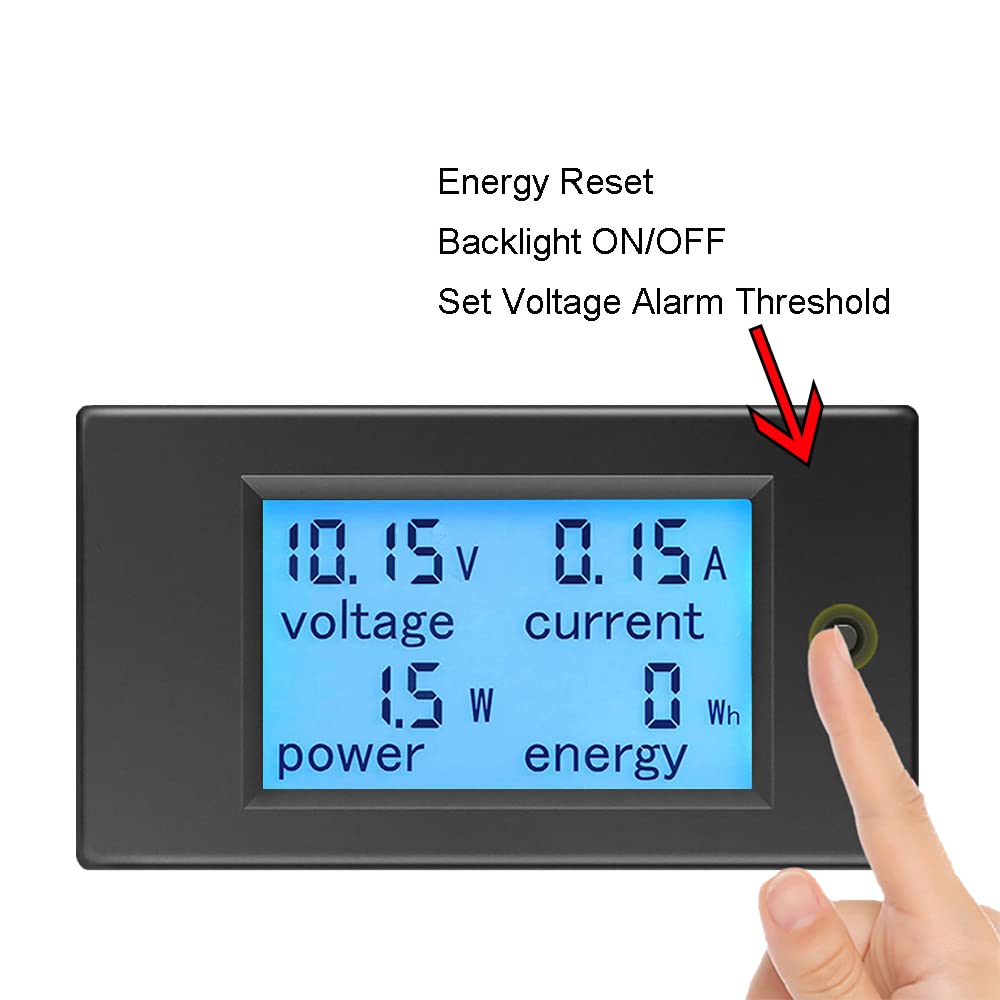
Image 5: Demonstrates the interaction with the control button for backlight, energy reset, and voltagإعدادات الإنذار الإلكتروني.
8. الصيانة
- Keep the device clean and dry. Use a soft, dry cloth to wipe the display and casing.
- تجنب استخدام المنظفات الكاشطة أو المذيبات.
- قم بتخزين الجهاز في مكان بارد وجاف عندما لا يكون قيد الاستخدام.
- Regularly check wiring connections for tightness and signs of wear.
9. استكشاف الأخطاء وإصلاحها
- لا يوجد عرض:
- Check if the DC input voltage is within the 6.5V-100V range. The device requires at least 6.5V to power on.
- تأكد من صحة جميع توصيلات الأسلاك وتأمينها.
- Ensure the power supply is active.
- قراءات خاطئة:
- Confirm the wiring matches the diagram precisely. Incorrect current path can lead to inaccurate readings.
- Ensure the load current does not exceed 20A for continuous operation. Overloading can affect accuracy or damage the device.
- تحقق من وجود توصيلات فضفاضة أو أسلاك تالفة.
- Energy (kWh) Not Resetting:
- Ensure you are pressing and holding the button for approximately 3 seconds until the energy value flashes and resets.
- المجلدtage Alarm Not Working:
- Verify the alarm threshold is set correctly by entering the alarm setting mode (long press for 5 seconds).
- Ensure the measured voltage is actually below the set threshold.
10. الضمان والدعم
KETOTEK products are manufactured to high-quality standards. For warranty information, please refer to the terms and conditions provided at the time of purchase or contact your retailer. If you encounter any issues or require technical assistance, please contact KETOTEK customer support through the official website or your purchase platform. Provide your product model (KT-D132) and a detailed description of the issue for efficient support.