
1. المقدمة
This manual provides essential information for setting up, operating, maintaining, and troubleshooting your AVITA Essential NE14A2INC433-MB laptop. Please read this manual thoroughly before using your device to ensure proper functionality and longevity.
2. انتهى المنتجview
The AVITA Essential NE14A2INC433-MB is a thin and light 14-inch laptop designed for everyday use. It features an aluminum body and a unique cloth design on the palm rest.

Figure 2.1: AVITA Essential Laptop (Matt Black) with screen and keyboard visible.
2.1 ميزات العرض
The laptop is equipped with a 14-inch Full HD (1920x1080) anti-glare IPS display. The ultra-narrow bezels provide an immersive viewتجربة رائعة.

Figure 2.2: Close-up of the AVITA Essential display, showcasing the FHD IPS Anti-Glare Panel and 4mm Narrow Bezels.
2.2 المنافذ والاتصال
The AVITA Essential laptop offers various ports for connectivity, including two USB 3.0 Type A ports, one full-size HDMI port, and a Micro SD card reader.
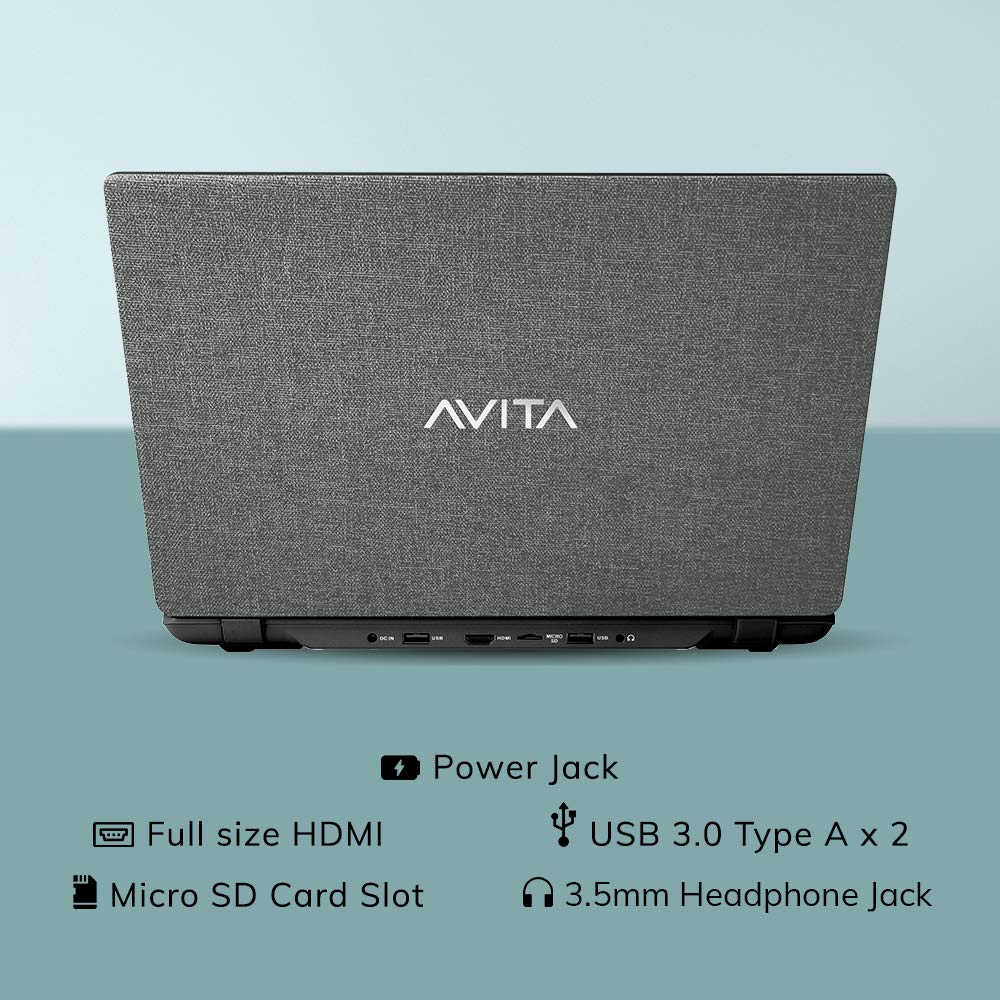
الشكل 2.3: خلفي view of the laptop detailing the available ports for external devices and power.
2.3 Keyboard and Webكاميرا
The laptop features a full-size island-style keyboard for comfortable typing and an integrated webكاميرا لعقد مؤتمرات الفيديو.

الشكل 2.4: من أعلى إلى أسفل view of the laptop's island-style keyboard and integrated webكام.
2.4 التصميم
The AVITA Essential boasts a unique cloth design, contributing to its aesthetic appeal.

Figure 2.5: The laptop in a closed position, highlighting its distinctive cloth design.
3. الإعداد
- فك الصندوق: Carefully remove the laptop and all accessories from the packaging. Ensure all items listed in the "What's in the Box" section are present.
- التهمة الاولية: Connect the AC adapter to the laptop's power jack and then to a power outlet. Allow the laptop to charge for at least 30 minutes before the first use, or until the battery indicator shows a sufficient charge.
- تشغيل الطاقة: Open the laptop lid and press the power button. The laptop will begin the initial boot process.
- Windows 10 Home in S Mode Setup: Follow the on-screen instructions to complete the Windows 10 Home in S Mode setup. This includes selecting your region, language, connecting to a Wi-Fi network, and creating a user account.
- تحديثات البرامج: After initial setup, connect to the internet and allow Windows to download and install any available updates. This ensures optimal performance and security.
4. تعليمات التشغيل
4.1 Windows 10 Home in S Mode
Your AVITA Essential laptop comes with Windows 10 Home in S Mode, which is designed for security and performance. In S Mode, you can only install apps from the Microsoft Store and must use Microsoft Edge for safe browsing. You can switch out of S Mode to regular Windows 10 Home at any time, but you cannot switch back.
The laptop is eligible for a free upgrade to Windows 11 when available. The upgrade rollout plan is scheduled to begin late in 2021 and continue into 2022, with specific timing varying by device.
4.2 الأداء والتخزين
Powered by an Intel Celeron N4000 processor and 4GB DDR4 RAM, combined with a 128GB SSD, the laptop offers responsive performance for daily tasks. The Solid State Drive (SSD) ensures faster boot times and quicker application loading compared to traditional hard disk drives.
Video 4.1: This video highlights key features of the AVITA Essential laptop, including its FHD IPS display, narrow bezels, island-style keyboard, integrated webcam, and fast SSD storage. It demonstrates the laptop's sleek design and quick performance for everyday computing tasks.
Video 4.2: This video illustrates the benefits of a modern PC with Windows 10 and an SSD, emphasizing thin and light design, faster startups, improved efficiency, longer battery life, and enhanced durability and security due to fewer moving parts.
5. الصيانة
- تنظيف: استخدم قطعة قماش ناعمة وخالية من الوبر لتنظيف الشاشة والجزء الخارجي. لإزالة البقع الصعبة، افركها برفق.ampامسح القماش بالماء أو بمنظف مناسب للشاشات. تجنب المواد الكيميائية القاسية.
- العناية بالبطارية: To maximize battery life, avoid fully discharging the battery frequently. It is recommended to keep the battery charged between 20% and 80%. Store the laptop in a cool, dry place when not in use for extended periods.
- تحديثات البرامج: قم بالتحقق من تحديثات نظام التشغيل وبرامج التشغيل وتثبيتها بانتظام لضمان الأداء والأمان الأمثل.
- ادارة التخزين: إعادة بشكل دوريview وحذف غير الضروري files to free up storage space on the 128GB SSD. Consider using external storage or cloud services for large files.
- تهوية: Ensure the laptop's vents are not obstructed to prevent overheating. Use the laptop on a hard, flat surface rather than soft furnishings.
6. استكشاف الأخطاء وإصلاحها
6.1 المشكلات والحلول الشائعة
- الكمبيوتر المحمول لا يعمل:
- تأكد من توصيل محول التيار المتردد بشكل آمن بالكمبيوتر المحمول ومأخذ الطاقة العامل.
- تأكد من أن منفذ الطاقة يعمل عن طريق توصيل جهاز آخر.
- If the battery is completely drained, allow it to charge for some time before attempting to power on.
- الأداء البطيء:
- أغلق التطبيقات غير الضرورية التي تعمل في الخلفية.
- التحقق من وجود أي تحديثات Windows معلقة وتثبيتها.
- تأكد من وجود مساحة خالية كافية على SSD.
- قم بإجراء فحص للنظام بحثًا عن البرامج الضارة أو الفيروسات.
- مشكلات الاتصال بشبكة Wi-Fi:
- أعد تشغيل جهاز توجيه Wi-Fi والكمبيوتر المحمول.
- تحقق مما إذا كان تم تمكين Wi-Fi في إعدادات Windows.
- Update Wi-Fi drivers from the AVITA support webموقع.
- Windows 10 S Mode App Restrictions:
- Remember that in S Mode, only apps from the Microsoft Store can be installed.
- If you need to install apps from other sources, you must switch out of S Mode. This is a one-way process.
7. المواصفات
| ميزة | التفاصيل |
|---|---|
| ماركة | أفيتا |
| اسم الموديل | ضروري |
| رقم الموديل | NE14A2INC433-MB |
| حجم الشاشة | 14 بوصة (35 سم) |
| دقة العرض | 1920 × 1080 (دقة عالية كاملة) |
| نوع العرض | FHD Anti-Glare IPS LED |
| المعالج | Intel Celeron N4000 (1.10 GHz base, 2.60 GHz Max) |
| ذاكرة الوصول العشوائي (RAM) | 4 جيجا بايت DDR4 |
| تخزين | 128 جيجا بايت SSD |
| نظام التشغيل | Windows 10 Home في الوضع S |
| الرسومات | بطاقة الرسومات Intel UHD 600 المتكاملة |
| عمر البطارية | Up to 6 Hours (as per MobileMark) |
| وزن | 1.37 كجم |
| الموانئ | 2x USB 3.0 Type A, 1x Full Size HDMI, Micro SD Card Reader |
| الاتصال اللاسلكي | 802.11 b/g/n/ac Wi-Fi, Bluetooth 4.0 |
| Webكاميرا | Integrated Front Camera |
8. الضمان والدعم
8.1 معلومات الضمان
Your AVITA Essential laptop comes with an 18+6 months onsite domestic warranty from AVITA. This warranty covers manufacturing defects and does not cover physical damage. For detailed terms and conditions, please refer to the warranty section provided with your product or visit the official AVITA support webموقع.
8.2 محتويات الصندوق
عند فتح العلبة، يجب أن تجد العناصر التالية:
- AVITA Essential Laptop
- محول التيار المتردد
- دليل المستخدم
- الدليل