
1. انتهى المنتجview
This RF Mini Wireless Remote Controller is designed for controlling single color 3528 and 5050 LED strip lights. It provides convenient wireless control over brightness and dynamic modes for 12V DC LED ribbons and shelf lights. The compact design and 11-key remote ensure ease of use and versatile application.

Image 1.1: The RF Mini Wireless Remote Controller (right) and its accompanying LED controller unit (left) with DC connectors.
2. تعليمات الإعداد
2.1. تحديد المكون
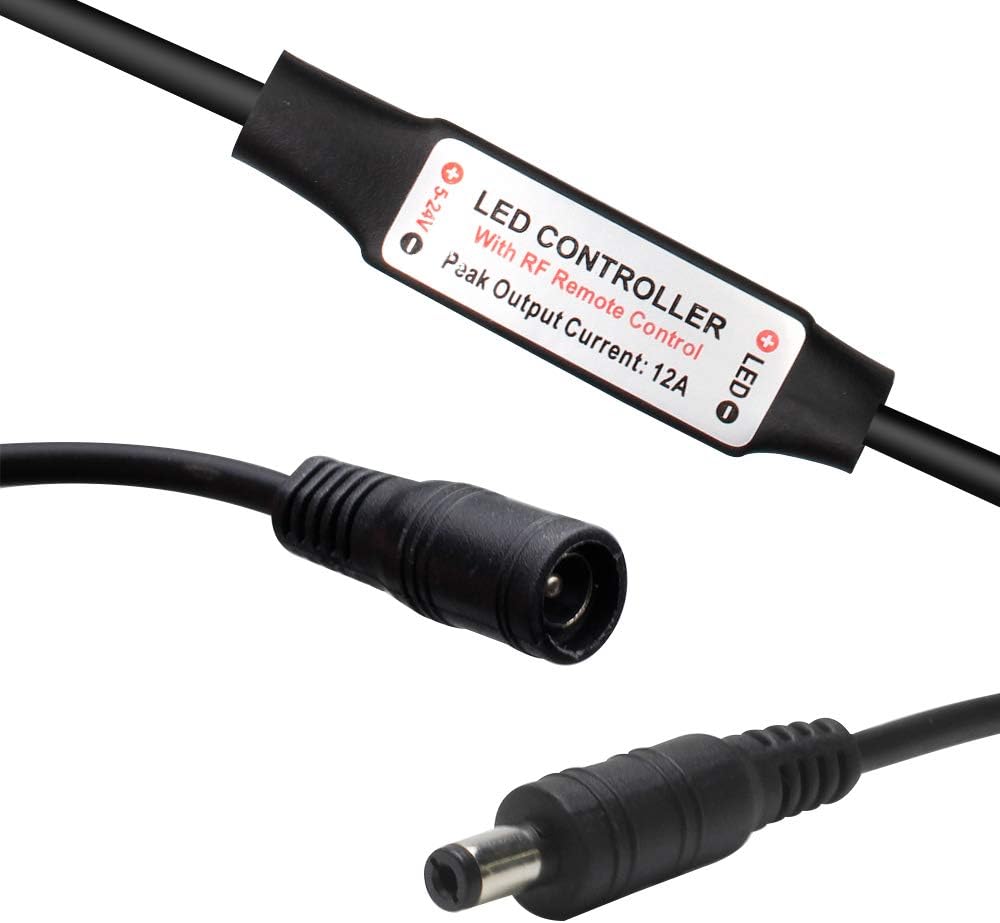
الصورة 2.1: عن قرب view of the LED controller unit, showing the input (5-24V) and output (LED) connections, and the "LED CONTROLLER With RF Remote Control Peak Output Current: 12A" label.
The system consists of two main parts: the RF Mini Wireless Remote Control and the LED Controller unit. The LED controller unit has a DC input connector and a DC output connector for connecting to your LED strip lights.
2.2. تركيب البطارية
The remote control requires one CR2025 or CR2032 battery, which is included. To install or replace the battery:
- حدد موقع حجرة البطارية في الجزء الخلفي من جهاز التحكم عن بعد.
- Push the tab marked "PUSH" and slide the battery tray out.
- Insert the CR2025/CR2032 battery with the positive (+) side facing up.
- Slide the battery tray back into the remote until it clicks into place.

Image 2.2: The back of the remote control, illustrating the battery compartment and the CR2025 battery being inserted.
2.3. Connecting the LED Controller
- Connect your 12V DC power adapter to the input side of the LED controller unit (labeled "5-24V").
- Connect your single color LED strip lights to the output side of the LED controller unit (labeled "LED"). Ensure correct polarity if applicable.
2.4. إقران جهاز التحكم عن بعد
The remote control and LED controller are typically pre-paired. If re-pairing is necessary or for multi-controller setups, follow these instructions:

Image 2.3: Visual guide for pairing the remote control, detailing both 1-to-many and 1-to-1 pairing methods.
- 1-to-Many Pairing: To pair one remote with multiple controllers, plug in the adapter for the LED controller. Within 5 seconds of powering on, press the green "LIGHT" button on the remote. The LED lights will flicker to indicate successful pairing. Repeat for other controllers.
- 1-to-1 Pairing: To pair one remote exclusively with a single controller, turn off the remote. Within 5 seconds of turning it back on, simultaneously press the "SPEED-" and "SPEED+" keys. The LED lights will flash, indicating a unique frequency pairing.
3. تعليمات التشغيل
The 11-key RF remote control allows for easy adjustment of your single color LED strip lights.
- زر الطاقة (⏻): يقوم بتشغيل أو إطفاء أضواء LED.
- LIGHT Button (ضوء): Toggles the light on/off and is used for 1-to-many pairing.
- BRIGHT+ / BRIGHT- Buttons: Adjusts the brightness level of the LED lights. The controller offers a smooth dimmer effect.
- أزرار 100% / 50% / 25%: Quickly sets the brightness to preset levels (100%, 50%, or 25%).
- MODE+ / MODE- Buttons: Cycles through the available dynamic lighting modes. There are 8 dynamic modes.
- SPEED+ / SPEED- Buttons: Adjusts the speed of the current dynamic lighting mode. There are 10 speed levels. These buttons are also used for 1-to-1 pairing.
The controller features an autosave function, retaining the last setting even after power off.
4. الصيانة
To ensure optimal performance and longevity of your RF Mini Wireless Remote Controller and LED Controller:
- Keep the remote control and LED controller dry. Avoid exposure to moisture or liquids.
- نظّف الأجهزة بقطعة قماش ناعمة وجافة. لا تستخدم المنظفات الكاشطة أو المذيبات.
- Replace the remote control battery (CR2025/CR2032) when the remote's range decreases or it becomes unresponsive. Refer to Section 2.2 for battery installation.
- Ensure proper ventilation around the LED controller unit to prevent overheating, especially during prolonged use.
5. استكشاف الأخطاء وإصلاحها
If you encounter issues with your RF Mini Wireless Remote Controller, please refer to the following common solutions:
| مشكلة | السبب المحتمل / الحل |
|---|---|
| LED lights do not respond to the remote. |
|
| الأضواء تومض أو تتصرف بشكل غير منتظم. |
|
| مدى التحكم عن بعد ضعيف. |
|
6. المواصفات
Technical specifications for the RF Mini Wireless Remote Controller and LED Controller unit:

Image 6.1: Detailed specifications table for the RF Mini Wireless Remote Controller system.
| ميزة | التفاصيل |
|---|---|
| الوضع الديناميكي | 8 وضعًا |
| مستوى السرعة الديناميكي | 10 مستويات |
| مستوى سطوع الإضاءة | 10 levels (256 PWM grades) |
| تأثير خافت سلس | نعم |
| العمل المجلدtage | العاصمة 12-24V |
| تيار الخرج | الذروة 6 أ |
| وضع التحكم عن بعد | الترددات اللاسلكية |
| تردد عن بعد | 433.92 ميجا هرتز |
| المسافة البعيدة | > 30 م في منطقة مفتوحة |
| رقم موديل العنصر | DC-RF-RC-12V |
| البطاريات | 1 CR2025/CR2032 battery required (included) |
| الأجهزة المتوافقة | LED Strip Lights, LED Ribbon, Shelf Lights |
7. الضمان والدعم
For warranty information and customer support, please refer to the documentation provided with your purchase or contact LEDLightsWorld directly through their official channels. Specific warranty terms and support contact details are not available in this manual.
Manufacturer: LEDLightsWorld