
1. المقدمة
This manual provides instructions for the Powerextra D-Tap Charger, designed for V Mount, V Lock, and Gold Mount batteries. It ensures efficient and safe charging for compatible camera batteries and other devices that utilize a D-Tap port for charging.

Image 1.1: Powerextra D-Tap Charger with its integrated D-Tap cable.
2. محتويات العبوة
تأكد من وجود جميع العناصر في الحزمة الخاصة بك:
- 1 x Powerextra D-Tap Charger
- 1 x 100cm AC Charging Cable
- 1 × قطعة قماش تنظيف من الألياف الدقيقة

Image 2.1: The D-Tap charger, AC power cable, and microfiber cloth included in the package.
3. المواصفات
| ميزة | مواصفة |
|---|---|
| مدخل التيار المتردد | 100-240 فولت / 0.8 أمبير |
| العاصمة المخرجات | 16.8 فولت-2.0 أمبير |
| حجم الإخراجtage | 16.8 فولت |
| وزن العنصر | 8.1 أونصة (حوالي 230 جرامًا) |
| أبعاد الحزمة | 6.14 × 3.58 × 1.46 بوصة |
| الشهادات | CE |
4. الإعداد
Follow these steps to set up your D-Tap Charger:
- Connect the AC Power Cable: Insert the included 100cm AC charging cable into the power input port on the charger unit.
- قم بتوصيله بمنفذ الطاقة: Plug the other end of the AC charging cable into a standard wall power outlet (100-240V).
- الاتصال بالبطارية: Insert the D-Tap connector from the charger into the D-Tap port on your compatible V Mount, V Lock, or Gold Mount battery. Ensure a secure connection.

Image 4.1: The D-Tap connector for battery connection.


الصورة 4.2: مثالamples of compatible V-Mount, Gold Mount, and other D-Tap port batteries.
5. تعليمات التشغيل
Once the charger is connected to a power source and a compatible battery, it will begin charging automatically.
- مؤشر الشحن: The charger features an LED indicator light to show the charging status.
- الضوء الأحمر: يشير إلى أن البطارية قيد الشحن حاليًا.
- الضوء الأخضر: يشير إلى أن البطارية مشحونة بالكامل.
The charger utilizes automatic constant current control to optimize charging speed and prevent overcharging.
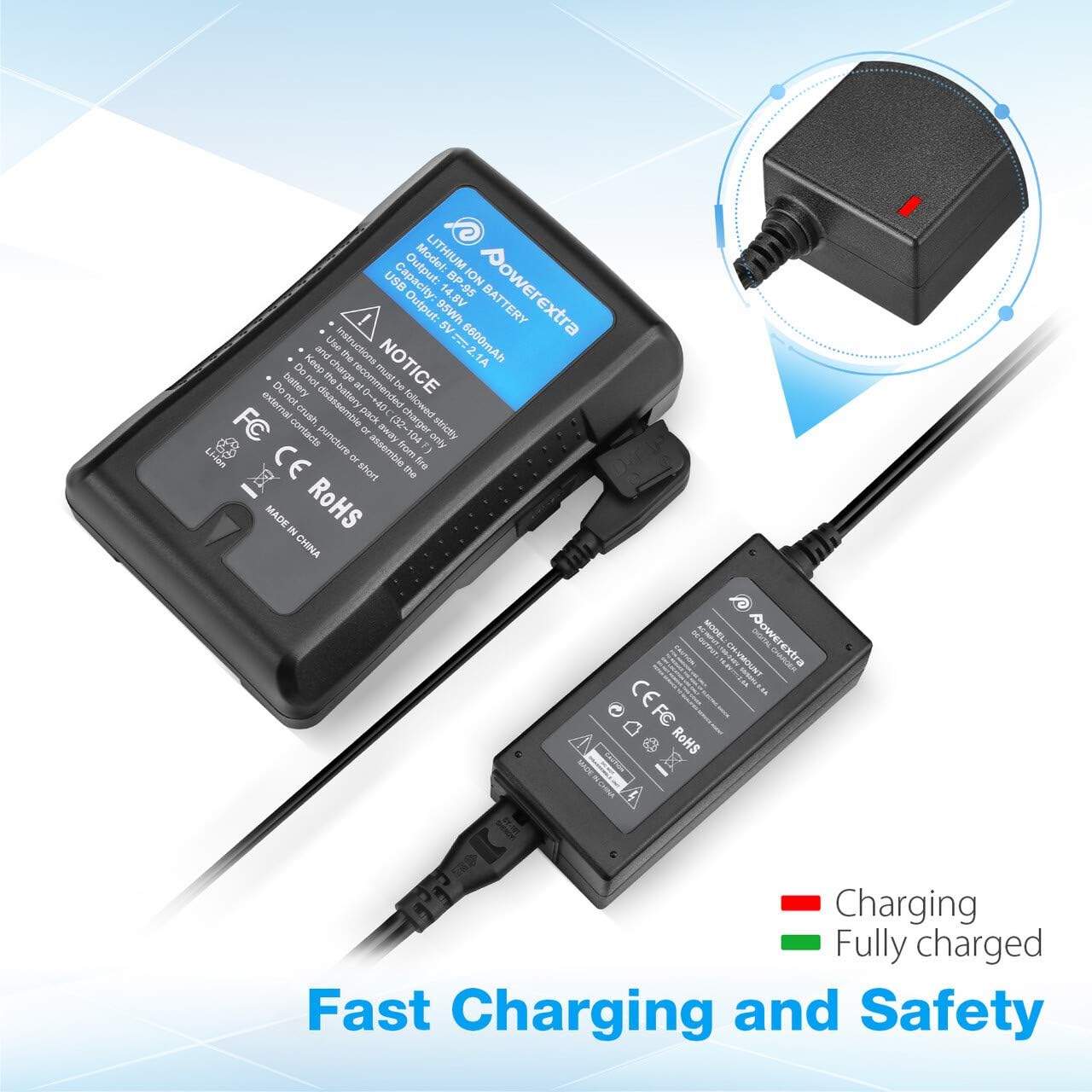
Image 5.1: Charger connected to a battery, with the red LED indicating active charging.
6. معلومات السلامة
To ensure safe operation and prolong the life of your charger and batteries, please observe the following safety precautions:
- حماية فاحش: The charger is designed to prevent batteries from overcharging.
- حماية من الدوائر القصيرة: Built-in mechanisms protect against short circuits.
- على الحماية الحالية: وسائل الحماية من التدفق الزائد للتيار الكهربائي.
- Over Heating Protection: Prevents the charger from overheating during operation.
- على حماية التفريغ: (Note: This protection is typically a feature of the battery itself, but the charger is designed to work safely with such batteries.)
- Use the charger only with compatible V Mount, V Lock, or Gold Mount batteries.
- لا تعرض الشاحن للرطوبة أو المطر أو درجات الحرارة القصوى.
- لا تقم بفك الشاحن أو تعديله. أرجِع جميع أعمال الصيانة إلى فنيين مؤهلين.
- يحفظ بعيدًا عن متناول الأطفال.

Image 6.1: Visual representation of the multi-protection features including short circuit, over discharge, over current, over charge, and over heating protection.
7. الصيانة
Proper maintenance ensures optimal performance and longevity of your charger:
- تنظيف: Use the provided microfiber cleaning cloth to gently wipe the charger and cables. Do not use liquid cleaners or solvents.
- تخزين: قم بتخزين الشاحن في مكان بارد وجاف بعيدًا عن أشعة الشمس المباشرة ودرجات الحرارة القصوى عند عدم استخدامه.
- العناية بالكابلات: Avoid bending or crimping the cables excessively. Always grasp the plug, not the cable, when disconnecting.
8. استكشاف الأخطاء وإصلاحها
If you encounter issues with your Powerextra D-Tap Charger, refer to the following common problems and solutions:
- الشاحن لا يعمل:
- Ensure the AC power cable is securely connected to both the charger and the wall outlet.
- تأكد من أن مقبس الحائط يعمل بشكل صحيح عن طريق اختباره بجهاز آخر.
- البطارية لا تشحن:
- Check that the D-Tap connector is fully and correctly inserted into the battery's D-Tap port.
- Confirm that the battery is compatible with the charger and is not fully charged already (green LED).
- Inspect the D-Tap cable and connector for any visible damage.
- ضوء المؤشر لا يعمل:
- If the charger is connected and the battery is not fully charged, but the light is off, contact customer support.
If the problem persists after attempting these solutions, please contact Powerextra customer support for further assistance.
9. الضمان والدعم
Powerextra provides the following for this D-Tap Charger:
- ضمان: 12-month hassle-free warranty from the date of purchase.
- يدعم: دعم فني مدى الحياة.
For warranty claims, technical assistance, or any product-related inquiries, please contact Powerextra customer service through their official webالموقع أو بائع التجزئة الذي تم شراء المنتج منه.