
1. المقدمة
This manual provides detailed instructions for the safe and effective use of the Walfront PM6508 Digital Temperature Humidity Meter. This device is designed for high-precision measurement of ambient temperature and relative humidity, offering features such as data hold, backlight display, and wet bulb/dew point temperature calculations. It is suitable for various applications including home, office, industrial settings, and environmental monitoring.
2. معلومات السلامة
Please read and understand all safety warnings and operating instructions before using this instrument. Failure to follow these instructions may result in electric shock, fire, or injury.
- لا تقم بتشغيل العداد إذا بدا تالفًا أو إذا لم يكن غطاء البطارية مغلقًا بشكل صحيح.
- Avoid exposing the meter to extreme temperatures, direct sunlight, or high humidity for prolonged periods.
- لا تحاول إصلاح العداد أو تعديله. قم بإحالة جميع أعمال الصيانة إلى فنيين مؤهلين.
- قم بإزالة البطاريات إذا لم يتم استخدام الجهاز لفترة طويلة لمنع التسرب.
- Keep the sensor area clean and free from obstructions to ensure accurate readings.
3. انتهى المنتجview
The Walfront PM6508 is a compact and portable digital meter designed for accurate environmental measurements. It features an easy-to-read LCD display with backlight and intuitive button controls.

الشكل 3.1: أمام view of the Walfront PM6508 meter with key components labeled. This includes the temperature and humidity sensor at the top, the HD display, various control buttons (Power, Max/Min, Data Hold, Data Storage, Unit Switch, Backlight), and an anti-fall protective sleeve.
3.1 الميزات الرئيسية
- مستشعر عالي الدقة: Provides accurate temperature and humidity readings.
- شاشة LCD بإضاءة خلفية: يضمن وضوح القراءة في مختلف ظروف الإضاءة.
- وظيفة الاحتفاظ بالبيانات: تجميد القراءة الحالية على الشاشة.
- تخزين البيانات: Stores up to 100 groups of measurement data.
- Wet Bulb & Dew Point Temperature: Calculates and displays these critical environmental parameters.
- وحدة التبديل: يمكنك التبديل بسهولة بين درجة مئوية (°C) وفهرنهايت (°F).
- الإغلاق التلقائي: يحافظ على عمر البطارية.
- مؤشر الطاقة المنخفضة: ينبه عند الحاجة إلى استبدال البطاريات.
3.2 محتويات العبوة

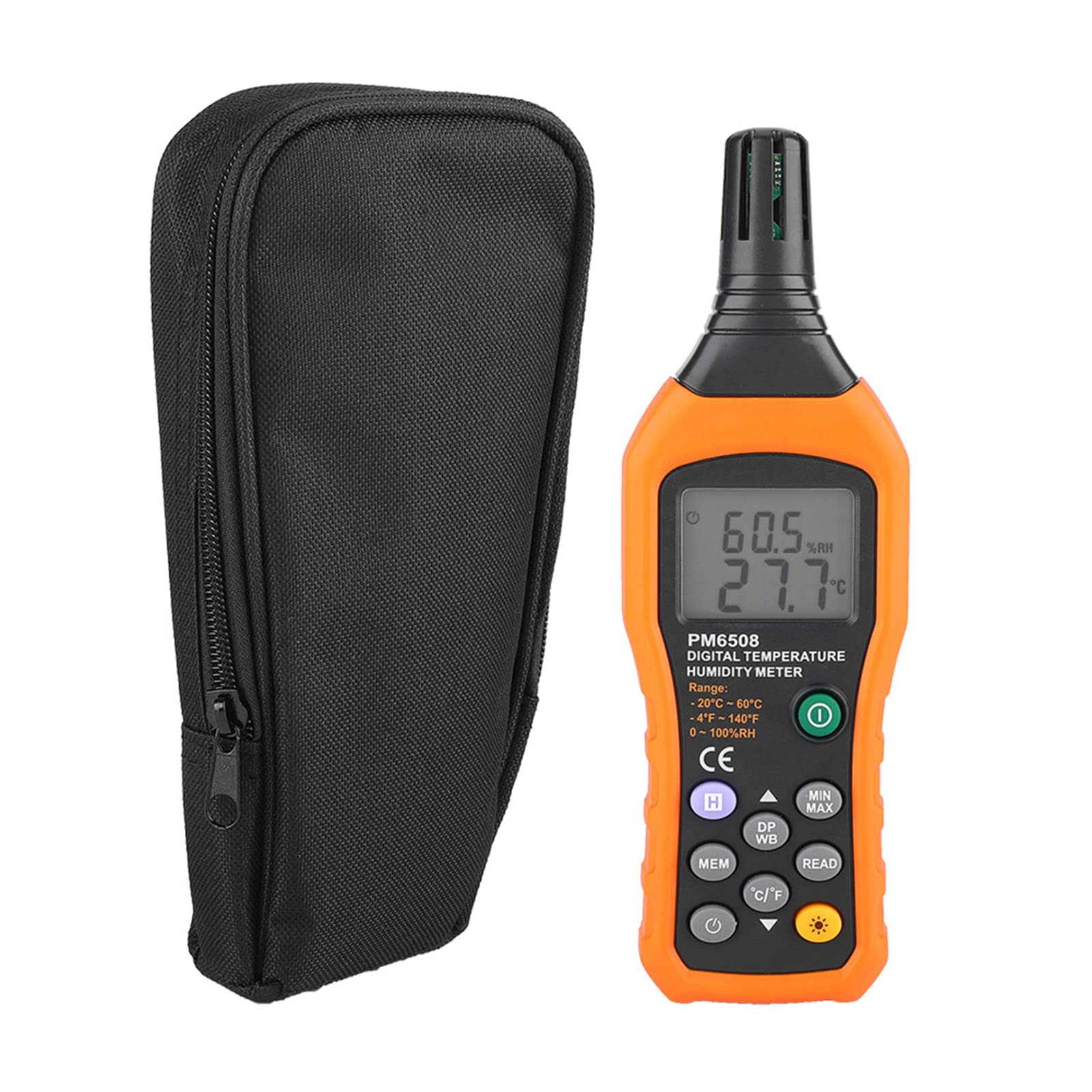
الشكل 3.2: The Walfront PM6508 meter shown alongside its portable storage bag, indicating typical package contents.
- Walfront PM6508 Digital Temperature Humidity Meter
- حقيبة التخزين المحمولة
- دليل المستخدم
4. الإعداد
4.1 تركيب البطارية
The PM6508 meter requires 4 x 1.5V AAA batteries (not included) for operation.
- حدد موقع غطاء حجرة البطارية على الجزء الخلفي من العداد.
- قم بتحريك غطاء البطارية إلى الأسفل لفتحه.
- أدخل أربع بطاريات AAA، مع التأكد من صحة القطبية (+ و -) كما هو موضح داخل الحجرة.
- قم باستبدال غطاء البطارية عن طريق تحريكه مرة أخرى إلى مكانه حتى يصدر صوت نقرة آمنة.
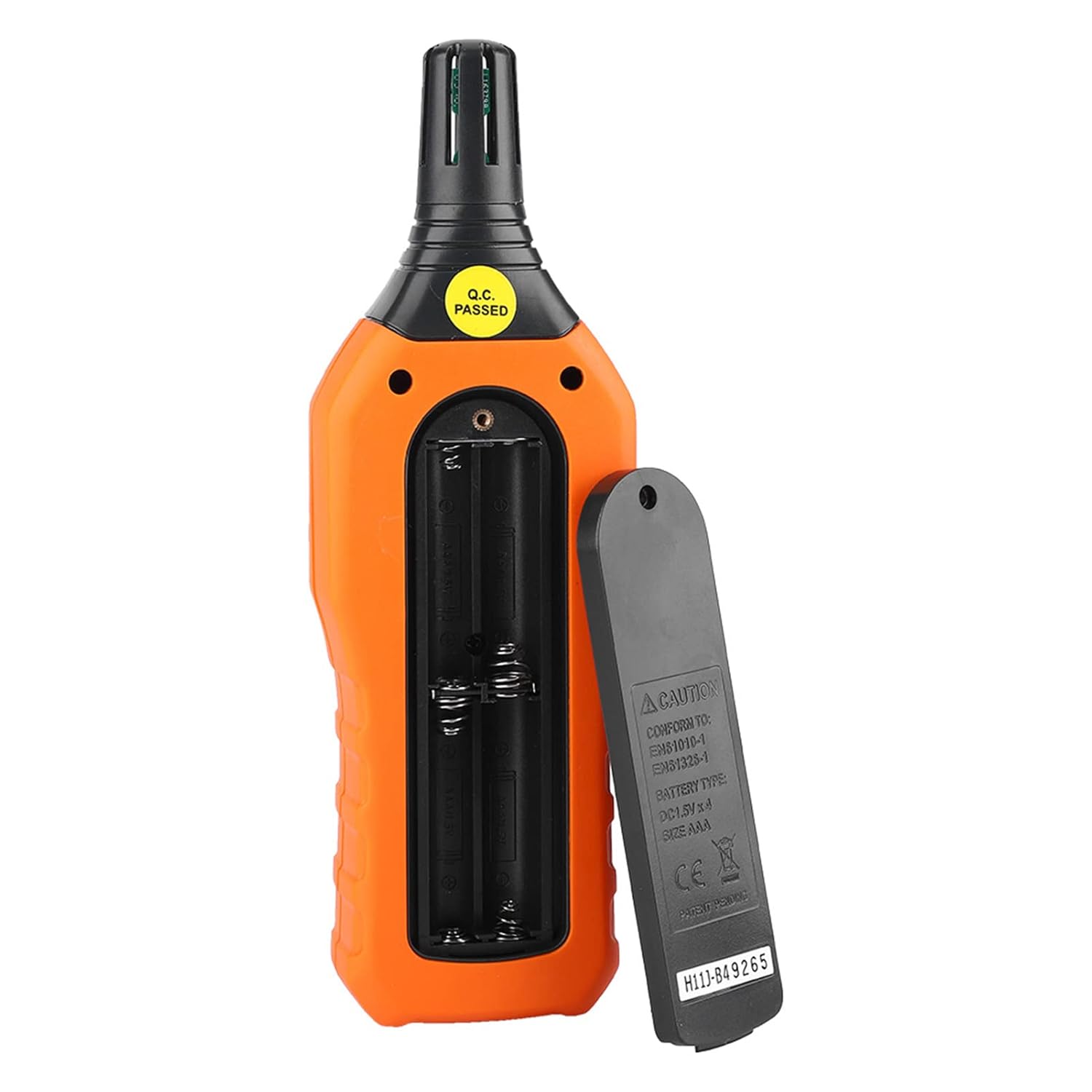
الشكل 4.1: مؤخرة view of the meter showing the open battery compartment for AAA battery installation.
5. تعليمات التشغيل
5.1 تشغيل/إيقاف التشغيل
- اضغط على green power button (
 ) لتشغيل العداد.
 - اضغط مع الاستمرار على gray power button () for approximately 2 seconds to turn the meter off. The meter also features an automatic shut-down function to conserve battery life.
5.2 أخذ القياسات
Once powered on, the meter will immediately begin displaying real-time temperature and humidity readings on the LCD screen. Ensure the sensor at the top of the device is exposed to the environment you wish to measure.

الشكل 5.1: The meter in use, displaying temperature and humidity readings on its LCD screen.
5.3 تبديل الوحدات (°م/°ف)
للتبديل بين وحدات قياس درجة الحرارة المئوية (°C) والفهرنهايتية (°F):
- اضغط على زر °C/°F () located on the keypad. The display will update to show readings in the selected unit.
5.4 وظيفة الإضاءة الخلفية
لتفعيل أو تعطيل إضاءة الشاشة الخلفية:
- اضغط على زر الإضاءة الخلفية () to toggle the backlight on or off. This is useful for reading in low-light conditions.
5.5 Data Hold (H)
لتجميد القراءات الحالية على الشاشة:
- اضغط على زر H (). The "H" icon will appear on the display, indicating that the data is held.
- اضغط على زر H again to release the data hold and resume real-time measurements.
5.6 Maximum/Minimum (MIN/MAX) Measurement
ل view the maximum or minimum recorded values:
- اضغط على زر MIN / MAX () once to display the maximum temperature and humidity recorded since the meter was powered on or the function was reset.
- اضغط على زر MIN / MAX again to display the minimum temperature and humidity.
- اضغط على زر MIN / MAX a third time to exit the MIN/MAX mode and return to real-time readings.
5.7 Data Storage (MEM) and Retrieval (READ)
The meter can store up to 100 groups of measurement data.
- لتخزين البيانات: اضغط على زر MEM () to save the current temperature and humidity readings. The display will briefly show a memory location number.
- To Retrieve Data: اضغط على زر القراءة () to enter data retrieval mode. Use the زر MEM to scroll through stored data records.
- To Exit Retrieval: اضغط على زر القراءة again to exit data retrieval mode.
5.8 Wet Bulb (WB) and Dew Point (DP) Temperature
To display Wet Bulb or Dew Point temperatures:
- اضغط على DP/WB button () once to display the Dew Point temperature.
- اضغط على DP/WB button again to display the Wet Bulb temperature.
- اضغط على DP/WB button a third time to return to standard temperature and humidity display.
6. الصيانة
6.1 التنظيف
- امسح عداد Casing مع لينة، damp القماش. لا تستخدم المنظفات أو المذيبات الكاشطة.
- Keep the sensor area clean and free from dust or debris to ensure accurate readings. Do not insert any objects into the sensor opening.
6.2 التخزين
- When not in use for extended periods, remove the batteries to prevent leakage and damage to the device.
- قم بتخزين العداد في مكان بارد وجاف، بعيدًا عن أشعة الشمس المباشرة ودرجات الحرارة القصوى.
- Utilize the provided portable storage bag for protection during storage and transport.
7. استكشاف الأخطاء وإصلاحها
| مشكلة | السبب المحتمل | حل |
|---|---|---|
| العداد لا يعمل. |
|
|
| قراءات غير دقيقة. |
|
|
| العرض خافت أو وميض. |
|
|
| Cannot store or retrieve data. |
|
|
8. المواصفات
The following table outlines the technical specifications for the Walfront PM6508 Digital Temperature Humidity Meter.


الشكل 8.1: Detailed technical specifications including ranges, resolution, and precision for temperature, humidity, wet bulb, and dew point measurements, along with general parameters.
| المعلمة | قيمة |
|---|---|
| نموذج | ب م 6508 |
| نطاق درجة الحرارة المحيطة | -20 إلى 60 درجة مئوية (-4 إلى 140 درجة فهرنهايت) |
| Ambient Temperature Precision | ±1.5 °C (-20 to 0 °C, 45 to 60 °C), ±0.5 °C (0 to 45 °C) |
| نطاق الرطوبة النسبية | رطوبة نسبية من 0% إلى 100% |
| Relative Humidity Precision | ±4.0% (0-20%, 80-100%), ±3.0% (20-80%) |
| نطاق درجة حرارة اللمبة الرطبة | -20 إلى 60 درجة مئوية (4 إلى 140 درجة فهرنهايت) |
| Wet Bulb Temperature Precision | ±1.5 °C (-20 to 0 °C, 45 to 60 °C), ±0.5 °C (0 to 45 °C) |
| نطاق درجة حرارة نقطة الندى | -50 إلى 60 درجة مئوية (-58 إلى 140 درجة فهرنهايت) |
| Dew Point Temperature Precision | ±1.5 °C (-50 to 0 °C, 45 to 60 °C), ±0.5 °C (0 to 45 °C) |
| دقة | 0.1 °C / °F / %RH |
| تخزين البيانات | 100 مجموعة |
| مزود الطاقة | بطاريتان AAA بقوة 1.5 فولت (غير مرفقة) |
| الأبعاد (الطول × العرض × الارتفاع) | 180 × 60 × 29 ملم (7.1 × 2.4 × 1.1 بوصة) |
| وزن | 254 جرام (9 أونصة) |
| رطوبة التشغيل | 0% - 100% (غير مكثف) |
9. التطبيقات
The Walfront PM6508 is suitable for a wide range of applications requiring accurate temperature and humidity monitoring.

الشكل 9.1: Examples of environments where the PM6508 meter can be effectively used for temperature and humidity monitoring.
- Residential and Office Environments: Monitoring indoor climate for comfort and health.
- Industrial Production: Ensuring optimal conditions for manufacturing processes.
- Warehousing and Storage: Protecting goods sensitive to temperature and humidity, such as in wine cellars or general storage.
- زراعة: Monitoring conditions in planting sheds, greenhouses, and aquaculture.
- Research and Development Laboratories: Maintaining precise environmental controls for experiments.
- أنظمة التدفئة والتهوية وتكييف الهواء: Assisting in the evaluation and maintenance of heating, ventilation, and air conditioning systems.
10. الضمان والدعم
Walfront products are designed for reliability and performance. For warranty information, technical support, or service inquiries, please refer to the contact information provided with your purchase or visit the official Walfront webيرجى الاحتفاظ بإثبات الشراء الخاص بك للمطالبة بالضمان.