
1. المقدمة
The DSC PG9985 PowerSeries Neo Wireless PowerG Flood Detector is designed to provide early warning of water leaks and potential flooding in residential and commercial environments. This device utilizes PowerG wireless technology for secure and reliable communication with compatible DSC PowerSeries Neo security systems. It is an essential component for protecting property from water damage by detecting the presence of water at critical locations.
2. معلومات السلامة
Please read and understand all safety instructions before installing and operating this device. Failure to follow these instructions may result in damage to the product, property, or personal injury.
- معالجة البطارية: Use only the specified battery type. Do not mix old and new batteries. Dispose of used batteries according to local regulations.
- الموقع: Ensure the detector is placed in an area where it will not be exposed to extreme temperatures, direct sunlight, or excessive humidity, unless specifically designed for such conditions.
- صيانة: لا تحاول إصلاح الجهاز أو تعديله. أحل جميع أعمال الصيانة إلى فنيين مؤهلين.
- التعرض للماء: While designed to detect water, the main unit itself is not waterproof and should not be submerged. Only the sensor probe is designed for direct contact with water.
3. محتويات العبوة
تأكد من وجود جميع العناصر في العبوة:
- DSC PG9985 Wireless Flood Detector Main Unit
- Wired Flood Sensor Probe
- أدوات التثبيت (البراغي والمثبتات)
- دليل التثبيت (هذا المستند)
4. انتهى المنتجview
The DSC PG9985 consists of a main wireless transmitter unit and a wired flood sensor probe. The main unit communicates with your security system, while the probe detects water.
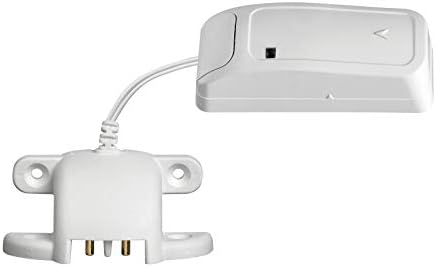
الشكل 1: DSC PG9985 Wireless Flood Detector, showing the main unit connected to the wired sensor probe. The main unit is a compact white rectangular device, and the probe is a flat, white component with two metal contacts at its base, designed to be placed on a surface.

الشكل 2: DSC PG9985 Wireless Flood Detector in a vertical orientation, highlighting the connection between the main unit and the wired sensor probe. This view emphasizes the compact design of both components.
4.1. المكونات
- الوحدة الرئيسية: Houses the wireless transmitter, battery, and status indicator.
- Wired Flood Sensor Probe: Contains two metal contacts that detect the presence of water. It connects to the main unit via a cable.
- Status Indicator (LED): Provides visual feedback on the device's status (e.g., alarm, low battery, communication).
- تركيب الفتحات: Located on the sensor probe for secure installation.
5. الإعداد والتثبيت
Proper installation is crucial for the reliable operation of the flood detector.
5.1. تركيب البطارية
- افتح وحدة التحكم الرئيسيةasing.
- Insert the specified Lithium battery, observing correct polarity.
- أغلق حرف casing securely. The LED may flash to indicate power-up.
5.2. تركيب الوحدة الرئيسية
The main unit is designed for tabletop mounting or wall mounting near the area to be monitored. Ensure it is placed in a dry location, away from direct contact with water.
- جبل الطاولة: Place the main unit on a flat, stable surface within range of your PowerSeries Neo system.
- جدار جبل: Use the provided screws and anchors to secure the main unit to a wall. Ensure the mounting location allows for easy access to the battery compartment.
5.3. Placing the Flood Sensor Probe
The flood sensor probe should be placed at the lowest point of the area where water accumulation is expected.
- Position the probe with its metal contacts facing downwards, directly on the surface where water would first appear (e.g., basement floor, near a water heater, under a sink).
- Secure the probe using its mounting holes and screws if necessary, to prevent accidental displacement.
- Ensure the cable connecting the probe to the main unit is not pinched or damaged.
5.4. Enrolling with the PowerSeries Neo System
Refer to your PowerSeries Neo control panel's installation manual for specific enrollment procedures. Generally, the steps involve:
- Access the system's programming menu.
- Select the option to add a new wireless device or zone.
- Activate the flood detector (e.g., by pressing a tamper switch or triggering a flood event) to transmit its unique ID to the panel.
- Assign the detector to an appropriate zone and configure its attributes (e.g., 24-hour flood zone).
- Test the communication and flood detection functionality.
6. تعليمات التشغيل
Once installed and enrolled, the PG9985 operates automatically.
6.1. Water Detection
When water bridges the two metal contacts on the sensor probe, the detector will immediately transmit a flood alarm signal to the PowerSeries Neo control panel. The panel will then initiate the programmed response, which may include sounding an alarm, sending notifications, or activating other connected devices.
6.2. مؤشر الحالة
The LED on the main unit provides visual status indications:
- الوميض السريع: Indicates a flood alarm transmission.
- الوميض البطيء: May indicate a low battery condition or a communication issue.
- لا يوجد ضوء: Normal standby operation or no power.
6.3. Testing the Detector
Regular testing ensures the detector is functioning correctly.
- Place a small amount of water (e.g., a few drops) on the metal contacts of the sensor probe.
- Observe the main unit's LED for a rapid flash, indicating an alarm transmission.
- Verify that your PowerSeries Neo system receives the flood alarm.
- Dry the sensor probe thoroughly after testing.
7. الصيانة
Minimal maintenance is required to keep your flood detector in optimal condition.
7.1. استبدال البطارية
When the system indicates a low battery for the PG9985, replace the battery promptly to ensure continuous protection.
- Disarm your security system to prevent false alarms during battery replacement.
- افتح وحدة التحكم الرئيسيةasing.
- Remove the old battery and insert a new Lithium battery of the same type, ensuring correct polarity.
- أغلق حرف casinج بشكل آمن.
- Test the detector after battery replacement to confirm proper operation.
7.2. التنظيف
Periodically inspect the sensor probe for dirt, dust, or corrosion on the metal contacts. Clean with a soft, dry cloth. Do not use abrasive cleaners or solvents.
7.3. الاختبار الدوري
It is recommended to test the flood detector at least once a month to ensure its functionality. Refer to Section 6.3 for testing procedures.
8. استكشاف الأخطاء وإصلاحها
If you encounter issues with your flood detector, refer to the following common problems and solutions.
| مشكلة | السبب المحتمل | حل |
|---|---|---|
| Detector does not respond to water. | بطارية فارغة أو منخفضة. نقاط تلامس المستشعر متسخة أو متآكلة. Probe not making proper contact with water. Device not enrolled or configured correctly. | استبدال البطارية. Clean sensor contacts. Reposition probe to ensure contacts are submerged. Verify enrollment and zone programming in the control panel. |
| إنذارات كاذبة. | Condensation or moisture on contacts. Probe placed in an area with high humidity. Faulty probe or main unit. | Ensure contacts are dry. Relocate probe to a drier area if possible. Contact technical support if problem persists. |
| مؤشر انخفاض البطارية. | Battery is nearing end of life. | استبدل البطارية على الفور. |
| No communication with control panel. | خارج النطاق. تدخل. Device not enrolled. | Relocate detector closer to the control panel or a wireless repeater. Check for sources of interference. Re-enroll the device. |
If troubleshooting steps do not resolve the issue, contact your security system installer or technical support.
9. المواصفات
| ميزة | التفاصيل |
|---|---|
| رقم الموديل | بي جي 9985 |
| ماركة | DSC |
| تقنية الاستشعار | جهاز استشعار المياه |
| طريقة التحكم | Touch (for enrollment/testing) |
| نوع التركيب | جبل منضدية |
| مصدر الطاقة | تعمل بالبطارية |
| نوع البطارية | Lithium (specific type not provided, refer to device label) |
| وزن العنصر | حوالي 1 جنيه |
| أبعاد المنتج | يبلغ حجم الوحدة الرئيسية حوالي 1 × 1 × 1 بوصة. |
| لون | أبيض |
| رمز المنتج الموحد | 738714001753 |
10. الضمان والدعم
For warranty information, please refer to the documentation provided with your DSC PowerSeries Neo security system or contact your authorized DSC dealer. Technical support is typically provided by your security system installer or the dealer from whom you purchased the product.
For further assistance, please contact your local DSC representative or visit the official DSC webموقع.