
Micool 52161554
Micool Bluetooth Headset V5.0 Instruction Manual
الموديل: 52161554
1. المقدمة
Thank you for choosing the Micool Bluetooth Headset V5.0. This manual provides detailed instructions for setting up, operating, and maintaining your new headset. Designed for clear communication and comfort, this headset features advanced noise cancellation, long-lasting battery life, and multi-device connectivity.
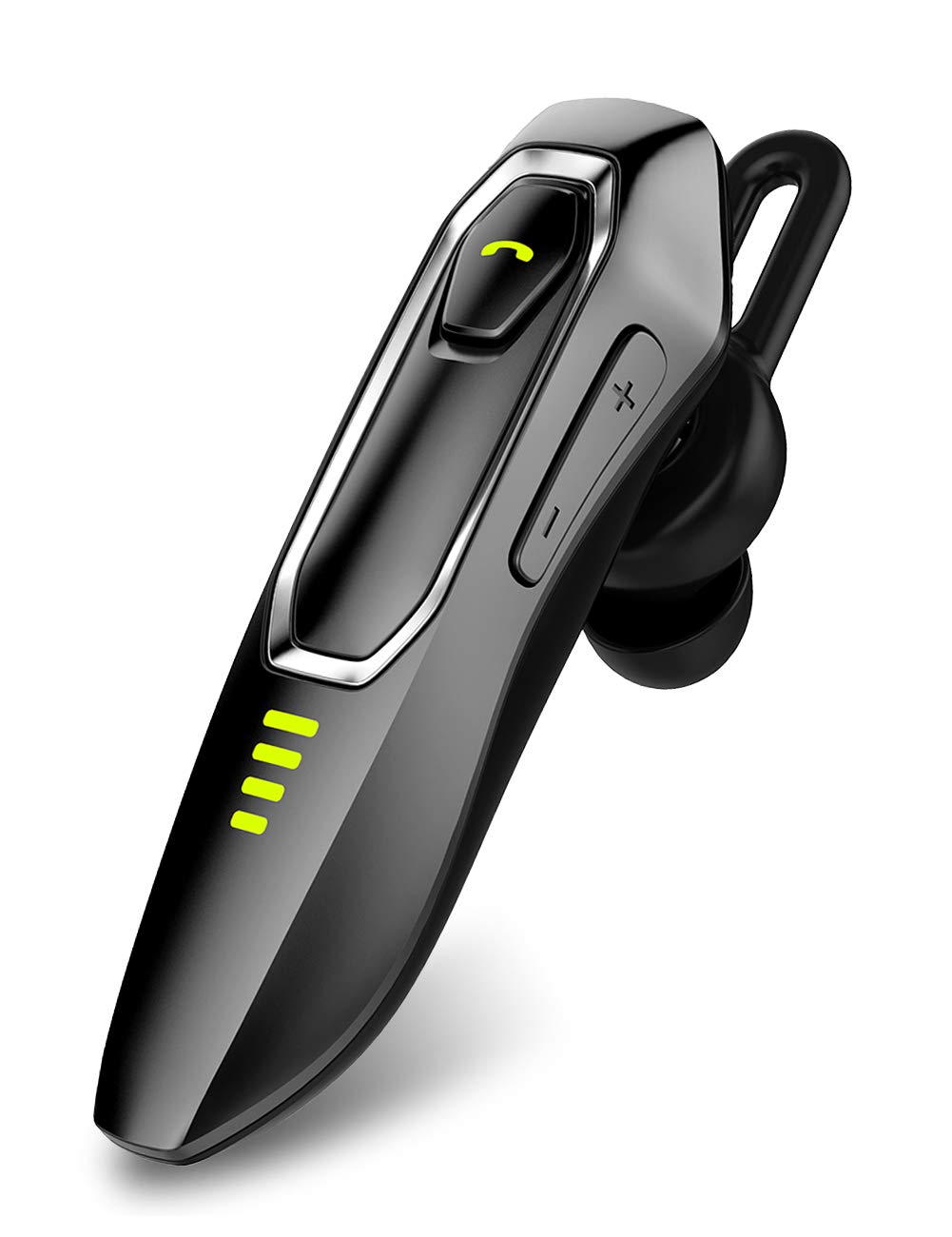
Image: Micool Bluetooth Headset V5.0, showcasinتصميمها الأنيق.
2. ماذا يوجد في الصندوق
Upon opening your Micool Bluetooth Headset package, you should find the following items:
- 1 x Micool DY20 Headset
- 1 × كابل شحن USB
- 1 × خطاف للأذن
- 3 x EarGels (S/M/L sizes)
- 1 × دليل البدء السريع (هذا الدليل)
- 2 x Flat EarGels
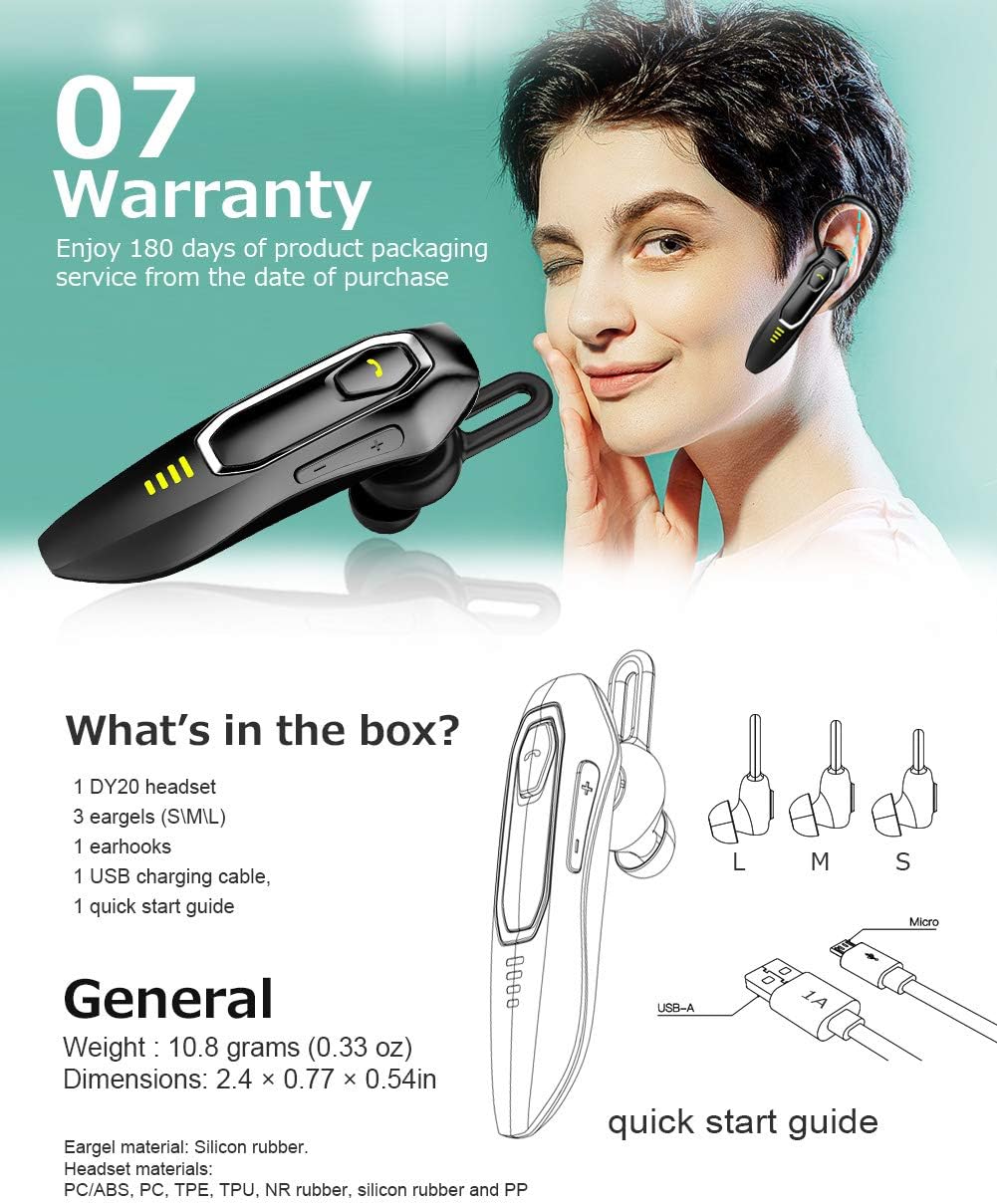
Image: All components included in the Micool Bluetooth Headset package, including the headset, charging cable, ear hook, and various EarGels.
3. مواصفات المنتج
- وقت المكالمة الممتد: Built-in 220mAh battery provides up to 30 hours of talk time and 48 hours of music playback on a single charge. Standby time is up to 15 days.
- HD Voice & Powerful Noise Cancellation: Features CVC8.0 noise cancellation and an omnidirectional silicon microphone for clear calls in noisy environments. The 10mm dynamic speaker ensures stereo sound quality.
- دعم المساعد الصوتي: Easily activate Siri or Google Assistant with a dedicated button for hands-free control.
- الاتصال بأجهزة متعددة: Connect to two devices simultaneously, allowing you to listen to music on one and answer calls on another.
- تصميم مريح: Ergonomically designed and weighing only 10.8g, the headset offers a secure and comfortable fit for all-day wear. Includes professional ear cap type ear canal mouth design for optimized bass.
تفاصيل الميزة:
HD Voice & Noise Cancellation

The headset utilizes CVC8.0 noise cancellation and an omnidirectional MEMS silicon microphone for superior call clarity. A 10mm dynamic speaker delivers rich audio.
بطارية تدوم طويلاً

Enjoy up to 30 hours of talk time and 48 hours of music. The 220mAh battery charges in approximately 2-3 hours via the included Micro USB cable, offering up to 15 days of standby time.
Siri/Google Assistant & Multi-Use

Activate your preferred voice assistant with ease. The headset also supports connecting to two devices simultaneously for seamless switching between calls and media.
ملاءمة مريحة

The ergonomic design allows for comfortable wear throughout the day, with or without the ear hook. Multiple EarGel sizes ensure a perfect fit for optimal sound and comfort.
4. الإعداد
4.1 شحن سماعة الرأس
Before first use, fully charge the headset. Connect the provided USB charging cable to the headset's charging port and to a USB power source (e.g., computer, wall adapter). The charging indicator light will show the charging status. A full charge typically takes 2-3 hours.
4.2 اقتران بلوتوث
- تأكد من إيقاف تشغيل سماعة الرأس.
- Press and hold the Multi-function button until the indicator light flashes red and blue alternately, indicating pairing mode.
- على جهازك المحمول، قم بتمكين Bluetooth وابحث عن الأجهزة المتاحة.
- Select "Micool DY20" from the list of devices.
- بمجرد الاتصال، سوف يومض مؤشر الضوء باللون الأزرق ببطء.
To connect to a second device, disable Bluetooth on the first device after successful pairing. Put the headset back into pairing mode and connect to the second device. Then, re-enable Bluetooth on the first device; the headset should automatically connect to both.
5. تعليمات التشغيل
5.1 الضوابط الأساسية
| وظيفة | فعل |
|---|---|
| تشغيل/إيقاف الطاقة | اضغط مع الاستمرار على الزر متعدد الوظائف |
| تشغيل/إيقاف الموسيقى مؤقتًا | زر متعدد الوظائف بنقرة واحدة |
| الرد على المكالمة/إنهائها | زر متعدد الوظائف بنقرة واحدة |
| رفض المكالمة | اضغط مع الاستمرار على الزر متعدد الوظائف |
| قم بتنشيط Siri / Google Assistant | Double-click Multi-function button |
| رفع/خفض الصوت | Click Volume + / - button |
| الأغنية التالية / السابقة | Press and hold Volume + / - button for 3 seconds |
| تحقق من الطاقة المتبقية | Double-click Volume + button |
6. الصيانة
To ensure the longevity and optimal performance of your Micool Bluetooth Headset, follow these maintenance guidelines:
- تنظيف: Use a soft, dry cloth to wipe the headset. Do not use harsh chemicals or abrasive materials.
- تخزين: قم بتخزين سماعة الرأس في مكان بارد وجاف بعيدًا عن درجات الحرارة القصوى وأشعة الشمس المباشرة.
- الشحن: Always use the provided USB charging cable. Avoid overcharging the battery.
- EarGels: Regularly clean or replace EarGels for hygiene and optimal sound quality.
7. استكشاف الأخطاء وإصلاحها
إذا واجهت مشكلات مع سماعة الرأس الخاصة بك، فراجع الحلول الشائعة التالية:
| مشكلة | حل |
|---|---|
| لا يمكن الاقتران بالجهاز | Ensure the headset is in pairing mode (red and blue flashing light). Turn off and on your device's Bluetooth. Try restarting both devices. |
| حجم منخفض | Adjust the volume on both the headset (Volume + button) and your connected device. Ensure the EarGel is properly seated in your ear. |
| اتصال متقطع | Ensure the headset is within the 10-15m wireless range of your device. Avoid obstacles between the headset and device. Re-pair the headset. |
| سماعة الرأس غير مريحة | Try different sizes of EarGels to find the best fit. Adjust the ear hook for optimal comfort and stability. |
| Cannot activate voice assistant | Ensure your device's voice assistant (Siri/Google Assistant) is enabled and configured. Double-click the Multi-function button firmly. |
8. المواصفات
| ميزة | التفاصيل |
|---|---|
| ماركة | Micool |
| رقم الموديل | 52161554 |
| الاتصال | بلوتوث V5.0 |
| سعة البطارية | 220 مللي أمبير |
| وقت الشحن | حوالي 2-3 ساعات |
| وقت التحدث | تصل إلى 30 ساعة |
| وقت تشغيل الموسيقى | تصل إلى 48 ساعة |
| وقت الاستعداد | حتى 15 يوما |
| التحكم في الضوضاء | إلغاء الضوضاء النشط (CVC8.0) |
| ميكروفون | Omnidirectional Silicon Microphone |
| المتحدث | مكبر صوت ديناميكي 10 ملم |
| وزن | 10.8 جرام (0.33 أونصة) |
| أبعاد | 2.4 × 0.77 × 0.54 بوصة |
| مادة | PC/ABS, PC, TPE, TPU, NR rubber, silicon rubber and PP |
9. الضمان والدعم
The Micool Bluetooth Headset comes with a ضمان لمدة 180 يومًا from the date of purchase. This warranty covers manufacturing defects and ensures product quality.
If you experience any issues or have questions regarding your headset, please refer to the troubleshooting section of this manual. For further assistance, contact Micool customer support through the retailer's platform or the official Micool webموقع.
يرجى الاحتفاظ بإثبات الشراء الخاص بك لمطالبات الضمان.
Ask a question about this manual
Ask about setup, troubleshooting, compatibility, parts, safety, or missing instructions. Manuals+ will review the question and use this page’s manual context to help answer it.