
1. المقدمة
This manual provides detailed instructions for the installation, operation, and maintenance of the Fafeicy TM626 DIN Rail Mount AC220V Power Timer Switch. This digital timer is designed for precise time control of electrical appliances and systems, offering programmable on/off cycles for various applications.
The TM626 is suitable for controlling street lights, factory equipment, advertising signs, production machinery, radio and television equipment, stage lighting, and other power equipment that requires regular automated switching.
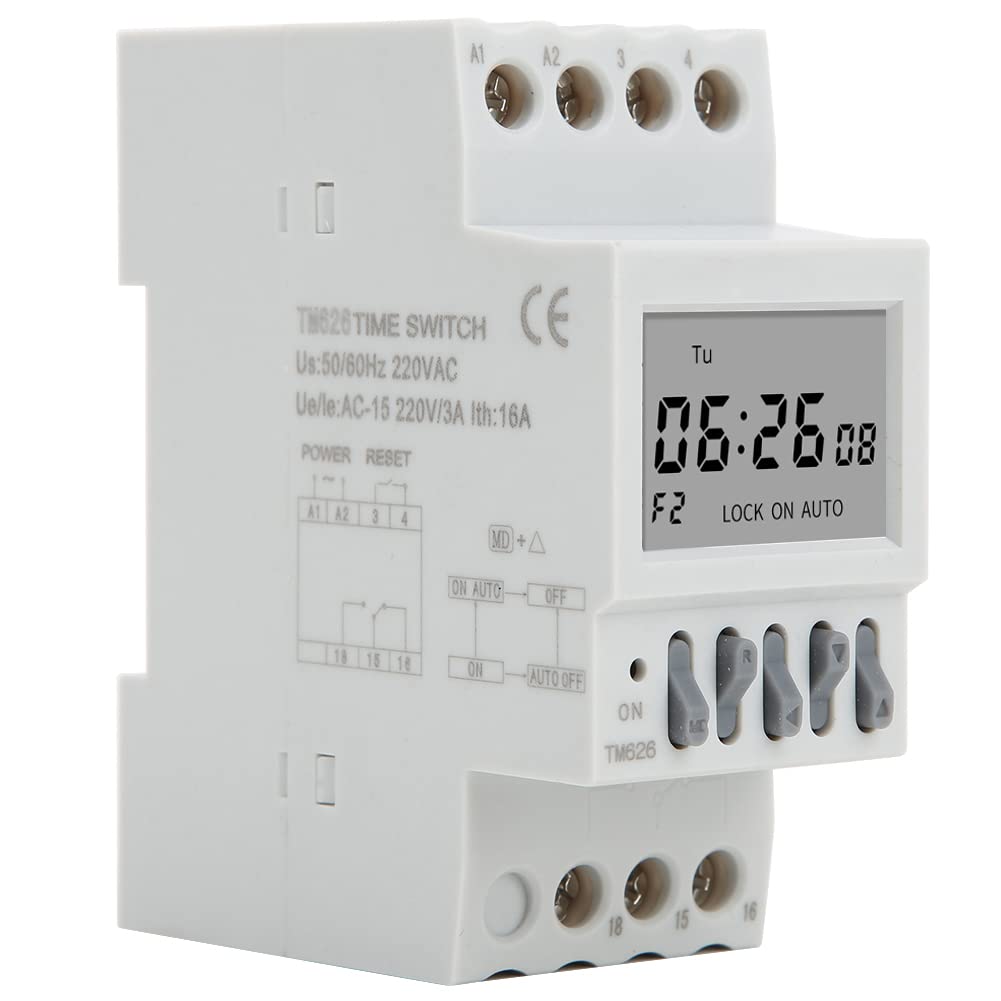
الصورة 1.1: بزاوية view of the Fafeicy TM626 Power Timer Switch, showing the display and terminal connections.

Image 1.2: The TM626 timer switch is ideal for automating various applications, including street lighting, industrial equipment, and advertising displays.
2. معلومات السلامة
يرجى قراءة وفهم جميع تعليمات السلامة قبل تركيب أو تشغيل هذا الجهاز. قد يؤدي عدم اتباع هذه التعليمات إلى صدمة كهربائية أو حريق أو إصابة خطيرة.
- تأكد من فصل مصدر الطاقة قبل أي أعمال تركيب أو صيانة.
- يجب أن يتم إجراء التثبيت بواسطة كهربائي مؤهل فقط.
- لا تتجاوز الحجم المحددtage (AC220V) and current (16A) ratings.
- أبقِ الجهاز بعيداً عن الماء والبيئات ذات الرطوبة العالية.
- لا تحاول فتح الجهاز أو إصلاحه بنفسك. اتصل بفنيين مؤهلين للصيانة.
3. انتهى المنتجview
The Fafeicy TM626 is a compact digital timer switch designed for DIN rail mounting. It features a clear LCD display for time and program settings, along with intuitive control buttons.
3.1 مكونات
- شاشة LCD: يعرض الوقت الحالي واليوم وحالة البرمجة.
- أزرار التحكم: Used for setting time, programming, and manual override.
- الكتل الطرفية: For connecting power input and load output.
- DIN Rail Clips: للتثبيت الآمن على سكة DIN القياسية.

الصورة 3.1: الجبهة view of the TM626 timer switch, highlighting the LCD display and control buttons.

الصورة 3.2: الجانب view of the TM626, illustrating the integrated DIN rail mounting clips.
4. المواصفات
| ميزة | مواصفة |
|---|---|
| ماركة | فافيسي |
| رقم الموديل | TM626 (Fafeicy txusog0m3i) |
| حجم التشغيلtage | AC220V (50/60Hz) |
| التيار المقدر | 16 أمبير |
| حجم الشاشة | 1.6 بوصة |
| الحياة الميكانيكية | ≥ 30,000 مرة |
| الحياة الكهربائية | ≥ 10,000 مرة |
| الأبعاد (تقريبًا) | Width: 35mm (1.4in), Height: 82mm (3.2in), Depth: 68mm (2.7in) |
| التركيب | دين السكك الحديدية |
| بلد المنشأ | الصين |

Image 4.1: Dimensional drawing of the TM626 timer switch, showing key measurements.

Image 4.2: The TM626 timer switch, illustrating its robust design for long mechanical and electrical life.
5. الإعداد والتثبيت
Follow these steps for proper installation and initial setup of your TM626 timer switch.
5.1 التركيب
- Ensure the main power supply is OFF before mounting.
- Locate a standard 35mm DIN rail within your electrical panel.
- Align the DIN rail clips on the back of the TM626 with the DIN rail.
- Press the timer firmly onto the rail until it clicks into place.
5.2 الأسلاك
Refer to the wiring diagram on the device and below for correct connections. Incorrect wiring can damage the device or cause electrical hazards.

الصورة 5.1: الجانب view of the TM626 showing the wiring terminals and a simplified internal diagram. Terminals A1 and A2 are for power input (AC220V). Terminals 15, 16, 18 are for load output (15: Common, 16: Normally Closed, 18: Normally Open).
- Connect the AC220V power supply to terminals A1 و A2.
- Connect the common wire of your load to terminal 15.
- For normally open operation (load turns ON when timer activates), connect the load's live wire to terminal 18.
- For normally closed operation (load turns OFF when timer activates), connect the load's live wire to terminal 16.
- تأكد من أن جميع التوصيلات آمنة ومعزولة.
5.3 التشغيل الأولي
After wiring, restore power. The display should light up. If the display is blank, check power connections. The timer may require an initial charge if it has been stored for a long time; allow it to be powered for a few minutes.
6. تعليمات التشغيل
The TM626 timer switch allows you to set the current time and program multiple on/off cycles.
6.1 ضبط الوقت واليوم الحاليين
- اضغط على ساعة button (if available, or a similar button for time setting).
- استخدم D+ (Day), H+ (Hour), and M+ (Minute) buttons to adjust the current day, hour, and minute.
- يضعط ساعة مرة أخرى للحفظ والخروج.
6.2 برمجة دورات التشغيل/الإيقاف
The TM626 typically supports multiple ON/OFF programs. The exact number may vary, but common models support 8-16 programs.
- اضغط على بروغ button. The display will show "1 ON".
- يستخدم D+ to select the day(s) for this ON event (e.g., Mon-Fri, Sat-Sun, every day, specific days).
- يستخدم H+ و M+ لضبط وقت التشغيل المطلوب.
- يضعط بروغ مرة أخرى. ستظهر على الشاشة عبارة "خصم 1".
- يستخدم D+, H+، و M+ to set the desired OFF time for the first program.
- Repeat steps 1-5 for additional ON/OFF programs (e.g., "2 ON", "2 OFF", etc.).
- بعد ضبط جميع البرامج المطلوبة، اضغط على ساعة button to exit programming mode and save settings.
6.3 تجاوز يدوي
ال يدوي or تشغيل/تلقائي/إيقاف button allows you to manually override the programmed settings.
- Pressing this button cycles through modes: ON (متصل دائمًا)، آلي (follows programs), عن (مغلق دائمًا).
- يختار آلي for the timer to execute its programmed schedules.
6.4 وظيفة إعادة الضبط
لمسح جميع الإعدادات وإعادة المؤقت إلى حالة المصنع الافتراضية، حدد موقع الزر الصغير إعادة ضبط button (often recessed) and press it using a pointed object (e.g., a pen tip). This will erase all time and program settings.
7. الصيانة
The Fafeicy TM626 timer switch requires minimal maintenance to ensure long-term reliable operation.
- تنظيف: استخدم قطعة قماش ناعمة وجافة لمسح الجزء الخارجي من الجهاز. لا تستخدم المنظفات الكاشطة أو المذيبات.
- تقتيش: قم بفحص توصيلات الأسلاك بشكل دوري للتأكد من إحكامها وخلوها من علامات التآكل أو التلف.
- البطارية النسخ الاحتياطي: The device typically includes an internal battery for retaining settings during power outages. This battery is usually non-replaceable by the user and recharges when the device is powered.
8. استكشاف الأخطاء وإصلاحها
If you encounter issues with your TM626 timer switch, refer to the following common problems and solutions:
| مشكلة | السبب المحتمل | حل |
|---|---|---|
| العرض فارغ. | لا يوجد مصدر طاقة؛ البطارية الداخلية فارغة. | Check power connections to A1/A2. Allow device to be powered for several minutes to charge the internal battery. |
| لا يتم تشغيل/إيقاف الحمل كما هو مبرمج. | Incorrect programming; timer in manual ON/OFF mode; incorrect wiring; faulty load. | Verify program settings. Ensure the timer is in آلي mode. Check wiring connections (15, 16, 18). Test the load independently. |
| الوقت غير صحيح. | Time not set correctly; power interruption (though internal battery should prevent this). | Reset and re-set the current time and day. Ensure the internal battery is charged. |
| الأزرار لا تستجيب. | عطل في الجهاز؛ خلل مؤقت في البرنامج. | Perform a full reset using the recessed RESET button. If the issue persists, contact support. |
9. الضمان والدعم
For warranty information or technical support, please refer to the documentation provided with your purchase or contact Fafeicy customer service through their official channels. Keep your purchase receipt as proof of purchase.
للاستفسارات العامة، يمكنك زيارة Fafeicy Brand Store.