
1. المقدمة
The OWON HDS1021MN is a versatile handheld device combining the functionalities of a digital storage oscilloscope and a digital multimeter. It is designed for engineers, technicians, and hobbyists requiring portable and accurate measurement capabilities. This manual provides essential information for the safe and effective operation of your device.
المميزات الرئيسية:
- نموذج: HDS1021MN
- Sample Rate (real time): 500 مللي ثانية / ثانية
- النطاق الترددي: 20 ميجا هرتز
- Horizontal Scale (s/div): 5ns/div to 100s/div, step by 1-2.5-5
- قناة: أعزب
- Waveform Record & Replay
- FFT Functions
- 3.7 inch color TFT display (640 × 480 pixels)
2. معلومات السلامة
Before using the OWON HDS1021MN, please read and understand all safety instructions. Failure to follow these instructions may result in electric shock, fire, or damage to the device or other equipment.
- الأمان العام: Always operate the device within its specified voltage and current limits. Do not use the device if it appears damaged or is not operating correctly.
- مزود الطاقة: Use only the specified power adapter and battery. Ensure the power source matches the device's requirements.
- Probes and Leads: Use only probes and test leads rated for the voltage and current being measured. Inspect probes and leads for damage before each use.
- بيئة: لا تقم بتشغيل الجهاز في حالة رطبة أو دamp conditions, or in explosive atmospheres. Keep the device away from strong electromagnetic fields.
- الخدمة: Refer all servicing to qualified service personnel. Do not attempt to open or repair the device yourself.
3. مكونات المنتج
The standard package for the OWON HDS1021MN typically includes the following items:
- OWON HDS1021MN Handheld Digital Storage Oscilloscope and Digital Multimeter Unit
- Oscilloscope Probe (1X/10X)
- أسلاك اختبار جهاز القياس المتعدد
- محول الطاقة
- كابل يو اس بي
- دليل المستخدم (هذا المستند)
- Soft Carrying Case (may vary by region/retailer)
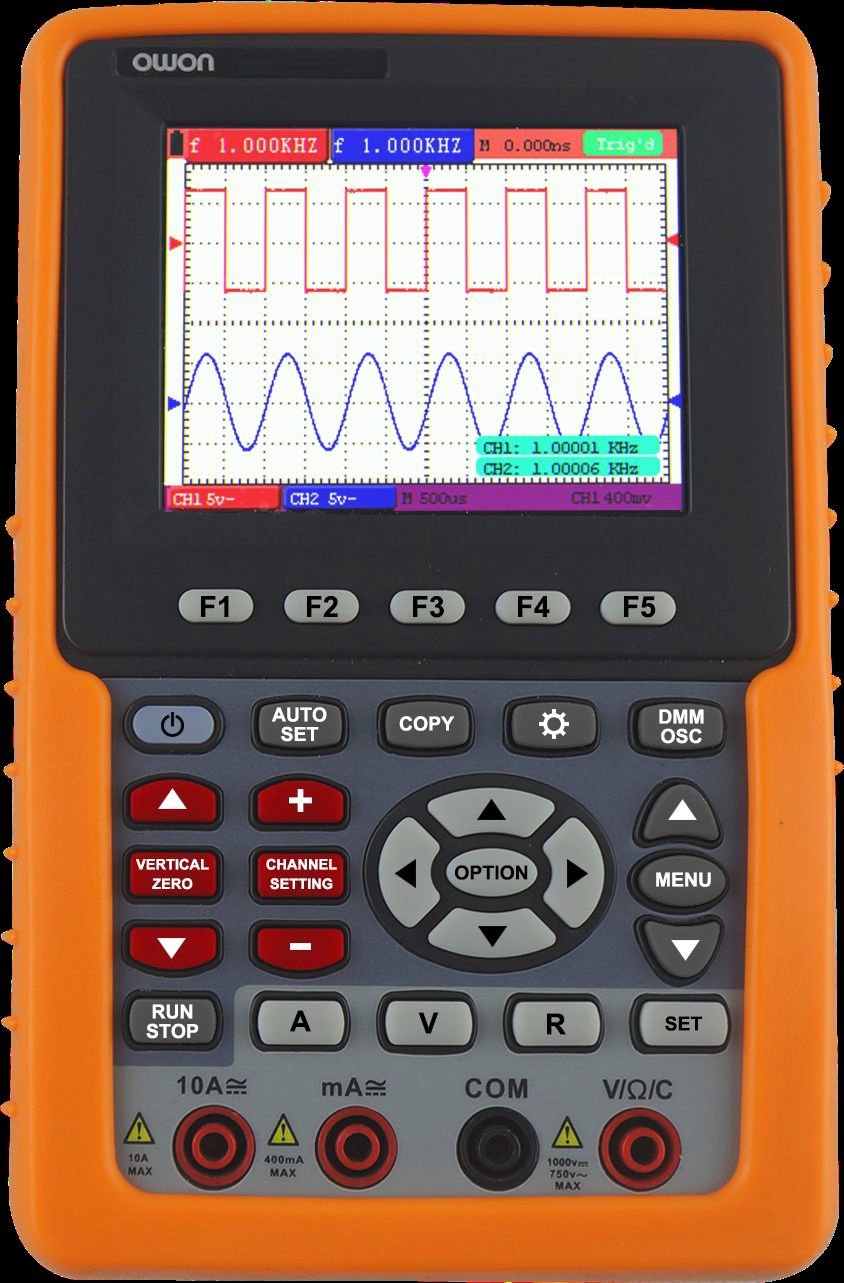
أمام view of the OWON HDS1021MN, showing the display screen, control buttons, and input jacks.
4. الإعداد
4.1 تركيب البطارية وشحنها
- حدد مكان حجرة البطارية في الجزء الخلفي من الجهاز.
- Insert the provided Li-ion battery (7.4V) into the compartment, ensuring correct polarity.
- أغلق غطاء حجرة البطارية جيدًا.
- Connect the power adapter to the device's charging port and plug it into a suitable AC outlet (100V-240V AC, 50/60Hz). The battery indicator will show charging status.
- Allow the device to charge fully before initial use. A full charge provides approximately 6 hours of operation.
4.2 توصيل المجسات وأسلاك الاختبار
- Oscilloscope Probe: For oscilloscope functions, connect the BNC connector of the oscilloscope probe to the BNC input port on the device. Ensure the probe's attenuation setting (e.g., 1X or 10X) matches the setting on the oscilloscope menu.
- أسلاك اختبار جهاز القياس المتعدد: For multimeter functions, insert the red test lead into the VΩmA input jack and the black test lead into the COM input jack. For high current measurements (e.g., 20A), use the dedicated current input jack if available and switch the function accordingly.
5. تعليمات التشغيل
5.1 تشغيل/إيقاف التشغيل
Press and hold the power button until the display illuminates to turn on the device. To power off, press and hold the power button again until the display shuts down.
5.2 تشغيل جهاز راسم الإشارة
- Select Oscilloscope Mode: Use the function selection buttons to switch to oscilloscope mode.
- توصيل المسبار: Attach the oscilloscope probe to the circuit under test. Ensure the ground clip is connected to the circuit's ground.
- Adjust Vertical Scale (Volts/Div): Use the vertical control knob or buttons to adjust the voltage sensitivity per division, matching the ampعرض إشارة الإدخال.
- Adjust Horizontal Scale (Time/Div): Use the horizontal control knob or buttons to adjust the time base per division, suitable for viewing the signal's frequency.
- Set Trigger: Use the trigger controls to stabilize the waveform. Common trigger types include Edge, Video, and Alternate. Adjust the trigger level to a point on the waveform to ensure a stable display.
- Acquisition Mode: حدد S.ample, Peak Detect, or Average mode based on measurement needs.
- Waveform Record & Replay: Access the menu to enable waveform recording. Follow on-screen prompts to save and replay captured waveforms.
- دالة تحويل فورييه السريع (FFT): Activate the FFT (Fast Fourier Transform) function from the menu to analyze the frequency components of the signal.
5.3 تشغيل جهاز القياس المتعدد
- Select Multimeter Mode: Use the function selection buttons to switch to multimeter mode.
- Select Measurement Function: Rotate the rotary switch or press function buttons to select the desired measurement (e.g., VDC, VAC, Current DC, Current AC, Resistance, Diode, Continuity).
- توصيل أسلاك الاختبار: Connect the red and black test leads to the circuit or component being measured according to the selected function.
- قراءة القياس: The measurement value will be displayed on the screen.
- اختبار الصمام الثنائي: Connect leads across the diode. The forward voltagسيتم عرض قطرة.
- اختبار الاستمرارية: Connect leads across the circuit. An audible beep indicates continuity (<50Ω).
6. الصيانة
6.1 التنظيف
لتنظيف الجهاز، استخدم قطعة قماش ناعمة دampened with mild detergent and water. Do not use abrasive cleaners or solvents. Ensure the device is powered off and disconnected from all power sources before cleaning.
6.2 العناية بالبطارية
- قم بشحن البطارية بانتظام، حتى لو لم يكن الجهاز قيد الاستخدام المتكرر، للحفاظ على صحة البطارية.
- تجنب تفريغ البطارية بالكامل بشكل متكرر.
- في حالة تخزين الجهاز لفترة طويلة، اشحن البطارية إلى حوالي 50% وخزنها في مكان بارد وجاف.
6.3 التخزين
Store the device in a dry, dust-free environment, away from direct sunlight and extreme temperatures. Use the provided carrying case to protect it from physical damage.
7. استكشاف الأخطاء وإصلاحها
This section addresses common issues you might encounter with your OWON HDS1021MN.
| مشكلة | السبب المحتمل | حل |
|---|---|---|
| الجهاز لا يعمل | Low or dead battery; Power adapter not connected; Device fault | Charge the battery; Connect power adapter; Contact support if issue persists |
| No waveform displayed (Oscilloscope) | Probe not connected; Incorrect vertical/horizontal scale; Incorrect trigger settings; No input signal | Check probe connection; Adjust Volts/Div and Time/Div; Adjust trigger level/mode; Verify signal source |
| Incorrect multimeter reading | Incorrect function selected; Test leads improperly connected; Damaged test leads; Out of range measurement | Select correct function; Ensure leads are in correct jacks; Replace damaged leads; Check measurement range |
| الشاشة خافتة أو تومض | Low battery; Environmental factors | Charge battery; Operate in recommended temperature range |
8. المواصفات
Detailed technical specifications for the OWON HDS1021MN.
Oscilloscope Specifications:
- النطاق الترددي: 20 ميجا هرتز
- Sample Rate (real time): 500 مللي ثانية / ثانية
- Horizontal Scale (s/div): 5ns/div to 100s/div, step by 1-2.5-5
- Rise Time (at input, typical): 17.5 نانو ثانية
- عرض: 3.7 inch color TFT panel (640 × 480 pixels, 65535 colors)
- قناة: أعزب
- معاوقة الإدخال: 1MΩ ± 2%, in parallel with 20pF ± 5pF
- مدة التسجيل: max 6K points on each channel
- Interpolation: sin (x) / x
- Probe Attenuation Factor: 1X، 10X، 100X، 1000X
- اقتران الإدخال: DC, AC, and GND
- DC Accuracy (average): average >16 : ±(5% reading + 0.05div) for ΔV
- الحساسية الرأسية: 5mV/div to 5V/div (at input)
- Vertical Resolution (A/D): 8 بت (2 قنوات في وقت واحد)
- الحد الأقصى لحجم الإدخالtage: 400V (PK - PK) (DC + AC, PK - PK, 1MΩ input impedance, probe attenuation 10:1), CAT II
- نوع الزناد: Edge, Video, Alternate
- وضع الزناد: تلقائي، عادي، فردي
- مستوى التهديف: ±6 divisions from screen center
- Acquisition Mode: Sample, Peak Detect, and Average
- دقة كسب التيار المستمر: ±3%
- القياس التلقائي: Vpp, Vavg, Vrms, Freq, Period, Vmax, Vmin, Vtop, Vbase, Vamp, Overshoot, Pre-shoot, Rise Time, Fall Time, +Width, -Width, +Duty, -Duty, Delay A→B, Delay A→B
- Waveform Math: +, -, ×, ÷, invert, FFT
- Waveform Storage: 4 شكل موجي
- Lissajous Figure: Bandwidth full bandwidth, Phase Difference ±3 degrees
Multimeter Specifications:
- Full Scale Reading: 3 ¾ digit (max 4000-count)
- الصمام الثنائي: 0 فولت-1.5 فولت
- معاوقة الإدخال: 10 ميغا أوم
- On / Off Test: <50Ω (± 30Ω) beeping
- المجلدtage VDC: 400mV, 4V, 40V, 400V, 1000V : ±(1% ± 1 digit); max input : DC 1000V
- المجلدtagه بطالة: 4V, 40V, 400V : ±(1% ± 3 digits), 750V : ±(2% ± 3 digits); Frequency : 40Hz - 400Hz; max input : AC 750V (virtual value)
- Current DC: 40mA, 400mA : ±(1.5% ± 1 digit), 20A : ±(3% ± 3 digits)
- Current AC: 40mA : ±(1.5% ± 3 digits), 400mA : ±(2% ± 1 digit), 20A : ±(5% ± 3 digits)
المواصفات العامة:
- واجهة الاتصال: USB
- مزود الطاقة: 100 فولت -240 فولت تيار متردد ، 50/60 هرتز
- بطارية ليثيوم أيون: 7.4V, 6 hours operation
- الأبعاد (عرض × ارتفاع × عمق): 180 × 115 × 40 (مم)
- لون: البرتقالي
9. الضمان والدعم
OWON products are manufactured to high quality standards. For warranty information, please refer to the warranty card included with your product or visit the official OWON website. For technical support, troubleshooting assistance beyond this manual, or service inquiries, please contact OWON customer support through their official channels.
الشركة المصنعة: أوون