
FLINQ 8720168680396
FlinQ Mobile Air Conditioner User Manual
الموديل: 8720168680396
1. تعليمات السلامة الهامة
Please read all instructions carefully before using this appliance and retain them for future reference. Failure to follow these instructions may result in electric shock, fire, or serious personal injury.
- قم دائمًا بتوصيل الوحدة بمأخذ كهربائي مؤرض.
- لا تقم بتشغيل الوحدة بسلك أو قابس تالف.
- أبقِ الجهاز بعيداً عن المواد القابلة للاشتعال واللهب المكشوف.
- تأكد من التهوية المناسبة حول الوحدة أثناء التشغيل.
- لا تدخل أشياء في مدخل أو مخرج الهواء.
- افصل الوحدة عن التيار الكهربائي قبل التنظيف أو إجراء أي صيانة.
- لا يُقصد استخدام هذا الجهاز من قبل الأشخاص (بما في ذلك الأطفال) ذوي القدرات البدنية أو الحسية أو العقلية المحدودة، أو الذين يفتقرون إلى الخبرة والمعرفة، ما لم يتم الإشراف عليهم أو إعطائهم تعليمات فيما يتعلق باستخدام الجهاز من قبل شخص مسؤول عن سلامتهم.
2. انتهى المنتجview
The FlinQ Mobile Air Conditioner is a versatile unit designed to provide cooling, dehumidification, and fan functions for your living space. It is equipped with an energy-efficient design and comes with a window kit for easy installation.

الشكل 2.1: الجبهة view of the FlinQ Mobile Air Conditioner, showing the main air outlet and control panel area.

Figure 2.2: The mobile air conditioner unit, displaying its energy efficiency label (Class A) and the included remote control for convenient operation.
3. المكونات والأجزاء
Familiarize yourself with the main components of your mobile air conditioner:
- الوحدة الرئيسية (مع لوحة التحكم)
- خرطوم العادم
- Window Sealing Kit (adjustable window slider/plate)
- جهاز التحكم عن بعد
- Drain Hose (for continuous drainage in dehumidification mode)
- Air Filters (located on the back/side)
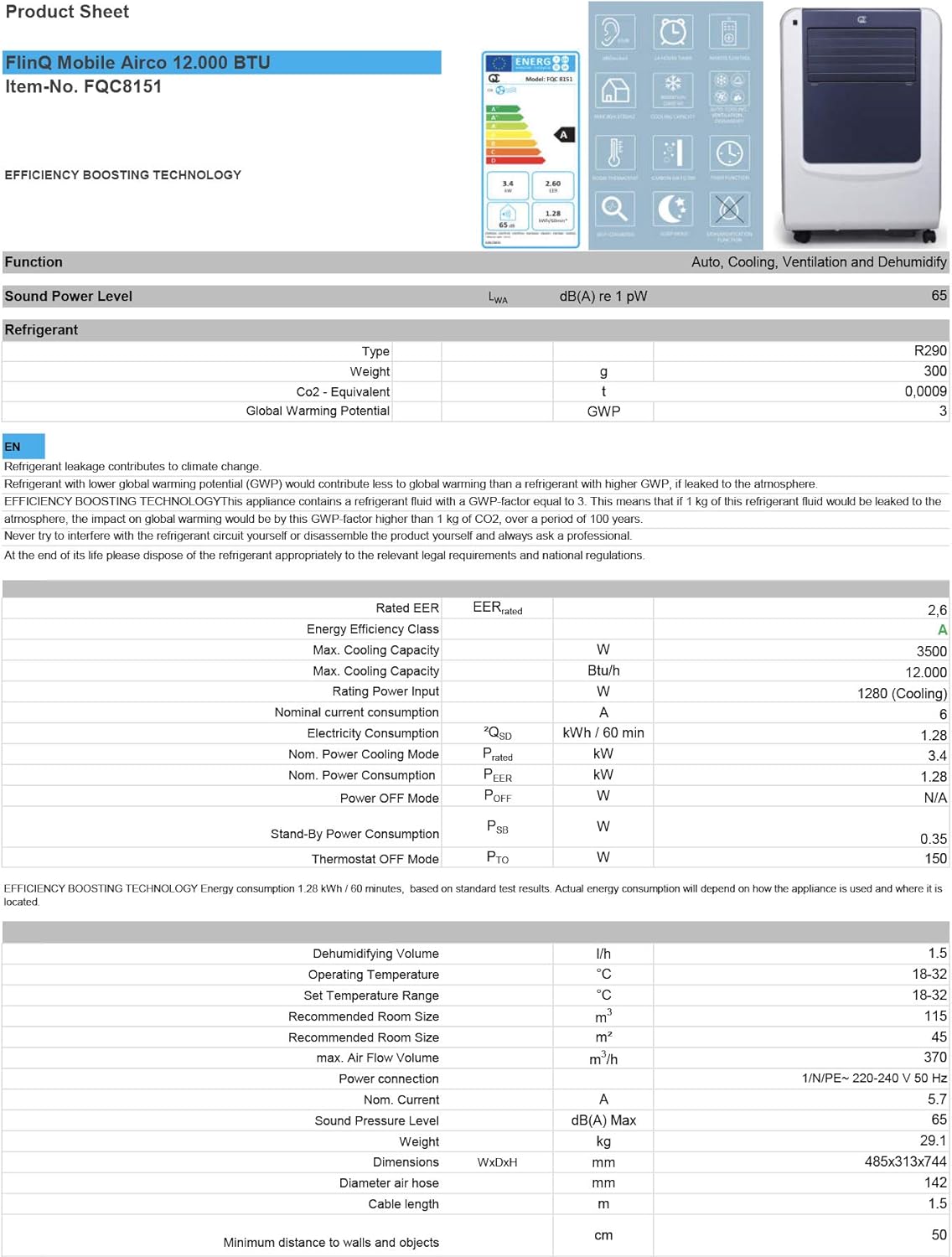
Figure 3.1: The remote control and a visual representation of the unit's key features, including noise level (65dB), 24-hour timer, cooling capacity (12000 BTU/h), room thermostat, carbon air filter, self-diagnosis, sleep mode, remote control function, timer function, auto cooling/fan/dehumidification, and dehumidification function.
4. الإعداد والتثبيت
4.1 فك التعبئة
Carefully remove the air conditioner and all accessories from the packaging. Inspect for any damage during transit. Keep the original packaging for future storage or transport.
4.2 التنسيب
Place the unit on a flat, stable surface. Ensure there is at least 30 cm (12 inches) of clear space around the unit for proper airflow. Do not place it near heat sources or in direct sunlight.
4.3 تركيب مجموعة النوافذ
To ensure efficient cooling, the hot air extracted by the unit must be vented outside. Use the provided window sealing kit for this purpose.
- قم بتوصيل وصلة خرطوم العادم بمنفذ الهواء الموجود في الجزء الخلفي من الوحدة.
- Extend the exhaust hose and attach the window adapter to the other end.
- Adjust the window slider/plate to fit your window opening.
- Insert the window adapter into the opening of the window slider/plate.
- Close the window as much as possible to seal the opening around the kit, minimizing air leakage.

الشكل 4.1: الجانب view of the mobile air conditioner, illustrating the connection point for the exhaust hose, which expels hot air from the room.
5. تعليمات التشغيل
5.1 لوحة التحكم
The control panel is located on the top of the unit and features various buttons and an LED display for setting modes, temperature, and timer functions.
5.2 التحكم عن بعد
The remote control allows you to operate all functions of the air conditioner from a distance. Ensure the remote control batteries are inserted correctly.
أوضاع التشغيل 5.3
اضغط على زر "الوضع" للتنقل بين أوضاع التشغيل المتاحة:
- وضع التبريد: لتبريد الغرفة، اضبط درجة الحرارة المطلوبة باستخدام أزرار ضبط درجة الحرارة.
- وضع التجفيف: Removes excess moisture from the air. The fan speed is typically fixed in this mode. Consider connecting a drain hose for continuous drainage.
- وضع المروحة: Circulates air without cooling. You can adjust the fan speed (Low, Medium, High).

الشكل 5.1: الصورة عن قرب view of the adjustable louvers on the air conditioner's front panel, which direct the airflow.
6. الصيانة
تضمن الصيانة المنتظمة الأداء الأمثل وتطيل عمر مكيف الهواء الخاص بك.
6.1 تنظيف فلاتر الهواء
The air filters should be cleaned every two weeks or more frequently depending on usage and air quality. Dirty filters reduce efficiency and can damage the unit.
- افصل مكيف الهواء عن مأخذ الطاقة.
- Locate and remove the air filters (usually on the back or side of the unit).
- Wash the filters under running water (warm, not hot) or use a vacuum cleaner to remove dust.
- Allow the filters to air dry completely before reinserting them. Do not expose them to direct sunlight.

Figure 6.1: Illustration of how to remove the air filter from the mobile air conditioner for cleaning, highlighting the accessible filter panel.
6.2 تصريف المياه
The unit collects condensed water during cooling and dehumidification. The internal tank will fill up, and the unit may stop operating when full. Drain the water regularly.
- Place a shallow pan or tray under the drain port (usually at the bottom rear of the unit).
- قم بإزالة سدادة التصريف للسماح بتدفق الماء للخارج.
- For continuous drainage in dehumidification mode, attach the provided drain hose to the drain port.
6.3 التخزين
عند تخزين الوحدة لفترة طويلة:
- قم بتفريغ جميع المياه من الوحدة.
- نظف مرشحات الهواء.
- افصل سلك الطاقة وقم بلفه بشكل أنيق.
- قم بتخزين الوحدة في مكان جاف وبارد، ويفضل أن يكون ذلك في عبوتها الأصلية.
7. استكشاف الأخطاء وإصلاحها
قبل الاتصال بدعم العملاء، يرجى الرجوع إلى الجدول التالي للتعرف على المشكلات الشائعة وحلولها:
| مشكلة | السبب المحتمل | حل |
|---|---|---|
| الوحدة لا تعمل | لا يوجد كهرباء؛ سلك الطاقة غير موصول بالكهرباء؛ خزان المياه ممتلئ | افحص مأخذ الطاقة؛ وصّل سلك الطاقة؛ فرّغ خزان المياه |
| لا تبرد الوحدة بشكل كافٍ | Dirty air filters; Exhaust hose blocked/leaking; Room too large; Doors/windows open | Clean filters; Check hose for blockages/proper sealing; Ensure room size is within capacity; Close doors/windows |
| الوحدة صاخبة | Unit not on a flat surface; Air filters dirty | Place on flat surface; Clean air filters |
| تسرب المياه من الوحدة | Drain plug not properly sealed; Unit tilted | تأكد من إحكام سدادة التصريف؛ ضع الوحدة على سطح مستوٍ |
8. المواصفات
Technical details for the FlinQ Mobile Air Conditioner:
| ميزة | قيمة |
|---|---|
| رقم الموديل | 8720168680396 |
| أبعاد المنتج | 74 × 48 × 31 سم |
| وزن العنصر | 29 g (Note: This weight seems unusually low for an AC unit, please refer to product packaging for accurate weight) |
| مستوى الضوضاء | 65 ديسيبل |
| سعة التبريد | 12000 وحدة حرارية بريطانية/ساعة |
| حجم الغرفة الموصى به | تصل إلى 45 متر مربع |
| المميزات الخاصة | جهاز التحكم عن بعد |
| فئة الطاقة | A |

Figure 8.1: Official product sheet detailing technical specifications, energy consumption, cooling capacity, and dimensions of the FlinQ Mobile Air Conditioner.
9. الضمان والدعم
This FlinQ Mobile Air Conditioner comes with a limited warranty. Please refer to the warranty card included with your purchase for specific terms and conditions.
For technical support, service, or warranty claims, please contact your retailer or the manufacturer directly. Keep your proof of purchase for warranty validation.
معلومات الاتصال:
- ماركة: فلينك
- Webموقع: www.flinq.nl (مثالampلي، يرجى الرجوع إلى وثائق المنتج الفعلية للحصول على المعلومات الصحيحة webموقع)
- بريد إلكتروني: support@flinq.nl (مثالamp(يرجى الرجوع إلى وثائق المنتج الفعلية للحصول على البريد الإلكتروني الصحيح)
Ask a question about this manual
Ask about setup, troubleshooting, compatibility, parts, safety, or missing instructions. Manuals+ will review the question and use this page’s manual context to help answer it.