
HENEX HC-2000
دليل مستخدم ماسح الباركود HENEX HC-2000
Model: HC-2000 | Brand: HENEX
مقدمة
This user manual provides comprehensive instructions for the operation, maintenance, and troubleshooting of your HENEX HC-2000 Handheld Wired 2D Barcode Scanner. Designed for efficiency and ease of use, this scanner is ideal for various commercial and industrial applications, including retail, warehousing, and logistics. Please read this manual carefully before using the device to ensure optimal performance and longevity.
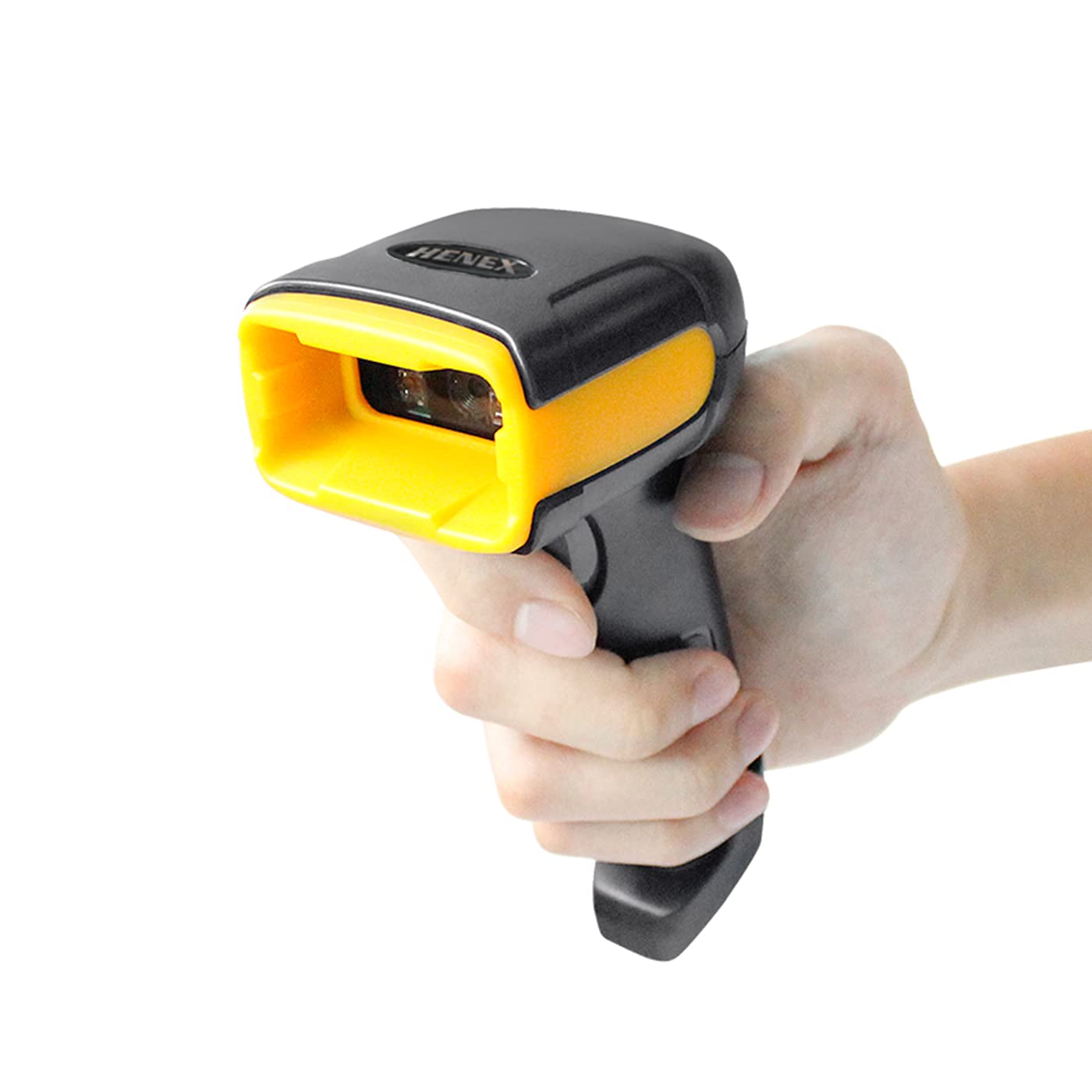
Image: The HENEX HC-2000 barcode scanner, a black and yellow handheld device, shown from the front, ready for use.
المنتج انتهىview
الميزات الرئيسية
- فك تشفير متعدد الاستخدامات: Capable of scanning both 1D and 2D barcodes, including UPC, EAN-13, Code 39, Code 128, PDF417, Data Matrix, Maxicode, and QR Code. It can read barcodes from mobile phone screens and PC screens.
- الأداء العالي: Features a scanning and decoding speed of 100 scans per second with a resolution of 640x480, enabling efficient reading of barcodes as small as 5mil and up to 13mil.
- التوافق الواسع: Supports various operating systems including Windows XP, Windows 7, Windows 8, Windows 10, and Mac OS. (Note: Does not work with Square POS systems).
- التوصيل والتشغيل: Simple USB connectivity ensures quick setup without the need for complex driver installations.
- تصميم متين: Ergonomically designed for comfortable long-term use and built to withstand drops from up to 1.5 meters, offering anti-shock and anti-fall protection.
- تطبيق واسع: Suitable for a wide range of environments such as supermarkets, convenience stores, warehouses, libraries, bookstores, and apparel stores.
ماذا يوجد في الصندوق
عند فتح العبوة، يرجى التأكد من تضمين جميع العناصر التالية:
- HENEX HC-2000 Barcode Scanner Unit
- كابل توصيل USB
- Quick Set-Up Guide (Version 2.0)

Image: The HENEX HC-2000 scanner, its USB cable, and the Quick Set-Up Guide, laid out to show package contents.
يثبت
The HENEX HC-2000 scanner is designed for simple plug-and-play operation, requiring no complex driver installations for most compatible systems.
- قم بتوصيل كبل USB: Insert the USB connector of the scanner's cable into an available USB port on your computer (desktop or laptop).
- التعرف على النظام: Your operating system (Windows XP/7/8/10 or Mac OS) will automatically detect and install the necessary generic drivers for the scanner. This process usually takes a few seconds.
- جاهز للاستخدام: Once the system indicates that the device is ready, the scanner is prepared for operation. You can test it by opening a text editor (like Notepad or Word) and scanning any barcode; the data should appear in the document.

Image: A visual representation of the scanner's easy setup, showing the USB cable connecting the scanner to a computer monitor, emphasizing "No Installation Required."

Image: Icons representing various operating systems (Windows 7, 8, 10, XP, and Mac OS) to highlight the scanner's wide compatibility with different ERP systems.
تعليمات التشغيل
The HENEX HC-2000 barcode scanner is designed for intuitive and efficient scanning across various applications.
Basic Scanning Procedure
- الاستعداد للفحص: Ensure the scanner is connected to your computer and the application where you want the barcode data to appear (e.g., a POS system, spreadsheet, or text document) is active and ready to receive input.
- هدف الماسح الضوئي: Point the scanner's window towards the barcode you wish to read. Ensure the entire barcode is within the scanner's field of view.
- بدء المسح: Press and hold the trigger button located on the handle of the scanner. A red scanning line or light will emit from the scanner's window.
- تأكيد المسح الضوئي: Once the barcode is successfully read, the scanner will typically emit an audible beep and/or a visual indicator (e.g., a green light) to confirm the scan. The barcode data will then be transmitted to your connected device.
أنواع الباركود المدعومة
The HC-2000 is capable of decoding a wide range of 1D and 2D barcode symbologies, including those found on physical labels and digital screens.
- الرموز الشريطية ثنائية الأبعاد: UPC, EAN-13, EAN-8, Codabar, Code 39, Code 128, ISBN, ISSN.
- الرموز الشريطية ثنائية الأبعاد: PDF417, MicroPDF417, Data Matrix, Maxicode, QR Code.

Image: A visual guide illustrating the different types of 1D and 2D barcodes that the scanner can read, such as QR codes, Data Matrix, and various linear barcodes, including incomplete and high-density codes.

Image: The HENEX HC-2000 scanner in action, demonstrating its ability to scan QR codes from a mobile phone screen, highlighting its versatility for various scanning needs.
سيناريوهات الاستخدام النموذجية
The HC-2000 is suitable for a variety of professional environments:
- بيع بالتجزئة: Supermarkets, convenience stores, and apparel stores for point-of-sale (POS) and inventory management.
- الخدمات اللوجستية والتخزين: For tracking inventory, managing shipments, and streamlining warehouse operations.
- Libraries & Bookstores: For cataloging and checkout processes.
- Pharmacies: For managing pharmaceutical products and prescriptions.

Image: A collage depicting the diverse environments where the HENEX HC-2000 barcode scanner can be effectively utilized, including retail, hospitality, and logistics.
صيانة
Proper maintenance ensures the longevity and optimal performance of your HENEX HC-2000 barcode scanner.
تنظيف
- الخارج: Use a soft, dry, lint-free cloth to wipe the exterior of the scanner. For stubborn dirt, slightly dampen the cloth with water or a mild, non-abrasive cleaner. Avoid using harsh chemicals, solvents, or abrasive materials, as these can damage the scanner's casing.
- نافذة المسح الضوئي: Gently clean the scanning window with a soft, clean microfiber cloth. If necessary, use a small amount of lens cleaner designed for optical surfaces. Ensure no dust or debris remains on the window, as this can affect scanning accuracy.
تخزين
- When not in use, store the scanner in a clean, dry place away from direct sunlight, extreme temperatures, and high humidity.
- Avoid placing heavy objects on the scanner to prevent damage.
متانة
The HC-2000 is designed with a robust construction to withstand typical operational impacts. It features 1.5-meter anti-shock and anti-fall protection, reducing the risk of damage from accidental drops.

Image: A graphic representation of the scanner's durability, showing it in a falling motion with impact effects, emphasizing its 1.5-meter anti-shock and anti-fall capabilities.
استكشاف الأخطاء وإصلاحها
If you encounter issues with your HENEX HC-2000 barcode scanner, please refer to the following common problems and their solutions:
| مشكلة | السبب المحتمل | حل |
|---|---|---|
| لم يتعرف الكمبيوتر على الماسح الضوئي. | اتصال USB غير محكم، أو منفذ USB معطل، أو مشكلة في برنامج تشغيل النظام. |
|
| الماسح الضوئي لا يقرأ الباركود. | Barcode damaged, incorrect scanning angle, dirty scanning window, or scanner settings. |
|
| البيانات الممسوحة ضوئيا غير صحيحة أو غير كاملة. | Partial scan, interference, or incorrect keyboard layout settings. |
|
| Scanner does not work with Square POS. | Incompatibility with Square POS system. | This model is explicitly noted as not compatible with Square POS systems. No workaround is available for this specific incompatibility. |
If the problem persists after trying these solutions, please contact HENEX customer support for further assistance.
تحديد
Detailed technical specifications for the HENEX HC-2000 Barcode Scanner:
| ماركة | هينكس |
| اسم الموديل | HC-2000 |
| الأبعاد (الطول × العرض) | 162 مم × 64 مم (6.37 بوصة × 2.51 بوصة) |
| وزن العنصر | 190 جرام (0.41 رطل) |
| توافق نظام التشغيل | Windows XP و Windows 7 و Windows 8 و Windows 10 و Mac OS |
| معدل المسح | 100 إطارًا في الثانية (fps) |
| دقة | 640*480 |
| Minimum Barcode Resolution | 5 مليون |
| Maximum Barcode Resolution | 13 مليون |
| نوع الموصل | كابل يو اس بي |
| مصدر الطاقة | Corded (USB powered) |
| المميزات الخاصة | Ergonomic design, decoding capability for multiple barcode types, wide industry applicability, plug and play. |

Image: A technical drawing illustrating the physical dimensions (length and width) and weight of the HENEX HC-2000 scanner.
الضمان والدعم
معلومات الضمان
Information regarding the product warranty is typically provided with your purchase documentation or can be obtained directly from the manufacturer or authorized seller. Please retain your proof of purchase for warranty claims.
دعم العملاء
For technical assistance, troubleshooting beyond this manual, or inquiries about your HENEX HC-2000 barcode scanner, please contact HENEX customer support. Refer to the contact information provided on the product packaging or the official HENEX webموقع.
You can also visit the official HENEX brand store for more information and products: HENEX Brand Store
Ask a question about this manual
Ask about setup, troubleshooting, compatibility, parts, safety, or missing instructions. Manuals+ will review the question and use this page’s manual context to help answer it.