
1. المقدمة
The Kinter A7BT is a compact 2-channel mini amplifier designed for various audio applications, including home, automotive, and motorcycle setups. It features Bluetooth connectivity, USB and TF card playback, FM radio, and multiple control options. This manual provides detailed instructions for the proper installation, operation, and maintenance of your A7BT ampمكبر.
2. محتويات العبوة
Verify that all items listed below are included in your package. If any items are missing or damaged, please contact Kinter customer support.
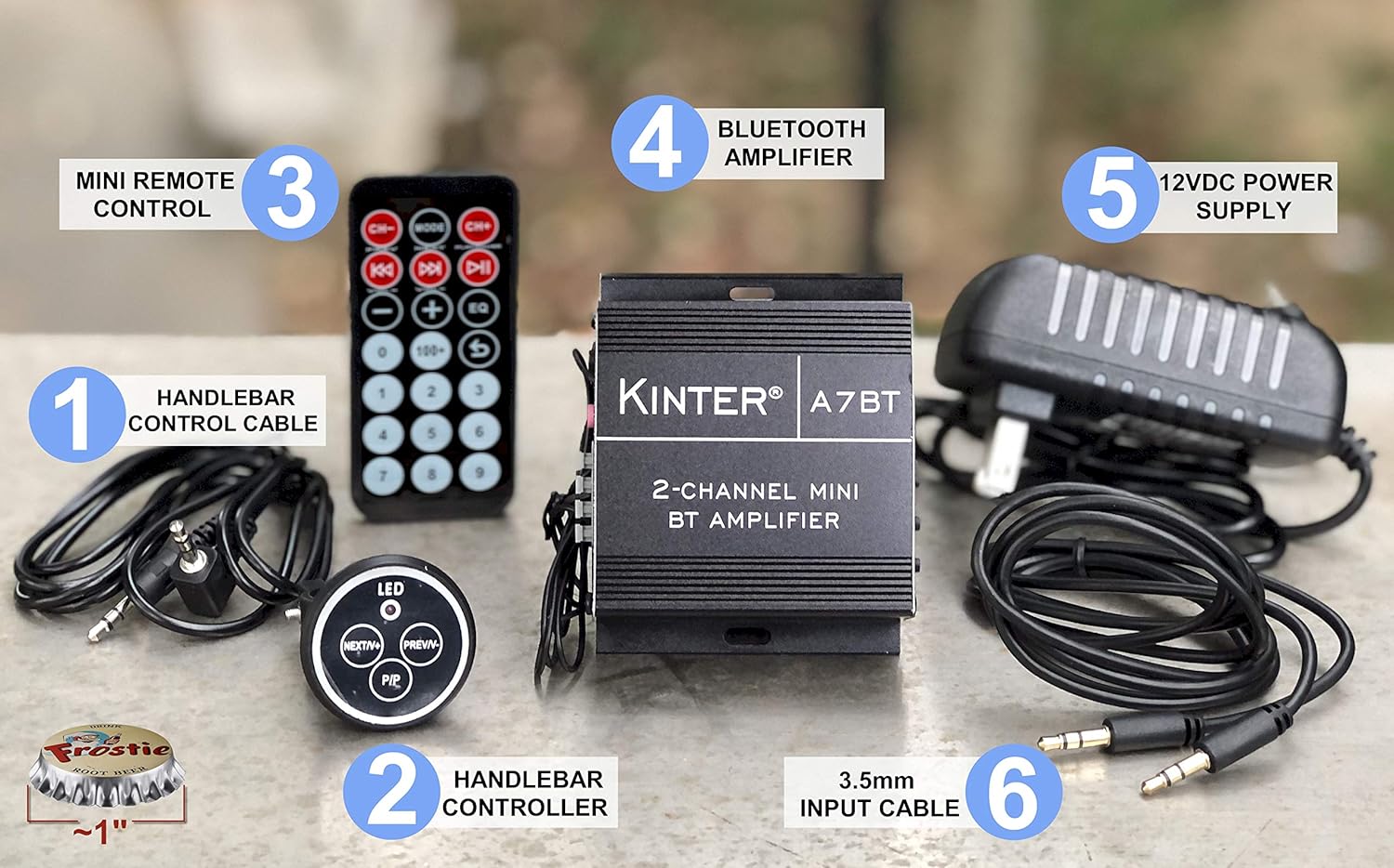
Image: Kinter A7BT amplifier, handlebar controller, IR remote, 12V power supply, and cables.
- Kinter A7BT 2-Channel Mini Bluetooth Ampالقمامة
- Wired Handlebar Controller
- Wireless Infrared (IR) Remote Control
- 3.5mm Audio Input Cable (59 inches length)
- 12V DC Power Supply (34 inches length)
3. انتهى المنتجview
3.1 اللوحات الأمامية والخلفية
Familiarize yourself with the various controls and connections on the ampمكبر.
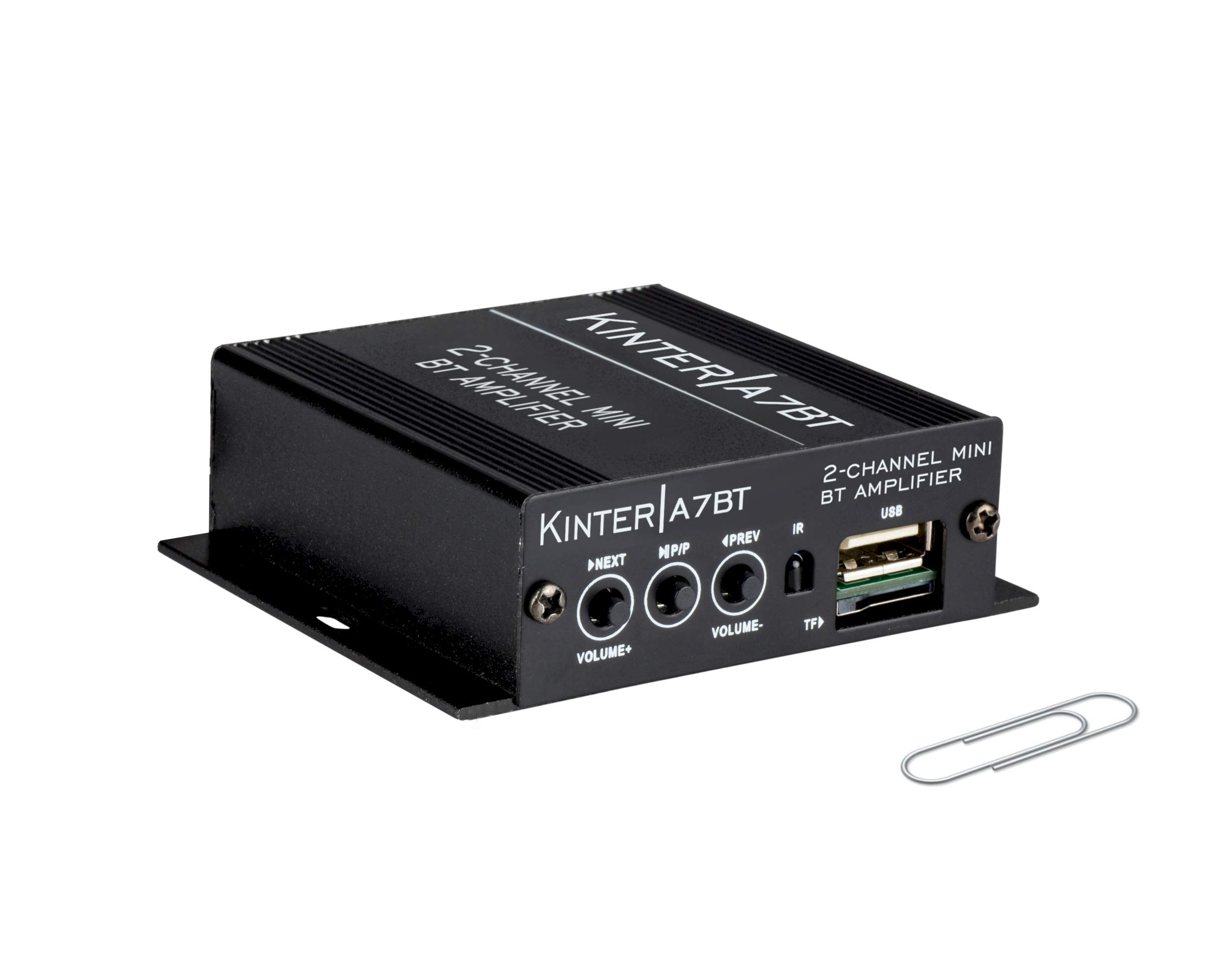
Image: Detailed diagram showing the front and rear panels of the Kinter A7BT ampمكبر صوت بمكونات مرقمة.
- NEXT/P (Next Song / Volume Up): ضغطة قصيرة للانتقال إلى المقطع التالي، وضغطة طويلة لرفع مستوى الصوت.
- M/P/P (Mode / Play / Pause): Short press for play/pause, long press to change input mode (Bluetooth, AUX, USB/TF, FM).
- PREV/V (Previous Song / Volume Down): ضغطة قصيرة للانتقال إلى المقطع السابق، وضغطة طويلة لخفض مستوى الصوت.
- IR (مستقبل الأشعة تحت الحمراء): For wireless remote control signals.
- TF (TransFlash / Micro SD Card Slot): لتشغيل الصوت fileق من بطاقة TF.
- USB (USB Port): لتشغيل الصوت files من محرك أقراص فلاش USB. Note: This is not a charging port.
- AUX IN (3.5mm Stereo Audio Input Jack): لتوصيل أجهزة الصوت الخارجية عبر كابل 3.5 ملم.
- هوائي FM: Connection point for the FM antenna wire.
- REMOTE LINE IN: Input for the wired handlebar remote control.
- SPEAKER OUT (R/L): Terminals for connecting passive speakers (Right and Left channels).
- DC12V (12V DC Power Input): For connecting the 12V DC power supply.
- Bluetooth Operation Indicator: LED indicator for Bluetooth status.
3.2 Handlebar Controller
The wired handlebar controller provides convenient access to essential functions.
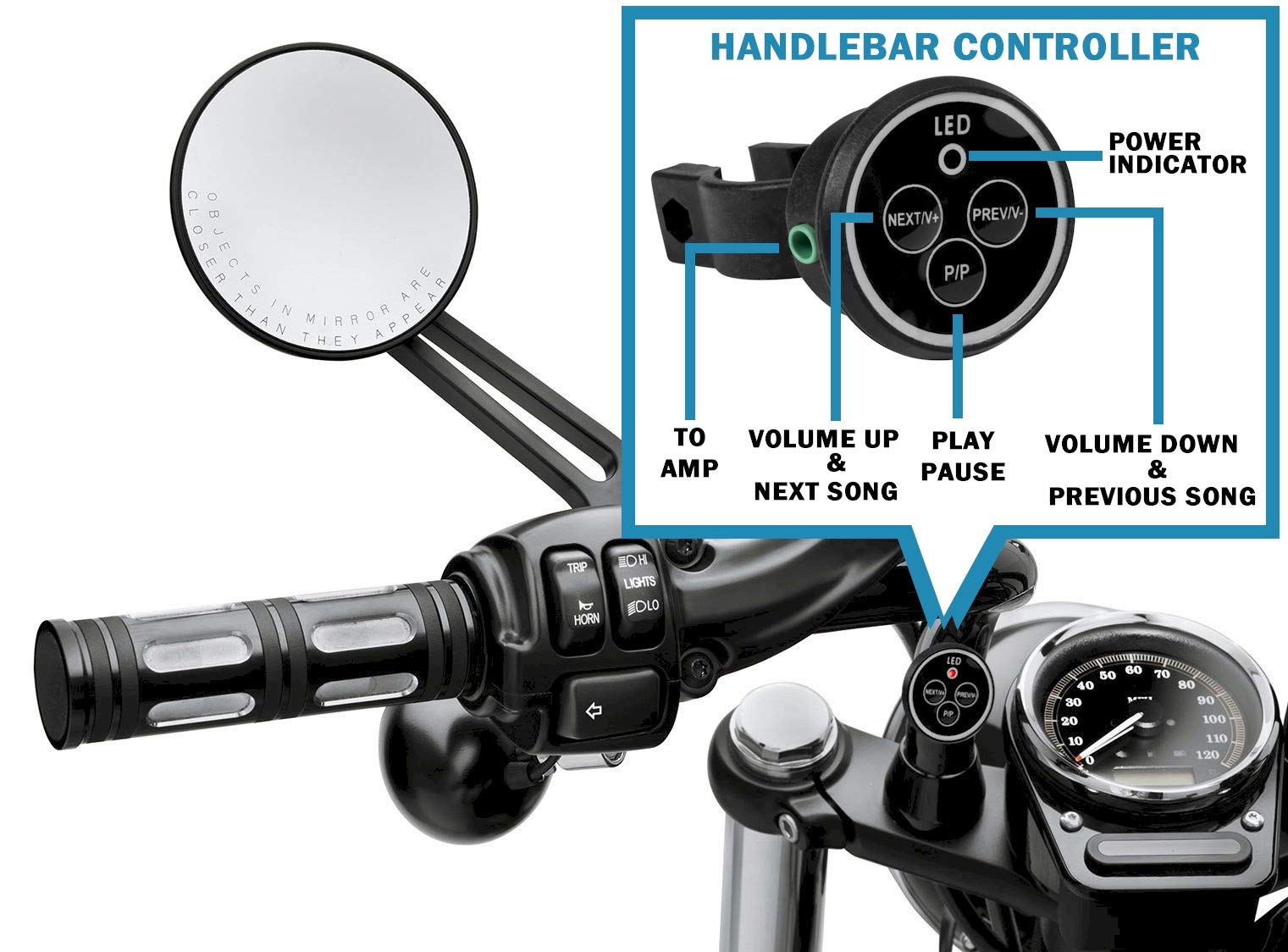
Image: Close-up of the handlebar controller showing LED power indicator, Next/Volume Up, Previous/Volume Down, and Play/Pause buttons.
- قاد: مؤشر الطاقة.
- التالي/V+: Next Song / Volume Up.
- السابق/السابق-: Previous Song / Volume Down.
- P / P: تشغيل / وقفة.
4. الإعداد
4.1 توصيل الطاقة
Connect the included 12V DC power supply to the DC12V input on the amplifier. Plug the power supply into a standard wall outlet.
For automotive or motorcycle applications, you can hardwire the amplifier to a 12V battery system. Use the included PSU's wire and connector. Strip the wire as shown in the diagram below. The white wire is POSITIVE (+), and the bare wire is GROUND (-). It is recommended to install a 2 Amp fuse inline (not included) for protection.
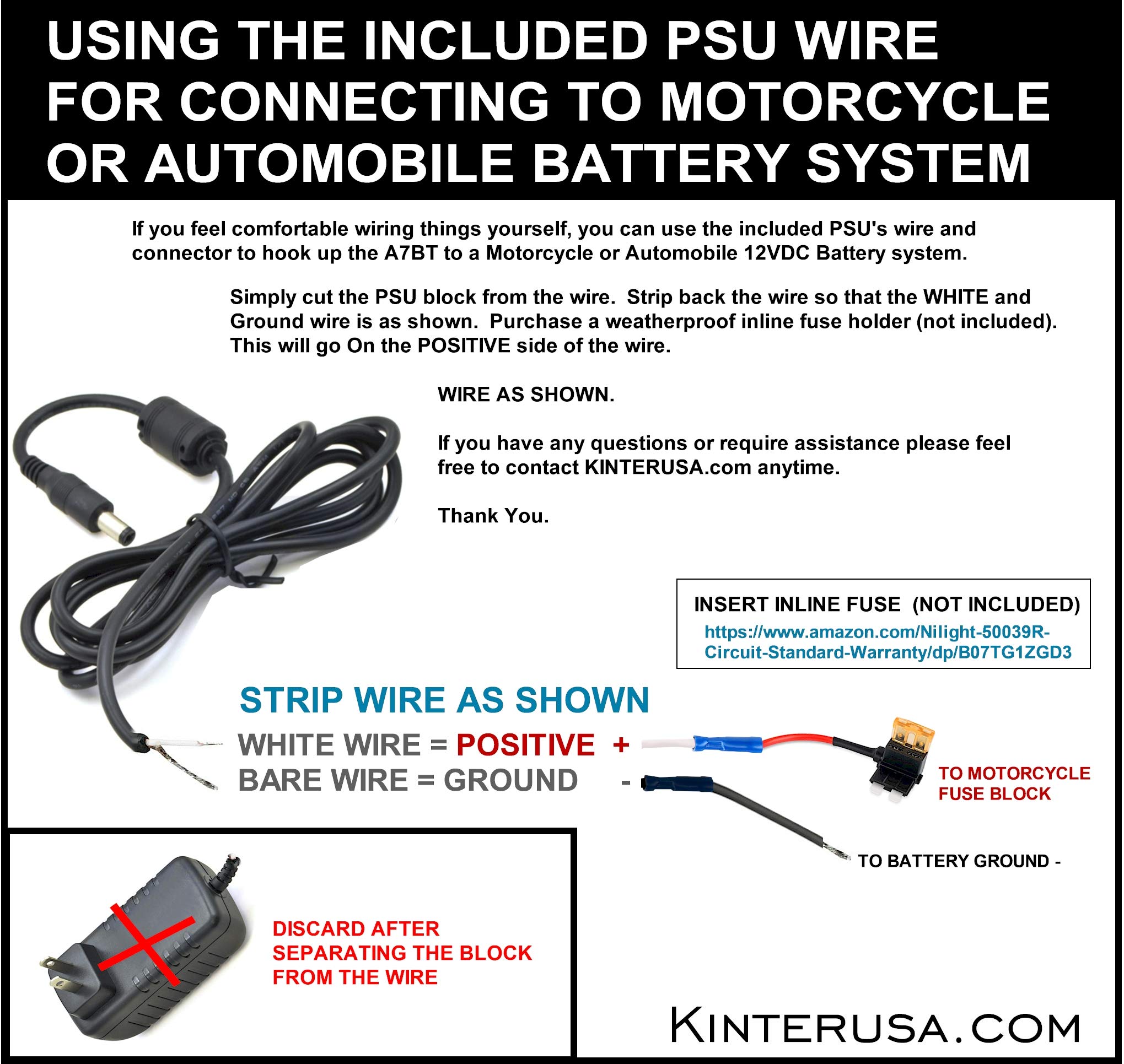
Image: Instructions for connecting the amplifier to a motorcycle or automobile battery, including wire stripping and fuse recommendation.
4.2 اتصال مكبر الصوت
Connect your passive speakers to the SPEAKER OUT terminals on the rear panel. Ensure correct polarity (positive to positive, negative to negative) for each channel (Left and Right). Use a small screwdriver to press the terminal tabs, insert the speaker wire, and then release the tab to secure the wire.
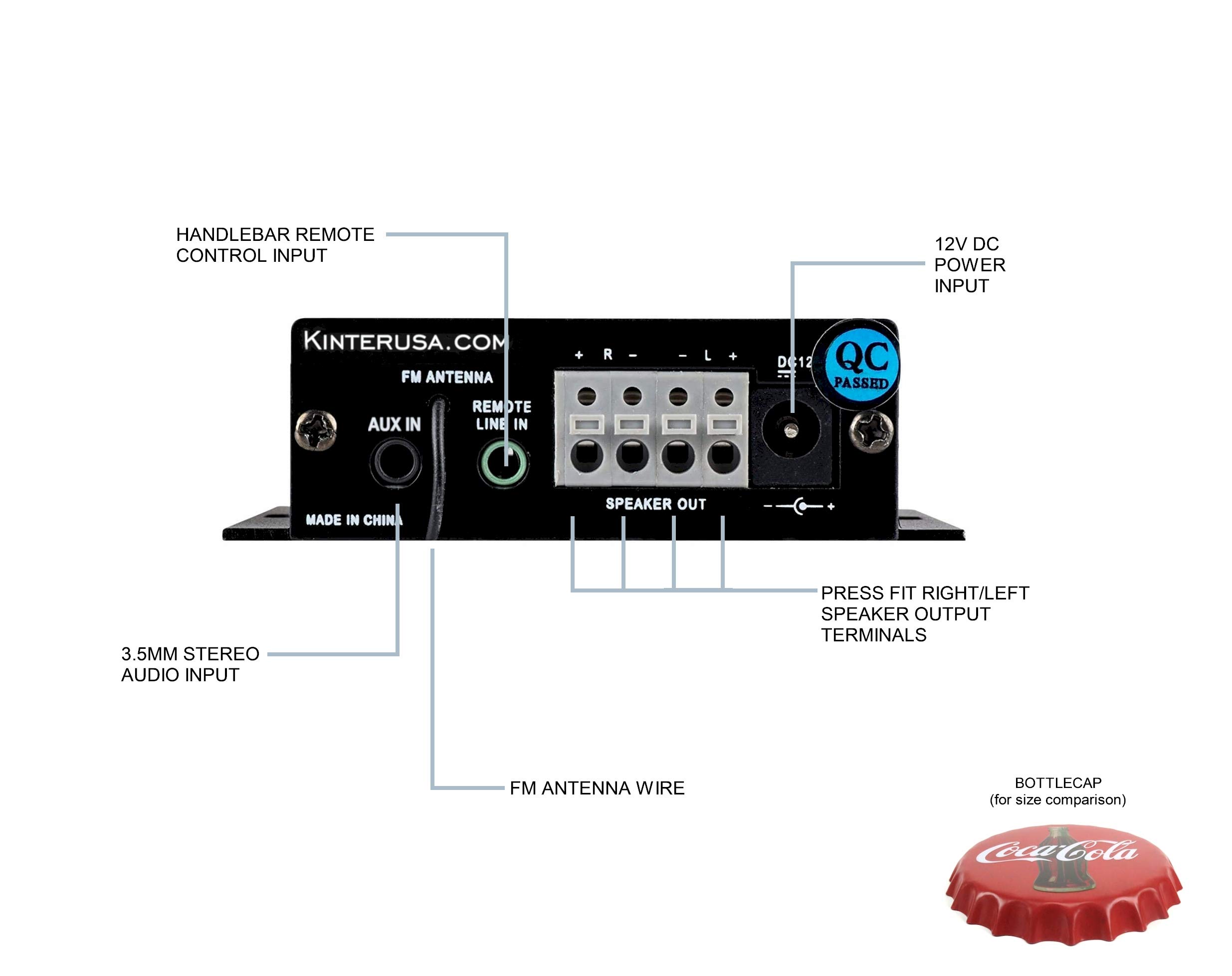
Image: A finger pressing a speaker terminal tab while inserting a speaker wire.
ملحوظة: Avoid using excessively large speaker wire that may cause shorts. Soldering the ends of the speaker wires can prevent stray strands and improve connection reliability.
4.3 توصيلات إدخال الصوت
- مدخلات AUX: Connect external audio devices (e.g., smartphone, MP3 player) using the included 3.5mm audio cable to the AUX IN jack.
- بطاقة USB/TF: أدخل ذاكرة فلاش USB أو بطاقة TF (Micro SD) تحتوي على ملفات صوتية MP3 files into the respective ports. The amplifier will automatically detect and play compatible files.
- هوائي FM: Connect the FM antenna wire to the FM ANTENNA input for radio reception.
4.4 اتصال جهاز التحكم عن بعد
- Wired Handlebar Controller: Plug the handlebar controller cable into the REMOTE LINE IN jack on the ampاللوحة الخلفية للمضخم.
- Wireless IR Remote: Ensure the IR receiver on the front panel (labeled 'IR') has a clear line of sight to the remote control.
5. التشغيل
5.1 تشغيل/إيقاف التشغيل
The Kinter A7BT amplifier does not have a dedicated power on/off button. It powers on automatically when connected to a 12V DC power source and powers off when the power source is disconnected.
5.2 اختيار الوضع
اضغط مع الاستمرار على M/P/P button on the front panel or the 'MODE' button on the IR remote to cycle through the available input modes: Bluetooth, AUX, USB, TF, and FM radio.
5.3 التحكم في مستوى الصوت
Adjust the volume using the:
- اللوحة الأمامية: اضغط لفترة طويلة على NEXT/P button for Volume Up, and long press the PREV/V button for Volume Down.
- Handlebar Controller: استخدم التالي / V + button for Volume Up, and السابق/الخامس- button for Volume Down.
- جهاز التحكم عن بعد بالأشعة تحت الحمراء: Use the dedicated Volume Up and Volume Down buttons.
5.4 التحكم في التشغيل
Control audio playback using the:
- اللوحة الأمامية: ضغطة قصيرة NEXT/P for next track, short press PREV/V for previous track, short press M/P/P للعب / وقفة.
- Handlebar Controller: يستخدم التالي / V + للمسار التالي، السابق/الخامس- for previous track, and ص/ص للعب / وقفة.
- جهاز التحكم عن بعد بالأشعة تحت الحمراء: Use the dedicated track skip and play/pause buttons.
5.5 اقتران بلوتوث
When the A7BT amplifier is powered on, it is ready for Bluetooth pairing. Follow these steps:
- تأكد من تفعيل البلوتوث على جهازك الصوتي (مثل الهاتف الذكي أو الجهاز اللوحي).
- افتح إعدادات البلوتوث الخاصة بجهازك.
- البحث عن أجهزة جديدة.
- Select "A7BT" from the list of available devices to connect.
- Once connected, the Bluetooth operation indicator will confirm the status.
تشغيل راديو 5.6 FM
In FM mode, use the track skip buttons on the front panel, handlebar controller, or IR remote to scan for and select radio stations.
تشغيل بطاقة USB/TF 5.7
When a USB drive or TF card is inserted, the amplifier will automatically switch to the corresponding mode and begin playing audio files. The unit will resume playback from where it left off when powered off and on again. Fast-forwarding within a song is not supported.
6. الصيانة
To ensure optimal performance and longevity of your Kinter A7BT amplifier, observe the following maintenance guidelines:
- تهوية: تأكد من amplifier is placed in a well-ventilated area. The aluminum casing acts as a heatsink, and proper airflow is crucial to prevent overheating. Avoid enclosing the unit in tight spaces without ventilation.
- تنظيف: استخدم قطعة قماش ناعمة وجافة لتنظيف amplifier's exterior. Do not use liquid cleaners or solvents.
- بيئة: تجنب تعريض amplifier to extreme temperatures, direct sunlight, high humidity, or dusty environments.
- الاتصالات: قم بفحص جميع توصيلات الكابلات بشكل دوري للتأكد من أنها آمنة وخالية من التآكل.
7. استكشاف الأخطاء وإصلاحها
If you encounter issues with your Kinter A7BT ampالمحفز، راجع المشاكل والحلول الشائعة التالية:
| مشكلة | السبب المحتمل | حل |
|---|---|---|
| لا يوجد طاقة | Power supply not connected or faulty; vehicle battery issue. | Check power supply connection and outlet. If hardwired, check battery connection and inline fuse (if installed). |
| لا يوجد صوت | Incorrect input mode; speaker wires loose or incorrectly connected; volume too low; faulty audio source. | Verify correct input mode. Check speaker wire connections and polarity. Increase volume. Test with a different audio source. |
| البلوتوث غير متصل | Ampمكبر الصوت ليس في وضع البلوتوث؛ الجهاز بعيد جدًا؛ الجهاز مقترن بالفعل بوحدة أخرى. | يضمن amplifier is in Bluetooth mode. Move device closer. Forget "A7BT" on your device and re-pair. |
| بطاقة USB/TF لا تعمل | غير مدعوم file تهيئة؛ لم يتم إدخال البطاقة/محرك الأقراص بشكل صحيح؛ تالف files. | يضمن fileملفات الصوت بصيغة MP3. أعد إدخال البطاقة/محرك الأقراص. جرب بطاقة/محرك أقراص آخر. |
| Ampارتفاع درجة حرارة الرافعة | Poor ventilation; impedance mismatch with speakers. | Ensure adequate airflow around the unit. Verify speaker impedance matches ampمواصفات مكبر الصوت. |
| جهاز التحكم عن بعد لا يعمل | IR receiver blocked; remote battery low (for wireless IR remote); wired remote connection loose. | Ensure clear line of sight to IR receiver. Replace remote battery. Check wired remote connection. |
8. المواصفات
Detailed technical specifications for the Kinter A7BT ampمكبر.
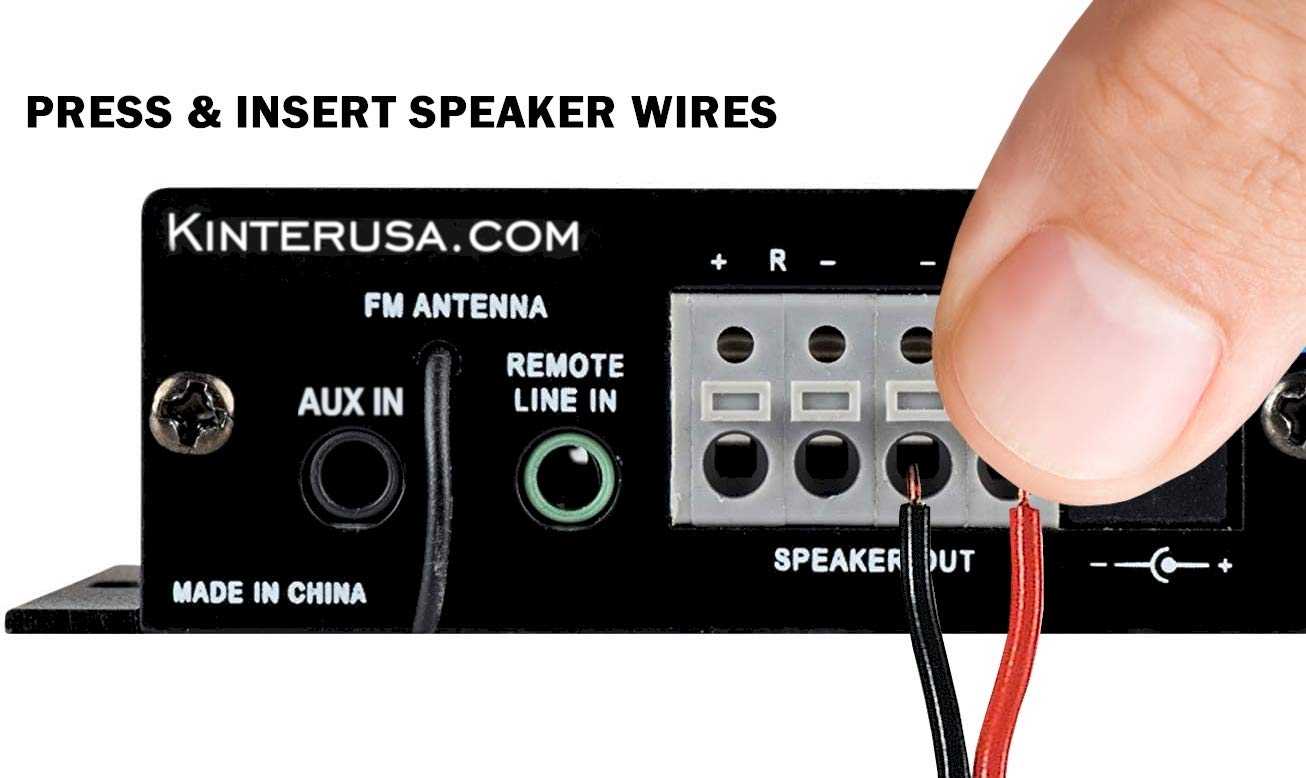
Image: The Kinter A7BT amplifier with its length, width, and height dimensions indicated.
| ميزة | مواصفة |
|---|---|
| رقم الموديل | A7BT |
| عدد القنوات | 2 |
| طاقة الإخراج | 2 x 20W (4Ω, 10% THD Max) |
| حجم الإدخالtage | 9-DC 14.4V |
| تصنيف حجم المدخلاتtage | 12 فولت |
| التيار المدخل المقدر | ≤3A |
| استجابة التردد | 20 هرتز-20 كيلو هرتز |
| معاوقة الخرج | 4-8 أوم |
| نسبة الإشارة إلى الضوضاء (SNR) | ≥80 ديسيبل |
| التشويه التوافقي الكلي (THD) | ≤0.02% 4W |
| نطاق التردد FM | 87.5-108.0 ميجا هرتز |
| Input Impedance (FM) | 47 كيلو أوم |
| الرقابة الخارجية | جهاز التحكم عن بعد بالأشعة تحت الحمراء |
| درجة حرارة التشغيل | 0-46 درجة مئوية (32-115 درجة فهرنهايت) |
| درجة حرارة التخزين | 0-60 درجة مئوية (32-140 درجة فهرنهايت) |
| رطوبة | 10-85% (Operating), 10-95% (Storage) |
| أبعاد العنصر (الطول × العرض × الارتفاع) | 6.4 × 6.4 × 2.5 سم (2.5 × 2.5 × 1 بوصة تقريبًا) |
9. الضمان والدعم
The Kinter A7BT amplifier comes with a one-year warranty from the date of purchase. This warranty covers manufacturing defects under normal use. It does not cover damage caused by misuse, accidents, unauthorized modifications, or improper installation.
For technical support, warranty claims, or any questions regarding your Kinter A7BT amplifier, please visit the official KinterUSA webالموقع أو اتصل بخدمة العملاء الخاصة بهم مباشرة.