
1. المقدمة
This manual provides essential instructions for the safe and effective operation of your Vastar Industrial Endoscope Inspection Camera. Please read this manual thoroughly before use and retain it for future reference. This device is designed for non-destructive inspection in hard-to-reach areas, offering clear visual feedback on its integrated display.
2. انتهى المنتجview
2.1 مكونات
- Main Endoscope Unit with 4.3-inch LCD Screen
- Flexible Camera Probe (5m/16.4ft) with 6 Adjustable LED Lights
- كابل شحن USB
- Accessory Kit (Hook, Magnet, Mirror)
- دليل المستخدم
2.2 الميزات الرئيسية
- عرض: 4.3-inch Full-Color IPS HD LCD Screen
- دقة: Supports 1920x1080P for images and videos
- قطر الكاميرا: 5.5mm ultra-thin lens
- تصنيف مقاومة الماء: IP67 for camera probe and lens
- إضاءة: 6 مصباح LED قابل للتعديل على مسبار الكاميرا
- بطارية: 3000mAh rechargeable battery, providing 5-7 hours of working time
- كابل: Rigid yet flexible cable for easy maneuverability
- تخزين: Supports Micro SD card (not included) for photo and video recording
- متانة: Silicone design for anti-collision and drop resistance

Figure 1: Vastar Industrial Endoscope main unit, flexible probe, and included accessories.

Figure 2: Detailed specifications of the endoscope's cable, lens, resolution, and waterproof rating.
3. الإعداد
3.1 شحن الجهاز
Before first use, fully charge the endoscope unit using the provided USB charging cable. Connect the micro USB end to the device's charging port (usually at the bottom) and the USB-A end to a compatible power adapter (not included).
3.2 إدخال بطاقة الذاكرة الصغيرة (Micro SD)
To save photos and videos, a Micro SD card (FAT32 format, not included) is required. Locate the Micro SD card slot on the side of the device and insert the card until it clicks into place. Ensure the device is powered off before inserting or removing the card.
3.3 إرفاق الملحقات
The endoscope comes with a hook, magnet, and mirror attachment. These can be screwed onto the tip of the camera probe for specific tasks, such as retrieving dropped items or viewing at an angle.

Figure 3: Included accessories: hook, magnet, and mirror, which attach to the camera probe.
4. تعليمات التشغيل
4.1 تشغيل/إيقاف التشغيل
Press and hold the power button (usually located on the side or front panel) for a few seconds to turn the device on. The LCD screen will illuminate. To power off, press and hold the power button again.
4.2 التشغيل الأساسي
Once powered on, the camera feed will display on the 4.3-inch LCD screen. Use the navigation buttons (up, down, left, right, OK) to interact with the menu and settings.
4.3 التقاط الصور وتسجيل مقاطع الفيديو
- التقاط صورة: Short press the photo key (usually indicated by a camera icon).
- تسجيل الفيديو: Long press the photo key to start recording. Long press again to stop recording.
All captured media will be saved to the inserted Micro SD card.
4.4 ضبط إضاءة LED
The camera probe features 6 adjustable LED lights. Use the scroll wheel or dedicated buttons on the side of the main unit to increase or decrease the brightness of these lights. This helps illuminate dark inspection areas.
4.5 Language and Resolution Settings
Access the device's menu to adjust various settings, including:
- دقة: Select desired image/video resolution (e.g., 1920x1080, 1280x720, 640x480).
- لغة: اختر لغتك المفضلة للواجهة.
- سطوع: ضبط سطوع الشاشة.
- تناوب: Rotate the image on the screen.
- شكل: قم بتهيئة بطاقة Micro SD.
- ضبط الوقت: ضبط التاريخ والوقت.
Video 1: Demonstrates basic operation, including inserting an SD card, taking photos, recording videos, and navigating language and resolution settings.
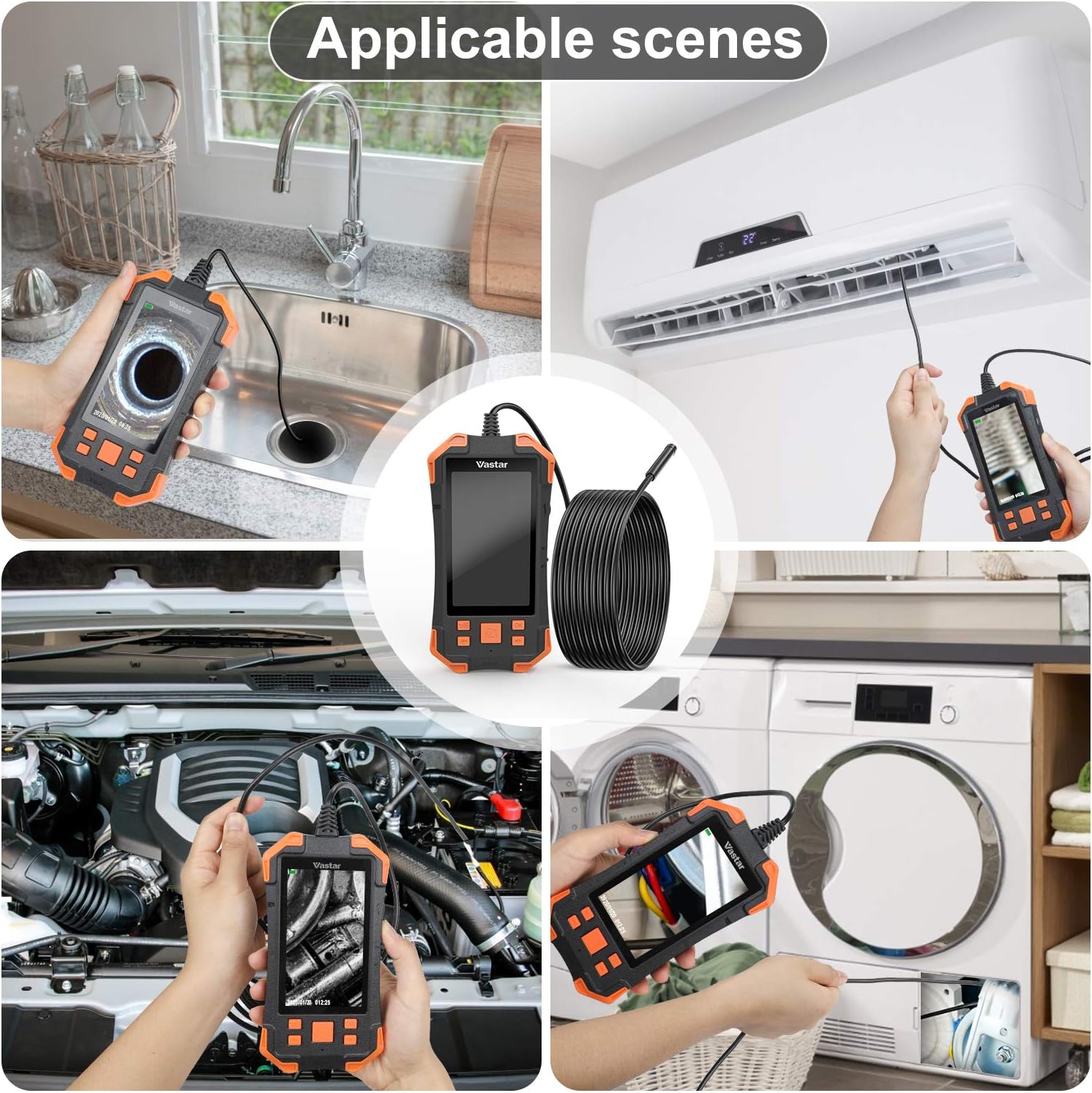
الشكل 4: مثالamples of practical applications for the Vastar Industrial Endoscope, such as inspecting plumbing, HVAC systems, and automotive components.
5. الصيانة
- تنظيف العدسة: Use a soft, dry cloth to gently clean the camera lens. For stubborn dirt, a slightly damp cloth can be used, ensuring no liquid enters the main unit.
- العناية بالبطارية: لإطالة عمر البطارية، تجنب تفريغ الجهاز بالكامل بشكل متكرر. اشحنه بانتظام، حتى لو لم تستخدمه لفترات طويلة.
- تخزين: Store the endoscope in a cool, dry place away from direct sunlight and extreme temperatures. Ensure the camera probe is coiled neatly to prevent damage.
- مسبار مقاوم للماء: While the camera probe is IP67 waterproof, the main unit is not. Avoid submerging the main unit in water.
6. استكشاف الأخطاء وإصلاحها
- لا يوجد طاقة: Ensure the device is fully charged. Check the USB charging cable and adapter.
- صورة ضبابية: The optimal focal area is 1.5 cm to 5 cm from the object. Adjust the distance. Ensure the lens is clean. Adjust LED brightness to avoid overexposure.
- لا يمكن حفظ الصور/الفيديوهات: Ensure a Micro SD card is inserted and formatted correctly (FAT32). Check for sufficient storage space.
- Screen Pixelation: The screen resolution is 480*272P, while the camera can capture higher resolutions. Adjust camera resolution in settings for optimal viewجي أو التسجيل.
- أضواء LED لا تعمل: Check the brightness adjustment wheel/buttons.
7. المواصفات
| ميزة | مواصفة |
|---|---|
| عرض | 4.3-inch IPS HD LCD Screen (480*272P) |
| دقة التقاط الفيديو | 1080p (1920x1080), 1280x720, 640x480 |
| قطر الكاميرا | 5.5 ملم |
| طول الكابل | 5 أمتار (16.4 قدم) |
| تصنيف مقاومة الماء (المسبار) | IP67 |
| أضواء LED | 6 مصابيح LED قابلة للتعديل |
| سعة البطارية | 3000 مللي أمبير قابلة للشحن |
| وقت العمل | 5-7 ساعات |
| Best Focal Area | 1.5 سم - 5 سم |
| نوع الوسائط | Micro SD Card (FAT32 format) |
| وزن العنصر | 1.23 رطل |
| أبعاد الحزمة | 9.06 × 5.04 × 2.52 بوصة |
8. الضمان والدعم
For warranty information and customer support, please refer to the documentation included with your product or contact Vastar customer service directly. Keep your purchase receipt for warranty claims.