
1. المقدمة
This manual provides detailed instructions for the installation, operation, and maintenance of your Axis Communications M3064-V Mini Dome Camera. This camera is designed for indoor surveillance, offering HDTV 720p video quality, dust resistance, and IK08 impact protection. Please read this manual thoroughly before using the product to ensure proper functionality and safety.
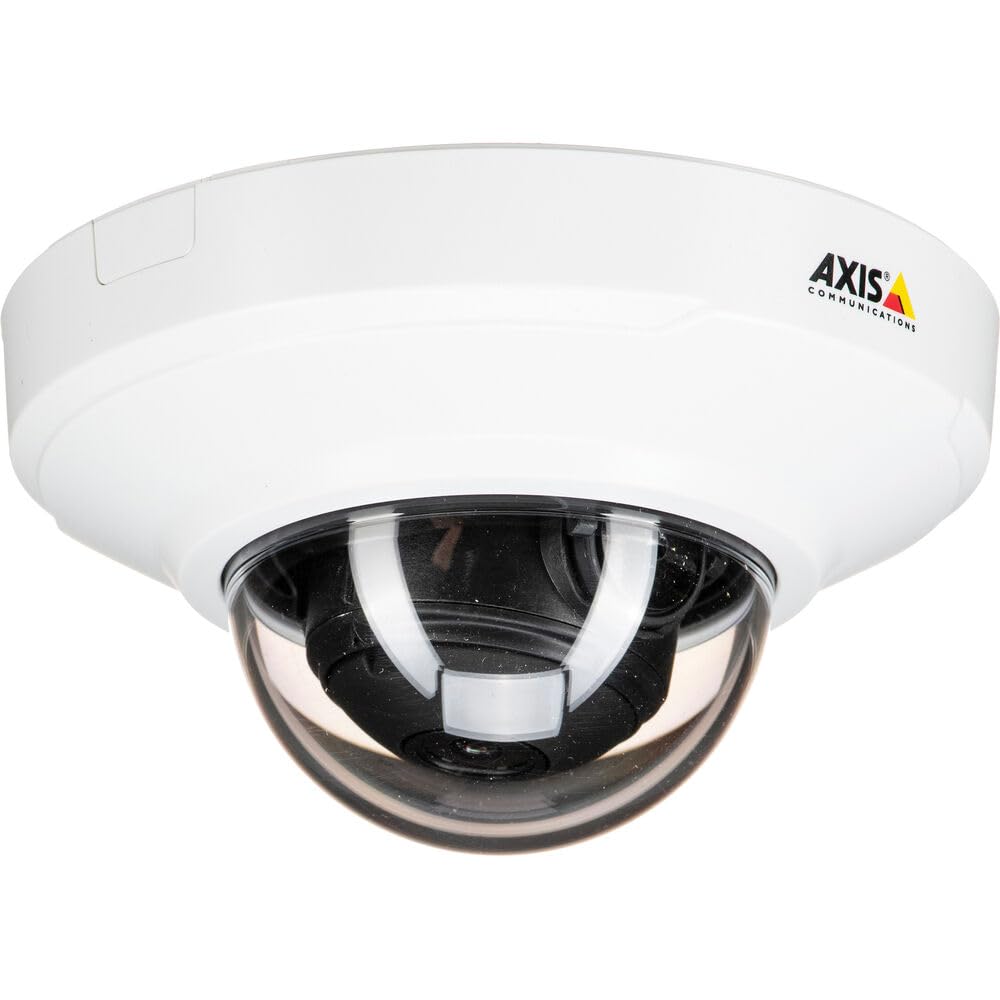
الشكل 1: الجبهة view of the Axis M3064-V Mini Dome Camera. This image shows the compact dome design suitable for discreet indoor surveillance.
2. معلومات السلامة
- مزود الطاقة: Use only the specified power supply (AC/DC, 220 Volts, 1.6 Watts) to prevent damage or fire.
- تثبيت: Installation should be performed by qualified personnel and comply with all local electrical codes. Ensure the mounting surface can support the camera's weight.
- بيئة: This camera is designed for indoor use. While dust-resistant and IK08 rated, avoid exposing it to extreme temperatures, direct water spray, or corrosive substances.
- تنظيف: افصل الكهرباء قبل التنظيف. استخدم قطعة قماش ناعمة وجافة. لا تستخدم منظفات سائلة أو بخاخات.
- الخدمة: لا تحاول خدمة هذا المنتج بنفسك. قم بإحالة جميع أعمال الصيانة إلى أفراد الخدمة المؤهلين.
3. محتويات العبوة
Verify that all items are present in the package. If any items are missing or damaged, contact your supplier.
- Axis M3064-V Mini Dome Camera (1 unit)
- دليل التثبيت
- تزايد شريحة
- مسامير التثبيت ومقابس الحائط
- مفتاح المقاومة على شكل حرف L
4. الإعداد والتثبيت
4.1 تركيب الكاميرا
The Axis M3064-V camera can be mounted on a ceiling or wall. Ensure the mounting surface is stable and can support the camera's weight.
- تحضير السطح: Choose a suitable location. Use the mounting bracket as a template to mark drill holes.
- ثقوب الحفر: Drill pilot holes for the mounting screws. Insert wall plugs if necessary.
- تثبيت القوس: قم بتثبيت دعامة التثبيت على السطح باستخدام البراغي المرفقة.
- توصيل الكابلات: Route the network cable (wired connectivity) through the bracket and connect it to the camera's Ethernet port.
- إرفاق الكاميرا: Secure the camera body to the mounting bracket. Ensure it clicks into place or is fastened according to the specific bracket design.

Figure 2: Illustrative diagram of the camera mounting process on a ceiling. This shows the steps from marking holes to securing the camera.
4.2 تشغيل الطاقة والاتصال بالشبكة
- الاتصال السلكي: Connect an Ethernet cable from your network switch or router to the camera's Ethernet port. The camera supports Power over Ethernet (PoE), simplifying power delivery.
- اتصال واي فاي: The camera supports Wi-Fi connectivity. After initial wired setup, you can configure wireless settings via the camera's web واجهة.
- مزود الطاقة: If not using PoE, connect a compatible AC/DC power adapter (220V, 1.6W) to the camera's power input.
- الوصول الأولي: Once powered, the camera will obtain an IP address from your network (DHCP). Use an Axis IP Utility tool or your network router's client list to find the camera's IP address.
5. تعليمات التشغيل
5.1 Accessing the Camera Interface
افتح web browser (e.g., Chrome, Firefox) and enter the camera's IP address in the address bar. You will be prompted to create a new password for the root user upon first access. Follow the on-screen instructions.
5.2 مباشر View and Video Settings
- يعيش View: The main interface provides a live video feed. You can adjust the viewing angle remotely if the camera supports pan/tilt/zoom (PTZ) functions, though this model features a fixed dome with 3x optical zoom.
- دقة: The camera supports HDTV 720p video capture resolution. You can configure streaming profiles for different quality and frame rate needs.
- الرؤية الليلية: The camera includes Night Color functionality, providing enhanced visibility in low-light conditions. This feature can be configured in the image settings.
- التكبير البصري: Utilize the 3x optical zoom feature through the web interface to focus on specific areas within the 83-degree viewزاوية جي.
5.3 التسجيل والتخزين
تدعم الكاميرا خيارات تسجيل متنوعة:
- التخزين الطرفي: The camera has 128 GB of flash memory installed for local recording. Insert a compatible microSD card (not included) for additional storage.
- مسجل الفيديو الشبكي (NVR): Integrate the camera with an NVR or video management system (VMS) for centralized recording and management.
- التسجيل القائم على الأحداث: Configure motion detection or other event triggers to start recording, saving storage space.
6. الصيانة
6.1 تنظيف الكاميرا
يساعد التنظيف المنتظم في الحفاظ على جودة الصورة المثلى.
- إيقاف التشغيل: Always disconnect the camera from its power source before cleaning.
- عدسة: Gently wipe the lens cover with a soft, lint-free cloth. For stubborn dirt, slightly dampen the cloth with water or a mild lens cleaning solution. Avoid abrasive materials.
- السكن: Wipe the camera housing with a soft, dry cloth. Do not use strong detergents or solvents.
6.2 تحديثات البرامج الثابتة
تحقق دوريًا من اتصالات المحور website for firmware updates. Keeping your camera's firmware up-to-date ensures optimal performance, security, and access to new features. Follow the instructions provided with the firmware update package.
7. استكشاف الأخطاء وإصلاحها
| مشكلة | السبب المحتمل | حل |
|---|---|---|
| الكاميرا لا تعمل | No power supply; Faulty PoE switch/injector; Damaged cable. | Check power connection. Verify PoE functionality. Test with a different Ethernet cable or power adapter. |
| لا يوجد تغذية الفيديو | Network connectivity issue; Incorrect IP address; Firewall blocking access; Camera not configured. | Verify network connection. Confirm camera's IP address. Check firewall settings. Ensure camera is properly configured via its web واجهة. |
| جودة الصورة رديئة | Dirty lens; Incorrect focus; Low light conditions; Network bandwidth issues. | Clean the lens. Adjust focus settings in the web interface. Ensure adequate lighting or verify Night Color settings. Check network bandwidth. |
| لا يمكن الوصول web واجهة | Incorrect IP address; Network issue; Browser compatibility. | Confirm IP address. Ping the camera's IP. Try a different web المتصفح. مسح ذاكرة التخزين المؤقت للمتصفح. |
8. المواصفات
| ميزة | التفاصيل |
|---|---|
| اسم الموديل | M3064-V |
| رقم الموديل | 01716-001 |
| ماركة | أكسيس كوميونيكيشنز |
| عامل الشكل | قبة |
| تكنولوجيا الاتصال | سلكي، واي فاي |
| دقة التقاط الفيديو | 720p (HDTV) |
| دقة ثابتة فعالة | 64 MP (Note: This might refer to sensor resolution, actual video output is 720p) |
| دقة مستشعر الصورة | 5 ميجا بكسل |
| Viewزاوية جي | 83 درجة |
| التكبير البصري | 3x |
| الرؤية الليلية | لون الليل |
| تصنيف مقاومة الماء | IP42 (Dust-resistant) |
| حماية من الصدمات | اي كيه08 |
| مصدر الطاقة | AC/DC, PoE |
| المجلدtage | 220 فولت |
| واتtage | 1.6 واط |
| حجم ذاكرة الفلاش المثبتة | 128 جيجا بايت |
| أبعاد العنصر (LxWxH) | 3.98 × 3.98 × 2.2 بوصة |
| وزن العنصر | 150 جرام |
| لون | اسود / ابيض |
9. الضمان والدعم
9.1 ضمان المنتج
Axis Communications products typically come with a limited manufacturer's warranty. Please refer to the warranty card included with your product or visit the official Axis Communications website for detailed warranty terms and conditions specific to the M3064-V model. Keep your proof of purchase for warranty claims.
9.2 الدعم الفني
For technical assistance, troubleshooting beyond this manual, or service inquiries, please contact Axis Communications customer support. You can find contact information, FAQs, and additional resources on the official Axis Communications support website. When contacting support, please have your product model number (M3064-V or 01716-001) and serial number ready.
الموارد المتاحة على الإنترنت: www.axis.com/support


