
1. المقدمة وما فوقview
The TP-Link AX1500 Wi-Fi 6 Range Extender, model RE505X, is designed to expand your existing Wi-Fi network coverage, eliminating dead zones and providing a stronger, more reliable wireless signal throughout your home or office. Utilizing the latest Wi-Fi 6 technology, it offers faster speeds, increased capacity, and reduced network congestion for a smoother online experience. This device supports dual-band Wi-Fi, operating on both 2.4 GHz and 5 GHz frequencies, and is compatible with any standard Wi-Fi router or access point. It also features a Gigabit Ethernet port for wired connections and supports TP-Link OneMesh for seamless whole-home coverage.
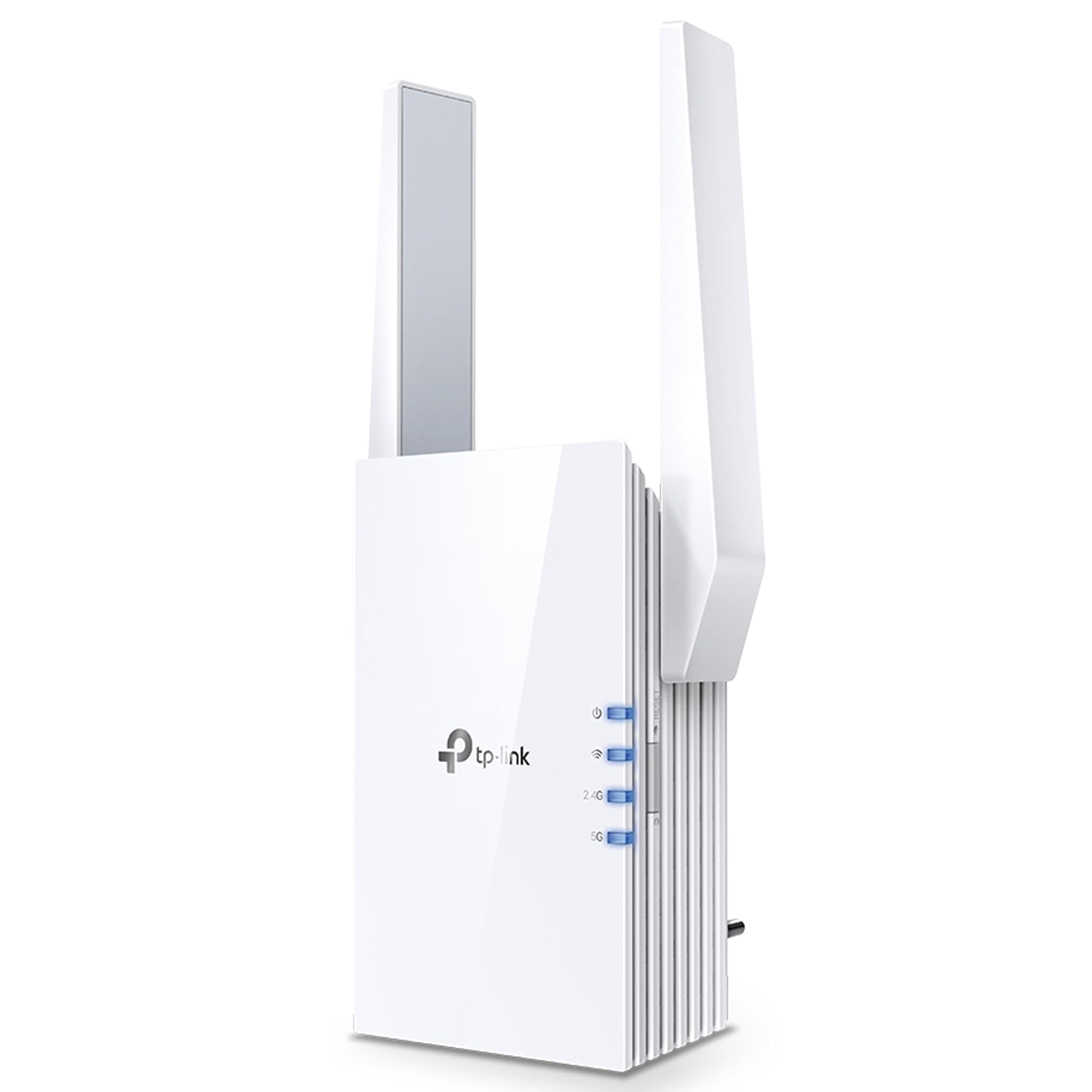
الصورة 1.1: أمام view of the TP-Link RE505X Wi-Fi 6 Range Extender, showing its compact design and indicator lights.
2. ماذا يوجد في الصندوق
تأكد من أن الحزمة الخاصة بك تحتوي على العناصر التالية:
- TP-Link RE505X Wi-Fi Range Extender
- دليل التثبيت السريع

الصورة 2.1: The retail box for the TP-Link RE505X, indicating the product and its key features.
3. مواصفات المنتج
- تقنية Wi-Fi 6: Equipped with the latest wireless technology for faster speeds, greater capacity, and reduced network congestion.
- سرعات النطاق المزدوج: Offers up to 1.5 Gbps (1200 Mbps on 5 GHz and 300 Mbps on 2.4 GHz) for smooth streaming, gaming, and downloading.
- متوافق مع OneMesh: Creates a seamless Mesh network when connected to a OneMesh router, providing whole-home coverage with a single Wi-Fi name.
- منفذ جيجابت إيثرنت: Provides a fast-wired connection for devices like smart TVs, computers, and gaming consoles.
- ضوء الإشارة الذكي: Helps determine the optimal placement for the extender by indicating the signal strength from your router.
- وضع AP: Functions as an access point, converting a wired internet connection into a dual-band wireless signal.
- تطبيق TP-Link Tether: Allows easy setup and management of your network from any iOS or Android mobile device.
- التوافق العالمي: Extends the range of any standard Wi-Fi router or wireless access point.

الصورة 3.1: جانب view of the RE505X, highlighting the Gigabit Ethernet port for wired connections.
4. الإعداد
The RE505X offers two primary methods for setup: using the TP-Link Tether app or via a web المتصفح.
4.1. Setup via TP-Link Tether App (Recommended)
- تنزيل تطبيق Tether: بحث عن "TP-Link Tether" in the Apple App Store or Google Play Store and install the app on your mobile device.
- تشغيل الطاقة: وصّل جهاز RE505X بمأخذ كهربائي قريب من جهاز التوجيه الرئيسي. انتظر حتى يضيء مؤشر الطاقة باللون الأزرق الثابت.
- الاتصال بالموسع: Connect your mobile device to the RE505X's Wi-Fi network (e.g., "TP-Link_Extender"). No password is required for the initial connection.
- إطلاق التطبيق: Open the Tether app. The app will detect your extender. Follow the on-screen instructions to select your host Wi-Fi network and set up the extended network.
- الوضع الأمثل: Use the Intelligent Signal Light on the extender to find the best location. A solid blue light indicates a good connection, while a red light suggests moving closer to the router.

الصورة 4.1: The TP-Link Tether app interface, demonstrating the simple steps for setting up and managing the range extender.
4.2. الإعداد عبر Web المتصفح
- تشغيل الطاقة: وصّل جهاز RE505X بمأخذ كهربائي قريب من جهاز التوجيه الرئيسي. انتظر حتى يضيء مؤشر الطاقة باللون الأزرق الثابت.
- الاتصال بالموسع: Connect your computer or mobile device to the RE505X's Wi-Fi network (e.g., "TP-Link_Extender").
- وصول Web الواجهة: افتح web المتصفح والنوع http://tplinkrepeater.net or http://192.168.0.254 into the address bar. Create a login password when prompted.
- اتبع التعليمات: Follow the on-screen instructions to select your host Wi-Fi network and configure the extended network settings.
- الوضع الأمثل: Relocate the extender to a suitable position between your router and the Wi-Fi dead zone. Ensure the Intelligent Signal Light is solid blue for optimal performance.
5. تشغيل موسع نطاق الشبكة
Once set up, the RE505X operates to extend your Wi-Fi coverage. Here are key operational aspects:
5.1. Extended Network Connection
Your devices can connect to the extended network using the same Wi-Fi name (SSID) as your main router if OneMesh is enabled, or a new SSID if configured manually. The extender will automatically choose the best band (2.4 GHz or 5 GHz) for your devices.

الصورة 5.1: A diagram showing how the RE505X extends Wi-Fi coverage throughout a multi-story home, eliminating dead zones.
5.2. وظائف OneMesh
If your main router supports TP-Link OneMesh, the RE505X can join the Mesh network. This creates a unified network with a single Wi-Fi name, allowing your devices to seamlessly roam between the router and extender without disconnections. To enable OneMesh, ensure your TP-Link router's firmware is updated to the OneMesh version.
5.3. وضع نقطة الوصول (AP)
The RE505X can also function as a wireless access point. Connect an Ethernet cable from your router (or any wired network source) to the Gigabit Ethernet port on the RE505X. The extender will then broadcast a new dual-band Wi-Fi network, converting your wired connection into a high-speed wireless signal.

الصورة 5.2: Illustration of the RE505X operating in Access Point mode, converting a wired connection into a wireless network.
5.4. Gigabit Ethernet Port Usage
The Gigabit Ethernet port can be used to provide a stable wired connection to a device such as a desktop computer, smart TV, or game console, even when the extender is operating wirelessly.
6. الصيانة
To ensure optimal performance and longevity of your RE505X, consider the following maintenance tips:
- تحديثات البرامج الثابتة: التحقق بانتظام من تحديثات البرامج الثابتة وتثبيتها عبر تطبيق Tether أو web واجهة الإدارة. غالبًا ما تتضمن التحديثات تحسينات في الأداء، وتصحيحات أمنية، وميزات جديدة.
- الوضع الأمثل: Periodically re-evaluate the extender's placement using the Intelligent Signal Light to ensure it maintains a strong connection to your router, especially if your network layout changes.
- تنظيف: حافظ على نظافة الجهاز وخلوه من الغبار. استخدم قطعة قماش ناعمة وجافة لمسح السطح الخارجي. تجنب استخدام المنظفات السائلة أو المواد الكاشطة.
- تهوية: Ensure the extender's ventilation slots are not obstructed to prevent overheating.
- إعادة تشغيل: If you experience intermittent issues, try restarting the extender by unplugging it from the power outlet for 10 seconds and then plugging it back in.
7. استكشاف الأخطاء وإصلاحها
If you encounter issues with your RE505X, refer to the following common troubleshooting steps:
7.1. عدم توفر اتصال بالإنترنت بعد الإعداد
- التحقق من ضوء الإشارة: Ensure the Intelligent Signal Light on the extender is solid blue. If it's red or off, the connection to your router is weak or non-existent. Relocate the extender closer to your router.
- التحقق من اتصال جهاز التوجيه: تأكد من أن جهاز التوجيه الرئيسي الخاص بك يعمل بشكل صحيح ويوفر الوصول إلى الإنترنت.
- إعادة التهيئة: Try re-configuring the extender using the Tether app or web واجهة.
7.2. Frequent Disconnections or Unstable Connection
- الوضع الأمثل: The most common cause of instability is poor placement. Ensure the extender is positioned where the Intelligent Signal Light is solid blue. Avoid placing it near large metal objects, concrete walls, or other electronic devices that may cause interference.
- تدخل: Other wireless devices (cordless phones, microwaves, Bluetooth devices) can cause interference. Try changing the Wi-Fi channel on your main router.
- تحديث البرامج الثابتة: تأكد من تحديث برنامج جهاز التمديد.
- مشاكل جهاز التوجيه: Check if your main router is experiencing issues.
7.3. نسيت Web كلمة مرور الإدارة
إذا نسيت كلمة المرور الخاصة بـ web management interface, you will need to reset the extender to factory default settings. Locate the Reset button (usually a small pinhole) on the extender, press and hold it for about 5-10 seconds until the LEDs flash, then release. The extender will restart with default settings, and you can set up a new password during the re-configuration process.
7.4. Slow Speeds on Extended Network
- الموقع: Ensure the extender is placed optimally. While extending range, some speed reduction is normal, but poor placement can severely impact it.
- اختيار فرقة: For high-bandwidth activities, ensure your devices are connecting to the 5 GHz band if possible.
- ازدحام الشبكة: Too many devices on the network or heavy internet usage can slow down speeds.
8. المواصفات
| ميزة | التفاصيل |
|---|---|
| ماركة | تي بي لينك |
| رقم الموديل | RE505X |
| معيار الاتصال اللاسلكي | 802.11ax (Wi-Fi 6), 802.11ac |
| معدل نقل البيانات | حتى 1500 ميجابت في الثانية (1200 ميجابت في الثانية على 5 جيجاهرتز، 300 ميجابت في الثانية على 2.4 جيجاهرتز) |
| فئة نطاق التردد | النطاق المزدوج (2.4 جيجاهرتز، 5 جيجاهرتز) |
| المميزات الخاصة | Wi-Fi 6, Gigabit Port, OneMesh Compatible, AP Mode, Intelligent Signal Light, Tether App |
| الأجهزة المتوافقة | Smartphone, PC, Gaming Consoles, Smart TVs |
| يتراوح | Up to 1500 square feet (approximate) |
| نوع الموصل | RJ45 (جيجابت إيثرنت) |
| وزن العنصر | 380 جرام |
| أبعاد المنتج (العمق × العرض × الارتفاع) | 4.6 عمق × 7.4 عرض × 12.5 ارتفاع سنتيمتر |
9. الضمان والدعم
9.1. معلومات الضمان
The TP-Link RE505X comes with a standard warranty. Please refer to the specific warranty terms provided with your product or on the official TP-Link website for detailed information regarding coverage and duration.
9.2. دعم العملاء
For technical assistance, troubleshooting, or warranty claims, please contact TP-Link customer support:
- Toll-Free Support (India): 1800-209-4168
- دعم البريد الإلكتروني: support.in@tp-link.com
- جهة اتصال الشركة المصنعة: TP-Link Systems Inc. 10 Mauchly, Irvine, CA 92618, USA or TP-Link India Private Limited Office No.1, Tower 2, Level 2, Raiaskaran Tech Park, Andheri Kurla Road, M.V Road, Andheri East-400072
يمكنك أيضًا زيارة موقع TP-Link الرسمي website for FAQs, updated drivers, and additional support resources.