
مقدمة
This manual provides essential information for the safe and efficient operation of your Domo DO157A Tower Fan. Please read these instructions carefully before use and retain them for future reference.
The Domo DO157A is a versatile appliance combining the functions of an air cooler, fan, and humidifier, designed to enhance your indoor comfort.

الصورة: الجبهة view of the Domo DO157A Tower Fan.
معلومات السلامة
يجب عليك دائمًا مراعاة احتياطات السلامة الأساسية عند استخدام الأجهزة الكهربائية لتقليل خطر الحريق والصدمات الكهربائية والإصابة الشخصية.
- تأكد من مستوى الصوتtagيتوافق e المشار إليه على الجهاز مع مجلد التيار الكهربائي المحليtagقبل الاتصال.
- لا تغمر الجهاز أو القابس أو السلك في الماء أو السوائل الأخرى.
- Unplug from the outlet when not in use, before cleaning, or before moving the appliance.
- احتفظ بالجهاز بعيدًا عن متناول الأطفال.
- لا تقم بتشغيل أي جهاز بسلك أو قابس تالف، أو بعد حدوث عطل في الجهاز أو تعرضه للتلف بأي شكل من الأشكال.
- Refer to the official safety document for detailed safety guidelines: معلومات السلامة (PDF).
مكونات المنتج
Familiarize yourself with the main parts of your Domo DO157A Tower Fan:
- Main Unit (Tower Fan)
- 7 لتر خزان المياه
- Washable Filter System (Honeycomb Cooling Membrane)
- جهاز التحكم عن بعد
- Coolpack (for enhanced cooling)
- لوحة تحكم مع شاشة LED
صورة: View of the tower fan with the filter system removed, showing the honeycomb cooling membrane.
يثبت
- فك التعبئة: Carefully remove the appliance from its packaging. Retain packaging for storage or disposal.
- الموقع: Place the tower fan on a firm, level surface. Ensure there is adequate space around the unit for proper airflow.
- تعبئة خزان المياه:
- اسحب خزان المياه من الجزء الخلفي السفلي للوحدة.
- Fill the 7-liter water tank with clean, cold water. For enhanced cooling, place the included Coolpack (after freezing) into the water tank.
- Ensure the water level does not exceed the maximum fill line.
- أدخل خزان الماء مرة أخرى في الوحدة حتى تسمع صوت طقطقة عند تثبيته في مكانه.
- توصيل الطاقة: قم بتوصيل سلك الطاقة بمأخذ كهربائي مناسب (230 فولت).
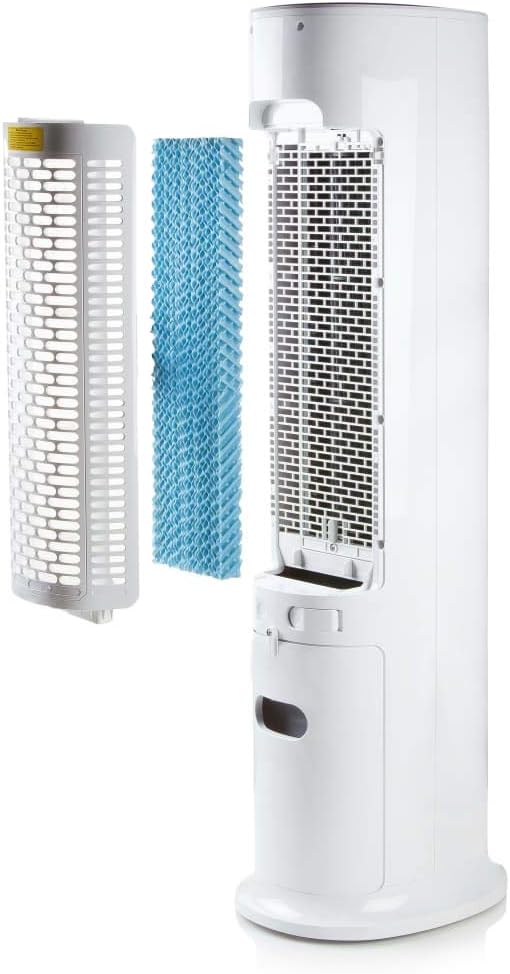
Image: Demonstrating the process of filling the water tank of the tower fan.
تعليمات التشغيل
The Domo DO157A can be operated using the control panel on top of the unit or the included remote control.
لوحة التحكم ووظائف التحكم عن بعد

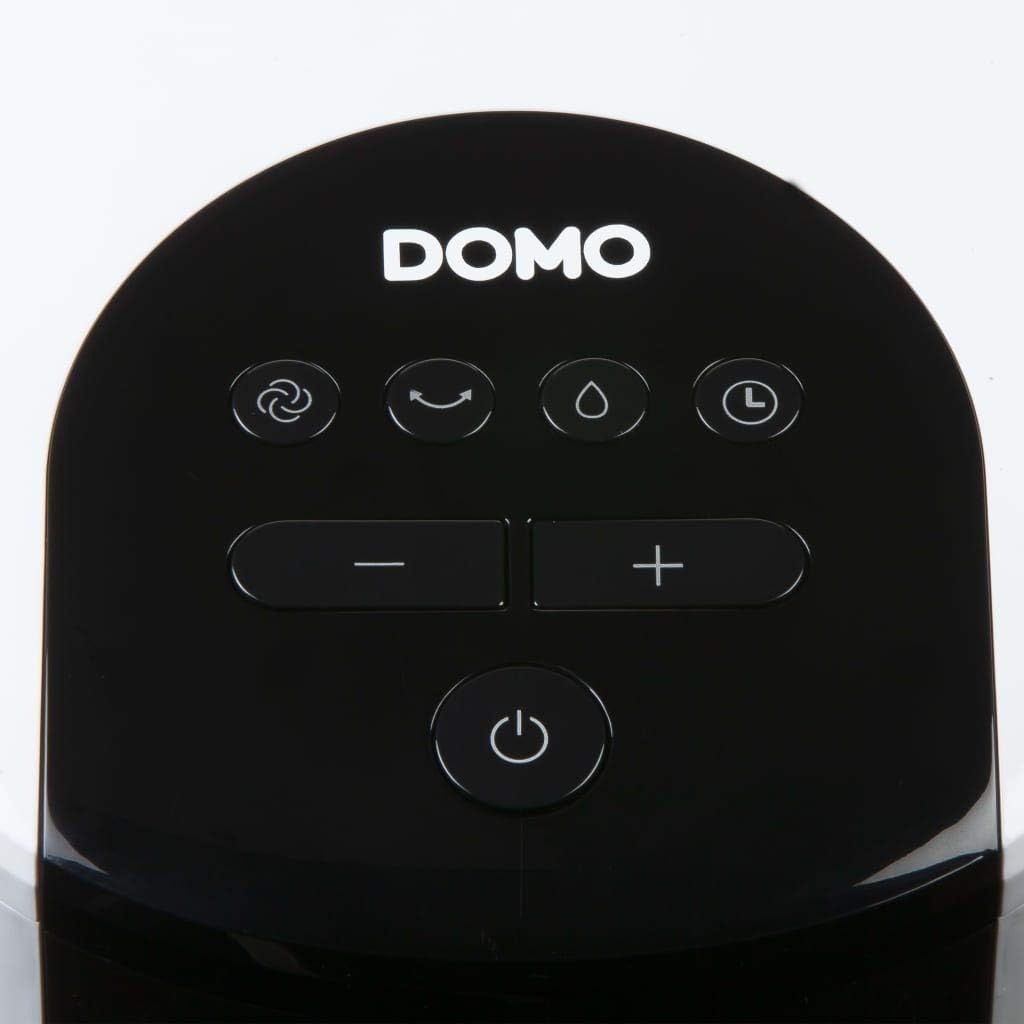
الصورة: عن قرب view of the control panel on the top of the tower fan.
- زر الطاقة (⏻): يقوم بتشغيل الوحدة أو إيقاف تشغيلها.
- زر الوضع (☺): Cycles through 3 ventilation modes:
- طبيعي: تدفق هواء ثابت بالسرعة المحددة.
- طبيعي >> صفة: يحاكي النسيم الطبيعي بسرعات مروحة متفاوتة.
- ينام: Reduces fan speed and noise for quiet operation during sleep.
- Speed Buttons (- / +): ضبط سرعة المروحة (4 مستويات).
- Cooling/Humidifier Button (💧): Activates or deactivates the air cooling and humidifying function. This function requires water in the tank.
- زر المؤقت (⏱): Sets the operating timer for up to 10 hours. Each press adds 1 hour.
- زر التذبذب (↻): Activates or deactivates the oscillation function, allowing the fan to rotate and distribute air over a wider area.
التشغيل الأولي
- Press the Power button to turn on the unit. The default mode is usually Normal.
- Use the Speed buttons to select your desired fan speed (1-4).
- To activate cooling/humidifying, press the Cooling/Humidifier button. Ensure the water tank is filled.
- Select a ventilation mode (Normal, Natural, Sleep) using the Mode button.
- Press the Oscillation button for wider air distribution.
- Set the timer if desired using the Timer button.

Image: The tower fan operating in a living room, illustrating the airflow direction.
صيانة
تضمن الصيانة المنتظمة الأداء الأمثل وتطيل عمر جهازك.
تنظيف الجزء الخارجي
- افصل الوحدة دائمًا قبل التنظيف.
- امسحي الأسطح الخارجية بقطعة ناعمة ، دamp القماش. لا تستخدم المنظفات أو المذيبات الكاشطة.
- تأكد من عدم دخول الماء إلى المكونات الداخلية.
تنظيف خزان المياه
- قم بإزالة خزان المياه من الوحدة.
- تفريغ أي مياه متبقية.
- Clean the tank with mild soap and water. Rinse thoroughly.
- اترك الخزان يجف تماماً في الهواء قبل إعادة إدخاله.
- Clean the water tank regularly, especially if using the humidifying function frequently, to prevent mold or mildew buildup.
تنظيف نظام الفلتر
- The high-quality filter system is washable.
- Carefully remove the filter (honeycomb cooling membrane) from the unit as shown in the "Product Components" section.
- اشطف الفلتر تحت الماء الجاري لإزالة الغبار والحطام.
- اترك الفلتر حتى يجف تمامًا قبل إعادة إدخاله في الوحدة.
- Regular cleaning of the filter is recommended, especially for allergy sufferers, to maintain hygiene and efficiency.
استكشاف الأخطاء وإصلاحها
If you encounter issues with your Domo DO157A, refer to the following common problems and solutions:
| مشكلة | السبب المحتمل | حل |
|---|---|---|
| الوحدة لا تعمل. | لا يوجد مصدر للطاقة. | تأكد من توصيل سلك الطاقة بشكل آمن بمأخذ كهربائي يعمل. |
| لا يوجد تأثير تبريد. | Water tank is empty or cooling function is not activated. | Fill the water tank. Press the Cooling/Humidifier button to activate the function. Ensure Coolpack is frozen and placed in the tank if desired. |
| تدفق الهواء ضعيف. | Fan speed is too low; air filter is dirty. | Increase the fan speed. Clean the air filter as per maintenance instructions. |
| رائحة كريهة. | Stagnant water in the tank or dirty filter. | Empty and clean the water tank. Clean the filter. Use fresh water. |
تحديد
| ميزة | التفاصيل |
|---|---|
| ماركة | دومو |
| اسم النموذج/الرقم | DO157A |
| يكتب | Tower Fan, Air Cooler, Humidifier |
| مادة | بلاستيك |
| نوع التركيب | قائما بذاته |
| لون | أبيض |
| سعة تدفق الهواء | 294.29 Cubic Feet per Minute (500 m³/h) |
| نوع التحكم | جهاز تحكم عن بعد، لوحة تحكم مدمجة |
| سعة خزان المياه | 7 لتر |
| مساحة الأرضية الموصى بها | 25 متر مربع |
| وزن المنتج | 11.2 كيلوغرام |
| واتtage | 65 واط |
| مستوى الضوضاء | 40 ديسيبل |
| عدد السرعات | 4 |
| المجلدtage | 230 فولت |
| الأبعاد (D x W x H) | 34 سم × 26 سم × 106.5 سم |
| الموقت | تصل إلى 10 ساعة |
| طرق التهوية | عادي، طبيعي، نوم |
| المميزات الخاصة | Sleep mode, Washable filter system, Oscillation, Coolpack included |
الضمان والدعم
For warranty information, please refer to the documentation provided with your purchase or contact Domo customer support. Keep your proof of purchase for warranty claims.
If you require further assistance or have questions not covered in this manual, please contact Domo customer service through their official webالموقع الإلكتروني أو بيانات الاتصال المرفقة مع منتجك.