
1. انتهى المنتجview
The ALINCO DJ-VX50HE is a robust VHF/UHF FM portable transceiver designed for reliable communication. It features a dual-band, semi-duplex operation with a screen and keypad offering three selectable colors for enhanced visibility. The device is IP67 compliant, providing dust and water resistance, making it suitable for various environments. With 200 memory channels, it supports any combination of VHF/UHF frequencies. Advanced features include VOX (Voice Operated Transmit), alphanumeric channel labels, and direct frequency input from the keypad. Professional-level signaling functions and a variety of wide and narrow FM scan modes are also integrated.

الشكل 1: الأمام والجانب والخلف views of the ALINCO DJ-VX50HE portable transceiver.
2. دليل الإعداد
2.1. تركيب البطارية
- تأكد من إيقاف تشغيل جهاز الإرسال والاستقبال.
- Align the battery pack with the battery compartment on the back of the transceiver.
- أدخل حزمة البطارية برفق في مكانها حتى تسمع صوت طقطقة عند تثبيتها بإحكام.
2.2. ملحق الهوائي
- Locate the antenna connector on the top of the transceiver.
- قم بربط الهوائي المرفق باتجاه عقارب الساعة على الموصل حتى يصبح محكماً باليد. لا تفرط في إحكام الربط.
2.3. مشبك تثبيت الحزام
- Identify the screw holes on the back of the transceiver, typically above the battery compartment.
- Position the belt clip over these holes and secure it with the provided screws.
2.4. شحن البطارية
- Connect the AC adapter to the charging cradle.
- Place the transceiver (with battery installed) into the charging cradle.
- Ensure the charging indicator light on the cradle illuminates, indicating proper charging.
- A full charge typically takes several hours. Refer to the indicator light for charge status.
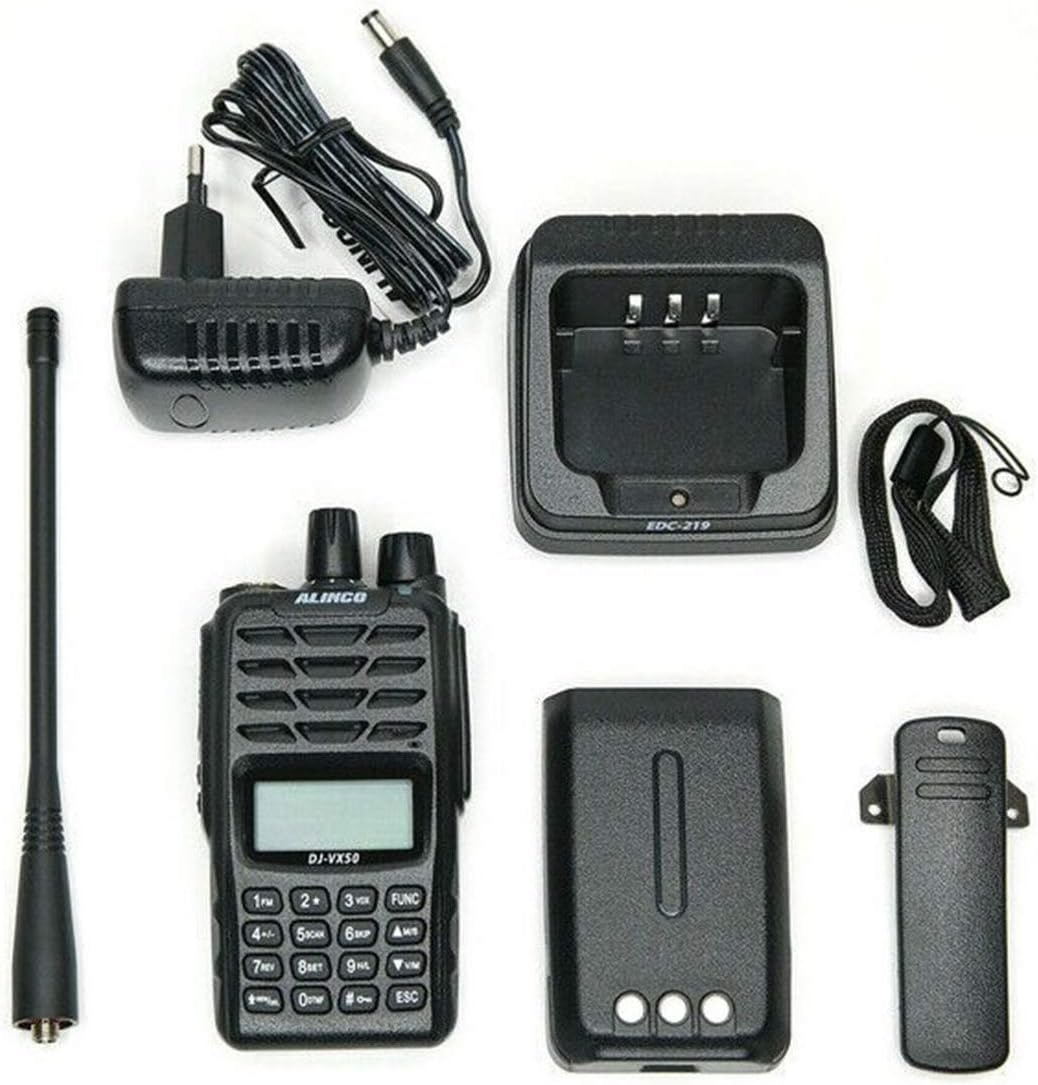
Figure 2: Included components: transceiver, battery, antenna, charging cradle, AC adapter, and belt clip.
3. تعليمات التشغيل
3.1. تشغيل/إيقاف التشغيل والتحكم في مستوى الصوت
- To power on, rotate the top-mounted power/volume knob clockwise until you hear a click and the display illuminates.
- To adjust volume, continue rotating the same knob. Clockwise increases volume, counter-clockwise decreases it.
- لإيقاف التشغيل، قم بتدوير المقبض عكس اتجاه عقارب الساعة حتى تسمع صوت طقطقة.
3.2. اختيار التردد والقناة
- إدخال التردد المباشر: Use the numeric keypad to enter desired frequencies directly.
- وضع القناة: Press the 'VFO/MR' button to switch between VFO (Variable Frequency Oscillator) mode for direct frequency input and Memory Recall (MR) mode for stored channels.
- التنقل في القناة: In MR mode, use the UP/DOWN arrow keys to scroll through programmed memory channels.
3.3. التشغيل ثنائي النطاق
The DJ-VX50HE supports dual-band operation (VHF/UHF). Use the 'BAND' button to switch between the VHF and UHF bands. The display will indicate the active band.
3.4. وظيفة VOX (الإرسال الصوتي)
The VOX function allows for hands-free transmission. When activated, the transceiver will automatically transmit when it detects your voice. Refer to the menu settings to enable/disable VOX and adjust its sensitivity.
3.5. أوضاع المسح الضوئي
The transceiver offers various scanning modes to monitor frequencies. These include wide and narrow FM TX/RX scanning. Consult the full manual for detailed instructions on activating and customizing scan parameters.

Figure 3: The ALINCO DJ-VX50HE features a multi-color selectable screen backlight for improved visibility in various conditions.
4. الصيانة
4.1. التنظيف
Regularly clean the transceiver with a soft, damp cloth. Do not use harsh chemicals or abrasive cleaners. Ensure all ports are dry before use, especially after exposure to water or dust.
4.2. العناية بالبطارية
To prolong battery life, avoid overcharging or completely discharging the battery. Store the battery in a cool, dry place when not in use for extended periods. Replace the battery if you notice a significant decrease in operating time.
4.3. العناية بالهوائي
Ensure the antenna is securely attached but not overtightened. Avoid bending or stressing the antenna, as this can affect performance and cause damage.
5. استكشاف الأخطاء وإصلاحها
| مشكلة | السبب المحتمل | حل |
|---|---|---|
| Transceiver does not power on. | البطارية فارغة أو غير مثبتة بشكل صحيح. | قم بشحن البطارية أو إعادة تثبيتها بشكل صحيح. |
| No reception or poor audio quality. | Antenna not attached, incorrect frequency/channel, or low signal strength. | Ensure antenna is attached. Verify frequency/channel settings. Move to an area with better signal. |
| لا يمكن الإرسال. | Incorrect frequency, low battery, or transmit power setting. | Check frequency for transmit capability. Ensure battery is charged. Adjust transmit power in settings. |
| لوحة المفاتيح لا تستجيب. | قفل لوحة المفاتيح مُفعّل. | Deactivate keypad lock (refer to the full manual for specific key combination). |
6. المواصفات الفنية
- Frequency Coverage RX FM: 136-174 ميجا هرتز / 400-470 ميجا هرتز
- Frequency Coverage RX WFM: 76-107.95 ميجا هرتز
- Frequency Coverage RX AM: 118-135.99 ميجا هرتز
- Frequency Coverage TX: 136-174 ميجا هرتز / 400-470 ميجا هرتز
- عدد القنوات: 200
- تعديل: F3E (16K0F3E/11K0F3E/RX only WFM/AM)
- تباعد القنوات: 2.5، 5، 6.25، 10، 12.5، 15، 20، 25، 30، 50 كيلو هرتز
- متطلبات الطاقة: 7.4 V (Battery)
- الاستهلاك الحالي (تقريبًا): 1500 mA TX / 300 mA Receive (max audio output) / 80 mA (squelched)
- استقرار التردد: 2.5 جزء في المليون
- Usable Temperature Range: -20 درجة مئوية إلى +60 درجة مئوية
- Dimensions (with battery): 118 × 59 × 38 ملم
- Weight (including battery and antenna): حوالي 230 جرام
- Receiver System: التحويل المباشر
- Receiver Sensitivity (12 dB SINAD Wide/Narrow): Wide -12 dBu / Narrow 9 dBu
- انتقائية القناة المجاورة: Wide > 65 dB / Narrow > 60 dB
- قوة إخراج الصوت: 1 W (10% distortion)
- Transmitter Output Power (approx.): 5 W (VHF) / 4 W (UHF) / 2 W / 1 W
- انحراف التردد: 5 كيلو هرتز / 2.5 كيلو هرتز
- الانبعاثات الزائفة: Less than -27 dBm
- مستوى مقاومة الماء: Waterproof (IP67 compliant)
7. ماذا يوجد في الصندوق
- ALINCO DJ-VX50HE Portable Transceiver
- بطارية ليثيوم أيون
- هوائي
- حامل الشحن
- محول التيار المتردد
- مشبك الحزام
8. الضمان والدعم
The ALINCO DJ-VX50HE comes with a standard manufacturer's warranty. For specific warranty terms, duration, and conditions, please refer to the warranty card included with your product or visit the official ALINCO website. For technical support, service, or inquiries, please contact ALINCO customer service through their official channels. Keep your purchase receipt as proof of purchase for warranty claims.