
1. المقدمة
Thank you for choosing the GLIDiC Sound Air TW-5000s True Wireless Earbuds. This manual provides essential information for setting up, operating, and maintaining your new earbuds. Please read it carefully before use to ensure optimal performance and longevity of your device.

The GLIDiC Sound Air TW-5000s True Wireless Earbuds are shown alongside their compact charging case. The earbuds feature a sleek, in-ear design, while the case is a small, square unit designed for portability and convenient charging.
2. محتويات العبوة
تأكد من تضمين جميع العناصر التالية في الحزمة الخاصة بك:
- GLIDiC Sound Air TW-5000s True Wireless Earbuds (Left and Right)
- حافظة الشحن
- كابل شحن USB
- أطراف أذن بأحجام متعددة (صغير، متوسط، كبير)
- دليل التعليمات
3. انتهى المنتجview
The GLIDiC Sound Air TW-5000s earbuds are designed for comfort and high-quality audio. Each earbud features a multifunction button for control and an LED indicator light. The compact charging case provides extended battery life and has its own LED indicator to show its charge level.
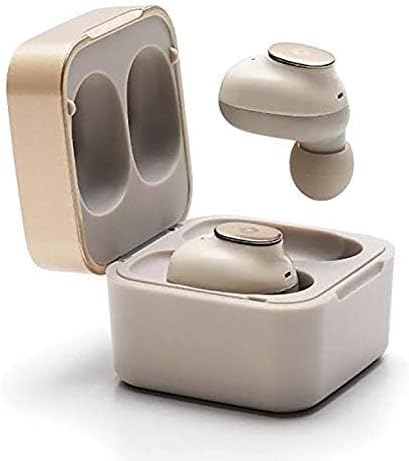
This image displays the GLIDiC TW-5000s earbuds securely placed within their open charging case. The case is designed to hold and charge both earbuds, ensuring they are ready for use.
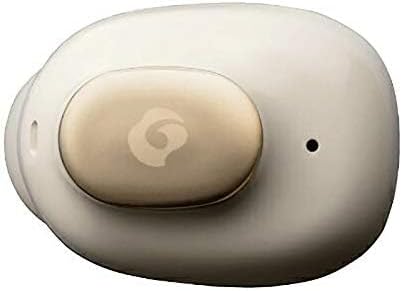
تفصيلية view of a single GLIDiC TW-5000s earbud, highlighting its ergonomic shape and the subtle branding on its surface. This design ensures a comfortable and secure fit within the ear.

الجزء الخلفي view of a GLIDiC TW-5000s earbud, revealing the charging contacts and the 'R' (Right) indicator. These contacts align with the charging pins inside the case.
4. الإعداد
4.1 الشحن الأولي
- ضع كلتا سمّاعات الأذن في علبة الشحن.
- قم بتوصيل كابل الشحن USB بمنفذ الشحن الموجود على العلبة ومصدر الطاقة.
- The LED indicator on the case will illuminate to show charging status. Ensure both earbuds and the case are fully charged before first use.
4.2 الاقتران بجهازك
- افتح علبة الشحن. ستدخل سماعات الأذن تلقائيًا في وضع الاقتران، ويُشار إلى ذلك بأضواء LED الوامضة على سماعات الأذن.
- على جهازك (الهاتف الذكي، الجهاز اللوحي، وما إلى ذلك)، قم بتمكين البلوتوث.
- بحث عن available Bluetooth devices and select "GLIDiC TW-5000s" from the list.
- Once connected, the earbud LED indicators will stop flashing or show a steady light.
5. تعليمات التشغيل
The GLIDiC Sound Air TW-5000s earbuds feature multifunction buttons on each earbud for control. Note that these are physical buttons requiring a press, not touch-sensitive controls.
5.1 تشغيل/إيقاف التشغيل
- تشغيل الطاقة: افتح علبة الشحن، أو اضغط مع الاستمرار على الزر متعدد الوظائف الموجود على كل سماعة أذن لمدة ثانيتين.
- إيقاف التشغيل: Place earbuds back into the charging case and close the lid, or press and hold the multifunction button on each earbud for 5 seconds.
5.2 تشغيل الموسيقى
- تشغيل/إيقاف مؤقت: Press the multifunction button on either earbud once.
- المسار التالي: اضغط مرتين على الزر متعدد الوظائف الموجود على سماعة الأذن اليمنى.
- المسار السابق: اضغط مرتين على الزر متعدد الوظائف الموجود على سماعة الأذن اليسرى.
5.3 إدارة المكالمات
- الرد/إنهاء المكالمة: Press the multifunction button on either earbud once.
- رفض المكالمة: Press and hold the multifunction button on either earbud for 2 seconds.
5.4 مساعد صوتي
- تنشيط مساعد الصوت: Triple-press the multifunction button on either earbud.
5.5 Multi-Communication Mode
The TW-5000s features a multi-communication mode that allows select ambient sounds, such as train announcements or vehicle sounds, to be heard without compromising audio quality. This enhances user comfort and security. Refer to the detailed instructions in the included manual for activation and adjustment of this mode.
6. الشحن
6.1 شحن سماعات الأذن
Place the earbuds into the charging case. They will automatically begin charging. The LED indicators on the earbuds will show charging status (e.g., red for charging, off when fully charged).
6.2 شحن العلبة
Connect the USB charging cable to the charging port on the case and a compatible USB power adapter. The LED indicator on the back of the case will show the charging status and battery level of the case. A full charge provides up to 60 days of standby time for the earbuds when stored in the case.
7. الصيانة
- تنظيف: نظّف سماعات الأذن وعلبة الشحن بانتظام بقطعة قماش ناعمة وجافة. تجنّب استخدام المواد الكيميائية القاسية أو المواد الكاشطة.
- نصائح الأذن: Remove and clean the eartips periodically. Ensure they are completely dry before reattaching.
- تخزين: عندما لا تكون قيد الاستخدام، قم بتخزين سماعات الأذن في علبة الشحن الخاصة بها لحمايتها والحفاظ على عمر البطارية.
- مقاومة الماء: The earbuds are water-resistant, suitable for sports and exercise. However, they are not waterproof; do not submerge them in water.
8. استكشاف الأخطاء وإصلاحها
- سماعات الأذن غير مقترنة: Ensure both earbuds are charged and in pairing mode. Turn off and on your device's Bluetooth, then try pairing again.
- لا يوجد صوت من سماعة أذن واحدة: Try resetting the earbuds by placing them in the case, closing the lid, and then reopening. Re-pair if necessary.
- قضايا الشحن: Check the USB cable and power adapter. Ensure the charging contacts on the earbuds and in the case are clean and free of debris.
- حجم منخفض: اضبط مستوى الصوت على جهازك المتصل.
9. المواصفات
| ميزة | التفاصيل |
|---|---|
| اسم الموديل | تي دبليو-5000 إس |
| تكنولوجيا الاتصال | لاسلكي (بلوتوث) |
| تكنولوجيا الاتصالات اللاسلكية | بلوتوث |
| المكونات المضمنة | حافظة الشحن |
| مادة | سيليكون |
| استخدامات محددة للمنتج | Communication, Sports and Exercise |
| الأجهزة المتوافقة | الهواتف الذكية، أجهزة الكمبيوتر المحمولة، الأجهزة اللوحية، مكبرات الصوت الذكية |
| نوع التحكم | Voice Control, Physical Button |
| مستوى مقاومة الماء | مقاوم للماء |
| نوع برنامج تشغيل الصوت | سائق المحرك المتوازن |
| مدى البلوتوث | 10 مترا |
| وضع الأذن | في الأذن |
| عامل الشكل | في الأذن |
| التحكم في الضوضاء | إلغاء الضوضاء النشط |
| أبعاد المنتج | 0.98 × 0.67 × 0.91 بوصة |
| وزن العنصر | 9.6 أونصة (0.27 كجم) |
10. الضمان والدعم
GLIDiC products are designed for reliability and performance. For warranty information and customer support, please refer to the official GLIDiC webالموقع أو تواصل مع بائع التجزئة. احتفظ بإيصال الشراء كإثبات للشراء في حال وجود أي مطالبات بالضمان.