
1. المقدمة
The V7 KW550ESBT Bluetooth Keyboard is designed to enhance your productivity with versatile connectivity options. This compact, ultra-slim keyboard offers a comfortable and quiet typing experience, featuring laser-etched keys for long-lasting durability. It supports connection to multiple devices via Bluetooth or a 2.4 GHz USB dongle.
تتضمن الميزات الرئيسية ما يلي:
- Seamless switching between up to 2 Bluetooth devices or connection via the included 2.4 GHz USB dongle.
- Scissor-switch keys for comfortable and quiet typing.
- Laser-etched keys for enhanced durability.
- Ultra-slim and compact design.
- Includes two AAA batteries for immediate use.
2. محتويات العبوة
يرجى التحقق من الحزمة للعناصر التالية:
- V7 KW550ESBT Bluetooth Keyboard
- 2.4 GHz USB Receiver (dongle)
- 2 بطاريات AAA
- دليل المستخدم (هذا المستند)

Image: The V7 KW550ESBT keyboard shown with its accompanying 2.4 GHz USB receiver, ready for connection.
3. الإعداد
3.1. تركيب البطارية
- حدد مكان حجرة البطارية على الجانب السفلي من لوحة المفاتيح.
- افتح غطاء حجرة البطارية.
- قم بإدخال بطاريتين AAA، مع التأكد من القطبية الصحيحة (+/-).
- أغلق غطاء حجرة البطارية جيدًا.
3.2. Connecting via 2.4 GHz USB Dongle
- Remove the 2.4 GHz USB receiver from its storage slot (usually within the battery compartment or a dedicated slot).
- قم بتوصيل جهاز الاستقبال USB بمنفذ USB المتاح على الكمبيوتر أو الجهاز الخاص بك.
- The keyboard should automatically connect. If not, ensure the keyboard is powered on and the connection indicator light (if present) is active.
3.3. الاتصال عبر البلوتوث
The V7 KW550ESBT keyboard supports connecting to up to two Bluetooth devices.
- تأكد من تشغيل لوحة المفاتيح.
- Press and hold the Bluetooth pairing key (refer to keyboard layout for specific key, often indicated by a Bluetooth symbol or 'BT1'/'BT2') for a few seconds until the Bluetooth indicator light starts blinking, indicating it's in pairing mode.
- على جهازك (الكمبيوتر، الجهاز اللوحي، الهاتف الذكي)، انتقل إلى إعدادات البلوتوث.
- بحث عن available devices and select "V7 KW550ESBT" (or similar name) from the list.
- اتبع التعليمات التي تظهر على الشاشة لإكمال عملية الاقتران. قد يُطلب منك إدخال رمز يظهر على الشاشة باستخدام لوحة المفاتيح.
- Repeat for a second Bluetooth device if desired, using the other Bluetooth pairing key.
3.4. التبديل بين الأجهزة المتصلة
To switch between connected devices (Bluetooth 1, Bluetooth 2, or 2.4 GHz USB), press the corresponding function key (e.g., Fn + BT1, Fn + BT2, or Fn + 2.4G if available). Refer to your keyboard's specific layout for these keys.
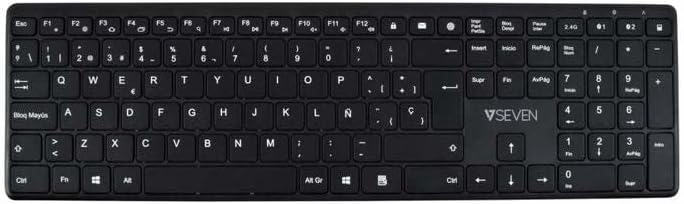
الصورة: من أعلى إلى أسفل view of the V7 KW550ESBT keyboard, showing the full QWERTY layout and function keys.
4. تشغيل لوحة المفاتيح
4.1. Standard Key Functions
The keyboard features a standard QWERTY layout with all essential alphanumeric keys, punctuation, and modifier keys (Shift, Ctrl, Alt, Windows/Command).
4.2. مفاتيح الوسائط المتعددة والوظائف
The top row of keys (F1-F12) often doubles as multimedia or special function keys. These functions are typically accessed by pressing the Fn key simultaneously with the desired F-key. Common functions include:
- Volume control (mute, decrease, increase)
- Media playback (play/pause, previous, next)
- تعديل سطوع الشاشة
- وظيفة البحث
- قفل الشاشة
Refer to the icons printed on your specific keyboard's F-keys for exact functionality.
4.3. Quiet Typing Experience
The scissor-switch key design minimizes typing noise, making it suitable for quiet environments.

الصورة: الجانب المحترفfile of the V7 KW550ESBT keyboard, highlighting its ultra-slim design.
5. الصيانة
5.1. التنظيف
لتنظيف لوحة المفاتيح:
- Turn off the keyboard and disconnect it from your device.
- استخدم قطعة قماش ناعمة وخالية من الوبر وامسحها برفق.ampبالماء أو بمحلول تنظيف معتدل.
- Wipe the keycaps and surface gently. Avoid excessive moisture.
- لإزالة الغبار والحطام بين المفاتيح، استخدم الهواء المضغوط.
5.2. استبدال البطارية
When the keyboard's performance degrades or the battery indicator (if present) signals low power, replace the AAA batteries as described in Section 3.1.
6. استكشاف الأخطاء وإصلاحها
If you encounter issues with your V7 KW550ESBT keyboard, try the following solutions:
| مشكلة | الحل المحتمل |
|---|---|
| لوحة المفاتيح لا تستجيب |
|
| المفاتيح ملتصقة أو لا تستجيب |
|
| فشل اقتران البلوتوث |
|
7. المواصفات
| ميزة | التفاصيل |
|---|---|
| ماركة | V7 |
| رقم الموديل | KW550ESBT |
| تكنولوجيا الاتصال | Bluetooth, 2.4 GHz Wireless (USB Dongle) |
| وصف لوحة المفاتيح | الوسائط المتعددة |
| الاستخدام الموصى به | مكتب |
| ميزة خاصة | بلوتوث |
| لون | أسود |
| أسلوب | كلاسيكي |
| أبعاد المنتج | 16.1 طول × 4.7 عرض × 0.8 ارتفاع سم |
| مادة | بلاستيك |
| مصدر الطاقة | 2 × بطاريات AAA (مضمنة) |
8. الضمان والدعم
For warranty information and technical support, please refer to the documentation provided with your purchase or visit the official V7 webالموقع. احتفظ بإثبات الشراء الخاص بك لتقديم مطالبات الضمان.