
مقدمة
This manual provides essential instructions for the proper use, setup, and maintenance of your BYTECH Lightning Cable (Model: CLMFCBLASST). This cable is designed for charging and data transfer with compatible Apple iOS devices, including iPhones, iPads, and iPods, as well as connecting to laptops and personal computers.
المنتج انتهىview
The BYTECH Lightning Cable is a durable accessory for your Apple devices. It features a Lightning connector on one end and a USB-A connector on the other, facilitating both power delivery for charging and data exchange. The cable supports fast charging capabilities for compatible devices.
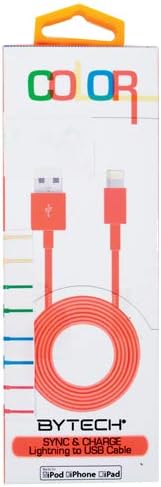
This image displays the retail packaging for the BYTECH Lightning to USB Cable. The packaging is white with 'COLOR' printed at the top in multi-colored letters. An orange Lightning to USB cable is visible through a clear window, coiled neatly. The bottom of the package indicates 'BYTECH SYNC & CHARGE Lightning to USB Cable' and compatibility with iPod, iPhone, and iPad.
عناصر:
- موصل Lightning: Connects to your Apple iOS device (iPhone, iPad, iPod).
- موصل USB-A: Connects to a USB power adapter, computer USB port, or other USB charging source.
- كابل: The flexible cord connecting the two connectors, designed for durability and efficient power/data transfer.
يثبت
To begin using your BYTECH Lightning Cable, follow these steps:
- تحديد الموصلات: Locate the Lightning connector (smaller, 8-pin) and the USB-A connector (larger, rectangular).
- الاتصال بمصدر الطاقة أو الكمبيوتر:
- For charging, insert the USB-A connector into a compatible USB wall adapter or car charger.
- For charging and data transfer, insert the USB-A connector into an available USB port on your laptop or personal computer.
- الاتصال بجهاز iOS: Insert the Lightning connector into the charging port of your iPhone, iPad, or iPod. Ensure it is fully seated.
- تحقق من الاتصال: Your device should indicate that it is charging or connected to a computer.
تعليمات التشغيل
شحن جهازك:
Once connected as described in the "Setup" section, your iOS device will begin charging automatically. The cable supports fast charging when paired with a compatible power adapter and device.
نقل البيانات:
When connected to a computer, the cable enables data transfer between your iOS device and the computer. This allows for syncing media, documents, and other fileباستخدام iTunes أو Finder (macOS Catalina والإصدارات الأحدث).
- Connect your iOS device to your computer using the BYTECH Lightning Cable.
- Unlock your iOS device and respond to any "Trust This Computer?" prompts by tapping "Trust" and entering your passcode if required.
- Open iTunes (Windows/older macOS) or Finder (macOS Catalina and later) on your computer.
- Select your device within the application to manage and transfer data.
صيانة
Proper care extends the life of your cable:
- تخزين: When not in use, coil the cable loosely. Avoid tight coiling or sharp bends, especially near the connectors, as this can damage the internal wires.
- تنظيف: Use a soft, dry cloth to gently wipe the cable and connectors. Do not use liquid cleaners or abrasive materials.
- التعامل: Always grasp the connector head when plugging or unplugging the cable. Avoid pulling directly on the cable itself.
- بيئة: احتفظ بالكابل بعيدًا عن درجات الحرارة العالية وأشعة الشمس المباشرة والرطوبة.
استكشاف الأخطاء وإصلاحها
If you encounter issues with your BYTECH Lightning Cable, consider the following:
- الجهاز لا يشحن:
- تأكد من توصيل كلا طرفي الكابل بشكل آمن.
- Try a different USB power adapter or computer USB port.
- Check the charging port on your iOS device for debris or lint.
- Test the cable with a different compatible iOS device, if available.
- مشاكل نقل البيانات:
- Ensure your iOS device is unlocked and you have tapped "Trust This Computer" when prompted.
- Restart both your iOS device and your computer.
- Update iTunes or Finder to the latest version.
- جرب منفذ USB مختلفًا على جهاز الكمبيوتر الخاص بك.
- تلف الكابل: Inspect the cable for any visible signs of damage, such as fraying, cuts, or bent connectors. Discontinue use if damage is found.
تحديد
| يصف | التفاصيل |
|---|---|
| ماركة | بايتك |
| رقم الموديل | CLMFCBLASST |
| رمز المنتج الموحد | 805112016938 |
| نوع الموصل | Lightning (Male) to USB-A (Male) |
| نوع الكابل | البرق |
| الأجهزة المتوافقة | iPhone, iPad, iPod, Laptop, Personal Computer |
| ميزة خاصة | الشحن السريع |
| الاستخدامات الموصى بها | Charging, data transfer for iOS devices |
| عدد الدبابيس | 8 (Lightning) |
| وزن العنصر | 1.76 أونصات |
| أبعاد المنتج | 1 × 1 × 1 بوصة (التغليف) |
الضمان والدعم
For warranty information or technical support regarding your BYTECH Lightning Cable, please refer to the official Bytech webالموقع أو تواصل مع خدمة العملاء مباشرةً. احتفظ بإيصال الشراء لطلبات الضمان.
للاستفسارات العامة، يمكنك زيارة Bytech brand page on Amazon.