
جاكيري اكسبلورر 1000
دليل مستخدم محطة الطاقة المحمولة Jackery Explorer 1000
Your comprehensive guide to operating and maintaining your Jackery Explorer 1000.
مقدمة
The Jackery Explorer 1000 is a portable power station designed to provide reliable power for various applications, including home backup, emergency situations, outdoor camping, and RV trips. With a 1002Wh capacity and 1000W AC output, it can power a wide range of devices and small appliances. This manual provides essential information for safe and efficient use of your Explorer 1000.
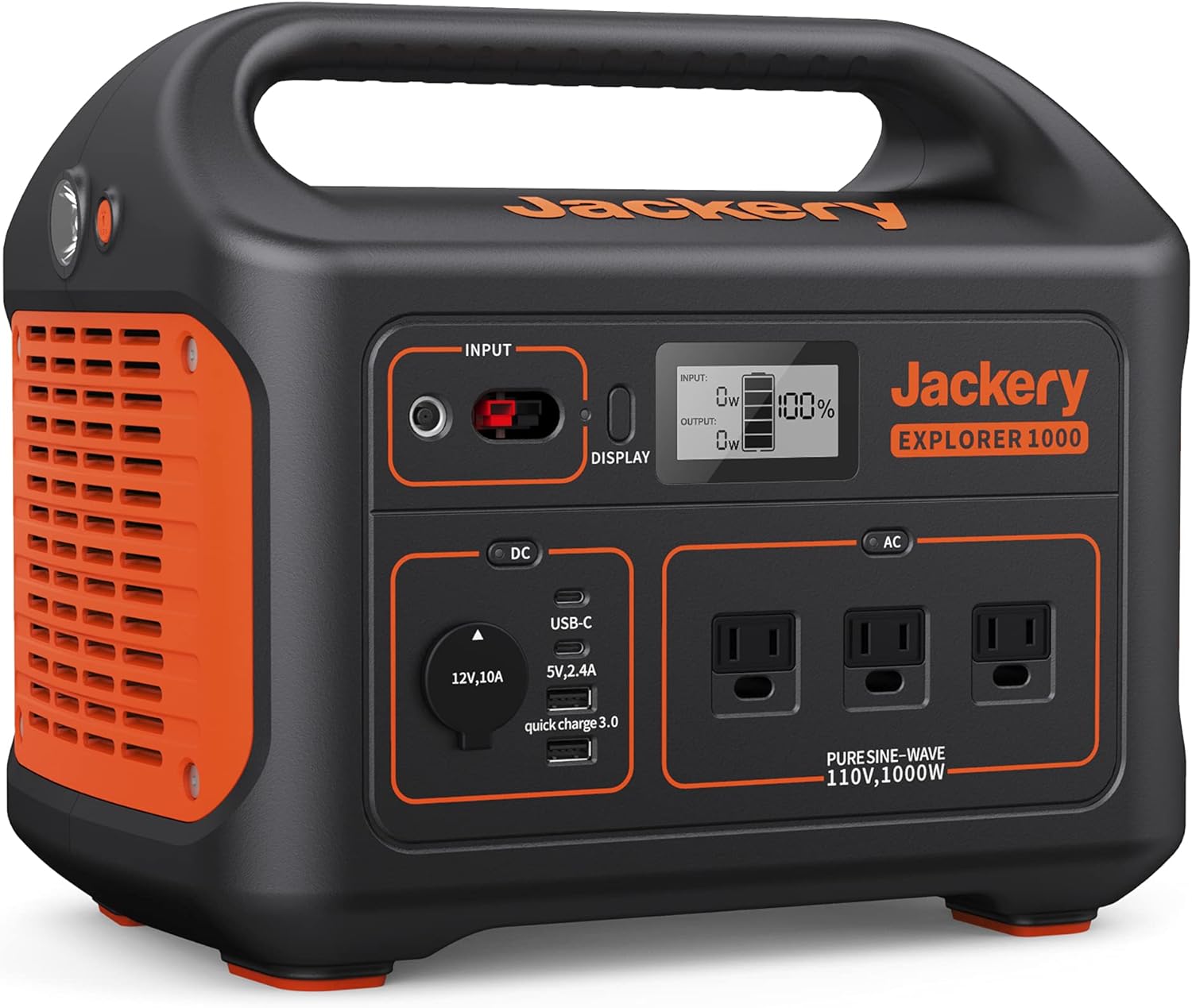
الشكل 1: الجبهة view of the Jackery Explorer 1000 Portable Power Station, showcasing its various ports and digital display.
يثبت
Before first use, ensure your Jackery Explorer 1000 is fully charged. The unit offers multiple charging options for convenience.
طرق الشحن
- منفذ تيار متردد: Connect the provided AC adapter to the INPUT port on the power station and then to a standard wall outlet. A full charge typically takes approximately 5.5 hours.
- شاحن السيارة: Use the included car charger cable to connect the power station to your vehicle's 12V car outlet. This method is ideal for charging while traveling.
- الألواح الشمسية: For eco-friendly charging, connect up to two Jackery SolarSaga 100W solar panels (sold separately) to the INPUT port using the SolarSaga Parallel Adapter Cable. With optimal sunlight, the unit can be fully charged in about 6 hours.

Figure 2: Illustration of the three primary charging methods for the Jackery Explorer 1000: AC wall outlet, car charger, and solar panels.
تعليمات التشغيل
The Jackery Explorer 1000 features a user-friendly interface with multiple output options to power various devices.
شاشة رقمية
The integrated digital display provides real-time information about the power station's status, including:
- نسبة البطاريةtagه المتبقية.
- مدخلات واتtage (when charging).
- انتاج واتtage (when powering devices).
منافذ الإخراج
The Explorer 1000 is equipped with 8 versatile outlets:
- 3 x AC Outlets (1000W Pure Sine Wave): للأجهزة المنزلية العادية.
- 1 x USB-A Port.
- 1 x USB-A Quick Charge 3.0 Port: لشحن أسرع للأجهزة المتوافقة.
- 2 x USB-C PD Ports: For modern devices requiring USB-C Power Delivery.
- 1 x Car Outlet (12V, 10A): For 12V DC powered devices.
Each section (DC and AC) has a dedicated power button to activate or deactivate the respective outputs, helping to conserve battery life when not in use.

Figure 3: The Jackery Explorer 1000 simultaneously powering a coffee maker, electric grill, and mini cooler, demonstrating its multi-device capability.
مصباح يدوي متكامل
The unit includes a built-in flashlight for convenience in low-light conditions or emergencies. Activate it using the dedicated button on the side of the unit.
صيانة
Proper maintenance ensures the longevity and optimal performance of your Jackery Explorer 1000.
- الشحن المنتظم: To prolong battery life, it is recommended to fully charge the power station every 3-6 months, even when not in active use.
- تخزين: قم بتخزين الوحدة في مكان بارد وجاف بعيدًا عن أشعة الشمس المباشرة ودرجات الحرارة القصوى.
- تنظيف: Use a dry, soft cloth to clean the exterior. Avoid using harsh chemicals or abrasive materials.
- حماية البطارية: The unit features industry-leading cylindrical batteries that meet UL safety standards and are certified with Impact-Resistance Class 9. The pure sine wave inverter protects connected equipment from damage by delivering constant voltage.

Figure 4: An internal diagram illustrating the robust and safe battery construction of the Jackery Explorer 1000.
استكشاف الأخطاء وإصلاحها
If you encounter issues with your Jackery Explorer 1000, please refer to the following common solutions:
- الوحدة لا تعمل: Ensure the battery is charged. If not, connect to an AC wall outlet for charging.
- Outputs Not Working: Verify that the DC or AC output buttons are pressed to activate the respective ports. Check the digital display for any error codes.
- الجهاز لا يشحن: Confirm that the device's power requirements do not exceed the Explorer 1000's output capacity (1000W AC output). Try a different port or cable.
- الشحن الشمسي البطيء: Ensure solar panels are placed in direct sunlight without obstruction. Clean the solar panel surface. Check all cable connections.
For further assistance, please contact Jackery customer support.
تحديد
| ميزة | التفاصيل |
|---|---|
| ماركة | جاكيري |
| اسم الموديل | المستكشف 1000 |
| سعة | 1002 واط/ساعة |
| انتاج واتtage | 1000 واط (2000 واط ذروة) |
| منافذ التيار المتردد | 3 (Pure Sine Wave 110V) |
| منافذ USB-A | 1 (5V, 2.4A) + 1 (Quick Charge 3.0) |
| USB-C PD Ports | 2 |
| منفذ السيارة | 1 (12 فولت، 10 أمبير) |
| طرق الشحن | AC Wall Outlet, Car Charger, Solar Panels (SolarSaga 100W x2) |
| أبعاد | 13.1 بوصة طول × 9.2 بوصة عرض × 11.1 بوصة ارتفاع |
| وزن العنصر | 22 رطل |
| المميزات الخاصة | 3 Ways to Recharge, Lightweight and Portable, Long Battery Standby, Robust and Durable, Shock and Fire Resistance, Supports 8 Devices Simultaneously |
المنتج الرسمي انتهىview
شاهد هذا الفيديو الرسمي للحصول على نظرة شاملةview of the Jackery Explorer 1000 Portable Power Station.
فيديو 1: مسؤول فوقview of the Jackery Explorer 1000, detailing its features and benefits for various uses.
الضمان والدعم
The Jackery Explorer 1000 comes with a ضمان الشركة المصنعة لمدة سنة واحدة. For warranty claims, technical support, or any inquiries, please refer to the contact information provided in your product packaging or visit the official Jackery webموقع.
This user manual is intended to provide general guidance. Always refer to the included physical user manual for the most detailed and up-to-date information.
Ask a question about this manual
Ask about setup, troubleshooting, compatibility, parts, safety, or missing instructions. Manuals+ will review the question and use this page’s manual context to help answer it.