
1. المقدمة
This user manual provides detailed instructions for the installation, operation, and maintenance of your BAFANG C965 LCD Display. This display is designed for use with Bafang Mid Drive motors that utilize the UART communication protocol. Please read this manual thoroughly before using the product to ensure safe and correct operation.
The BAFANG C965 LCD Display offers essential information for your electric bicycle, including speed, battery level, assistance level (PAS), and trip data, enhancing your riding experience.
2. معلومات السلامة
- Always ensure the display is securely mounted and all cables are properly connected before riding.
- Do not attempt to open or modify the display unit. This may void the warranty and cause damage.
- Keep the display screen clean and free from obstructions to ensure clear visibility of information.
- تجنب تعريض الشاشة لدرجات حرارة قصوى أو لأشعة الشمس المباشرة لفترات طويلة.
- In case of malfunction, refer to the troubleshooting section or contact Bafang support.
3. محتويات العبوة
تأكد من وجود جميع العناصر في الحزمة الخاصة بك:
- BAFANG C965 LCD Display Unit
- Handlebar Mounting Bracket
- Control Button Unit
- دليل المستخدم (هذا المستند)
4. الإعداد والتثبيت
Follow these steps to install your BAFANG C965 LCD Display:
- تركيب الشاشة: Attach the handlebar mounting bracket to your bicycle's handlebar. The bracket is compatible with handlebar diameters of 22.2mm, 25.4mm, and 31.8mm. Secure the C965 display unit into the bracket.
- توصيل الكابلات: Connect the 5-pin female connector from the display unit to the corresponding male connector on your Bafang Mid Drive motor system. Ensure the connection is firm and secure.
- Mounting Control Buttons: Position the external control button unit on your handlebar within easy reach. Connect its cable to the display unit.

Figure 1: Bafang C965 LCD display unit with cables and mounting bracket.
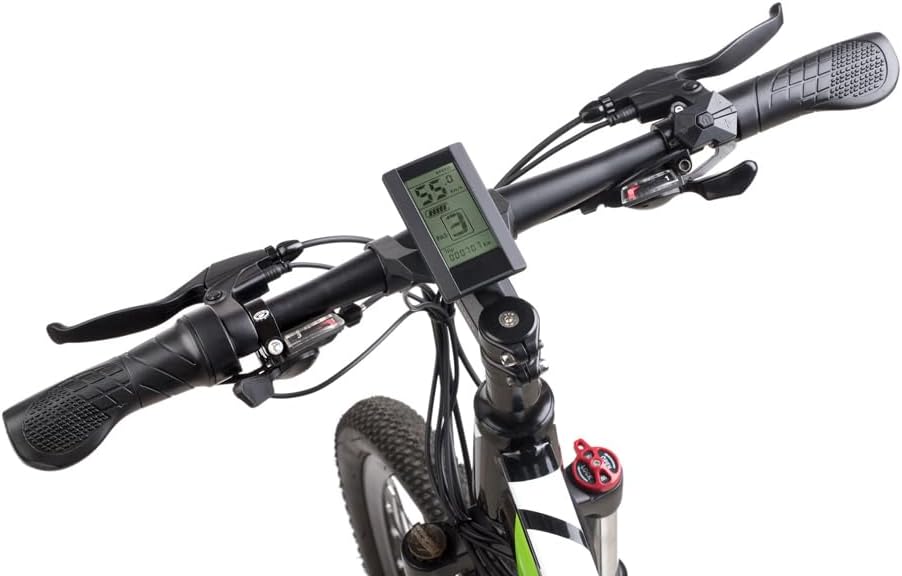
Figure 2: Bafang C965 LCD display mounted on an e-bike handlebar.
5. تعليمات التشغيل
Once installed, operate your BAFANG C965 LCD Display as follows:
- تشغيل/إيقاف التشغيل: Press and hold the power button on the external control unit to turn the display on or off.
- Adjusting PAS Level: Use the '+' and '-' buttons on the control unit to increase or decrease the Pedal Assist System (PAS) level.
- عرض المعلومات: The display cycles through various information screens. Use the 'M' (Mode) button to switch between different data views such as trip distance, total distance, average speed, max speed, and time.
- التحكم في المصابيح الأمامية: If your e-bike system supports it, a dedicated button or a long press of a specific button (refer to your motor's manual) may control the headlights.

Figure 3: Bafang C965 LCD display showing active riding data.
6. Display Functions and Indicators
The C965 display provides various indicators and data points:
- عرض السرعة: Shows current speed, average speed (AVG), and maximum speed (MAX).
- مؤشر البطارية: يعرض مستوى شحن البطارية المتبقي.
- مستوى PAS: Indicates the current pedal assist level (0-9 or 0-3, depending on configuration).
- Mileage Indicator: Shows trip distance and total odometer reading.
- مؤشر الطاقة: Displays real-time motor power output.
- وقت: Current time or trip duration.
- مؤشر الفرامل: يضيء عند الضغط على الفرامل.
- مؤشر الخطأ: Displays error codes if a system fault occurs.
- Headlight Power On: Indicates when the e-bike's headlights are active.

Figure 4: Bafang C965 LCD display icons and basic specifications.
7. الصيانة
To ensure the longevity and optimal performance of your C965 display:
- تنظيف: امسح شاشة العرض والجسم بقطعة قماش ناعمة.amp القماش. لا تستخدم المنظفات أو المذيبات الكاشطة.
- مقاومة الماء: The display has an IP65 waterproof rating, meaning it is protected against dust and low-pressure water jets. Avoid submerging the unit in water.
- درجة حرارة: Operate the display within its specified temperature range of -20°C to 60°C.
- فحص الكابلات: قم بفحص جميع الكابلات والموصلات بشكل دوري بحثًا عن علامات التآكل أو التلف.
8. استكشاف الأخطاء وإصلاحها
If you encounter issues with your BAFANG C965 LCD Display, consider the following:
- الشاشة لا تعمل:
- تأكد من شحن بطارية الدراجة الكهربائية وتوصيلها بشكل صحيح.
- Check all cable connections between the display, control unit, and motor for looseness or damage.
- تأكد من الضغط على زر الطاقة بشكل صحيح.
- قراءات غير صحيحة للسرعة/المسافة:
- Check the speed sensor and magnet on your wheel for proper alignment and cleanliness.
- Ensure the wheel circumference setting in the display's advanced settings (if accessible) is correct.
- رموز الخطأ المعروضة:
- Refer to your Bafang motor's specific error code list for detailed explanations and solutions. Common issues include motor, controller, or sensor faults.
- Often, turning the system off and on again can clear temporary errors.
- الأزرار لا تستجيب:
- Check the connection of the external control button unit to the display.
- Ensure buttons are not physically stuck.
If problems persist after attempting these steps, contact Bafang customer support or your authorized dealer for assistance.
9. المواصفات
| ميزة | مواصفة |
|---|---|
| رقم الموديل | سي965 |
| نوع العرض | شاشة الكريستال السائل |
| تكنولوجيا الاتصال | سلكي |
| نوع المستشعر | Speed sensor, Voltagجهاز الاستشعار الإلكتروني |
| نوع التركيب | حامل المقود |
| مدخلات واجهة الإنسان | أزرار |
| تصنيف مقاومة الماء | IP65 |
| Max Speed Limit | 70 كم/س |
| حجم إمداد البطاريةtage | 36 فولت/48 فولت |
| درجة حرارة التشغيل | -20 درجة مئوية إلى 60 درجة مئوية |
| قطر المقود المتوافق | 22.2mm / 25.4mm / 31.8mm |
| نوع الموصل | 5 دبوس أنثى |
| أبعاد الحزمة | 9.65 × 9.4 × 9.4 سم |
| وزن الحزمة | 159 جرام |
| رمز المنتج العالمي / رقم GTIN | 779296258319 |
10. الضمان والدعم
BAFANG products are typically covered by a manufacturer's warranty against defects in materials and workmanship. The specific terms and duration of the warranty may vary by region and retailer. Please retain your proof of purchase for any warranty claims.
For technical support, warranty inquiries, or spare parts, please contact your original retailer or visit the official BAFANG webموقع للحصول على معلومات الاتصال بخدمة العملاء.