
1. المقدمة
شكرا لك على الشراءasing the Moukey MAMP1 220W Bluetooth Dual Channel Power Ampمكبر. هذه amplifier is designed to provide powerful and versatile audio amplification for various applications, including karaoke, home theater systems, and general audio playback. It features multiple input options, Bluetooth 5.0 connectivity, and intuitive controls for an enhanced audio experience. Please read this manual thoroughly before use to ensure proper operation and to maximize the product's performance.
2. تعليمات السلامة
لتجنب الصدمة الكهربائية أو الحريق أو تلف الوحدة، يرجى مراعاة احتياطات السلامة التالية:
- لا تعرض هذه الوحدة للمطر أو الرطوبة.
- لا تفتح الصندوقasinز. لا توجد قطع غيار قابلة للصيانة من قِبل المستخدم. يُرجى إحالة جميع أعمال الصيانة إلى فنيين مؤهلين.
- تأكد من حجم امدادات الطاقةtagيتوافق مع المتطلبات المحددة في الوحدة.
- Place the unit on a stable, flat surface with adequate ventilation. Do not block ventilation openings.
- أبقِ الجهاز بعيداً عن مصادر الحرارة وأشعة الشمس المباشرة والغبار الزائد.
- Disconnect the power plug from the outlet if the unit will not be used for an extended period.
- لا تقم بتشغيل الوحدة ويداك مبتلتان.
3. محتويات العبوة
تأكد من وجود جميع العناصر في العبوة:
- موكي مAMP1 الطاقة Ampوحدة مكبر
- جهاز التحكم عن بعد
- هوائي FM
- دليل المستخدم (هذه الوثيقة)
4. انتهى المنتجview
4.1 Front Panel Controls and Functions
The front panel provides access to all primary controls and input ports for easy operation.

Image: Detailed diagram of the Moukey MAMP1 front panel, highlighting each control and port with corresponding numbers.
- مفتاح التشغيل: يقوم بتشغيل الوحدة أو إيقاف تشغيلها.
- USB / SD Slot: لتشغيل الصوت files from USB drives (max 32GB) or SD cards (max 16GB).
- زر الوضع: Cycles through input modes (Bluetooth, USB, SD, AUX, FM).
- زر BT: ينتقل مباشرة إلى وضع البلوتوث.
- Prev Button: ينتقل إلى المسار/المحطة السابقة.
- زر التشغيل / الإيقاف المؤقت: تشغيل أو إيقاف تشغيل الصوت مؤقتًا.
- زر' التالي: ينتقل إلى المسار/المحطة التالية.
- عرض الصمام: Shows current mode, track information, or frequency.
- Folder / Track: Navigates through folders or tracks on USB/SD.
- مقبض الصوت الرئيسي: ضبط مستوى الصوت الإجمالي للإخراج.
- مقبس سماعة الرأس: 3.5mm output for monitor headphones.
- Microphone 1 Input: مقبس 6.35 ملم لتوصيل الميكروفون.
- Microphone 2 Input: مقبس 6.35 ملم لتوصيل ميكروفون ثانٍ.
- مقبض صوت الميكروفون: يضبط مستوى صوت الميكروفونات المتصلة.
- مقبض الصدى: يتحكم في تأثير الصدى للميكروفونات.
- مقبض الجهير: يقوم بضبط خرج الصوت منخفض التردد.
- مقبض ثلاثي: يقوم بضبط خرج الصوت عالي التردد.
- مقبض التوازن: يضبط توازن القناة اليسرى/اليمنى.
- مقبس إدخال AUX: مدخل 3.5 ملم لأجهزة الصوت الخارجية.
- محدد المدخلات: Rotary switch to select between CD, AUX, DVD, and MP3/W inputs.
4.2 اتصالات اللوحة الخلفية
تحتوي اللوحة الخلفية على وصلات إدخال وإخراج الصوت الرئيسية.

الصورة: الخلفية view of the Moukey MAMP1 amplifier, showing all input and output ports.

Image: Detailed diagram of the Moukey MAMP1 rear panel, highlighting each connection point.
- Audio Input for DVD (RCA): Connect DVD players or other audio sources.
- Audio Input for CD (RCA): Connect CD players or other audio sources.
- Line Out Jack (RCA): للاتصال بآخر ampمكبر أو جهاز تسجيل.
- FM Antenna Jack: قم بتوصيل هوائي FM المرفق لاستقبال الراديو.
- Speaker Output Jacks: Connect passive speakers (4-16 Ohm impedance).
- مدخلات كابل الطاقة: قم بتوصيل سلك طاقة التيار المتردد.
5. الإعداد
5.1 التنسيب
ضع amplifier on a flat, stable surface. Ensure there is sufficient space around the unit for proper ventilation to prevent overheating.
5.2 توصيل الطاقة
Connect the power cable to the Power Cable Input on the rear panel of the amplifier, then plug the other end into a suitable AC power outlet (115V AC).
5.3 اتصال مكبر الصوت
همAMP1 amplifier supports two sets of passive speakers with an impedance of 4-16 Ohms. Use appropriate speaker wire to connect your speakers to the Speaker Output Jacks on the rear panel.

Image: Diagram illustrating how to connect speakers to the amplifier's binding posts.
- Rotate and loosen the speaker knob on the binding post.
- Insert the bare wire (remove approximately 10mm of insulation) into the hole. Ensure correct polarity (+ to + and - to -).
- Tighten the knobs to secure the wires firmly.
5.4 Input Device Connection
Connect your audio sources (CD player, DVD player, tuner, etc.) to the corresponding RCA Audio Input jacks on the rear panel. For microphones, use the 6.35mm jacks on the front panel. For 3.5mm AUX devices, use the front panel AUX Input Jack.
6. تعليمات التشغيل
6.1 تشغيل/إيقاف التشغيل
اضغط على مفتاح الطاقة على اللوحة الأمامية لتشغيل amplifier on or off. The LED display will illuminate when the unit is powered on.
6.2 اختيار المدخلات
استخدم زر الوضع on the front panel or the remote control to cycle through available input sources (Bluetooth, USB, SD, AUX, FM). Alternatively, use the محدد المدخلات knob on the front panel for RCA inputs (CD, AUX, DVD, MP3/W).
6.3 التحكم في مستوى الصوت
- الحجم الرئيسي: تدوير مقبض الصوت الرئيسي to adjust the overall output level of the ampمكبر.
- حجم صوت الميكروفون: استخدم مقبض صوت الميكروفون to control the volume of connected microphones independently.
6.4 لهجة التحكم
Adjust the audio characteristics using the مقبض باس و مقبض ثلاثي to suit your preference. The مقبض التوازن allows adjustment of the left and right channel output levels.

Image: Close-up of the Moukey MAMP1 showing the Bass and Treble adjustment knobs.
6.5 Echo Control
أدر صدى مقبض to add or reduce the echo effect on the microphone inputs, suitable for karaoke applications.
6.6 اقتران بلوتوث
لتوصيل جهاز بلوتوث:
- اضغط على BT زر or cycle through modes until "BLUE" appears on the LED display.
- قم بتفعيل البلوتوث على هاتفك الذكي أو جهازك اللوحي أو جهاز الكمبيوتر الخاص بك.
- بحث عن "Moukey MAMP1" in your device's Bluetooth settings and select it to pair.
- Once paired, you can stream audio wirelessly. Playback will temporarily pause during phone calls to protect privacy.
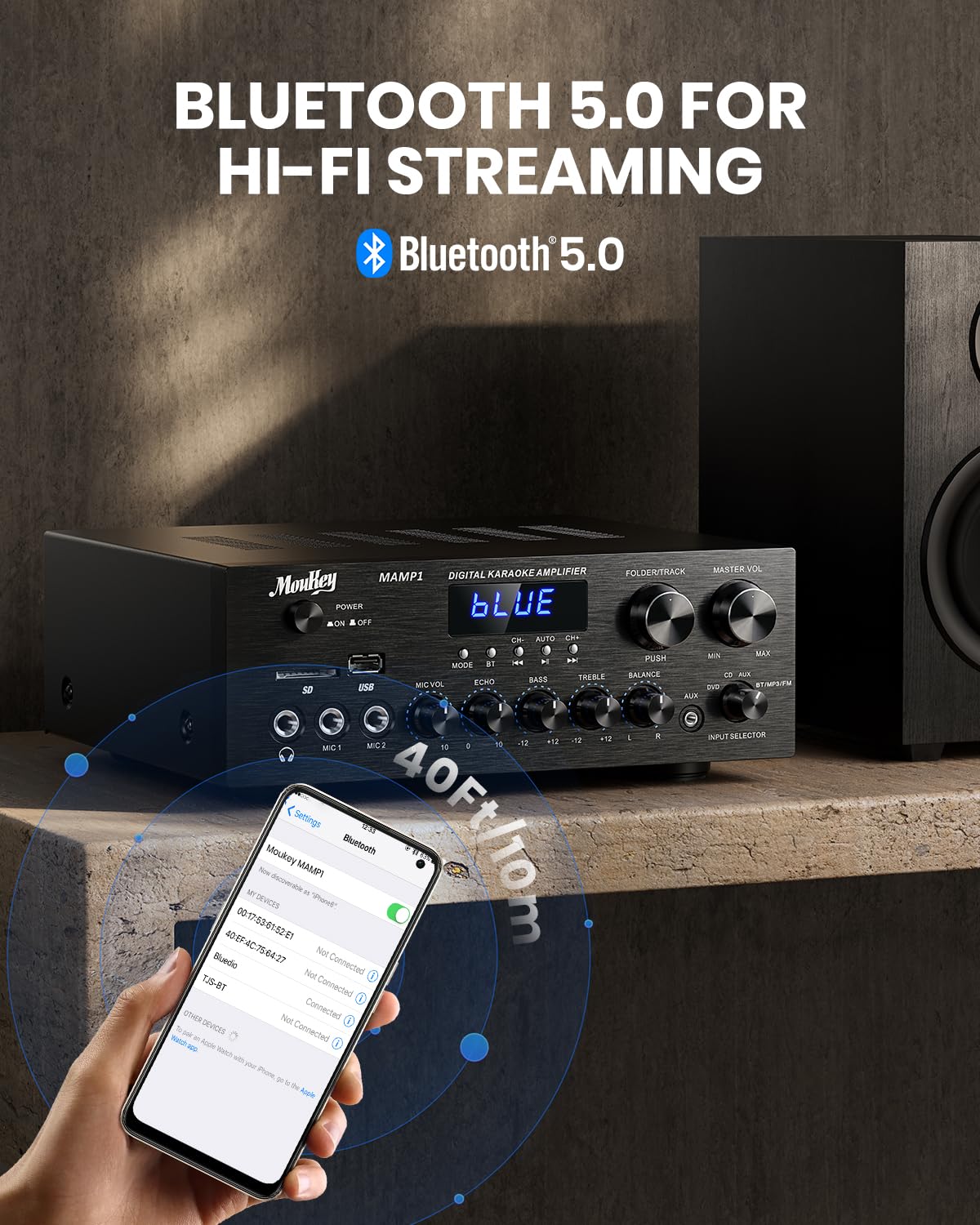
Image: The Moukey MAMP1 amplifier displaying "BLUE" on its screen, indicating Bluetooth mode, with a smartphone showing pairing options.
6.7 تشغيل USB/SD
Insert a USB drive (max 32GB) or SD card (max 16GB) into the respective slot on the front panel. The ampسيتحول مكبر الصوت تلقائيًا إلى وضع USB/SD ويبدأ التشغيل. استخدم السابق, تشغيل/إيقاف مؤقت, التالي، و Folder/Track أزرار للتحكم في التشغيل.
6.8 راديو FM
Ensure the FM antenna is connected to the rear panel. Select FM mode using the زر الوضع. استخدم السابق و التالي buttons to tune to radio stations. The LED display will show the current frequency.
7. الصيانة
للحفاظ على أداء ومظهر جهازك ampمكبر:
- تنظيف: Use a soft, dry cloth to wipe the exterior of the unit. Do not use liquid cleaners or abrasive chemicals.
- تهوية: تأكد من أن فتحات التهوية خالية من الغبار والحطام.
- تخزين: إذا كنت ستقوم بتخزين الوحدة لفترة طويلة، فافصلها عن الطاقة وقم بتخزينها في مكان بارد وجاف.
8. استكشاف الأخطاء وإصلاحها
If you encounter issues with your Moukey MAMP1 ampيرجى الرجوع إلى الجدول التالي للاطلاع على المشاكل الشائعة وحلولها:
| مشكلة | السبب المحتمل | حل |
|---|---|---|
| لا يوجد طاقة | كابل الطاقة غير موصول؛ مأخذ الطاقة معطل؛ مفتاح الطاقة مطفأ. | Ensure power cable is securely connected. Try a different power outlet. Press the power switch to ON. |
| لا يوجد مخرج صوت | Incorrect input selected; Volume too low; Speakers not connected; Speaker wires loose; Mute function active. | Select the correct input source. Increase Master Volume. Check speaker connections and polarity. Ensure mute is off. |
| البلوتوث غير متصل | Amplifier not in Bluetooth mode; Device too far; Device already paired to another unit. | يضمن amplifier is in Bluetooth mode ("BLUE" on display). Move device closer to amplifier. Disconnect from other devices. |
| الميكروفون لا يعمل | Microphone not connected; Mic volume too low; Echo knob set to minimum. | Connect microphone securely. Increase Microphone Volume. Adjust Echo knob. |
| مشاكل تشغيل USB/SD | غير مدعوم file format; USB drive/SD card corrupted; Capacity exceeded. | ضمان الصوت files are in supported formats (e.g., MP3). Try a different USB drive/SD card. Check capacity limits (USB max 32G, SD max 16G). |
إذا استمرت المشكلة بعد تجربة هذه الحلول، فيرجى الاتصال بدعم العملاء.
9. المواصفات
| ميزة | مواصفة |
|---|---|
| ماركة | موكي |
| نموذج | MAMP1 |
| طاقة الإخراج | 220 واط |
| القنوات | 2 |
| المجلدtage | 115 فولت (تيار متردد) |
| معاوقة مكبر الصوت | 4-16 أوم |
| نسخة البلوتوث | 5.0 |
| مدى البلوتوث | أكثر من 12 متراً (40 قدماً) |
| دعم بطاقة USB/SD | USB: Max 32GB, SD: Max 16GB |
| الأبعاد (الطول × العرض × الارتفاع) | 25 سم × 21.3 سم × 9.5 سم (تقريبًا 10 بوصة × 8 بوصة × 4 بوصة) |
| رمز المنتج الموحد | 715802779039 |
| بلد المنشأ | الصين |

Image: The Moukey MAMP1 amplifier with its dimensions labeled.
10. الضمان والدعم
This Moukey MAMP1 الطاقة Ampيأتي الليف مع أ ضمان لمدة 1 سنوات من تاريخ الشراء. يغطي هذا الضمان عيوب التصنيع والتصنيع في ظل الاستخدام العادي.
الضمان لا يشمل:
- Damage caused by accident, abuse, misuse, flood, fire, or other natural causes.
- الأضرار الناجمة عن التعديل أو الإصلاح غير المصرح به.
- Damage caused by improper installation or connection.
- Cosmetic damage, such as scratches, dents, and broken plastic on ports.
For warranty claims or technical support, please contact the retailer where you purchased the product or visit the official Moukey website for contact information. Please have your purchase receipt and product model number (MAMP1) ready when contacting support.