
UNIC UC68
Unic UC68 Multimedia Home Theatre LED Projector User Manual
الموديل: UC68
1. المقدمة
شكرا لك على الشراءasing the Unic UC68 Multimedia Home Theatre LED Projector. This manual provides essential information for setting up, operating, and maintaining your projector to ensure optimal performance and longevity. Please read this manual thoroughly before using the product and keep it for future reference.
2. معلومات السلامة
لضمان التشغيل الآمن ومنع التلف، يرجى مراعاة احتياطات السلامة التالية:
- لا تنظر مباشرة إلى عدسة جهاز العرض عندما يكون الضوءamp يتم تشغيله، لأن الضوء القوي يمكن أن يسبب تلفًا للعين.
- Ensure adequate ventilation around the projector. Do not block any ventilation openings.
- ضع جهاز العرض على سطح مستوٍ وثابت لمنعه من السقوط.
- استخدم فقط محول الطاقة المرفق مع جهاز العرض. قد يؤدي استخدام محول غير مناسب إلى تلف الجهاز أو نشوب حريق.
- Keep the projector away from water, moisture, and other liquids. Do not operate in wet environments.
- لا تحاول فتح جهاز العرض أو إصلاحه بنفسك. قم بإحالة جميع أعمال الصيانة إلى فنيين مؤهلين.
- افصل جهاز العرض عن مأخذ الطاقة أثناء العواصف الرعدية أو عند عدم استخدامه لفترات طويلة.
3. محتويات العبوة
يرجى التأكد من تضمين جميع العناصر المدرجة أدناه في الحزمة الخاصة بك:
- Unic UC68 Projector Host
- جهاز التحكم عن بعد
- كابل الطاقة
- كبل AV
- دليل التعليمات
- غطاء العدسة
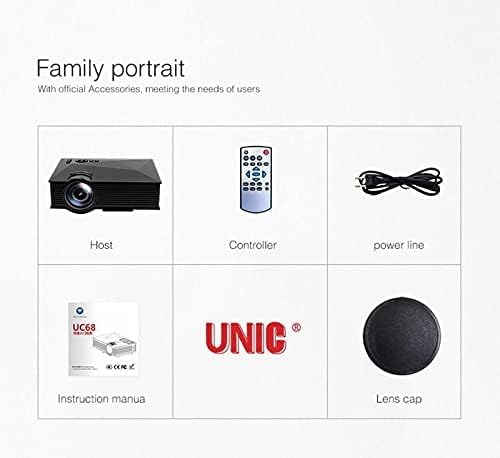
Image: The Unic UC68 projector package contents, showing the main unit, remote control, power cord, instruction manual, and lens cap.
4. انتهى المنتجview
Familiarize yourself with the various parts and ports of your Unic UC68 projector.

الصورة: تفصيلية view of the Unic UC68 projector, highlighting its lens, control buttons on top, and various input/output ports on the side.
منافذ الإدخال/الإخراج

Image: A visual representation of the Unic UC68 projector's rear and side panels, indicating ports for HDMI, USB, SD card, AV, VGA, and audio out, along with examples of devices that can be connected.
| ميناء | وصف |
|---|---|
| منفذ HDMI | Connect to devices like laptops, Blu-ray players, game consoles. |
| يو اس بي 2.0 (x2) | Connect USB flash drives for media playback or power external devices (5Vout-500mA). |
| فتحة بطاقة SD | Insert SD cards for direct media playback. |
| في جي ايه | قم بالاتصال بأجهزة الكمبيوتر أو أجهزة الكمبيوتر المحمولة القديمة. |
| AV | Connect to devices with composite video and stereo audio output (e.g., DVD players). |
| Headphone Port (3.5mm) | قم بتوصيل مكبرات الصوت الخارجية أو سماعات الرأس. |
5. الإعداد
اتبع هذه الخطوات لإعداد جهاز العرض الخاص بك في البداية:
- الموقع: Place the projector on a stable, flat surface. Ensure there is enough space around the projector for proper ventilation. The ideal projection distance is between 1.07m and 3.8m.
- توصيل الطاقة: قم بتوصيل كابل الطاقة بمدخل الطاقة الخاص بجهاز العرض، ثم قم بتوصيله بمأخذ الحائط.
- توصيل مصدر الإدخال: Connect your desired input device (e.g., laptop, game console, USB drive) to the appropriate port on the projector (HDMI, VGA, USB, AV, SD card).
- تشغيل الطاقة: Press the power button on the projector or the remote control to turn on the projector. The LED indicator will light up.
- ضبط التركيز: Once an image is displayed, rotate the focus ring on the projector lens until the image appears clear and sharp.
- تصحيح الانحراف: If the projected image appears trapezoidal, adjust the keystone correction (if available on your model, typically a manual slider near the lens) to square the image.
6. تعليمات التشغيل
تشغيل/إيقاف الطاقة
- لتشغيل: اضغط على زر الطاقة الموجود بجهاز العرض أو جهاز التحكم عن بُعد.
- لإيقاف التشغيل: Press the power button again. Wait for the fan to stop completely before unplugging the power cable.
اختيار مصدر الإدخال
Use the 'Source' button on the remote control or the projector's control panel to cycle through available input sources (HDMI, VGA, AV, USB, SD).
التنقل في القائمة
Use the arrow keys on the remote or projector to navigate through the on-screen menu. Press 'OK' or 'Enter' to confirm selections. Adjust settings such as picture mode, aspect ratio, and sound.
Media Playback (USB/SD)
Insert a USB flash drive or SD card into the respective port. The projector will typically prompt you to select the media type (Movie, Music, Photo, Text). Navigate to your desired file and press 'OK' to play.
7. الصيانة
تضمن الصيانة المناسبة طول عمر جهاز العرض الخاص بك وأدائه الأمثل:
- تنظيف العدسات: استخدم قطعة قماش ناعمة وخالية من الوبر، مُخصصة للعدسات البصرية. تجنّب استخدام منظفات كاشطة أو استخدام قوة مفرطة.
- تنظيف فلتر الغبار: Regularly check and clean the dust filter (if accessible) to maintain proper airflow and prevent overheating. Refer to the specific location in your manual if applicable.
- التنظيف الخارجي: امسح الجزء الخارجي لجهاز العرض بقطعة قماش ناعمة وجافة. لإزالة البقع الصعبة، امسحه بقطعة قماش جافة قليلاً.amp يمكن استخدام القماش، ولكن تأكد من عدم دخول الرطوبة إلى الجهاز.
- تخزين: When not in use for extended periods, store the projector in a cool, dry, dust-free environment. Use the lens cap to protect the lens.
8. استكشاف الأخطاء وإصلاحها
إذا واجهت مشكلات مع جهاز العرض الخاص بك، فيرجى الرجوع إلى المشكلات والحلول الشائعة التالية:
| مشكلة | السبب المحتمل | حل |
|---|---|---|
| لا يوجد طاقة | Power cable not connected; Power outlet faulty; Projector in standby mode. | Check power cable connection; Try a different outlet; Press power button. |
| لا يوجد صورة | Incorrect input source selected; Input device not connected properly; Lens cap on. | Select correct input source; Reconnect input cable; Remove lens cap. |
| الصورة ضبابية | Focus not adjusted; Projection distance too far/close. | اضبط حلقة التركيز؛ اضبط مسافة الإسقاط. |
| لا يوجد صوت | Volume too low; Muted; External speakers not connected/configured. | Increase volume; Unmute; Check external speaker connection. |
| جهاز التحكم عن بعد لا يعمل | البطاريات فارغة/تم إدخالها بشكل غير صحيح؛ وجود عائق بين جهاز التحكم عن بعد وجهاز العرض. | استبدل البطاريات؛ تأكد من وجود خط رؤية واضح لجهاز استقبال الأشعة تحت الحمراء. |
| ارتفاع درجة حرارة جهاز العرض | Ventilation blocked; Dusty filters. | Ensure clear ventilation; Clean dust filters. |
9. المواصفات
| ميزة | مواصفة |
|---|---|
| رقم الموديل | UC68 |
| سطوع | 1800 لومن (80 مقياس قياس الطاقة الأمريكي) |
| الدقة الأصلية | 800 × 480 رغب |
| دعم الدقة | Up to 1920 x 1080 pixels (1080p) |
| نسبة العرض إلى الارتفاع | 4:3 / 16:9 |
| LCD Contrast Ratio | 800:1 |
| الصمام Lamp حياة | أكثر من 20,000 ساعات |
| عدسة | ف=125 |
| Viewجي المسافة | 1.07 - 3.8 مترًا |
| حجم العرض | 34 - 130 بوصة |
| إدارة | يدوي |
| استهلاك الطاقة | 55 W Max |
| مخرج يو اس بي | 5 Vout-500 mA |
| مزود الطاقة | 100 V - 240 V / 0.9A (50/60Hz) |
| منافذ الإدخال/الإخراج | 1 AV, 1 Headphone (3.5mm), 2 USB 2.0, 1 SD Card Slot, 1 HDMI, 1 VGA |
| لون | أسود |
| وزن العنصر | 1.34 كيلوغرام |
| أبعاد الحزمة | 30 × 19.3 × 10.6 سم |
10. الضمان والدعم
This product comes with a standard manufacturer's warranty. For warranty claims, technical support, or service inquiries, please refer to the contact information provided with your purchase documentation or visit the official UNIC webالموقع. لا تحاول إصلاح الجهاز بنفسك، فقد يؤدي ذلك إلى إلغاء الضمان.
Ask a question about this manual
Ask about setup, troubleshooting, compatibility, parts, safety, or missing instructions. Manuals+ will review the question and use this page’s manual context to help answer it.