
1. المقدمة
شكرا لك على الشراءasing the Kisonli A404 Wired Mini USB Speakers. These compact speakers are designed to provide clear audio for your PC or Mac laptop/desktop setup. Please read this manual carefully to ensure proper installation and operation.
2. انتهى المنتجview
The Kisonli A404 speakers are a 2-piece wired speaker system featuring both USB and 3.5mm audio jack connectivity. They are designed for tabletop placement and offer a surround sound output mode for an enhanced audio experience.
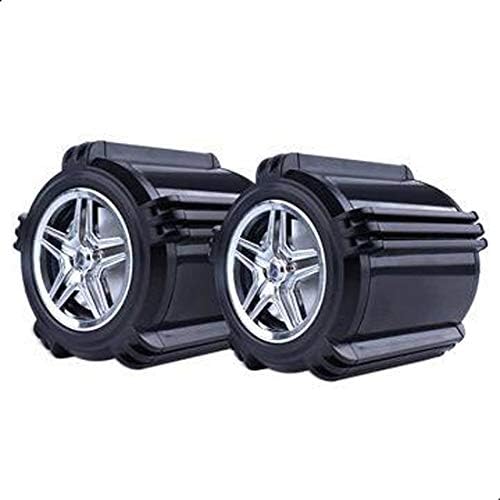
الصورة 2.1: الجبهة view of the Kisonli A404 speakers.
3. محتويات العبوة
- 2 x Kisonli A404 Mini USB Speakers (with integrated USB power cable and 3.5mm audio cable)
4. تعليمات الإعداد
- الموقع: Place the two speakers on a stable, flat surface, such as your desk, on either side of your computer monitor.
- توصيل طاقة USB: Locate the USB cable attached to the speakers. Plug this USB connector into an available USB port on your computer or a compatible USB power adapter (5V). This provides power to the speakers.
- توصيل الصوت: Locate the 3.5mm audio jack cable attached to the speakers. Plug this 3.5mm audio jack into the headphone or audio output port on your computer, laptop, or other audio source.
- تشغيل الطاقة: Once both cables are connected, the speakers should power on automatically. Some models may have an inline volume control with a power switch.
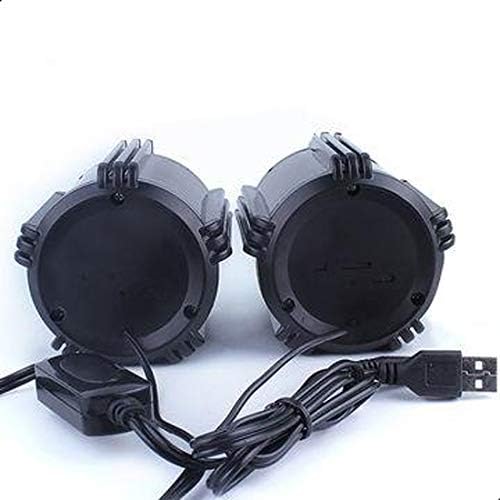
الصورة 4.1: خلفي view of speakers showing USB and 3.5mm audio connections.
5. تعليمات التشغيل
- التحكم في مستوى الصوت: Adjust the volume using the volume controls on your computer or the inline volume control on the speaker cable (if present).
- تشغيل الصوت: Once connected and powered, play audio from your computer. Sound should now be routed through the Kisonli A404 speakers.
- قطع الاتصال: To turn off the speakers, simply unplug the USB power cable from your computer or power source.
6. الصيانة
- تنظيف: Use a soft, dry cloth to clean the exterior of the speakers. Do not use liquid cleaners or aerosols.
- تخزين: عند عدم الاستخدام لفترات طويلة، قم بتخزين مكبرات الصوت في مكان بارد وجاف بعيدًا عن أشعة الشمس المباشرة ودرجات الحرارة القصوى.
- العناية بالكابلات: تجنب ثني أو ضغط الكابلات بشكل مفرط لمنع تلفها.
7. استكشاف الأخطاء وإصلاحها
| مشكلة | السبب المحتمل | حل |
|---|---|---|
| لا يوجد صوت من مكبرات الصوت |
|
|
| صوت منخفض أو مشوه |
|
|
8. المواصفات
- ماركة: كيسونلي
- رقم الموديل: أ404
- تقنية الاتصال: سلكي
- وضع إخراج الصوت: محيط
- نوع التركيب: جبل منضدية
- نوع السماعة: سماعات الكمبيوتر
- الأجهزة المتوافقة: الكمبيوتر الشخصي و ماك
- لون: أسود
- وزن السلعة: 350 جرام
- حجم السماعة: 7.5 سم (75 مم)
- عدد القطع: 2
- طاقة الإخراج: أقل من 5 واط

Image 8.1: Kisonli A404 speaker dimensions.
9. معلومات السلامة
- لا تعرض مكبرات الصوت للماء أو الرطوبة الزائدة.
- تجنب وضع مكبرات الصوت بالقرب من مصادر الحرارة أو في ضوء الشمس المباشر.
- لا تحاول تفكيك أو إصلاح السماعات بنفسك. استعن بفنيي صيانة مؤهلين.
- يحفظ بعيدًا عن متناول الأطفال.
10. الضمان والدعم
Kisonli products are manufactured to high-quality standards. For warranty information or technical support, please refer to the documentation provided at the time of purchase or contact your retailer. Please retain your proof of purchase for warranty claims.