
مقدمة
This manual provides essential information for the setup, operation, and maintenance of your Akia Screens AK-M110H1 110-inch Manual Pull-Down Projector Screen. Designed for both commercial and residential applications, this 16:9 widescreen screen features MaxWhite 2 front projection material, offering a 1.1 gain and a wide 180-degree viewing angle for clear, bright images. It is 4K and 8K HD Ready, ensuring compatibility with high-resolution content. The screen is also GREENGUARD Gold Certified for indoor air quality.

Image: Akia Screens projector screen showcasing cinematic clarity in an office environment.
يثبت
إرشادات التثبيت
The Akia Screens AK-M110H1 projector screen is designed for versatile installation, supporting both wall and ceiling mounting. The white metal case includes all necessary hardware for a secure setup. For optimal stability, it is recommended to mount at least one side of the screen to a wall stud if possible. If mounting to drywall, ensure to use appropriate drywall anchors (included) to support the screen's weight.
خيارات التركيب
- جدار جبل: Securely attach the screen case directly to a wall using the provided hardware.
- سقف جبل: The screen can also be mounted to the ceiling, offering flexibility for various room configurations.
- Optional L-Brackets: For installations requiring the screen to be positioned further from the wall, optional 6-inch and 12-inch L-brackets are available separately. These brackets allow for adjustable extension from the mounting surface.

Image: Mounting options for the Akia Screens projector, illustrating wall and ceiling installation with optional L-brackets.

الصورة: مفصلة view of the optional L-Bracket Wall Mount Kit.
تشغيل الشاشة
Manual Pull-Down Operation
The AK-M110H1 features a smooth manual pull-down system with an integrated auto-lock mechanism, allowing you to stop the screen securely at multiple desired height positions. A screen lanyard is included to assist with reaching the pull-down handle, especially in higher installations.
To Deploy the Screen:
- Gently pull the screen's handle downwards.
- Continue pulling until the screen reaches your desired viewارتفاع جي.
- Slightly release the handle to engage the auto-lock mechanism. The screen will hold its position.
To Retract the Screen:
- Gently pull the screen's handle downwards again, slightly past the auto-lock position.
- Slowly guide the screen upwards. The auto-lock mechanism will disengage, allowing the screen to retract smoothly into its casing.
- Ensure the screen retracts fully and evenly to prevent damage.

Image: The auto-locking system provides variable height settings and includes a screen lanyard for easy access.
Video: Official demonstration of the Akia Manual Projector Screen's auto-locking system.
صيانة
العناية والتنظيف
To maintain the quality and longevity of your projector screen, follow these simple cleaning guidelines:
- استخدمي قطعة قماش ناعمةamp cloth with mild soap and water to gently clean the screen surface.
- Avoid harsh chemicals, abrasive cleaners, or scrubbing, as these can damage the MaxWhite 2 material.
- Ensure the screen is completely dry before retracting it into its casing to prevent mildew or damage.
- Regularly inspect the pull-down mechanism and casinوتحقق من وجود أي علامات تآكل أو تلف.
استكشاف الأخطاء وإصلاحها
المشاكل الشائعة والحلول
Screen Not Retracting Smoothly:
If the screen does not retract smoothly, ensure you are pulling the handle slightly downwards to disengage the auto-lock before guiding it up. Avoid forcing the retraction. If the issue persists, gently pull the screen down to its full extension and then slowly guide it back up.
مخاوف بشأن جودة الصورة:
Ensure your projector is a standard (long-throw) type, as this screen is not compatible with ultra-short-throw projectors. Verify the projector's focus and alignment with the screen surface. The MaxWhite 2 material is ISF Certified for accurate color reproduction, so ensure your projector settings are optimized.
"Screeching" Sound During Operation:
A slight "screeching" sound during the screen's pull-down or retraction is a normal characteristic of some manual projector screen mechanisms and typically does not indicate a defect.
تحديد
مواصفات المنتج
| ميزة | التفاصيل |
|---|---|
| رقم الموديل | AK-M110H1 |
| أبعاد العرض | 110 بوصة قطري |
| نسبة العرض إلى الارتفاع | شاشة عريضة 16: 9 |
| Viewمنطقة قادرة | 54.0" H × 96.0" W |
| Overall Extended Size | 68.6" H × 105.5" W |
| Projection Material | MaxWhite 2 Front Projection |
| يكسب | 1.1 |
| Viewزاوية جي | 180 درجة |
| لون العلبة | أبيض |
| نوع التركيب | Wall mount, Ceiling mount |
| وضع التشغيل | Manual with Auto-Locking System |
| الشهادات | ISF Certified, GREENGUARD Gold Certified (UL 2818) |
| Recommended Projector Type | Standard (Long-throw) Projectors |
| وزن العنصر | 15.39 رطل |
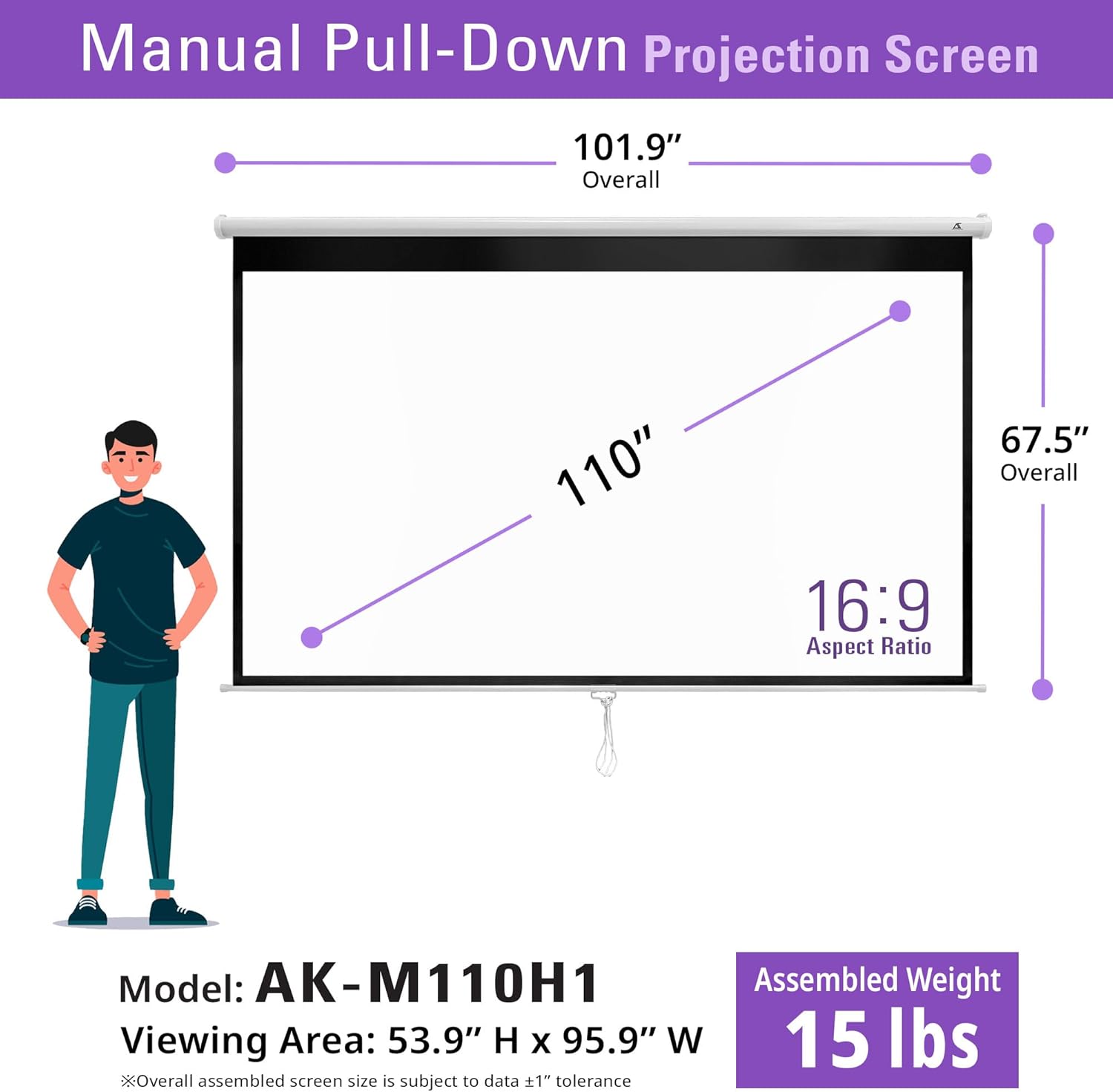
Image: Detailed dimensions of the Akia Screens AK-M110H1.

Image: Key features of the MaxWhite 2 projection material, including certifications.
الضمان والدعم
معلومات الضمان
The Akia Screens AK-M110H1 projector screen is backed by a ضمان الشركة المصنعة لمدة عامين، تغطية عيوب المواد والصناعة في ظل الاستخدام العادي.
دعم العملاء
For any questions, technical assistance, or warranty claims, Akia Screens provides comprehensive customer support:
- الدعم في الولايات المتحدة: Access to knowledgeable support staff located in the United States.
- دعم البريد الإلكتروني: الاتصال عبر البريد الإلكتروني للحصول على استفسارات مفصلة.
- يعيش Web محادثة: مساعدة فورية عبر الدردشة المباشرة على الموقع الرسمي webموقع.
- دعم فني مدى الحياة: Enjoy lifetime technical support for your product.

Image: Akia Screens offers comprehensive US-based customer support and warranty services.