
مقدمة
This manual provides comprehensive instructions for the setup, operation, and maintenance of your Oneconcept Beaufort Silver Edition Weather Station. Please read this manual thoroughly before using the device to ensure correct installation and optimal performance. This weather station is designed to provide accurate measurements of temperature, humidity, wind direction, wind speed, and rainfall.
مكونات المنتج
The Oneconcept Beaufort Silver Edition Weather Station includes the following main components:
- Outdoor Sensor Array: Measures wind speed, wind direction, rainfall, temperature, and humidity.
- Indoor Display Unit: Receives and displays data from the outdoor sensor, provides alarm functions, and stores historical data.
- Mounting Hardware: For securing the outdoor sensor array.
- دليل التعليمات: هذه الوثيقة.
- Batteries: 5 AA batteries are included for operation.

وصف الصورة: واضح view of the Oneconcept Beaufort Silver Edition Weather Station, showing the white outdoor sensor array with wind cups, wind vane, rain collector, and temperature/humidity sensor, alongside the silver-framed indoor display unit with a green backlit screen showing various weather readings.
يثبت
1. فك التغليف وتركيب البطارية
- قم بإزالة جميع المكونات بعناية من العبوة.
- For the Outdoor Sensor Array: Locate the battery compartment. Insert the required AA batteries, ensuring correct polarity. Close the compartment securely.
- For the Indoor Display Unit: Locate the battery compartment. Insert the required AA batteries, ensuring correct polarity. Alternatively, connect the display unit to a USB power source using the provided cable. Close the compartment securely.
2. Outdoor Sensor Array Placement
Proper placement of the outdoor sensor array is crucial for accurate readings.
- Choose an open location, free from obstructions like buildings, trees, or other structures that could interfere with wind, rain, or sunlight.
- Mount the sensor array securely using the provided hardware. Ensure it is level to guarantee accurate rain collection and wind direction.
- The recommended height for wind measurement is at least 2 meters (6.5 feet) above ground level.
- Ensure the wind vane is oriented correctly (e.g., pointing North) if calibration is required by the device. Refer to the display unit's initial setup for specific calibration steps.

وصف الصورة: The outdoor sensor array is shown mounted on a pole extending from a rooftop, with the indoor display unit visible in the foreground. This illustrates a typical installation scenario for accurate weather data collection.
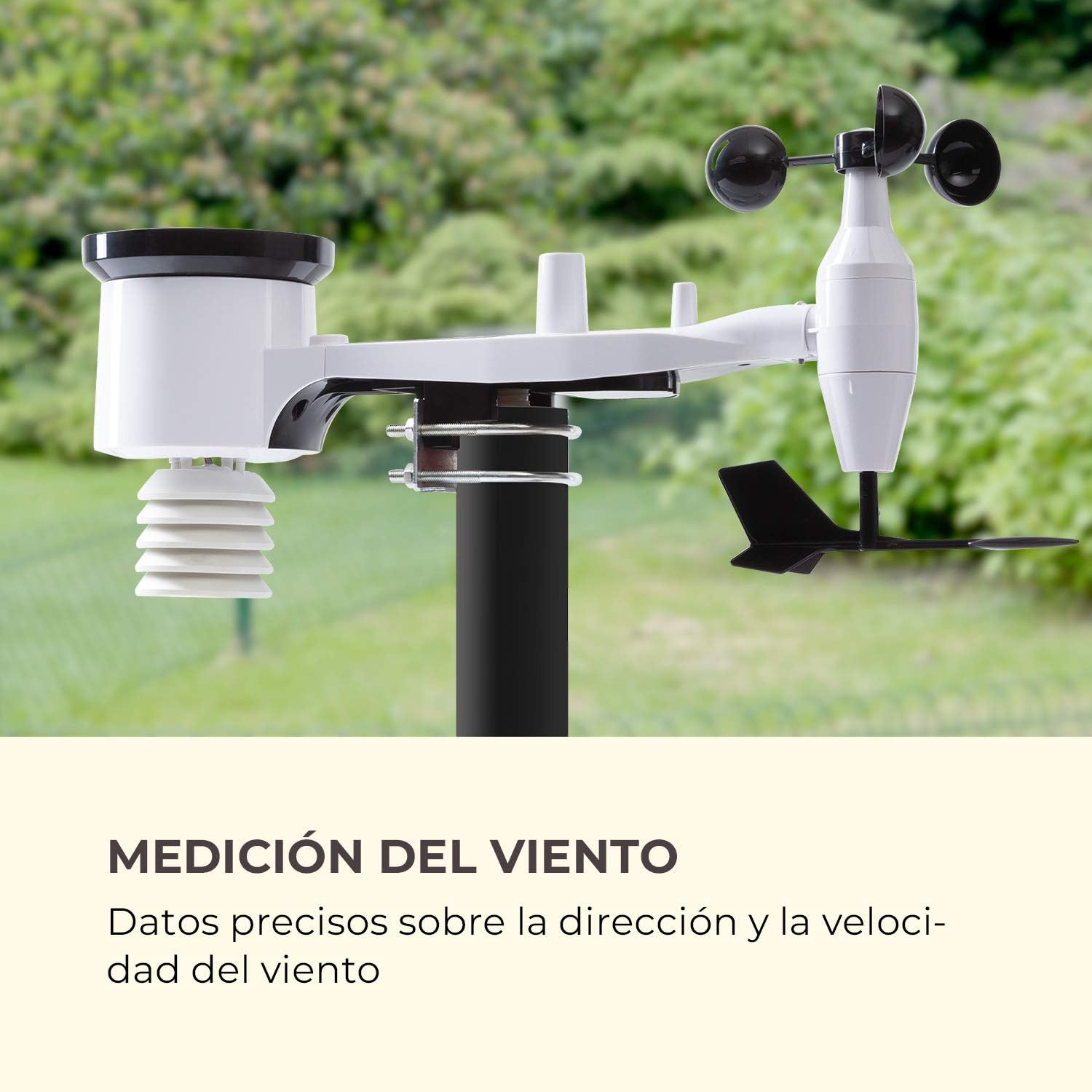
وصف الصورة: تفصيلية view of the outdoor sensor array, highlighting the wind cups for speed measurement and the wind vane for direction, against a blurred green background of trees, emphasizing its function for wind data collection.
3. Indoor Display Unit Setup
- Place the indoor display unit in a convenient location within the wireless range (up to 100m) of the outdoor sensor array.
- Avoid placing the unit near large metal objects or electronic devices that could cause interference.
- Once powered on, the display unit will automatically attempt to connect with the outdoor sensor. This may take a few minutes.
- Set the time, date, and preferred units of measurement (e.g., °C/°F, km/h/mph, hPa/inHg) using the buttons on the display unit. Refer to the specific button functions outlined in the Operating Instructions section.

وصف الصورة: The indoor display unit is positioned on a modern coffee table in a living room setting, next to a cup of coffee and a smartphone, illustrating its wireless and practical nature for indoor use.
تعليمات التشغيل
The indoor display unit provides various functions and displays for monitoring weather conditions.
عرض أكثرview

وصف الصورة: A detailed close-up of the indoor display unit's screen, showing indoor and outdoor temperature and humidity, wind speed and direction, rainfall, atmospheric pressure, time, and date, highlighting its versatile data display capabilities.
- IN TEMP / OUT TEMP: Displays indoor and outdoor temperature.
- رطوبة: Shows indoor and outdoor humidity levels.
- رياح: Indicates wind speed and direction.
- مطر: Displays rainfall data (e.g., hourly, daily, weekly).
- الضغط: Shows atmospheric pressure and historical trends.
- TENDENCY: Provides a weather forecast icon (e.g., sunny, cloudy, rainy).
- الوقت / التاريخ: الوقت والتاريخ الحالي.
وظائف الأزرار
Specific button functions may vary slightly. Refer to the icons on your device for precise controls.
- اتجاهات: Toggles between different display modes or settings.
- جلس: يدخل وضع الإعدادات أو يؤكد الاختيارات.
- UP/DOWN (or +/-): Adjusts values in settings or cycles through historical data.
- إنذار: Activates or deactivates the alarm function, or sets alarm parameters.
- ماكس دقيقة: Displays maximum and minimum recorded values for various parameters.
ضبط المنبهات
The weather station features an alarm function. To set an alarm:
- اضغط على إنذار زر للدخول إلى وضع إعداد التنبيه.
- استخدم أعلى/أسفل buttons to adjust the desired alarm time or weather threshold (e.g., temperature, wind speed).
- يضعط تعيين لتأكيد كل إعداد.
- Ensure the alarm is activated (an alarm icon should appear on the display).
صيانة
تضمن الصيانة الدورية طول عمر محطة الأرصاد الجوية ودقتها.
- تنظيف: Periodically clean the outdoor sensor array, especially the rain collector and wind sensors, to remove dirt, leaves, or debris that could affect readings. Use a soft, damp القماش. لا تستخدم المنظفات الكاشطة.
- استبدال البطارية: Replace batteries in both the outdoor sensor and indoor display unit when the low battery indicator appears on the display. Use high-quality AA batteries.
- فحص المستشعر: Occasionally check the outdoor sensor array for any physical damage or loose connections. Ensure the mounting is still secure.
- العناية بالشتاء: In areas with heavy snowfall or freezing rain, ensure the rain collector and wind sensors are clear of ice and snow to prevent damage and ensure accurate readings.
استكشاف الأخطاء وإصلاحها
| مشكلة | السبب المحتمل | حل |
|---|---|---|
| لم يتم عرض أي بيانات خارجية. |
|
|
| قراءات غير دقيقة لدرجة الحرارة والرطوبة. |
|
|
| سرعة/اتجاه الرياح غير دقيق. |
|
|
| قراءات هطول الأمطار غير صحيحة أو صفر. |
|
|
تحديد
| ميزة | التفاصيل |
|---|---|
| رقم الموديل | WTH3-3400-eauf |
| ماركة | Oneconcept |
| لاسلكي المدى | حتى 100 متر (328 قدمًا) في الهواء الطلق |
| مصدر الطاقة (مستشعر خارجي) | 5 بطاريات AA (مضمنة) |
| Power Source (Indoor Display) | Batteries, USB |
| ميزة خاصة | وظيفة التنبيه |
| مادة | معدن (غلاف) |
| تكنولوجيا الاتصال | USB (for display unit power/data) |
| المكونات المضمنة | Temperature and Humidity Sensor, Wind Sensor, Instruction Manual |
| تقنية الاستشعار | Ultrasonic, Motion |
| أبعاد الحزمة | 46.4 × 29.8 × 19.4 سم |
| وزن الحزمة | 2.38 كجم |
الضمان والدعم
For warranty information and technical support, please refer to the documentation provided with your purchase or visit the official Oneconcept webالموقع. احتفظ بإثبات الشراء الخاص بك لتقديم مطالبات الضمان.
معلومات الاتصال: Please consult the manufacturer's website or your retailer for the most up-to-date contact details for customer service and technical support.