
مقدمة
The Perel EDIN305N is a 230V 16A 3600W DIN-rail mount digital weekly timer designed for indoor use. This device allows for precise, programmable control of electrical circuits, enabling automatic switching ON and OFF of connected appliances or lighting systems over a weekly cycle. It features a clear digital display and multiple programming options to suit various scheduling needs.
احتياطات السلامة
تحذير: Electrical installation should only be performed by a qualified electrician. Incorrect wiring can lead to electric shock, fire, or damage to the device and connected equipment. Always disconnect power at the main circuit breaker before installation or maintenance.
- Ensure the power supply matches the device's specifications (230V~50Hz).
- لا تتجاوز سعة الحمل القصوى البالغة 16 أمبير / 3600 واط.
- This device is designed for indoor use only. Avoid exposure to moisture, dust, or extreme temperatures.
- لا تحاول فتح أو إصلاح الجهاز بنفسك. أحل جميع أعمال الصيانة إلى فنيين مؤهلين.
- يحفظ بعيدًا عن متناول الأطفال.
المنتج انتهىview
The Perel EDIN305N digital timer consists of a main body with a digital display, control buttons, and terminal blocks for electrical connections. A transparent cover protects the display and buttons.
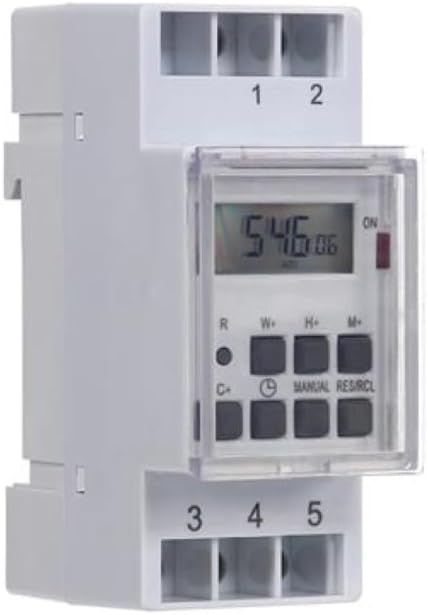
الشكل 1: أمام view of the Perel EDIN305N Digital Weekly Timer. The image displays the LCD screen, control buttons (R, W+, H+, M+, C+, Clock, Manual, RES/RCL), and numbered terminal blocks (1, 2 at the top, 3, 4, 5 at the bottom).
أزرار التحكم:
- R: Reset button (recessed).
- ث+: Weekday setting.
- ح+: إعداد الساعة.
- م +: Minute setting.
- C+: Clear program.
- أيقونة الساعة: Used to set current time and day, and to exit programming mode.
- يدوي: Manual override for ON/AUTO/OFF modes.
- RES/RCL: Reset/Recall program.
الكتل الطرفية:
- 1 ، 2: Power supply input (N, L).
- 3 ، 4 ، 5: Output terminals for controlled circuit (Common, Normally Open, Normally Closed).
المواصفات الفنية
| المعلمة | قيمة |
|---|---|
| رقم الموديل | إدين305ن |
| المجلدtage | 230 فولت ~ 50 هرتز |
| الحد الأقصى الحالي | 16 أمبير |
| الحد الأقصى للطاقة | 3600 واط |
| عدد الإعدادات | 7 (برامج التشغيل/الإيقاف) |
| نوع التركيب | DIN السكك الحديدية |
| الأبعاد (الطول × العرض × الارتفاع) | 2.36 × 3.54 × 1.57 بوصة (60 × 90 × 40 مم) |
| وزن | 0.12 كجم (4.2 أونصة) |
| مادة | بلاستيك |
| لون | أبيض |
| البطاريات المطلوبة | No (internal battery for memory backup) |
تثبيت
1. التركيب
The Perel EDIN305N is designed for DIN-rail mounting. Securely attach the timer to a standard 35mm DIN-rail within an electrical enclosure. Ensure sufficient space for wiring and ventilation.
2. الأسلاك
مهم: Ensure power is disconnected at the main circuit breaker before proceeding with wiring. Follow local electrical codes and regulations.
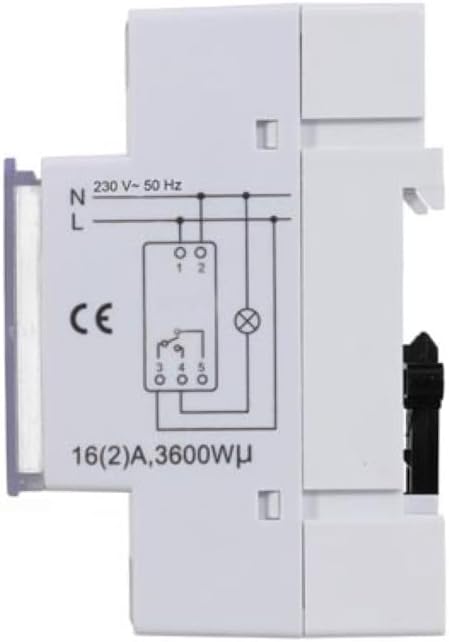
الشكل 2: جانب view of the Perel EDIN305N Digital Weekly Timer showing the electrical wiring diagram. It illustrates connections for Neutral (N), Live (L), and the output contacts (1, 2, 3, 4, 5) for controlling a load.
Refer to the wiring diagram (Figure 2) and the terminal block labels on the device:
- Connect the Neutral (N) wire of your 230V AC supply to terminal 1.
- Connect the Live (L) wire of your 230V AC supply to terminal 2.
- For the controlled circuit:
- Terminal 3: Common contact for the relay output.
- Terminal 4: Normally Open (NO) contact. The circuit connected here will be ON when the timer is active.
- Terminal 5: Normally Closed (NC) contact. The circuit connected here will be OFF when the timer is active.
- Connect the load (e.g., light, appliance) between the Live (L) supply and either terminal 4 (for NO operation) or terminal 5 (for NC operation), with terminal 3 connected to the Live (L) supply. Alternatively, connect the load between terminal 4 or 5 and the Neutral (N) supply, with terminal 3 connected to the Live (L) supply. Consult a qualified electrician for specific load wiring configurations.
الإعداد والتشغيل الأولي
1. Power On and Reset
After wiring and restoring power, the display will illuminate. If the display is blank or shows erratic characters, press the recessed R (Reset) button using a pointed non-metallic object (e.g., a pen tip). This will clear all settings and restore default values.
2. ضبط الوقت واليوم الحاليين
- اضغط مع الاستمرار على أيقونة الساعة زر.
- بينما تمسك أيقونة الساعة زر ، اضغط W+ to set the current day of the week (1=Monday, 7=Sunday).
- بينما تمسك أيقونة الساعة زر ، اضغط H+ لضبط الساعة الحالية (0-23).
- بينما تمسك أيقونة الساعة زر ، اضغط M+ لضبط الدقيقة الحالية (0-59).
- أطلق سراح أيقونة الساعة button. The time and day are now set.
3. برمجة دورات التشغيل/الإيقاف
يدعم المؤقت ما يصل إلى 7 برنامج تشغيل/إيقاف. يتكون كل برنامج من وقت تشغيل ووقت إيقاف.
- اضغط على أيقونة الساعة button once to enter programming mode. The display will show "1 ON".
- يضعط W+ لاختيار اليوم (الأيام) لهذا البرنامج. يمكنك اختيار يوم واحد، أو مجموعة من الأيام (مثلاً، من الاثنين إلى الجمعة)، أو جميع الأيام.
- يضعط H+ to set the ON hour for program 1.
- يضعط M+ to set the ON minute for program 1.
- اضغط على أيقونة الساعة اضغط على الزر مرة أخرى. ستظهر على الشاشة عبارة "1 OFF".
- Repeat steps 2-4 to set the OFF day(s), hour, and minute for program 1.
- To set additional programs (2-7), press the أيقونة الساعة button to cycle through "2 ON", "2 OFF", etc., and repeat the setting process.
- بعد ضبط جميع البرامج المطلوبة، اضغط على يدوي زر للخروج من وضع البرمجة والعودة إلى عرض الوقت الحالي.
4. تجاوز يدوي
اضغط على يدوي اضغط على الزر بشكل متكرر للتنقل بين أوضاع التشغيل:
- على: The output is continuously ON, overriding all programs.
- تلقاءي: يعمل المؤقت وفقًا لدورات التشغيل/الإيقاف المبرمجة.
- OFF: The output is continuously OFF, overriding all programs.
تأكد من ضبط المؤقت على آلي للتشغيل المبرمج.
5. Clearing Programs
To clear a specific program:
- Enter programming mode by pressing the أيقونة الساعة button until the desired program number (e.g., "3 ON") is displayed.
- اضغط على C+ button. This will clear both the ON and OFF times for that specific program.
- Repeat for other programs as needed.
- يضعط يدوي للخروج من وضع البرمجة.
To clear all programs and reset the device, use the recessed R (Reset) button.
صيانة
- نظّف الجهاز بقطعة قماش ناعمة وجافة. لا تستخدم منظفات أو مذيبات كاشطة.
- Ensure the transparent cover is closed to protect the display and buttons from dust and splashes.
- Regularly check electrical connections for tightness, especially in high-vibration environments.
استكشاف الأخطاء وإصلاحها
| مشكلة | السبب المحتمل | حل |
|---|---|---|
| العرض فارغ. | لا يوجد مصدر للطاقة، البطارية الداخلية فارغة. | Check power connections (terminals 1 & 2). Ensure main power is ON. If power is present, press the R (Reset) button. The internal battery recharges when connected to power. |
| المؤقت لا يعمل عند التشغيل/الإيقاف كما هو مبرمج. | Incorrect program settings; timer in manual ON/OFF mode. | Verify program settings (time, day, ON/OFF). Ensure the timer is in آلي الوضع بالضغط على يدوي زر. |
| Connected appliance not receiving power. | Incorrect wiring; appliance fault; timer fault. | Check wiring according to Figure 2. Test the appliance directly. If wiring and appliance are fine, the timer may be faulty. |
| Buttons unresponsive or display erratic. | Software glitch; low internal battery. | Press the recessed R (Reset) button. Ensure the timer has been connected to power for at least 24 hours to fully charge the internal battery. |
تصرف
Do not dispose of this product with general household waste. This electronic device contains materials that can be recycled. Please dispose of it at a designated collection point for electrical and electronic equipment waste, in accordance with local regulations.
الضمان والدعم
Perel products are manufactured to high quality standards. For warranty information, technical support, or service inquiries, please refer to the documentation provided with your purchase or contact your local Perel distributor or retailer. Please have your model number (EDIN305N) and purchase details ready when contacting support.