
1. المقدمة
This manual provides detailed instructions for the safe and proper installation and operation of your MOUNTUP MU0009 Full Motion TV Wall Mount. Please read this manual thoroughly before installation to ensure correct setup and to prevent damage or injury. This mount is designed for most 26-60 inch LED, LCD, OLED, and 4K TVs weighing up to 77 lbs (35 kg).
يسمح تصميم الحركة الكاملة بالاستخدام الأمثل viewing flexibility, including swivel, tilt, and extension capabilities. It features a robust alloy steel construction for durability and security.

Image: The MOUNTUP MU0009 full motion TV wall mount with a television extended from the wall, demonstrating its range of motion.
2. معلومات السلامة
- اقرأ جميع التعليمات: Before installation, read and understand all assembly instructions. If you have any questions, contact customer support.
- قدرة الوزن: لا تتجاوز الحد الأقصى للوزن المسموح به وهو 35 كيلوغراماً (77 رطلاً). قد يؤدي تجاوز هذا الحد إلى إصابات خطيرة أو أضرار في الممتلكات.
- حجم الشاشة: تم تصميم هذا الحامل للتلفزيونات التي يتراوح حجمها بين 26 و60 بوصة.
- نوع الجدار: This mount is designed for installation on wood studs or solid concrete/brick walls. لا تقم بالتثبيت على الحوائط الجافة وحدها. تأكد من أن سطح التثبيت يمكنه دعم الوزن الإجمالي للحامل والتلفزيون بأمان.
- أدوات: Use appropriate tools for installation. A stud finder, drill, level, and socket wrench are typically required.
- مساعدة: Due to the size and weight of TVs, it is recommended to have at least two people for installation.
- الأجهزة: Use only the provided hardware. If any parts are missing or damaged, contact customer support.
- فحص ما بعد التثبيت: After installation, ensure the mount is securely fastened and the TV is stable before use.
3. المواصفات
| ميزة | التفاصيل |
|---|---|
| رقم الموديل | MU0009 |
| توافق حجم التلفزيون | 26 - 60 بوصة |
| سعة الوزن | حتى 77 أرطال (35 كجم) |
| التوافق مع VESA | 100x100mm إلى 400x400mm |
| نوع التركيب | Full Motion (Articulating) |
| نطاق دوار | حتى 180 درجة (حسب حجم التلفزيون) |
| مدى الإمالة | من 0 درجة إلى -10 درجة |
| ضبط المستوى | +/- 3° post-installation |
| امتداد من الجدار | 2 بوصة (في وضع الانكماش) إلى 15.3 بوصة (في وضع التمدد) |
| مادة | سبائك الفولاذ |
| لون | أسود |
| وزن العنصر | 2 كيلوغرام |
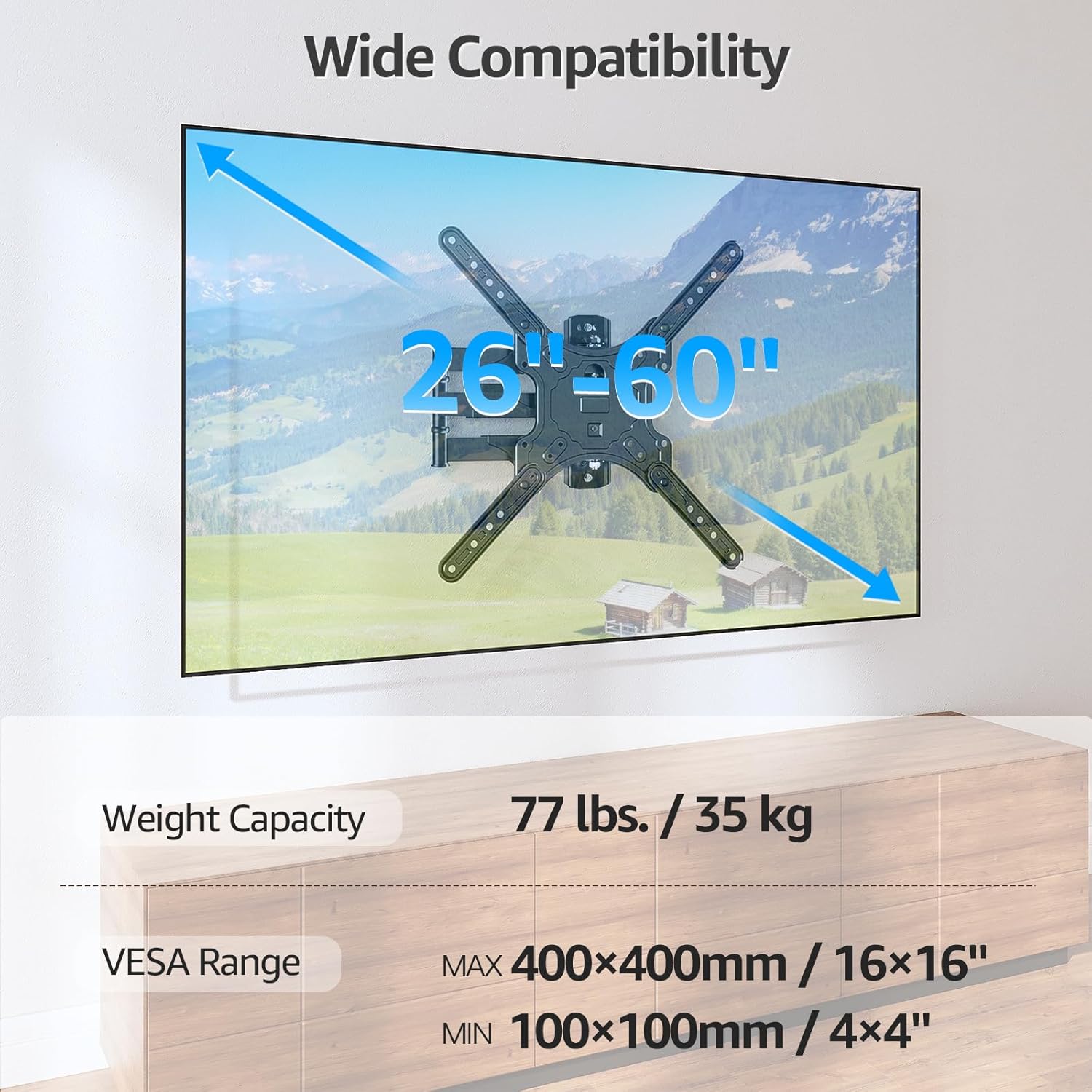
Image: Visual representation of the mount's compatibility, including supported TV sizes (26-60 inches), weight capacity (77 lbs / 35 kg), and VESA range (100x100mm to 400x400mm).
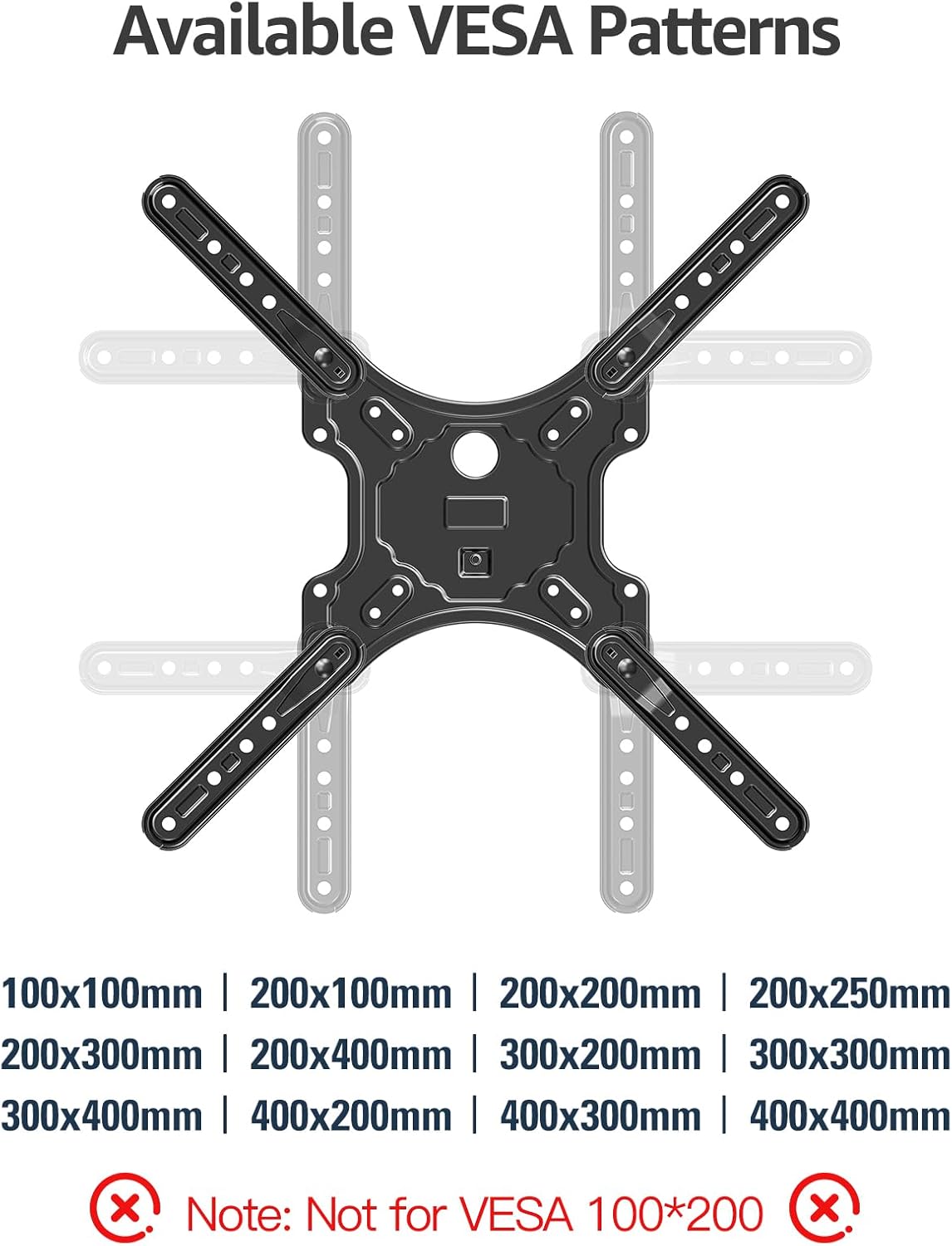
Image: A detailed diagram showing the available VESA patterns that the MOUNTUP MU0009 mount can accommodate, ranging from 100x100mm to 400x400mm.
4. التثبيت (الإعداد)
Before beginning, ensure you have all necessary tools and hardware. It is highly recommended to have a second person assist with the installation.
4.1. Check Wall Compatibility
The MOUNTUP MU0009 is designed for installation on a single wood stud or solid concrete/brick walls. لا تقم بالتركيب على الحوائط الجافة وحدها.
- تركيب مسمار الخشب: Locate the center of a wood stud using a stud finder.
- Concrete/Brick Wall Installation: Use appropriate concrete anchors (not included, but typically provided with the mount) and a masonry drill bit.

Image: Illustration of diverse wall compatibility, showing installation on a wood stud and a concrete/brick wall, with a clear warning not to mount on drywall alone.
4.2. التثبيت خطوة بخطوة
Follow these general steps for installation. Refer to the included instruction sheet for detailed diagrams and specific hardware usage.
- Step 1: Mount Brackets to TV. Attach the VESA plate and extension arms to the back of your TV using the appropriate screws, washers, and spacers from the hardware kit. Ensure the brackets are centered and securely tightened.
- Step 2: Install Wall Plate. Mark the desired height and position for the wall plate on your chosen wall type. Drill pilot holes according to the instructions for your wall type (wood stud or concrete). Secure the wall plate to the wall using the provided lag bolts. Ensure it is level and firmly attached.
- Step 3: Hang TV on Wall Plate. Carefully lift the TV (with brackets attached) and hook it onto the wall plate. Secure the TV to the wall plate using the safety screws or locking mechanisms as indicated in the detailed instructions.

Image: A visual guide to the easy 3-step installation process: 1. Mount brackets to TV, 2. Install wall plate, 3. Hang TV on the wall plate.
4.3. تركيب الزاوية
The single stud design and 15.3-inch extension make this mount suitable for corner installations, allowing the TV to be positioned optimally within a corner space.

Image: The MOUNTUP MU0009 TV mount shown installed in a room corner, highlighting its corner mounting solution capability.
5. التشغيل
Once installed, your MOUNTUP MU0009 TV wall mount offers various adjustments for an optimal viewتجربة رائعة.
- قطب: The articulating arms allow the TV to swivel up to 180° (90° left to 90° right), depending on TV size and wall clearance. Gently push or pull the TV to the desired angle.
- الإمالة: The mount offers a tilt range of 0° to -10°. Use the tool-free tilt adjustment knobs on the TV brackets to set the desired vertical angle, reducing glare.
- التمديد والانكماش: The mount can extend up to 15.3 inches from the wall and retract back to 2 inches, providing flexibility for viewing and saving space when not in use.
- تعديل المستوى: A post-installation leveling adjustment of +/- 3° allows for perfect TV alignment even if the wall plate was not perfectly level during installation.

Image: Illustration of the mount's swivel function, enabling a comfortable viewing experience by rotating the TV up to 90 degrees left or right.
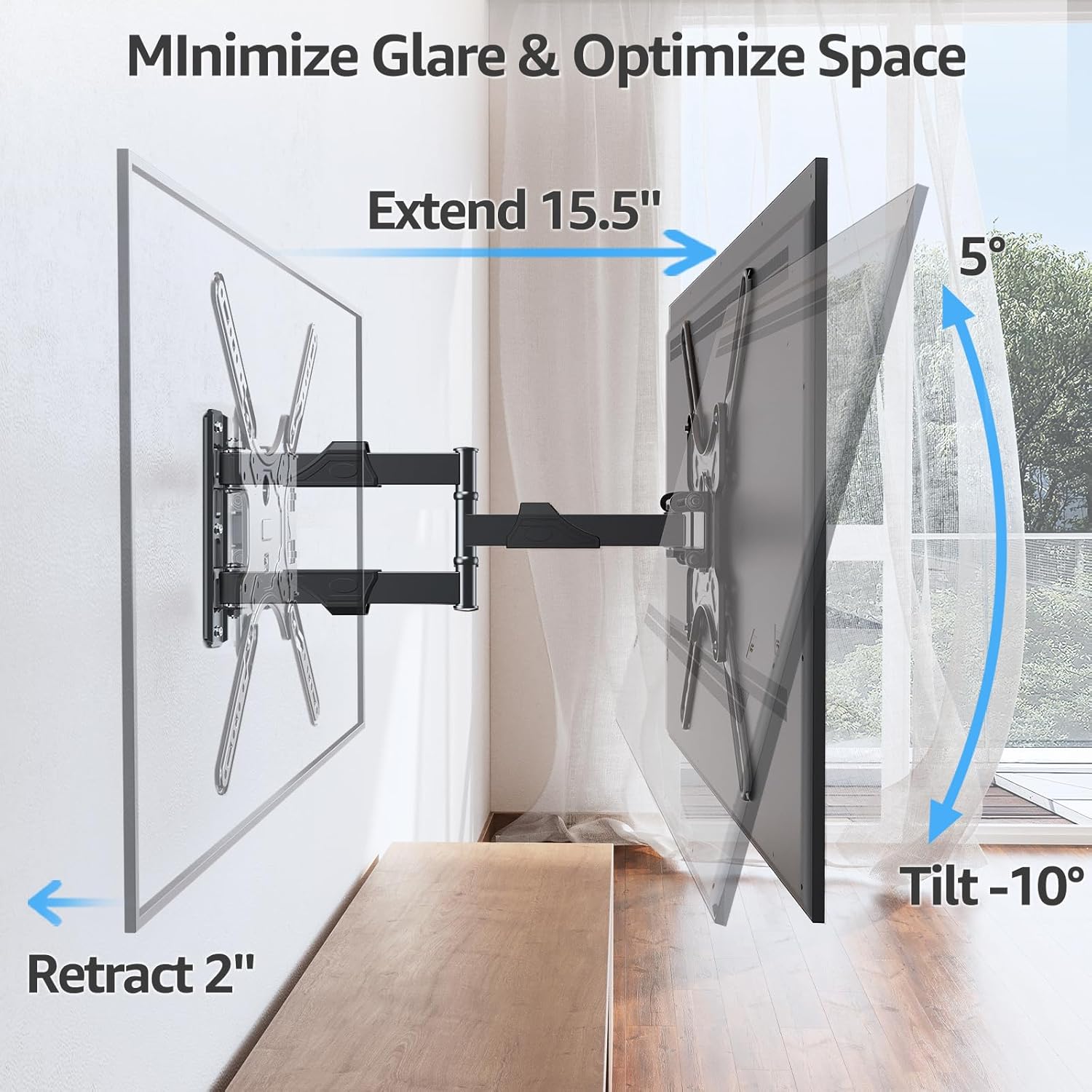
Image: Demonstrates how the mount extends up to 15.5 inches, retracts to 2 inches, and tilts up to -10 degrees to minimize glare and optimize space.
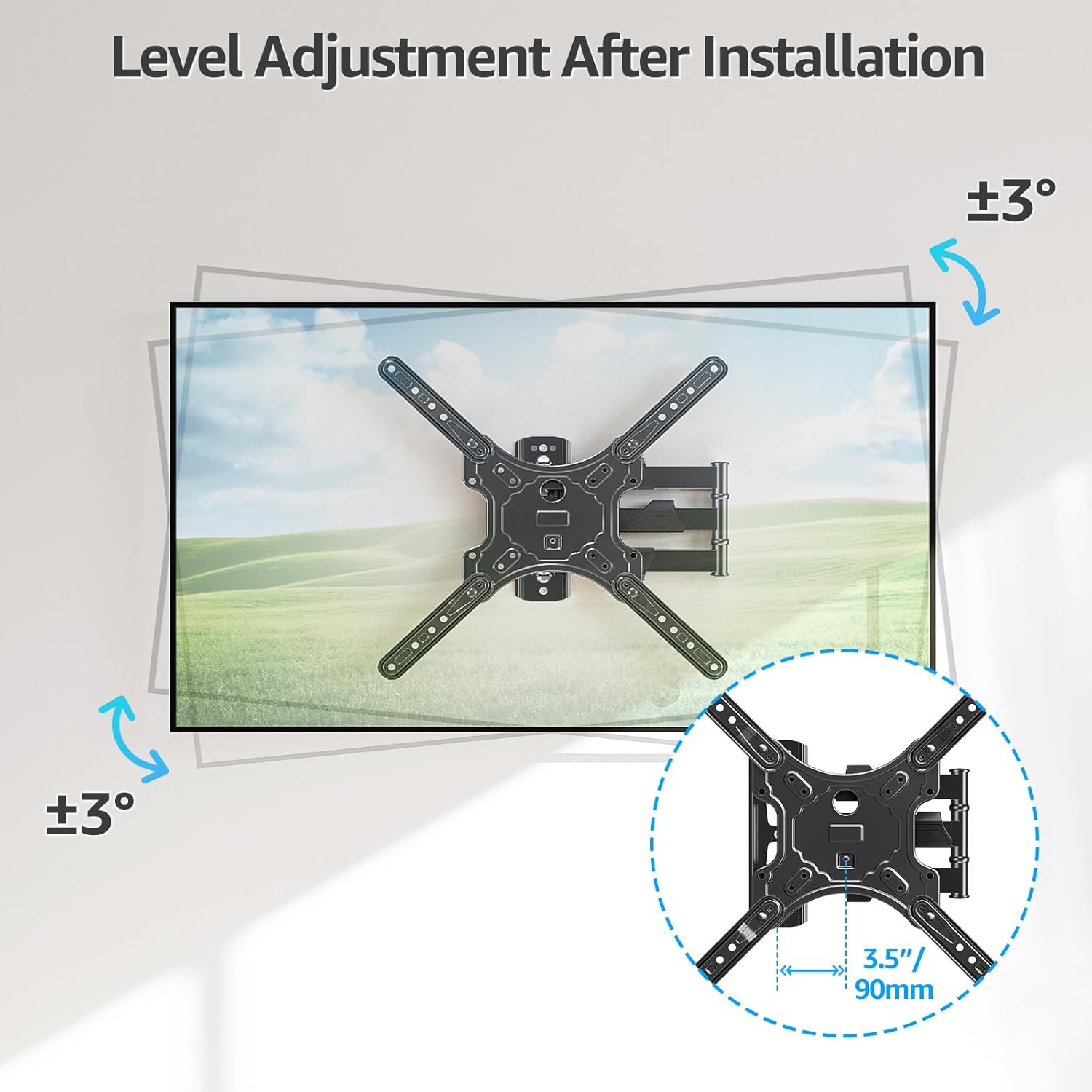
Image: Illustrates the level adjustment feature, allowing for a +/- 3 degree rotation of the TV after installation for perfect leveling.
5.1. إدارة الكابلات
Utilize the included cable ties to organize and secure cables along the articulating arms, providing a cleaner and more organized appearance.

Image: The MOUNTUP MU0009 mount with cables neatly managed along its arms, contributing to a clean living room aesthetic.
6. الصيانة
- الفحوصات الدورية: قم بفحص جميع البراغي والوصلات بشكل دوري للتأكد من أنها تبقى محكمة وآمنة.
- تنظيف: نظّف الحامل بقطعة قماش ناعمة وجافة. تجنّب استخدام المنظفات الكاشطة أو المذيبات التي قد تُتلف الطلاء.
- تشحيم: The articulating joints are designed for smooth operation and generally do not require lubrication. If movement becomes stiff, contact customer support.
7. استكشاف الأخطاء وإصلاحها
- التلفزيون ليس مستويا: Use the post-installation level adjustment feature (+/- 3°) to fine-tune the TV's horizontal position.
- جبل يشعر فضفاضة: Re-check all wall plate and TV bracket screws. Ensure they are tightened securely. If mounted on a wood stud, verify the stud was properly located and the lag bolts are fully engaged. If on concrete, ensure anchors are correctly installed.
- Difficulty moving TV: Ensure no cables are snagged. Check that all joints are free from obstruction. If the mount is new, it may require a few movements to loosen up.
- اجزاء مفقودة: Refer to the package contents list. If any parts are missing, contact MOUNTUP customer support immediately.
8. Official Product Video Guide
Watch the official MOUNTUP product video for a visual guide on the features and installation of the MU0009 TV Wall Mount.
Video: Official MOUNTUP video demonstrating the features and installation process of the MU0009 Swivel TV Wall Mount for 26-60 inch TVs.
9. الضمان والدعم
This MOUNTUP product comes with a ضمان لمدة 3 سنوات. For any pre-purchase questions, installation assistance, or warranty claims, please contact our professional support team.
معلومات الاتصال: Refer to the contact details provided on the product packaging or the official MOUNTUP webموقع.