
1. تعليمات السلامة الهامة
يرجى قراءة جميع تعليمات السلامة والتشغيل بعناية قبل استخدام هذا التلفزيون. احتفظ بهذه التعليمات للرجوع إليها مستقبلًا.
- مصدر الطاقة: قم بتوصيل التلفزيون فقط بمصدر الطاقة الموضح على الملصق.
- تهوية: تأكد من التهوية الجيدة. لا تسد فتحات التهوية.
- تنظيف: افصل التلفزيون عن مقبس الكهرباء قبل التنظيف. استخدم قطعة قماش ناعمة وجافة. لا تستخدم المنظفات السائلة أو البخاخات.
- الماء والرطوبة: Do not use this TV near water, such as a bathtub, washbowl, kitchen sink, laundry tub, swimming pool, or in a wet basement.
- حرارة: Position the TV away from heat sources such as radiators, heat registers, stoves, or other products (including ampالمُضخِّمات) التي تنتج الحرارة.
- الكابلات: احمِ سلك الطاقة من الدوس عليه أو انضغاطه، وخاصة عند المقابس ومنافذ الطاقة ونقطة خروجه من التلفزيون.
- البرق: افصل هذا التلفزيون أثناء العواصف الرعدية أو عند عدم استخدامه لفترات طويلة.
- الخدمة: لا تحاول صيانة هذا التلفزيون بنفسك. قم بإحالة جميع أعمال الصيانة إلى فنيين مؤهلين.
2. انتهى المنتجview
The CHIQ L40H7N is a 40-inch Full HD Smart TV designed to provide an immersive viewing experience with integrated smart features. It offers a resolution of 1080p and includes connectivity options such as Wi-Fi and Bluetooth.
المميزات الرئيسية:
- Full HD (1080p) Resolution: يقدم صورًا واضحة ومفصلة.
- وظائف التلفزيون الذكي: Access popular streaming services like Netflix, YouTube, and Prime Video.
- Integrated Wi-Fi and Bluetooth: For wireless connectivity and device pairing.
- Multiple Connectivity Ports: Includes 3 HDMI and 2 USB ports for various external devices.
- موالف ثلاثي: Supports DVB-T/T2/C/S/S2 for versatile broadcast reception.
- صوت دولبي: تجربة صوتية محسّنة.
- دعم HDR10: Provides improved contrast and color reproduction.
- Quad Core CPU: Ensures smooth performance for smart features and applications.

الصورة: الجبهة view of the CHIQ L40H7N Smart TV, showcasinيتميز بإطاره النحيف وشاشته.
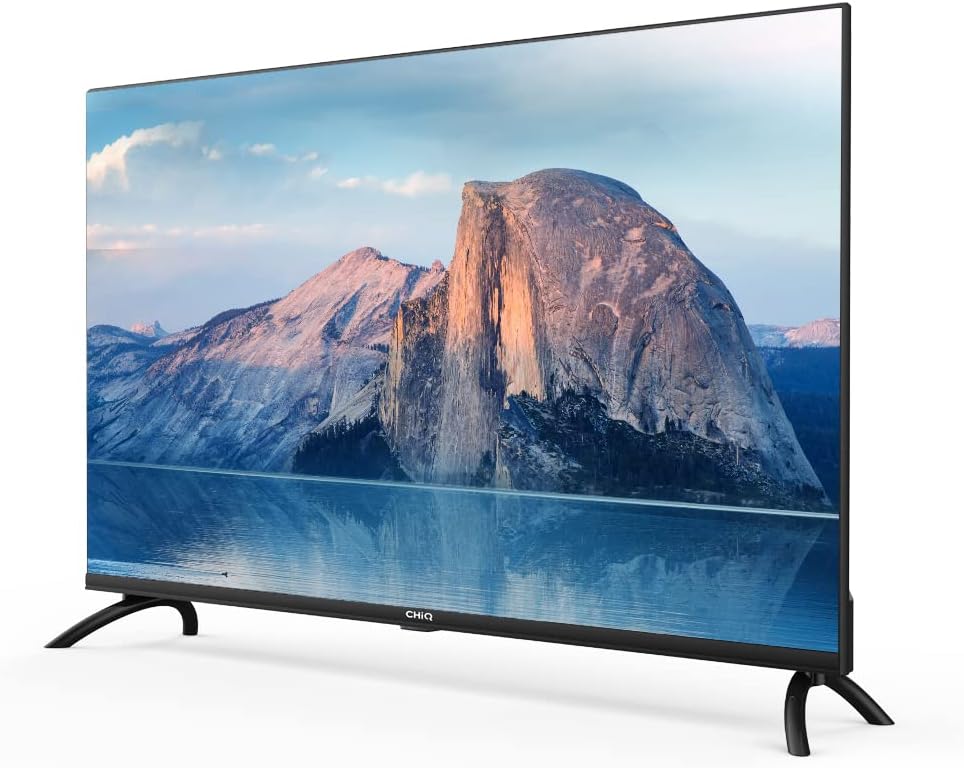
الصورة: الجانب view of the CHIQ L40H7N Smart TV, highlighting its thin profile.
3. الإعداد
3.1 فك التعبئة
- Carefully open the packaging and remove the TV and all accessories.
- Ensure all components are present: TV unit, remote control, batteries, power cord, stand components, and user manual.
- Retain the packaging materials for future transport or servicing.
3.2 تركيب الحامل
لتثبيت حامل التلفزيون:
- ضع التلفزيون على سطح ناعم ومسطح (مثل بطانية أو إسفنج) بحيث يكون وجهه لأسفل لمنع تلف الشاشة.
- قم بمحاذاة أرجل الحامل مع الفتحات المقابلة لها في الجزء السفلي من التلفزيون.
- ثبّت أرجل الحامل باستخدام البراغي المرفقة. تأكد من إحكام ربطها.

Image: Diagram showing the dimensions of the CHIQ L40H7N TV, including height with stand (568.9mm), width (900.3mm), and depth with stand (178.9mm).
3.3 التركيب على الحائط (اختياري)
If you choose to wall mount your TV, please consult a professional installer and refer to the specific instructions provided with your wall mount bracket. Ensure the wall mount is compatible with the TV's VESA mounting pattern.
3.4 توصيل الأجهزة الطرفية
قم بتوصيل أجهزتك الخارجية بمنافذ التلفزيون:
- HDMI: Connect Blu-ray players, game consoles, or set-top boxes to the HDMI ports (HDMI1, HDMI2, HDMI3).
- USB: Insert USB drives for media playback into the USB ports (USB1, USB2).
- هوائي / كابل: قم بتوصيل الهوائي أو إشارة تلفزيون الكابل بالمدخل المناسب.
- إيثرنت: للحصول على اتصال إنترنت سلكي مستقر، قم بتوصيل كابل إيثرنت بمنفذ الشبكة المحلية (LAN).
3.5 توصيل الطاقة
After connecting all necessary cables, plug the power cord into the TV's power input, then into a wall outlet.
3.6 التشغيل المبدئي
Press the power button on the remote control or on the TV. Follow the on-screen instructions to complete the initial setup, including language selection, network connection, and channel scanning.
4. تشغيل التلفزيون
4.1 وظائف التحكم عن بعد
The remote control allows you to navigate the TV's features:
- زر الطاقة: تشغيل التلفزيون أو إيقاف تشغيله.
- الحجم +/-: ضبط مستوى الصوت.
- القناة +/-: تغيير القنوات التلفزيونية.
- الإدخال / المصدر: حدد مصدر الإدخال (HDMI، USB، TV).
- أزرار التنقل (أعلى/أسفل/يسار/يمين/موافق): التنقل عبر القوائم وتأكيد الاختيارات.
- المنزل/المركز الذكي: الوصول إلى واجهة التلفزيون الذكي.
- أزرار التطبيق: أزرار مخصصة لـ Netflix وYouTube وPrime Video وغيرها.
4.2 ميزات التلفزيون الذكي
Your CHIQ L40H7N TV provides access to a range of smart features and applications:
- الوصول إلى التطبيقات: Press the Home button or dedicated app buttons to launch applications like Netflix, YouTube, and Prime Video.
- متجر التطبيقات: قم بتنزيل وتثبيت تطبيقات إضافية من متجر التطبيقات المدمج.
- شاشة النسخ المتطابق: قم بعرض المحتوى من الهواتف الذكية أو الأجهزة اللوحية المتوافقة على جهاز التلفزيون الخاص بك.

Image: The CHIQ Smart TV displaying the Netflix application interface, along with other streaming apps like YouTube and Prime Video.

Image: A CHIQ Smart TV screen showing a variety of content from streaming services, indicating a rich media experience.
4.3 اتصال الشبكة
To use Smart TV features, connect your TV to the internet:
- واي فاي: انتقل إلى الإعدادات > الشبكة > واي فاي، وحدد شبكتك، وأدخل كلمة المرور.
- إيثرنت: قم بتوصيل كابل إيثرنت من جهاز التوجيه الخاص بك إلى منفذ LAN الخاص بالتلفزيون. سيكتشف التلفزيون الاتصال السلكي تلقائيًا.
4.4 اتصال البلوتوث
Pair Bluetooth devices like headphones or speakers:
- Enable Bluetooth on your external device and set it to pairing mode.
- On the TV, go to Settings > Remotes & Accessories > Bluetooth.
- Select your device from the list and follow the on-screen prompts to pair.
4.5 اختيار المدخلات
Press the 'Input' or 'Source' button on your remote to switch between connected devices (HDMI1, HDMI2, HDMI3, USB, TV Tuner).
4.6 إعدادات الصورة والصوت
Adjust display and audio preferences via the Settings menu:
- وضع الصورة: Choose from standard, dynamic, movie, or custom settings.
- السطوع/التباين/اللون: اضبط جودة الصورة بدقة.
- وضع الصوت: Select audio presets like standard, music, movie, or custom.
- صوت دولبي: The TV supports Dolby Audio for enhanced sound.
- HDR10: Experience improved contrast and color with HDR10 content.

Image: The CHIQ L40H7N TV displaying a scene with the Dolby Audio logo, indicating support for enhanced sound.

Image: A split-screen comparison on the CHIQ L40H7N TV, demonstrating the visual improvement with HDR10 technology, showing richer colors and contrast.

Image: An illustration of a Quad Core CPU, representing the processing power within the CHIQ L40H7N TV for smooth operation.

Image: The CHIQ L40H7N TV positioned on a media console in a living room, showcasinدمجها الجمالي في البيئة المنزلية.
5. الصيانة
5.1 تنظيف التلفزيون
للحفاظ على مظهر وأداء التلفزيون:
- شاشة: امسح الشاشة برفق بقطعة قماش ناعمة وخالية من الوبر. لإزالة البقع الصعبة، امسح برفقampبلل قطعة القماش بالماء أو بمنظف الشاشة المتخصص (لا ترش مباشرة على الشاشة).
- خزانة: امسح خزانة التلفزيون بقطعة قماش ناعمة وجافة. تجنب استخدام المنظفات أو المذيبات الكاشطة.
- افصل دائمًا التلفاز عن الكهرباء قبل التنظيف.
5.2 تحديثات البرامج
Regular software updates can improve performance and add new features:
- التحديثات التلقائية: تأكد من توصيل جهاز التلفزيون الخاص بك بالإنترنت لتلقي التحديثات التلقائية.
- فحص يدوي: You can manually check for updates in the Settings menu (e.g., Settings > About > System Update).
6. استكشاف الأخطاء وإصلاحها
إذا واجهت مشكلات مع التلفزيون الخاص بك، فراجع المشكلات والحلول الشائعة التالية:
- لا يوجد طاقة:
- Check if the power cord is securely plugged into the TV and the wall outlet.
- Ensure the wall outlet is functioning by testing it with another device.
- حاول الضغط على زر التشغيل الموجود على التلفزيون نفسه، وليس فقط على جهاز التحكم عن بعد. - No Picture, But Sound is Present:
- Check the input source. Ensure it matches the device you are trying to view (e.g., HDMI1 for a Blu-ray player).
- Verify that the external device is powered on and functioning correctly.
- Try a different HDMI cable or port. - No Sound, But Picture is Present:
- Check the volume level and ensure the TV is not muted.
- Verify audio output settings in the TV menu (e.g., internal speakers, external audio system).
- If using an external device, check its volume and audio settings. - جهاز التحكم عن بعد لا يعمل:
- استبدل البطاريات في جهاز التحكم عن بعد.
- تأكد من عدم وجود أي عوائق بين جهاز التحكم عن بعد ومستشعر الأشعة تحت الحمراء الخاص بالتلفزيون.
- وجّه جهاز التحكم عن بعد مباشرة نحو التلفزيون. - مشاكل الاتصال بالشبكة:
- أعد تشغيل جهاز التوجيه (الراوتر) وجهاز المودم.
- Check Wi-Fi password if connecting wirelessly.
- If using a wired connection, ensure the Ethernet cable is properly connected.
If the problem persists, consult the CHiQ customer support or a qualified technician.
7. المواصفات
Below are the technical specifications for the CHIQ L40H7N Smart TV:
| ميزة | مواصفة |
|---|---|
| ماركة | تشيك |
| اسم الموديل | L40H7N |
| حجم الشاشة | 40 بوصة |
| تكنولوجيا العرض | شاشة الكريستال السائل |
| دقة | 1080 بكسل (عالي الدقة بالكامل) |
| معدل التحديث | 60 هرتز |
| ميزة خاصة | Full HD, Smart TV, HDR10, Dolby Audio |
| تكنولوجيا الاتصال | Bluetooth, Ethernet, HDMI (3 ports), USB (2 ports), Wi-Fi |
| خدمات الإنترنت المدعومة | أمازون برايم فيديو، نتفليكس، يوتيوب |
| الأجهزة المتوافقة | Laptop, Smart Speaker, Smart Watch, Tablet, Car Audio System, Cellphone |
| استهلاك الطاقة (SDR) | 47.0 واط |
| فئة كفاءة الطاقة (SDR) | G |
| Screen Diagonal (cm) | 100.3 سم |
| Screen Resolution (pixels) | 1920 × 1080 |
| Minimum Guaranteed Software Updates Until | 20-01-2030 |
| Minimum Guaranteed Spare Parts Until | 20-01-2029 |
للحصول على معلومات تفصيلية حول الطاقة، يرجى الرجوع إلى قاعدة بيانات EPREL: https://eprel.ec.europa.eu/qr/454406

Image: The EU Energy Label for the CHIQ L40H7N TV, showing an energy efficiency class G and consumption of 47 kWh/1000h.
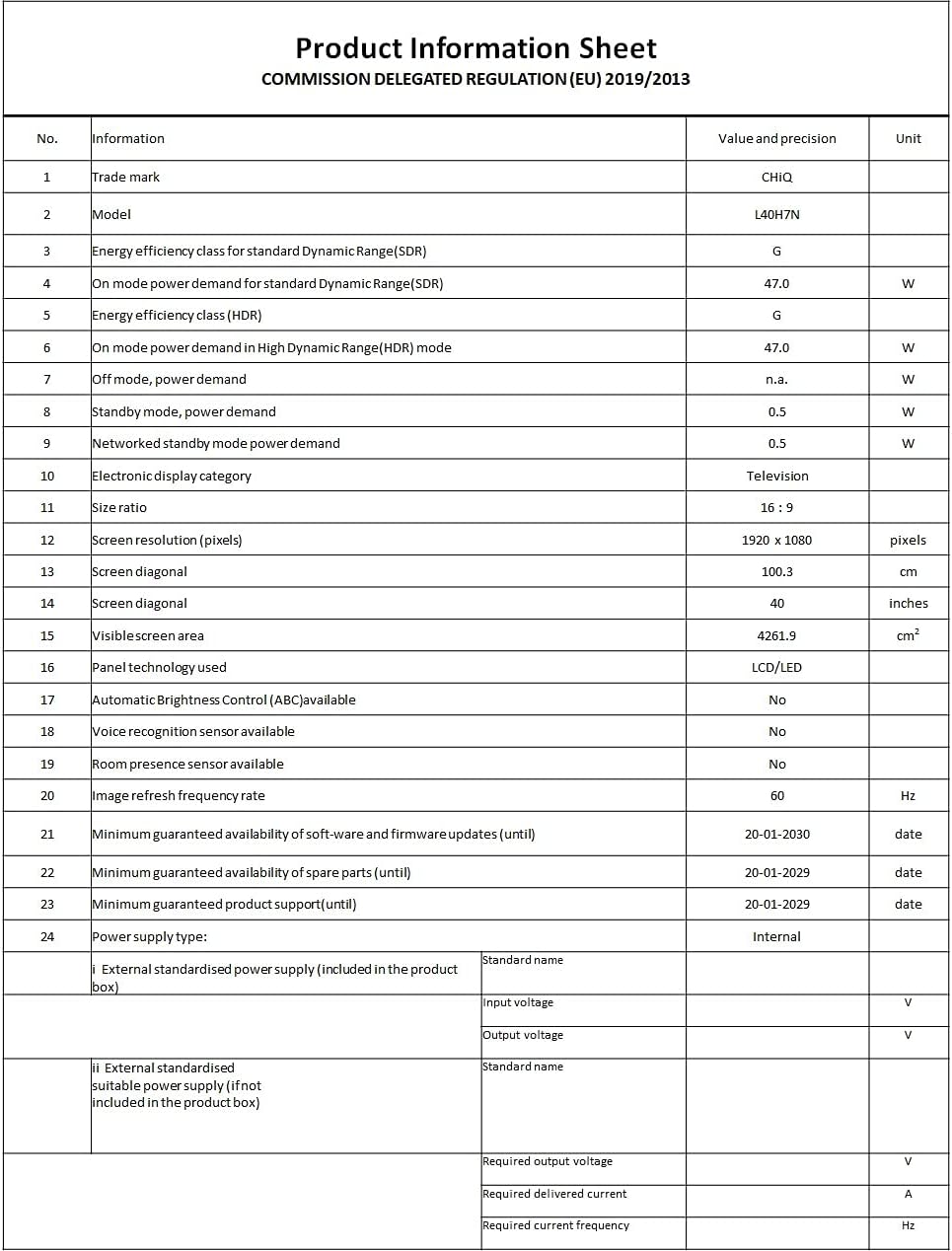
Image: A Product Information Sheet for the CHIQ L40H7N, detailing various specifications and compliance with COMMISSION DELEGATED REGULATION (EU) 2019/2013.
8. الضمان والدعم
Your CHIQ L40H7N Smart TV comes with a manufacturer's warranty. Please refer to the warranty card included in your product packaging for specific terms and conditions, including warranty period and coverage details.
دعم العملاء:
For technical assistance, troubleshooting, or warranty claims, please contact CHiQ customer support. Contact information can typically be found on the CHiQ official webالموقع أو في وثائق المنتج الخاص بك.