
مقدمة
This manual provides detailed instructions for the safe and efficient use of your FONESTAR DOTS-N Bluetooth TWS Speaker. Please read this manual thoroughly before operating the device and retain it for future reference.
The FONESTAR DOTS-N is a portable Bluetooth TWS speaker featuring Bluetooth 4.2 and NFC connectivity. It offers powerful sound with enhanced bass, playback controls, and hands-free calling. Equipped with a rechargeable Li-Ion battery providing up to 10 hours of autonomy, it also includes a 3.5mm auxiliary input. Its compact design makes it suitable for home use.
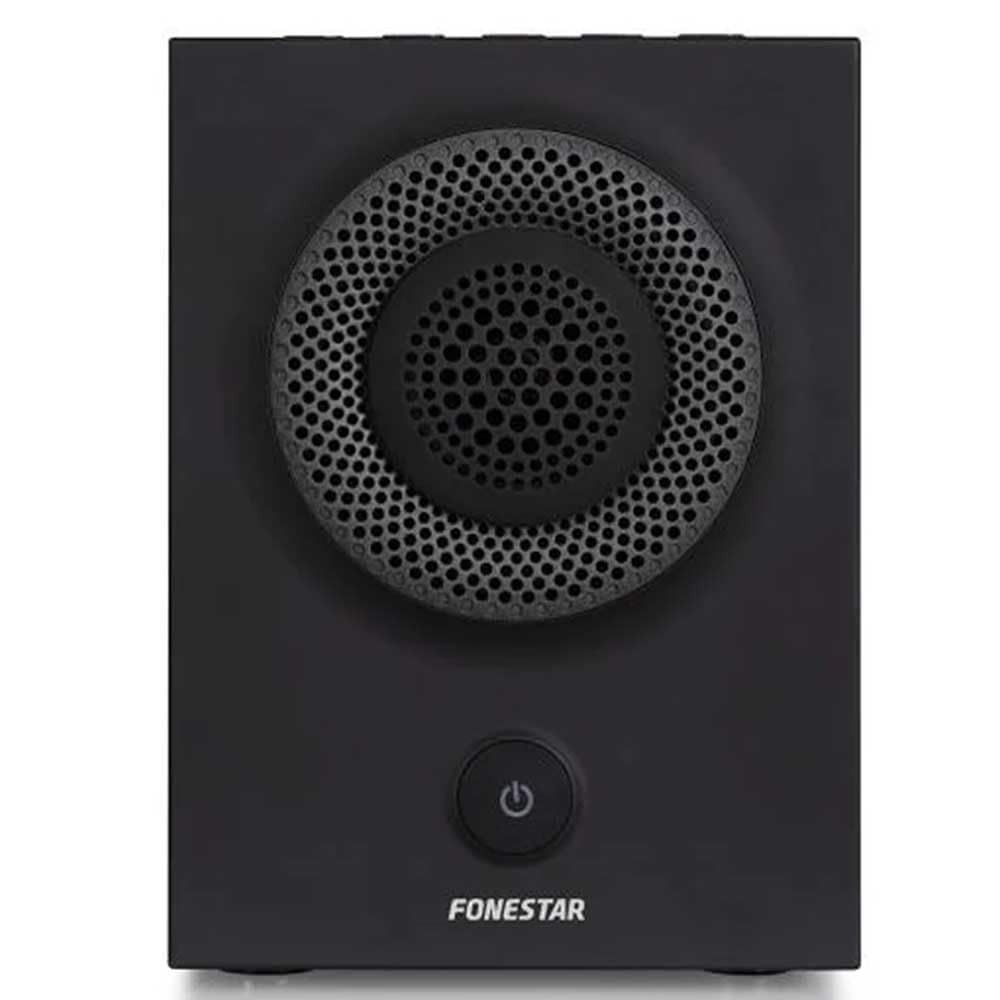
الشكل 1: الجبهة view of the FONESTAR DOTS-N Bluetooth TWS Speaker.
يثبت
1. فك التعبئة
أزل جميع المكونات من العبوة بعناية. تأكد من وجود جميع العناصر المذكورة أدناه:
- FONESTAR DOTS-N Bluetooth TWS Speaker
- كابل شحن من USB إلى Micro USB
- كابل صوت ستيريو مقاس 3.5 ملم
- دليل المستخدم (هذا المستند)
2. شحن مكبر الصوت
Before first use, fully charge the speaker. Connect the Micro USB end of the charging cable to the speaker's charging port and the USB-A end to a compatible USB power adapter (not included) or a computer's USB port.
- سيضيء مؤشر الشحن أثناء الشحن.
- وقت الشحن حوالي ساعتين للشحن الكامل.
- The indicator light will change or turn off once charging is complete.
3. تشغيل / إيقاف التشغيل
To power on the speaker, press and hold the power button (usually indicated by a ⏻ symbol) for a few seconds until you hear an audible prompt or see an indicator light. To power off, repeat the process.
تعليمات التشغيل
1. اقتران بلوتوث
يدعم مكبر الصوت تقنية بلوتوث 4.2 لبث الصوت لاسلكيًا.
- Ensure the speaker is powered on and in pairing mode (usually indicated by a flashing LED). If not, press the Bluetooth pairing button or power button briefly to enter pairing mode.
- على هاتفك الذكي أو جهازك اللوحي أو أي جهاز آخر يدعم تقنية Bluetooth، انتقل إلى إعدادات Bluetooth.
- بحث عن available devices and select "FONESTAR DOTS-N" from the list.
- Once paired, the speaker will emit an audible confirmation, and the LED indicator will typically become solid.
2. NFC Pairing (Near Field Communication)
For devices with NFC, pairing can be done quickly:
- Ensure NFC is enabled on your device and the speaker is powered on.
- Tap your NFC-enabled device gently against the NFC area on the speaker (refer to product diagram for exact location, if available).
- تأكيد طلب الاقتران على جهازك.
3. وظيفة الصوت الاستريو اللاسلكي الحقيقي (TWS)
The TWS function allows you to pair two FONESTAR DOTS-N speakers together for a stereo sound experience.
- Ensure both DOTS-N speakers are powered on and not connected to any other Bluetooth device.
- On one speaker (this will be the primary speaker), press and hold the TWS button (if available) or a designated button for TWS pairing.
- سيقوم مكبر الصوت الرئيسي بالبحث عن مكبر الصوت الثانوي. وبمجرد الاتصال، سيصدر كلا مكبري الصوت صوت تأكيد.
- الآن، قم بتوصيل جهازك الذي يعمل بتقنية البلوتوث بالسماعة الرئيسية كما هو موضح في قسم "اقتران البلوتوث". سيتم تشغيل الصوت بنظام ستيريو من خلال كلتا السماعتين.
4. المدخل الإضافي (AUX)
For non-Bluetooth devices, use the included 3.5mm stereo audio cable.
- قم بتوصيل أحد طرفي كبل الصوت مقاس 3.5 ملم بمنفذ AUX-in الموجود على مكبر الصوت.
- قم بتوصيل الطرف الآخر بمقبس سماعة الرأس أو مخرج الصوت في جهازك.
- سيتم تحويل مكبر الصوت تلقائيًا إلى وضع AUX أو قد يتطلب التحديد اليدوي عبر زر الوضع.
5. Playback Control and Hands-Free Calls
The speaker features integrated controls for music playback and managing calls:
- تشغيل/إيقاف مؤقت: Press the Play/Pause button (often combined with the power button or a dedicated button).
- رفع/خفض الصوت: استخدم أزرار الصوت (+ / -) on the speaker.
- المسار التالي / السابق: Long press or double-press the volume buttons, or use dedicated track skip buttons if present.
- الرد/إنهاء المكالمة: Press the Play/Pause button during an incoming call to answer, and again to end the call.
- رفض المكالمة: اضغط مع الاستمرار على زر التشغيل/الإيقاف المؤقت أثناء المكالمة الواردة.
صيانة
1. التنظيف
- قم دائمًا بإيقاف تشغيل السماعة قبل تنظيفها.
- استخدم قطعة قماش ناعمة وجافة وخالية من الوبر لمسح الأسطح الخارجية.
- لا تستخدم المنظفات الكاشطة أو الشمع أو المذيبات لأنها قد تؤدي إلى إتلاف الطبقة النهائية.
- تجنب دخول الرطوبة إلى أي فتحات.
2. التخزين
- قم بتخزين مكبر الصوت في مكان بارد وجاف بعيدًا عن أشعة الشمس المباشرة ودرجات الحرارة القصوى.
- في حالة التخزين لفترة طويلة، اشحن البطارية إلى حوالي 50% كل بضعة أشهر للحفاظ على صحة البطارية.
3. العناية بالبطارية
- لا تعرض البطارية للحرارة الزائدة أو النار أو أشعة الشمس المباشرة.
- تجنب تفريغ البطارية بالكامل بشكل متكرر، لأن هذا يمكن أن يقلل من عمرها الافتراضي.
- استخدم فقط كابل الشحن المرفق أو كابل شحن معتمد مماثل.
استكشاف الأخطاء وإصلاحها
| مشكلة | السبب المحتمل | حل |
|---|---|---|
| لا يتم تشغيل مكبر الصوت. | نفدت طاقة البطارية. | قم بشحن السماعة باستخدام كابل USB المرفق. |
| لا يمكن الاقتران عبر البلوتوث. | السماعة ليست في وضع الاقتران؛ الجهاز بعيد جدًا؛ تداخل. | Ensure speaker is in pairing mode. Move device closer (within 10m). Turn off other Bluetooth devices. |
| لا يوجد صوت أو مستوى الصوت منخفض. | مستوى الصوت منخفض جدًا على مكبر الصوت أو جهاز المصدر؛ وضع الإدخال غير صحيح. | Increase volume on both speaker and source device. Check if the correct input (Bluetooth/AUX) is selected. |
| فشل اقتران TWS. | Speakers are already paired to another device; incorrect TWS pairing procedure. | تأكد من فصل كلا السماعتين عن الأجهزة الأخرى. اتبع خطوات الاقتران اللاسلكي بدقة. |
| تشويه الصوت. | مستوى الصوت مرتفع جدًا؛ البطارية منخفضة؛ إشارة ضعيفة. | Reduce volume. Charge the speaker. Move source device closer to the speaker. |
المواصفات الفنية

Figure 2: Dimensions of the FONESTAR DOTS-N Bluetooth TWS Speaker.
| اسم الموديل | DOTS-N |
| ماركة | فونستار |
| تكنولوجيا الاتصال | Bluetooth 4.2, NFC, 3.5mm AUX |
| لاسلكي المدى | حتى 10 مترا (33 قدما) |
| وضع إخراج الصوت | ستيريو (مع TWS) |
| نوع السماعة | 3" Coaxial Woofer with Tweeter, 3" Subwoofer, 4" Passive Radiator |
| أقصى طاقة خرج للسماعة | 12 واتس RMS |
| استجابة التردد | 80 - 20,000 هرتز |
| إشارة إلى نسبة الضوضاء | ≥ 75 ديسيبل |
| مصدر الطاقة | يعمل بالبطارية (بطارية ليثيوم أيون قابلة لإعادة الشحن) |
| سعة البطارية | 2200 مللي أمبير، 7.4 فولت |
| استقلالية البطارية | ما يصل إلى 10 ساعات (بحجم 50%) |
| وقت الشحن | حوالي 3 ساعات |
| طريقة التحكم | اللمس |
| المميزات الخاصة | High-res audio, Bluetooth, Integrated microphone, USB port (for charging) |
| الأجهزة المتوافقة | الهواتف الذكية، أجهزة لوحية |
| الاستخدام الموصى به | For home |
| لون | أسود |
| الأبعاد (العرض × الارتفاع × العمق) | 125 × 175 × 158 ملم (تقريبًا 4.9 × 6.9 × 6.2 بوصة) |
| وزن العنصر | 1.82 كجم (حوالي 4.01 رطلاً) |
| ضد للماء | لا |
Note: Specifications are subject to change without prior notice. Battery autonomy may vary depending on usage, volume level, and music type.
معلومات الضمان
FONESTAR products are designed and manufactured to the highest quality standards. This product is covered by a limited warranty against manufacturing defects from the date of purchase. The specific terms and duration of the warranty may vary by region and retailer.
Please retain your proof of purchase (receipt or invoice) as it will be required for any warranty claims. The warranty does not cover damage caused by misuse, accident, unauthorized modification, or normal wear and tear.
For detailed warranty terms and conditions, please refer to the warranty card included with your product or contact your local FONESTAR distributor or retailer.
دعم العملاء
If you encounter any issues that are not resolved by the troubleshooting guide, or if you require further assistance, please contact FONESTAR customer support or your authorized retailer.
عند الاتصال بالدعم، يرجى الاستعداد لتقديم المعلومات التالية:
- Product Model: FONESTAR DOTS-N
- تاريخ الشراء
- وصف المشكلة
- معلومات الاتصال الخاصة بك
For the most up-to-date support information, including contact details and FAQs, please visit the official FONESTAR webموقع.