
1. انتهى المنتجview
The Bytech 6FT LED Back Light Strip is designed to illuminate your hardware, providing vibrant multi-color lighting. This versatile LED strip is USB powered and controlled via a 24-key remote, offering 16 distinct colors and various lighting modes to enhance your viewتجربة الألعاب أو الألعاب الإلكترونية.
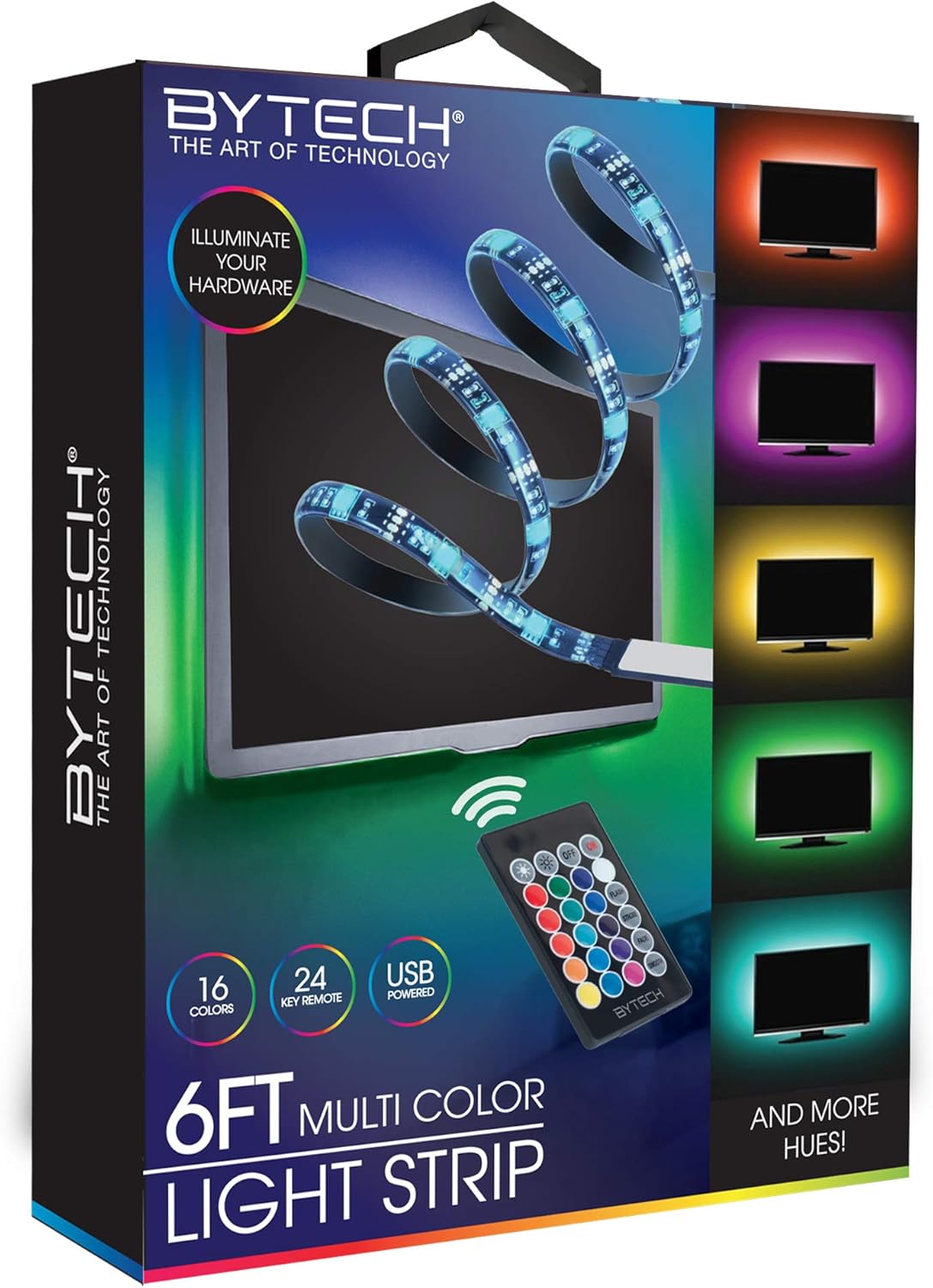
Image 1.1: Bytech 6FT LED Back Light Strip product and packaging.
2. معلومات السلامة
- Ensure the power source is compatible with the USB power requirements of the LED strip.
- Do not expose the LED strip to water or excessive moisture as it is not water resistant. This product is intended for indoor use only.
- Avoid bending the LED strip sharply or applying excessive force, which may damage the internal circuitry.
- يحفظ بعيدًا عن متناول الأطفال.
- Do not attempt to disassemble or modify the product. This will void any potential warranty.
- Unplug the LED strip from the power source before cleaning or when not in use for extended periods.
3. محتويات العبوة
يرجى التحقق من الحزمة للعناصر التالية:
- 1 x Bytech 6FT LED Back Light Strip
- 1 × جهاز تحكم عن بعد مكون من 24 مفاتيح
4. الإعداد والتثبيت
- تحضير السطح: تأكد من أن السطح الذي تنوي تركيب شريط الإضاءة LED عليه نظيف وجاف وأملس. فالغبار والأوساخ والرطوبة قد تؤثر على فعالية المادة اللاصقة.
- القياس والتخطيط: Before removing the adhesive backing, unroll the LED strip and temporarily position it to determine the best placement. The strip is 6 feet long.
- قشر ولصق: Carefully peel off the protective backing from the adhesive tape on the back of the LED strip. Begin sticking the strip to your desired surface, pressing firmly along its length to ensure good adhesion.
- الاتصال بالطاقة: Locate the USB connector on the LED strip. Plug the USB connector into a compatible USB power source (e.g., a TV's USB port, a USB wall adapter, or a power bank).
- وظيفة الاختبار: Once connected, the LED strip should light up. Use the remote control to test different colors and modes.
5. تعليمات التشغيل
The Bytech 6FT LED Back Light Strip is controlled using the included 24-key remote control. Ensure the remote has a clear line of sight to the LED strip's receiver.
وظائف التحكم عن بعد:
| زر | وظيفة |
|---|---|
| تشغيل/إيقاف | يقوم بتشغيل أو إيقاف شريط الإضاءة LED. |
| سطوع أعلى / أسفل | يضبط مستوى سطوع الأضواء. |
| Color Selection Buttons | Directly select from 16 static colors (e.g., Red, Green, Blue, White, various shades). |
| فلاش | Activates a rapid flashing mode. |
| STROBE | Activates a slow strobe effect. |
| FADE | Cycles through colors with a smooth fading transition. |
| السلس | Provides a gradual transition between colors. |
ملحوظة: The remote control requires a CR2025 button cell battery (not included). Please ensure the battery is inserted with the correct polarity.
6. الصيانة والعناية
- تنظيف: To clean the LED strip, first unplug it from the power source. Use a soft, dry cloth to gently wipe away dust or dirt. Do not use liquid cleaners or abrasive materials.
- تخزين: If storing the LED strip for an extended period, ensure it is clean and dry. Coil it loosely to prevent damage to the strip or wiring. Store in a cool, dry place.
- مادة لاصقة: The adhesive is designed for single application. Re-applying the strip multiple times may reduce its stickiness.
7. استكشاف الأخطاء وإصلاحها
| مشكلة | السبب المحتمل | حل |
|---|---|---|
| شريط الإضاءة LED لا يضيء. | No power, loose connection, remote battery dead/incorrectly inserted. | Ensure USB is securely plugged into a working power source. Check remote battery and polarity. |
| جهاز التحكم عن بعد لا يعمل. | Remote battery dead, no line of sight to receiver, remote too far. | Replace remote battery. Ensure remote is pointed directly at the strip's receiver. Move closer to the strip. |
| الأضواء تومض أو غير منتظمة. | Insufficient power, damaged strip. | Try a different USB power source with sufficient output. Inspect the strip for visible damage. |
| اللاصق غير ملتصق. | Surface is dirty, oily, or textured; adhesive backing not fully removed. | Clean and dry the surface thoroughly before application. Ensure the protective film is completely removed. |
8. المواصفات
- نموذج: BYOPCA217BK
- ماركة: بايتك
- طول: 6 قدمًا (حوالي 1.83 أمتار)
- نوع مصدر الضوء: قاد
- مصدر الطاقة: USB (كهربائي سلكي)
- طريقة التحكم: جهاز تحكم عن بعد بالأشعة تحت الحمراء بـ 24 مفتاحًا
- الألوان: 16 static colors + various dynamic modes
- الاستخدام الداخلي/الخارجي: داخلي
- مستوى مقاومة الماء: غير مقاوم للماء
- مادة: بلاستيك
- وزن السلعة: 2.89 أونصة (حوالي 82 جرامًا)
- رمز المنتج العالمي: 805112051533
9. الضمان والدعم
Warranty information for the Bytech 6FT LED Back Light Strip is not explicitly provided in the product specifications. For detailed warranty terms, technical support, or customer service inquiries, please contact the manufacturer, DEEJAYLED, or your point of purchase.
You may find contact information on the product packaging or the manufacturer's official webموقع.