
1. محتويات العبوة
يرجى التأكد من أن جميع العناصر المدرجة أدناه متضمنة في الحزمة الخاصة بك:
- 2 x LASUNEY T21 Bluetooth Earbuds
- 1 × حافظة شحن
- 1 x Micro USB Cable (50CM/1.6FT)
- 1 × دليل المستخدم
- Multiple sizes of ear tips (M size pre-installed)
2. الإعداد والاقتران
2.1 الشحن الأولي
Before first use, ensure both earbuds and the charging case are fully charged. Place the earbuds into the charging case and connect the Micro USB cable to a power source. The indicator lights on the case will show charging status.
2.2 الاقتران بخطوة واحدة
The LASUNEY T21 earbuds feature one-step pairing for convenience:
- Take both earbuds out from the charging case. They will automatically enter pairing mode.
- على جهازك (الهاتف الذكي، الجهاز اللوحي، الكمبيوتر المحمول)، انتقل إلى إعدادات البلوتوث.
- Select "Lasuney T21" from the list of available devices to connect.
Once successfully paired, the earbuds will automatically connect to your device when taken out of the charging case in the future.

3. تشغيل سماعات الأذن
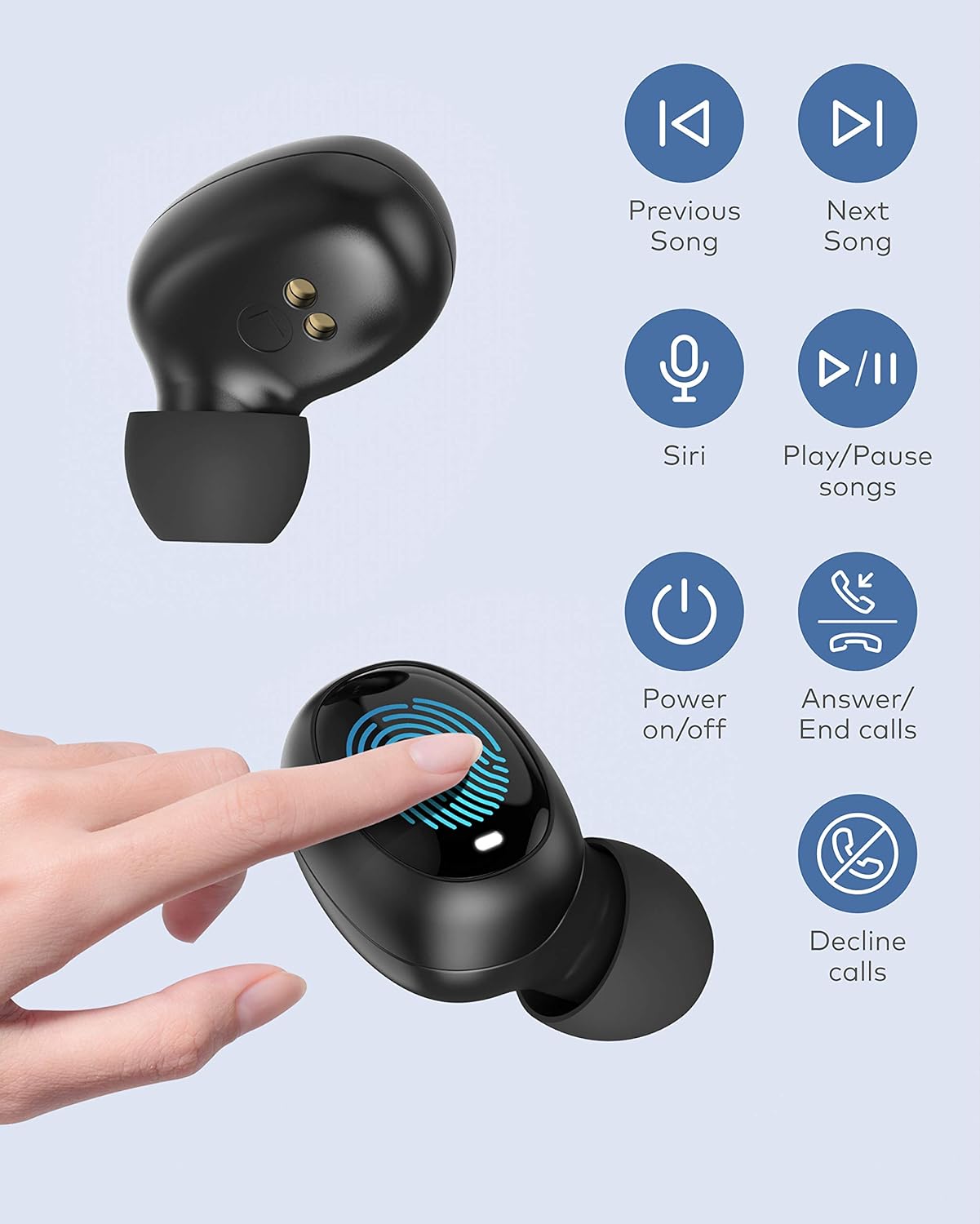
3.1 وظائف التحكم باللمس
The LASUNEY T21 earbuds utilize touch control technology. Refer to the following table for control functions:
| فعل | يتحكم |
|---|---|
| الأغنية السابقة | Long touch for 2 seconds on the Left earbud |
| الأغنية التالية | Long touch for 2 seconds on the Right earbud |
| تشغيل/إيقاف الموسيقى مؤقتًا | انقر نقرًا مزدوجًا على إحدى سماعتي الأذن |
| الرد/تعليق المكالمة | انقر نقرًا مزدوجًا على إحدى سماعتي الأذن |
| رفض المكالمة الواردة | Long touch for 2 seconds on either earbud |
3.2 Single and Binaural Mode
The earbuds support both single-earbud and two-earbud (binaural) modes, allowing flexible usage without re-pairing:
- Single-earbud mode: You can use either the left or right earbud independently. Simply take one earbud out of the case and connect it to your device.
- Switching to Binaural mode: If you are using one earbud and wish to use both, simply take the other earbud out of the charging case. It will automatically connect and switch to binaural mode.

3.3 Comfortable Wearing and Portability
The in-ear design ensures a secure and comfortable fit, reducing the likelihood of falling out during activities. The compact charging case and lightweight earbuds (4g per earbud, 38g for charging case) make them easy to carry for daily use or sports.


4. الشحن
The earbuds provide approximately 4.5 hours of playtime on a single charge. The charging case, when fully charged, can provide 4-5 additional full charges, extending the total playtime to about 25 hours. The earbuds can be fully charged within 2 hours.

ملاحظة هامة: If the charging case battery is depleted, the earbuds will not automatically turn off when placed inside. In this situation, long-press the Touch Control Area on each earbud for 10 seconds to manually power them off.
5. المواصفات
| ميزة | التفاصيل |
|---|---|
| اسم الموديل | ت21 |
| تكنولوجيا الاتصال | لاسلكي (بلوتوث) |
| نسخة البلوتوث | 5.0 |
| نوع التحكم | التحكم باللمس |
| مستوى مقاومة الماء | مقاومة للماء بدرجة IPX5 |
| عمر البطارية (شحنة واحدة) | 4.5 ساعة |
| إجمالي وقت اللعب (مع علبة الشحن) | حتى ساعتين |
| وقت الشحن | 2 ساعة |
| وزن ياربود | 4 غرام (لكل منها) |
| وزن علبة الشحن | 38 جرام |
| أبعاد المنتج | 2.7 × 0.17 × 1.28 بوصة |
| الأجهزة المتوافقة | Smartphones, Tablets, Laptops (Android, iPhone) |
| المميزات الخاصة | Microphone Included, Sports and Exercise suitability |
6. استكشاف الأخطاء وإصلاحها
6.1 Resetting Earbuds (Pairing Issues)
If your earbuds fail to pair with your device or with each other, follow these steps to reset them:
- Ensure the Bluetooth function on your device is turned OFF.
- While the earbuds are in pairing mode (out of the case), triple-tap the Touch Control Area of each earbud separately.
- Place both earbuds back into the charging case to turn them off.
- Take them out from the charging case again to initiate reconnection with your device.
6.2 Pairing Timeout
The pairing mode will automatically turn off after 10 minutes if the earbuds do not connect with any device. If this occurs, repeat the pairing steps from section 2.2.
6.3 Earbuds Not Turning Off
If the charging case battery is at zero, the earbuds will not automatically turn off when placed inside. To manually turn them off, long-press the Touch Control Area on each earbud for 10 seconds.
7. الضمان والدعم
LASUNEY provides 12 months of after-sales service for the T21 True Wireless Earbuds. For any inquiries, support, or to request different sizes of ear tips, please contact our customer service team.