
1. المقدمة
The ELEPHAS BL128 Mini Projector is a compact and versatile device designed for home entertainment, gaming, and portable presentations. Featuring advanced projection technology, it delivers a high-quality visual and audio experience in a small, lightweight package.
This manual provides detailed instructions for setting up, operating, and maintaining your projector to ensure optimal performance and longevity.
2. محتويات العبوة
يرجى تحديد المربع للعناصر التالية:
- ELEPHAS BL128 Mini Projector x1
- جهاز التحكم عن بعد X1
- غطاء عدسة ×1
- كابل طاقة التيار المتردد x1
- كابل HDMI x1
- 3-in-1 AV Cable x1
- User Manual (Japanese) x1
- ترايبود X1
- Dedicated Carry Bag x1

Image: All items included in the ELEPHAS BL128 Mini Projector package.
3. مواصفات المنتج
- تصميم فائق الصغر وخفيف الوزن: Measuring 15.4 x 12 x 6 cm and weighing only 420g, this projector is highly portable, offering a home theater experience in a palm-sized device.
- High-Quality 1080P Native Resolution: Equipped with German LED projection technology and the latest LCD display, it delivers native 1080P resolution with an 8000:1 contrast ratio and 24-bit color support for vivid, detailed images.
- عرض الشاشة الكبيرة ووظيفة التكبير: Project images from 30 to 200 inches. The 50% to 100% zoom function allows for flexible screen size adjustment. Ceiling projection is also supported.
- Built-in HIFI Stereo Speaker: Enjoy immersive audio with the integrated HIFI stereo speaker, providing a surround sound effect for movies, games, and videos.
- التوافق الواسع: Features HDMI, USB, AV, and 3.5mm ports for connection to various devices including Fire Stick TV, Chromecast, PCs, laptops, external speakers, TV Boxes, DVD players, PS3, PS4, and USB memory.
- نظام التبريد المتقدم: An upgraded cooling system with an innovative fan ensures low noise operation and excellent quietness, allowing for focused viewعمل.

Image: Internal components illustrating the advanced lens and display technology.
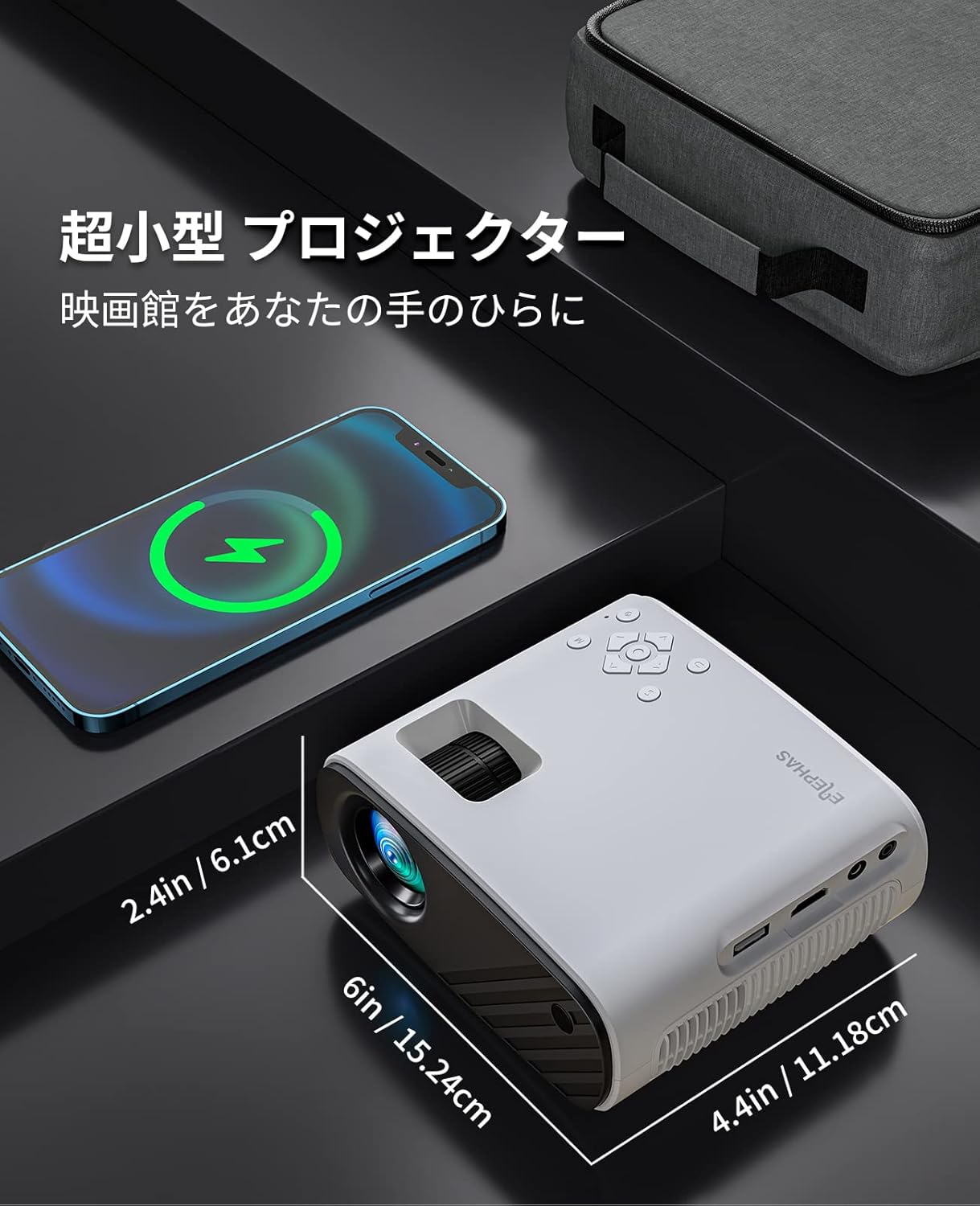
Image: The compact size of the ELEPHAS BL128 Mini Projector compared to a smartphone.

Image: Illustration of the projector's efficient heat dissipation system.
4. الإعداد
- فك حزمة جهاز العرض: قم بإزالة جميع المكونات بعناية من العبوة.
- توصيل الطاقة: Connect the AC power cable to the projector and then to a power outlet.
- الموقع:
- ضع جهاز العرض على سطح ثابت ومستوٍ.
- For ceiling projection, use the included tripod or a compatible ceiling mount.
- Ensure the projector lens is facing the desired projection surface (wall or screen).
- تشغيل الطاقة: اضغط على زر الطاقة الموجود على جهاز العرض أو جهاز التحكم عن بعد لتشغيله.
- ضبط التركيز: قم بتدوير حلقة التركيز الموجودة على عدسة جهاز العرض حتى تصبح الصورة واضحة وحادة.
- تصحيح الانحراف: Adjust the keystone setting (if available, typically in the menu) to correct any trapezoidal distortion of the image.

Image: Projector setup in a living room demonstrating large screen projection.

Image: Visual representation of the projector's 50-100% zoom function.
5. تعليمات التشغيل
- تشغيل/إيقاف التشغيل: اضغط على زر الطاقة الموجود بجهاز العرض أو جهاز التحكم عن بُعد.
- اختيار مصدر الإدخال: Use the 'Source' button on the remote or projector to cycle through available input options (HDMI, USB, AV).
- التنقل في القائمة: Use the arrow keys and 'OK' button on the remote or projector to navigate the on-screen menu for settings adjustments.
- التحكم في مستوى الصوت: Adjust the volume using the '+' and '-' buttons on the remote or projector.
- وظيفة التكبير: Access the zoom function through the projector's menu to adjust the screen size from 50% to 100% without moving the projector.
Video: A demonstration of the KITELY M8 projector, showcasing its features and operation. This video is relevant for understanding general projector functionality.
Video: A product display for the HY300Ultra projector, illustrating its design and projection capabilities. This video provides a visual overview of a similar projector type.
Video: An actual product display video for the HY300 Pro+ projector, showing its physical aspects and projection quality. This video helps visualize the projector in use.
6. الاتصال
The ELEPHAS BL128 Mini Projector offers multiple connectivity options to suit various devices:
- منفذ HDMI: Connect to laptops, PCs, game consoles (PS3, PS4), streaming devices (Fire Stick TV, Chromecast), and TV Boxes using the included HDMI cable.
- منفذ USB: Insert a USB memory stick to play media fileس مباشرة.
- منفذ AV: Use the 3-in-1 AV cable to connect to older devices like DVD players.
- مقبس صوت 3.5 ملم: قم بتوصيل مكبرات الصوت الخارجية أو سماعات الرأس للحصول على صوت محسّن.
- Wireless Connectivity (Screen Mirroring): The projector supports screen mirroring via Miracast (Android) and AirPlay (iOS) for smartphones and tablets. Navigate to the 'My Apps' section and select the appropriate screen mirroring option.
ملحوظة:
- Due to HDCP copyright protection, direct playback of content from Netflix, Amazon Prime, and Hulu is not supported. Please connect a Fire TV Stick or similar streaming device to the HDMI port for viewing these services.
- For iOS/Android smartphone connection, an HDMI adapter (Lightning to HDMI or Micro USB/Type-C to HDMI) may be required and is sold separately.

الصورة: أكثر منview of the projector's connectivity ports and compatible devices.

Image: Demonstrating compatibility with Fire TV Stick for streaming services.
Video: A guide on how to connect a projector to a PC, useful for beginners. This video demonstrates the connection process for external devices.
7. الصيانة
- تنظيف العدسات: Use a soft, lint-free cloth or lens cleaning paper to gently wipe the projector lens. Avoid using abrasive cleaners or excessive force.
- تنظيف فلتر الغبار: Regularly check and clean the dust filter (if accessible) to prevent overheating and maintain optimal performance. Refer to the Japanese user manual for specific instructions on filter access.
- تخزين: When not in use, store the projector in a cool, dry place, preferably in its dedicated carry bag, to protect it from dust and damage.
8. استكشاف الأخطاء وإصلاحها
| مشكلة | السبب المحتمل | حل |
|---|---|---|
| لم يتم عرض أي صورة |
|
|
| الصورة ضبابية |
|
|
| لا يوجد صوت |
|
|
| جهاز التحكم عن بعد لا يعمل |
|
|
9. المواصفات
| ميزة | التفاصيل |
|---|---|
| ماركة | إليفاس |
| رقم الموديل | بي ال128 |
| نوع العرض | شاشة الكريستال السائل |
| الدقة الأصلية | 1920 × 1080 (1080P Full HD) |
| نسبة التباين | 8000:1 |
| حجم العرض | 30 - 200 بوصة |
| مسافة الإسقاط الموصى بها | 0.8 - 2.2 مترًا |
| وظيفة التكبير | 50% - 100% |
| تكنولوجيا الاتصال | HDMI, USB, AV, 3.5mm Audio Jack, Wireless (Screen Mirroring) |
| منافذ HDMI | 1 |
| منافذ USB | 1 |
| مكبر صوت مدمج | Yes (HIFI Stereo) |
| أبعاد المنتج (الطول × العرض × الارتفاع) | 15.4 × 12 × 6 سم |
| وزن المنتج | 0.42 كيلوغرام |
| معدل التحديث | 60 هرتز |
| مصدر الطاقة | سلك الطاقة المتردد |
10. الضمان والدعم
The ELEPHAS BL128 Mini Projector comes with a ضمان لمدة 2 سنوات من تاريخ الشراء.
During the warranty period, ELEPHAS provides dedicated customer service and technical support. In the event of repair difficulties, we offer a free exchange or refund.
For any inquiries, technical assistance, or warranty claims, please contact our customer support team through the following channels:
- بريد إلكتروني: support@elephas.com (مثالampلو)
- Webموقع: www.elephas.com/support (مثالampلو)
Please have your product model number (BL128) and purchase date ready when contacting support.