
1. المقدمة
This manual provides essential information for the safe and efficient operation of your Artlii Q Mini Portable Projector. Please read this manual thoroughly before using the product and retain it for future reference.
2. معلومات السلامة
اتبع احتياطات السلامة التالية لمنع تلف جهاز العرض وضمان سلامة المستخدم:
- لا تسد فتحات التهوية. تأكد من وجود تدفق هواء كافٍ حول جهاز العرض لمنع ارتفاع درجة حرارته.
- Avoid direct exposure to the projector lens light. The bright light can cause eye strain.
- Do not place the projector in unstable locations. Ensure it is on a flat, stable surface.
- احتفظ بالجهاز بعيدًا عن الماء أو السوائل الأخرى.
- استخدم فقط محول الطاقة المرفق مع جهاز العرض.
- لا تحاول فتح جهاز العرض أو إصلاحه بنفسك. قم بإحالة جميع أعمال الصيانة إلى فنيين مؤهلين.
3. انتهى المنتجview
The Artlii Q Mini Portable Projector is a compact and versatile device designed for various projection needs. It features a manual focus system, automatic sleep function, and supports a wide range of input sources.

الشكل 3.1: أمامي وأعلى view of the Artlii Q Mini Portable Projector, highlighting the lens and control buttons.

الشكل 3.2: مؤخرة view of the projector, illustrating the various input and output ports available for connectivity.
3.1 الميزات الرئيسية
- تصميم محمول: Compact and lightweight, ideal for transport.
- بطارية مدمجة: Offers 1-1.5 hours of operation on battery power.
- التركيز اليدوي: Allows for precise image clarity adjustments.
- التوافق الواسع: Connects to various devices including USB sticks, PCs, Macs, and TV sticks.
- تشغيل منخفض الضوضاء: Engineered for quiet performance.

الشكل 3.3: The projector's internal battery, providing portable power for extended use.

الشكل 3.4: Demonstrating the projector's portability, easily fitting into a backpack.
4. الإعداد
4.1 تشغيل/إيقاف التشغيل
- قم بتوصيل محول الطاقة بجهاز العرض وبمأخذ الطاقة.
- Press the power button located on the top panel of the projector to turn it on.
- To turn off, press the power button again. The projector also features an automatic sleep function.
4.2 ضبط التركيز
The projector features a manual focus adjustment to ensure a clear image.
- قم بتشغيل جهاز العرض وعرض الصورة.
- Locate the focus knob near the lens.
- Rotate the focus knob clockwise or counter-clockwise until the projected image appears sharp and clear.

الشكل 4.1: Diagram showing the focus knob and various projection sizes from 14 to 72 inches at different distances.
4.3 مسافة العرض وحجمه
The projector can display images from 14 to 72 inches, depending on the distance from the projection surface. Refer to Figure 4.1 for approximate distances.
5. تعليمات التشغيل
5.1 التنقل عبر القائمة
Use the directional buttons (up, down, left, right) and the 'OK' button on the projector's top panel or remote control to navigate through the on-screen menu. The 'Return' button allows you to go back to the previous menu.
5.2 اختيار المصدر
After powering on, select your desired input source (e.g., HDMI, USB, AV) from the main menu. Ensure your external device is connected before selecting the source.
6. الاتصال
The Artlii Q Mini Portable Projector offers a variety of connection options for different devices.
6.1 جهاز متوافق
The projector is compatible with a wide range of devices, including:
- أجهزة الكمبيوتر المحمولة/الشخصية
- Gaming Consoles (e.g., Nintendo Switch, PS5)
- محركات أقراص فلاش USB
- TV Sticks (e.g., Fire TV Stick)
- مشغلات بلو راي
- الكاميرات
- TF Cards (MicroSD)
- أقراص يو
- كروم كاست
- Home Cinema Systems
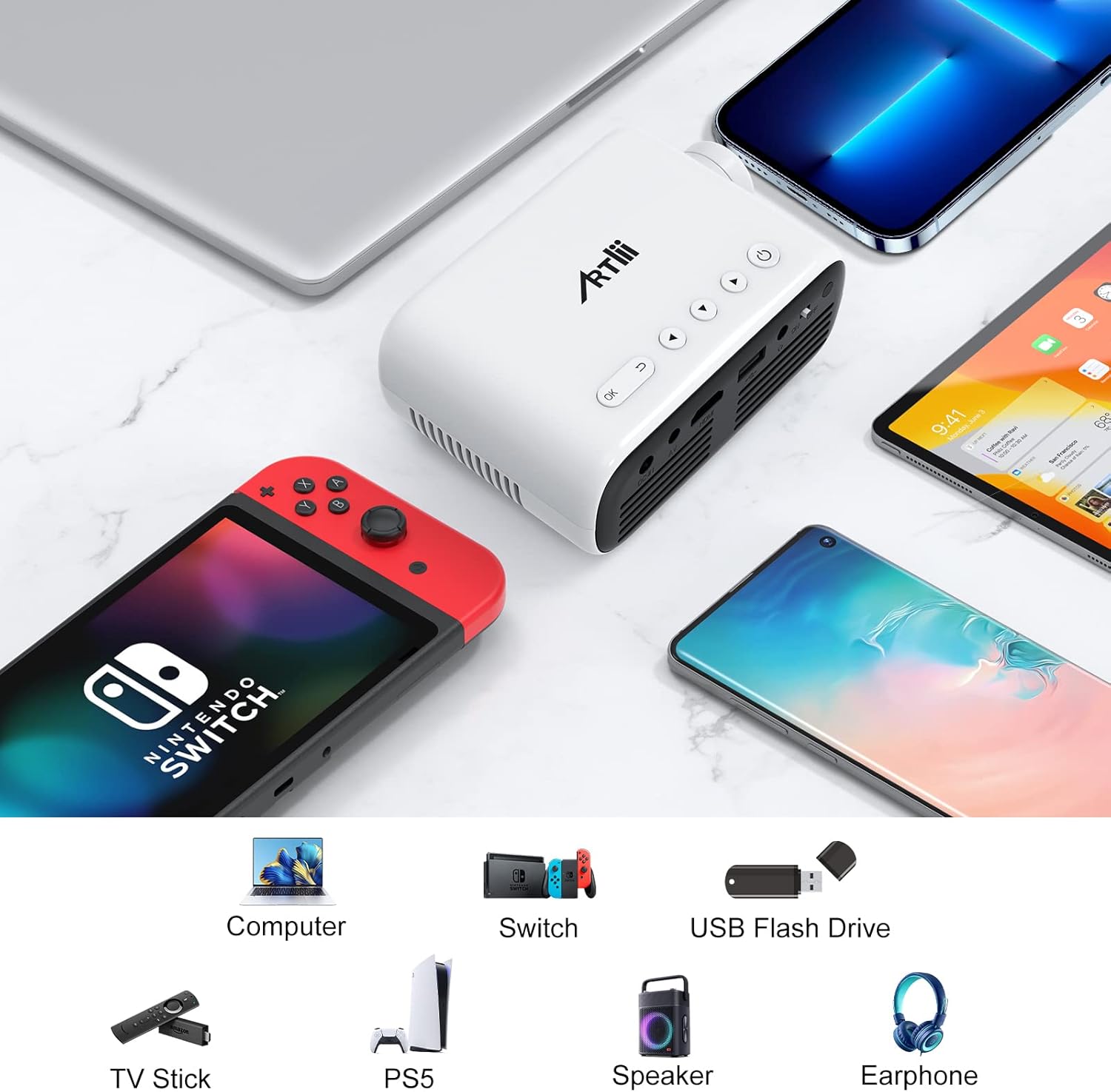
الشكل 6.1: Examples of devices that can be connected to the Artlii Q Mini Portable Projector.

الشكل 6.2: Further compatible devices and an illustration of connecting phones/tablets via a separate WiFi display dongle (not included).
6.2 Connecting to Phones/Tablets
To connect your phone or tablet, a separate WiFi display dongle (not included) is required. Connect the dongle to the projector's HDMI port and follow the dongle's instructions for screen mirroring.
7. الصيانة
7.1 تنظيف العدسة
Use a soft, lint-free cloth specifically designed for optical lenses to gently wipe the projector lens. Avoid using abrasive cleaners or excessive force.
7.2 تنظيف جسم جهاز العرض
Wipe the exterior of the projector with a soft, dry cloth. Do not use liquid or aerosol cleaners.
7.3 التخزين
عند عدم استخدام جهاز العرض لفترات طويلة، يُحفظ في مكان بارد وجاف، بعيدًا عن أشعة الشمس المباشرة ودرجات الحرارة القصوى. استخدم العبوة الأصلية أو حافظة واقية لمنع تراكم الغبار والتلف.
8. استكشاف الأخطاء وإصلاحها
إذا واجهت مشاكل مع جهاز العرض الخاص بك، فراجع الحلول الشائعة التالية:
| مشكلة | السبب المحتمل | حل |
|---|---|---|
| لا توجد صورة معروضة | الطاقة غير موصولة، مصدر الإدخال غير صحيح، وصلة الكابل غير محكمة | Check power cable, select correct input source, ensure all cables are securely connected. |
| الصورة ضبابية | لم يتم ضبط التركيز، جهاز العرض قريب جدًا/بعيد جدًا | Adjust the manual focus knob. Adjust projection distance. |
| لا يوجد صوت | Volume too low, external device volume low, audio cable not connected | Increase projector volume. Increase external device volume. Ensure audio cables are connected correctly. |
| ارتفاع درجة حرارة جهاز العرض | Blocked ventilation, prolonged use | Ensure ventilation openings are clear. Allow the projector to cool down. |
9. المواصفات
| ميزة | مواصفة |
|---|---|
| ماركة | Artlii |
| نموذج | HD Videoprojecteur |
| أبعاد المنتج | 31 × 24 × 11 سم |
| وزن العنصر | 3.34 كجم |
| واجهة الأجهزة | AV, HDMI, Infrared, MicroSD, USB, VGA |
| الأجهزة المتوافقة | Laptop, Gaming Consoles, USB Sticks, TV Sticks, Blu-ray Players, Cameras, Phones/Tablets (with dongle) |
| مميزات اضافية | Large projection size, High compatibility, Lightweight and portable, Powerful and clear sound, Clear and fresh image |
| تكنولوجيا الشاشة | شاشة الكريستال السائل |
| حجم الشاشة | Up to 200 Inches (Optimal 14-72 inches) |
| نسبة تباين الصورة | 3000:1 |
| نسبة العرض إلى الارتفاع | 16:9، 4:3 |
| الدقة الأصلية | 1280 × 800 |
| أقصى دقة للعرض | 1920 x 1080 (1080p supported) |
| مستوى الضوضاء | 40 ديسيبل |
| نوع الاتصال | HDMI، USB، VGA |
| عامل الشكل | محمول |
| نوع التركيب | سقف |
| سطوع | 3400 لومن |
| لون | أسود |
10. الضمان والدعم
Artlii provides a one-year warranty for this product. Additionally, a 3-month worry-free refund policy is offered. For any defective products or support inquiries, please contact Artlii customer service for a free replacement or a full refund.
لمزيد من المساعدة، يرجى زيارة Artlii Store on Amazon.