
مقدمة
This manual provides comprehensive instructions for the setup, operation, and maintenance of your Zerone Universal Remote Control. This remote is designed to function with various Pioneer DVD player models, offering a convenient replacement or secondary control unit.
التوافق
The Zerone Universal Remote Control is compatible with the following Pioneer DVD player models:
- بايونير VXX2811
- بايونير VXX2914
- بايونير VXX3218
- بايونير VXX2801
- بايونير VXX2800
- بايونير VXX2913
For optimal performance, ensure your DVD player model is listed above.
يثبت
1. تركيب البطارية
- حدد موقع حجرة البطارية في الجزء الخلفي من جهاز التحكم عن بعد.
- قم بتحريك غطاء البطارية إلى الأسفل أو اضغط على المزلاج وارفعه لفتحه.
- Insert two (2) AA 1.5V batteries, ensuring the positive (+) and negative (-) terminals align correctly with the markings inside the compartment.
- قم باستبدال غطاء البطارية عن طريق تحريكه مرة أخرى إلى مكانه حتى يصدر صوت نقرة آمنة.
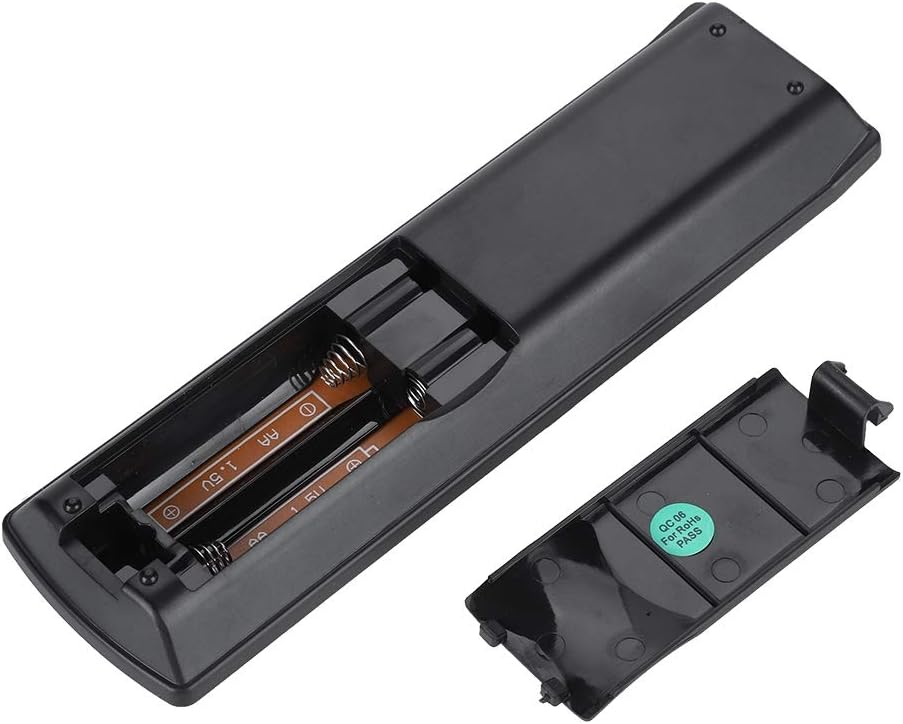
الصورة: الخلفية view of the Zerone remote control, showing the battery compartment cover.

Image: The battery compartment of the remote control with two AA batteries correctly inserted.
No programming or setup is required. Once batteries are installed, the remote is ready for use with compatible Pioneer DVD players.
تعليمات التشغيل
Point the remote control directly at your Pioneer DVD player. The effective control distance is typically over 8 meters (approximately 26 feet), though this may vary based on environmental factors and the specific DVD player model.

الصورة: الجبهة view of the Zerone Universal Remote Control, displaying all buttons and their labels.
الوظائف الرئيسية:
- الاستعداد/التشغيل: Powers the DVD player on or off.
- فتح / إغلاق: يفتح أو يغلق درج الأقراص.
- صوتي: Selects audio tracks or languages.
- العنوان الفرعي: Toggles or selects subtitle options.
- زاوية: تغير viewing angle if supported by the DVD.
- أزرار الأرقام (0-9): Direct track selection or input.
- واضح: Clears numerical input.
- أدخل: يؤكد التحديدات.
- القائمة العلوية: Accesses the main menu of the DVD.
- MENU: Accesses the disc menu.
- HOME MENU: Navigates to the home menu of the DVD player.
- يعود: العودة إلى الشاشة أو القائمة السابقة.
- Directional Pad (Up, Down, Left, Right) & ENTER: التنقل عبر القوائم وتأكيد الاختيارات.
- Playback Controls (Play, Pause, Stop, Fast Forward, Rewind, Skip Forward, Skip Backward): وظائف تشغيل الوسائط القياسية.
- طريقة اللعب: يحدد أوضاع التشغيل (مثل التكرار، والتشغيل العشوائي).
- المحيطي: Adjusts surround sound settings.
- تكبير: Zooms in or out on the video.
- عرض: Shows on-screen display information.

Image: A hand holding the Zerone remote control, demonstrating its ergonomic design and ease of use.

Image: The remote control positioned in front of a television displaying content, illustrating its intended use.

Image: A visual representation of the remote control's effective operating distance, indicating a range of over 8 meters.
صيانة
- تنظيف: امسح جهاز التحكم عن بُعد بقطعة قماش ناعمة وجافة. لا تستخدم منظفات سائلة أو مواد كاشطة.
- استبدال البطارية: استبدل البطاريات عندما تصبح استجابة جهاز التحكم عن بُعد بطيئة أو تتوقف عن العمل. استبدل البطاريتين معًا ببطاريات جديدة.
- تخزين: قم بتخزين جهاز التحكم عن بعد في مكان بارد وجاف بعيدًا عن أشعة الشمس المباشرة ودرجات الحرارة القصوى.
- تجنب الضرر: Do not drop the remote or expose it to water.
استكشاف الأخطاء وإصلاحها
- جهاز التحكم عن بعد لا يستجيب:
- تأكد من تركيب البطاريات بشكل صحيح مع مراعاة القطبية الصحيحة.
- استبدال البطاريات القديمة ببطاريات AA جديدة.
- Check for any obstructions between the remote control and the DVD player's infrared sensor.
- تأكد من أنك ضمن نطاق التشغيل الفعال (عادةً في حدود 8 أمتار).
- بعض الوظائف لا تعمل:
- Verify that your Pioneer DVD player model is listed in the compatibility section.
- Some advanced functions may be specific to the original remote or not supported by all DVD player models.
تحديد
| مادة الغلاف | High-grade ABS |
| مسافة التحكم | > 8 meters (316 inches) |
| نوع البطارية | 2 x AA 1.5V Batteries (Not included) |
| أبعاد | تقريبًا 174 × 49 × 20 ملم (6.85 × 1.93 × 0.79 بوصة) |
| وزن | حوالي 75 جرامًا (2.46 أونصة) |
| رقم الموديل | 743562180017 |
الضمان والدعم
For warranty information or technical support, please refer to the documentation provided with your purchase or contact the manufacturer, Zerone, directly through their official channels. Keep your purchase receipt as proof of purchase.