
مقدمة
This manual provides instructions for the Extreme Networks Summit X460-24p, a high-performance, managed Layer 3 Ethernet switch designed for enterprise and data center environments. It features 24 Gigabit Ethernet ports with Power over Ethernet (PoE) capabilities, along with additional SFP and shared Gigabit SFP ports for flexible connectivity.
معلومات السلامة
إرشادات السلامة
- Always disconnect all power supply inputs before removing any panel for servicing.
- This device contains a Class 1 Laser product. Avoid direct eye exposure to beam.
- تأكد من التأريض الصحيح أثناء التثبيت.
- Refer to the installation manual for power cord selection and additional compliance markings.
محتويات الحزمة
ماذا يوجد في الصندوق
- Extreme Networks Summit X460-24p Switch
- سلك الطاقة (خاص بالمنطقة)
- طقم تركيب الرف
- التوثيق (هذا الدليل)
المنتج انتهىview
The Summit X460-24p switch is designed for efficient network management and high-speed data transfer.
اللوحة الخلفية

This image displays the rear panel of the Summit X460-24p switch, highlighting the power input, fan modules, and the SummitStack ports. The overall chassis is purple.

تفصيلية view of the SummitStack ports (Stack Port 1 and Stack Port 2) located on the rear of the switch, used for stacking multiple switches.
ملصق المنتج
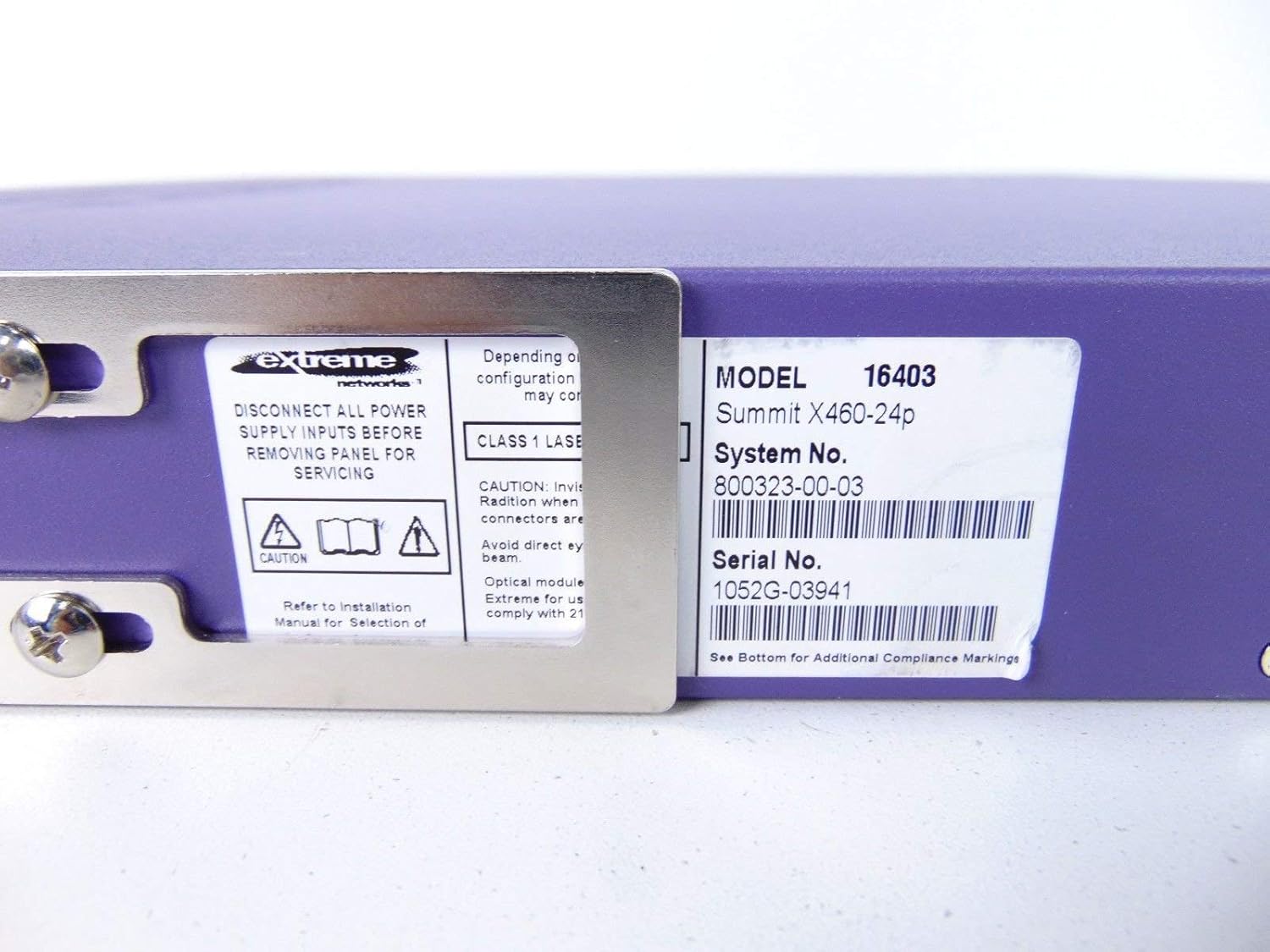
This label provides critical identification information for the switch, including Model: 16403, Summit X460-24p, System No.: 800323-00-03, and Serial No.: 1052G-03941.
المكونات الاختيارية

This image shows the label for an optional Extreme Networks Summit 750W PoE AC Power Supply Unit (PSU), Model 10931, System No. 800382-00-03, Serial No. 1053A-41986.

This image displays the label for an optional Extreme Networks SummitStack Module, Model 16419, System No. 800384-00-01, Serial No. 1122G-02565.
يثبت
دليل التثبيت
تركيب الرف
The Summit X460-24p is designed for standard 19-inch rack mounting. Use the provided rack-mounting kit to secure the switch in a server rack. Ensure adequate ventilation around the unit.
توصيل الطاقة
Connect the power cord to the AC power inlet on the rear of the switch and then to a grounded electrical outlet. The switch will power on automatically.
توصيل كبلات الشبكة
- Connect Ethernet cables from your network devices to the 24 10/100/1000Base-T PoE ports on the front panel.
- For uplink or fiber connections, use the SFP or shared Gigabit SFP ports.
- For stacking, connect SummitStack ports on multiple switches using appropriate stacking cables.
Initial Configuration Access
Access the switch's management interface via a console cable connected to the console port, or through a web browser if the switch has a default IP address configured. Refer to the Extreme Networks documentation for detailed initial setup procedures.
تعليمات التشغيل
التشغيل الأساسي
تشغيل/إيقاف الطاقة
The switch powers on automatically when connected to a power source. To power off, disconnect the power cord. For proper shutdown, it is recommended to use the software-based shutdown command if available.
مؤشرات LED
Observe the LED indicators on the front panel for status information regarding power, system health, port activity, and PoE status. Consult the full product documentation for a detailed explanation of each LED's behavior.
واجهة الإدارة
يمكن إدارة المحول عبر واجهة سطر الأوامر (CLI) التي يمكن الوصول إليها من خلال منفذ وحدة التحكم أو Telnet/SSH، أو من خلال web-based graphical user interface (GUI).
صيانة
العناية والصيانة
تنظيف
Keep the switch clean and free of dust. Use a soft, dry cloth for external cleaning. Do not use liquid or aerosol cleaners.
تحديثات البرامج الثابتة
Periodically check the Extreme Networks support webقم بزيارة الموقع لتحديث البرامج الثابتة لضمان الأداء الأمثل والأمان. اتبع التعليمات المرفقة لإجراءات ترقية البرامج الثابتة.
وحدات المروحة وإمدادات الطاقة
The switch may feature hot-swappable fan and power supply modules. Refer to the Extreme Networks documentation for instructions on replacement if necessary.
استكشاف الأخطاء وإصلاحها
القضايا الشائعة
لا يوجد طاقة
- تأكد من توصيل سلك الطاقة بإحكام بكل من المفتاح ومأخذ الطاقة.
- تأكد من أن منفذ الطاقة يعمل.
Port Link Down
- تحقق من توصيل كابل الإيثرنت من كلا الطرفين.
- تأكد من أن الجهاز المتصل قيد التشغيل ويعمل بشكل صحيح.
- Check the port status via the management interface.
مشاكل الاتصال بالشبكة
- Verify IP configuration and network settings.
- Check for conflicting IP addresses.
- Consult network diagnostics tools.
تحديد
المواصفات الفنية
| ميزة | وصف |
|---|---|
| نموذج | Summit X460-24p (Part Number: 16403) |
| الموانئ | 24 x 10/100/1000Base-T PoE+ ports, 4 x shared Gigabit SFP, 4 x SFP |
| طبقة | مفتاح الإدارة من الطبقة 3 |
| ماركة | الشبكات المتطرفة |
| نوع الواجهة | PoE، SFP |
| رقم النظام | 800323-00-03 |
| رقم سري | 1052ج-03941 |
| رمز المنتج الموحد | 683332278646 |
الضمان والدعم
معلومات الضمان
This product typically comes with a 90-day limited warranty. For specific warranty terms and conditions, please refer to the official Extreme Networks warranty statement or contact your vendor.
الدعم الفني
For technical assistance, visit the official Extreme Networks support website or contact their customer service. Have your product model and serial number ready when seeking support.