
مقدمة
This manual provides instructions for the Ematic NSWC012W Wired Controller. This controller is designed for use with Nintendo Switch and PC devices, offering an ergonomic design, responsive controls, rumble feedback, and a 7.2-foot USB cable for a reliable gaming experience.
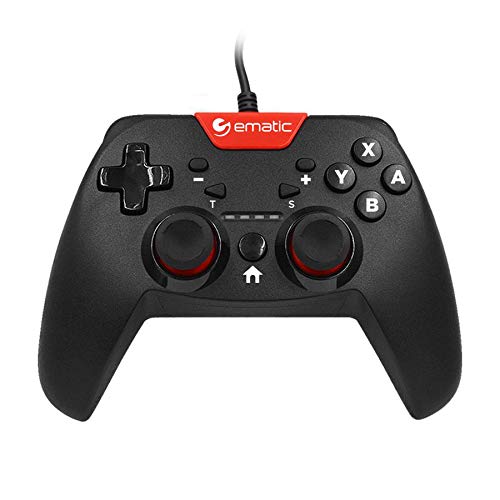
Image: Two individuals are shown holding Ematic wired controllers, actively engaged in a video game displayed on a television. The controllers are black with red accents, featuring joysticks and face buttons.
محتويات الحزمة
- Ematic NSWC012W Wired Controller
- دليل التعليمات (هذا المستند)
يثبت
الاتصال بجهاز نينتندو سويتش
- Ensure your Nintendo Switch console is powered on and docked.
- Plug the USB connector of the Ematic NSWC012W controller into an available USB port on the Nintendo Switch dock.
- The controller should be automatically recognized by the console. You may need to navigate to the 'Controllers' menu on your Switch to confirm connection.
- أصبح جهاز التحكم جاهزًا للاستخدام الآن.
الاتصال بجهاز الكمبيوتر (ويندوز)
- تأكد من تشغيل جهاز الكمبيوتر الخاص بك.
- Plug the USB connector of the Ematic NSWC012W controller into an available USB port on your computer.
- The operating system will typically install the necessary drivers automatically. This process may take a few moments.
- Once drivers are installed, the controller will be recognized as a standard game controller. You can verify its functionality in your PC's device settings or within compatible games.
تعليمات التشغيل
تخطيط وحدة التحكم ووظائفها
The Ematic NSWC012W controller features a standard button layout for intuitive gameplay.
- العصي التناظرية: عصا تحكم تناظرية قابلة للنقر للتحكم الدقيق في الحركة والكاميرا.
- لوحة الاتجاهات (D-Pad): For directional input in games.
- أزرار الوجه (A، B، X، Y): أزرار الإجراءات للأوامر داخل اللعبة.
- أزرار الكتف (يسار، يمين): الأزرار المثبتة في الأعلى.
- Trigger Buttons (ZL, ZR): Bottom-mounted triggers.
- زر الصفحة الرئيسة: Returns to the console's home screen (Nintendo Switch).
- أزرار الزائد (+) / الناقص (-): For in-game menu navigation and options.
- زر التقاط الشاشة: Captures screenshots during gameplay (Nintendo Switch).
- زر توربو: يقوم بتفعيل وظيفة التيربو للأزرار المخصصة.
Using TURBO Mode
- اضغط مع الاستمرار على توربيني زر.
- بينما يحمل توربيني, press the desired action button (e.g., A, B, X, Y, L, R, ZL, ZR) you wish to assign the turbo function to.
- Release both buttons. The assigned button will now rapidly repeat its input when held down.
- To disable TURBO mode for a specific button, repeat steps 1 and 2.
وظيفة لقطة
اضغط على زر قطة الشاشة during gameplay on Nintendo Switch to capture an image of your screen. The captured image will be saved to your console's album.
صيانة
- حافظ على نظافة وحدة التحكم عن طريق مسحها بقطعة قماش ناعمة وجافة.
- تجنب تعريض وحدة التحكم لدرجات الحرارة العالية أو الرطوبة أو أشعة الشمس المباشرة.
- لا تستخدم المنظفات الكاشطة أو المذيبات على وحدة التحكم.
- قم بتخزين وحدة التحكم في مكان آمن عند عدم استخدامها لمنع تلف الكابل أو الأزرار.
- لا تحاول تفكيك وحدة التحكم، لأن ذلك سيؤدي إلى إبطال الضمان.
استكشاف الأخطاء وإصلاحها
وحدة التحكم لا تستجيب
- التحقق من اتصال الكابل: تأكد من توصيل كابل USB بإحكام بكل من وحدة التحكم وجهاز الألعاب/الكمبيوتر.
- جرب منفذ USB مختلفًا: Connect the controller to another USB port on your console or PC.
- إعادة تشغيل الجهاز: Restart your Nintendo Switch or PC and try connecting the controller again.
- PC Driver Check: On PC, verify that the controller drivers are installed correctly in Device Manager.
Buttons or Joysticks Not Working Correctly
- تنظيف وحدة التحكم: تأكد من عدم وجود أي حطام عالق حول الأزرار أو عصي التحكم.
- Test in Another Game/Application: Determine if the issue is specific to one game or widespread.
- إعادة المعايرة (للحاسوب الشخصي): On PC, you may be able to recalibrate the controller through Windows Game Controller settings.
تحديد
| رقم الموديل | NSWC012W |
| ماركة | إيماتيك |
| الأجهزة المتوافقة | Nintendo Switch, PC, Windows |
| تكنولوجيا الاتصال | USB |
| طول الكابل | 7.2 أقدام (حوالي 2.2 أمتار) |
| مميزات اضافية | Ergonomic design, Rumble feedback, TURBO button, Screenshot button |
| كمية الأزرار | 10 (excluding D-Pad and analog stick clicks) |
| مصدر الطاقة | كهرباء سلكية (عبر USB) |
| رمز المنتج الموحد | 815592024156 |
معلومات الضمان
This Ematic product is covered by a STANDARD 90 DAYS warranty from the date of purchase. This warranty covers manufacturing defects under normal use. It does not cover damage caused by misuse, accidents, unauthorized modifications, or normal wear and tear. Please retain your proof of purchase for warranty claims.
يدعم
For further assistance, technical support, or warranty inquiries, please refer to the official Ematic webيمكنك زيارة الموقع الإلكتروني أو الاتصال بقسم خدمة العملاء. عادةً ما تجد معلومات الاتصال على عبوة المنتج أو على الموقع الرسمي للشركة المصنعة. webموقع.
ملاحظة: تخضع مواصفات المنتج وميزاته للتغيير دون إشعار مسبق.